
Akka-CQRS(9)- gRPC,实现前端设备与平台系统的高效集成
前面我们完成了一个CQRS模式的数据采集(录入)平台。可以预见:数据的产生是在线下各式各样的终端系统中,包括web、桌面、移动终端。那么,为了实现一个完整的系统,必须把前端设备通过某种网络连接形式与数据采集平台集成为一体。有两种方式可以实现需要的网络连接:Restful-api, gRPC。由于gRPC支持http/2通讯协议,支持持久连接方式及双向数据流。所以对于POS设备这样的前端选择gRPC作为网络连接方式来实现实时的操作控制应该是正确的选择,毕竟采用恒久连接和双向数据流效率会高很多。gRPC是google公司的标准,基于protobuffer消息:一种二进制序列化数据交换机制。gRPC的优势在这里就不再细说,读者可以参考前面有关gRPC的讨论博文。
下面是系统结构示意图:
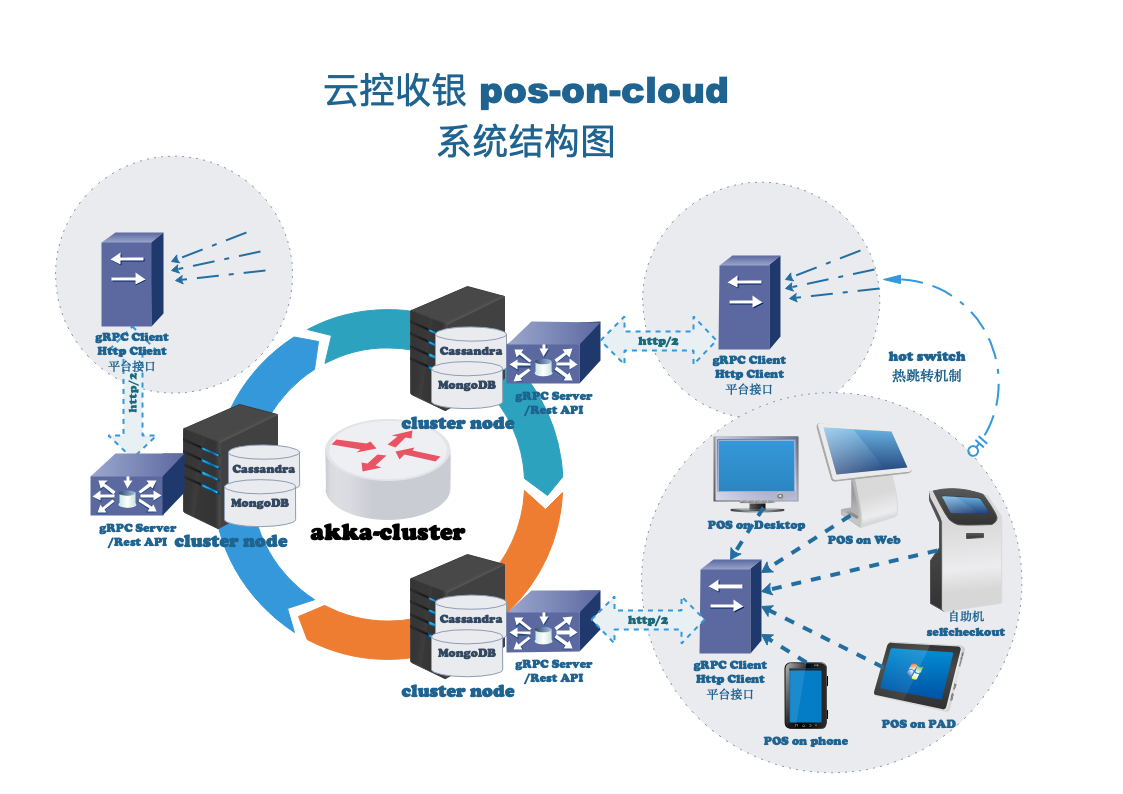
这篇讨论焦点集中在gRPC的server,client两头的具体实现。刚才提过,gRPC是google公司的开源库,同时还提供了各种语言的客户端,有:java, C++,python,go ... 但就是没有scala的,只能找第三方的scala客户端了。现在市面可供选择的gRPC-scala-客户端有scalaPB和akka-grpc两个,akka-grpc是基于akka-stream和akka-http构建的,按理来说会更合适,但由于还是处于preview版本,以后再说吧,现在只有scalaPB可选了。scalaPB是一个比较成熟的gRPC客户端,在前面的博客里我们也进行了介绍和示范。下面我们就用scalaPB来实现上面这个例子的客户端-平台集成。
首先,gRPC是通过protobuffer进行序列化数据传输的。下面是这个例子的.proto定义文件:
syntax = "proto3";

import "google/protobuf/wrappers.proto";

import "google/protobuf/any.proto";

import "scalapb/scalapb.proto";

option (scalapb.options) = {

  // use a custom Scala package name

  // package_name: "io.ontherocks.introgrpc.demo"

  // don't append file name to package

  flat_package: true

  // generate one Scala file for all messages (services still get their own file)

  single_file: true

  // add imports to generated file

  // useful when extending traits or using custom types

  // import: "io.ontherocks.hellogrpc.RockingMessage"

  // code to put at the top of generated file

  // works only with `single_file: true`

  //preamble: "sealed trait SomeSealedTrait"

};

package com.datatech.pos.messages;

message PBVchState {      //单据状态

    string opr  = 1;    //收款员

    int64  jseq = 2;    //begin journal sequence for read-side replay

    int32  num  = 3;    //当前单号

    int32  seq  = 4;    //当前序号

    bool   void = 5;    //取消模式

    bool   refd = 6;    //退款模式

    bool   susp = 7;    //挂单

    bool   canc = 8;    //废单

    bool   due  = 9;    //当前余额

    string su   = 10;   //主管编号

    string mbr  = 11;   //会员号

    int32  mode = 12;   //当前操作流程:0=logOff, 1=LogOn, 2=Payment

}

message PBTxnItem {       //交易记录

    string txndate    = 1;   //交易日期

    string txntime    = 2;   //录入时间

    string opr        = 3;   //操作员

    int32  num        = 4;   //销售单号

    int32  seq        = 5;   //交易序号

    int32  txntype    = 6;   //交易类型

    int32  salestype  = 7;   //销售类型

    int32  qty        = 8;   //交易数量

    int32  price      = 9;   //单价(分)

    int32  amount     = 10;  //码洋(分)

    int32  disc       = 11;  //折扣率 (%)

    int32  dscamt     = 12;  //折扣额:负值  net实洋 = amount + dscamt

    string member     = 13;  //会员卡号

    string code       = 14;  //编号(商品、卡号...)

    string acct       = 15;  //账号

    string dpt        = 16;  //部类

}

message PBPOSResponse {

    int32  sts                  = 1;

    string msg                  = 2;

    PBVchState voucher          = 3;

    repeated PBTxnItem txnitems   = 4;

}

message PBPOSCommand {

    int64  shopid = 1;

    string commandname = 2;

    string delimitedparams = 3;   //for multiple parameters, use ; to delimit

}

service SendCommand {

    rpc SingleResponse(PBPOSCommand) returns (PBPOSResponse) {};

    rpc MultiResponse(PBPOSCommand) returns (stream PBPOSResponse) {};

}
前端通过两种模式向平台发送指令PBPOSCommand: SingleResponse代表传统的request/response交互模式,MultiResponse,又或者server-streaming,代表前端发送一个指令,服务端返回一串Response, 或response-stream。Command和PBCommand、POSResponse和PBPOSResponse之间必须具备相互转换函数:
package com.datatech.pos.cloud

import Messages._

import com.datatech.pos.messages._

object PBConverter {

  implicit class PBConverter(pbmsg: PBPOSCommand) {

    def toPOSComand: POSMessage = pbmsg.commandname.toUpperCase match {

      case "LOGON" => POSMessage(pbmsg.shopid,LogOn(pbmsg.delimitedparams))

      case "LOGOFF" => POSMessage(pbmsg.shopid,LogOff)

      ...

    }

  }

  implicit class POSResponseConvert(resp: POSResponse) {

    def toPBPOSResponse: PBPOSResponse = new PBPOSResponse(

      sts = resp.sts,

      msg = resp.msg,

      voucher = Some(resp.voucher.toPBVchState),

      txnitems = resp.txnItems.map(_.toPBTxnItem)

    )

  }

  implicit class VchStateConvert(state: VchStates) {

    def toPBVchState: PBVchState = new PBVchState(

    opr  = state.opr,   //收款员

    jseq = state.jseq,   //begin journal sequence for read-side replay

    num  = state.num,  //当前单号

    seq  = state.seq,   //当前序号

    void = state.void,  //取消模式

    refd = state.refd, //退款模式

    susp = state.susp,   //挂单

    canc = state.canc,  //废单

    due  = state.due,   //当前余额

    su   = state.su,  //主管编号

    mbr  = state.mbr,   //会员号

    mode = state.mode //当前操作流程:0=logOff, 1=LogOn, 2=Payment

    )

  }

  implicit class TxnItemConvert(item: TxnItem) {

    def toPBTxnItem: PBTxnItem = new PBTxnItem(

    txndate    = item.txndate,   //交易日期

    txntime    = item.txntime,   //录入时间

    opr        = item.opr,   //操作员

    num        = item.num,   //销售单号

    seq        = item.seq,  //交易序号

    txntype    = item.txntype,   //交易类型

    salestype  = item.salestype,  //销售类型

    qty        = item.qty,  //交易数量

    price      = item.price,  //单价(分)

    amount     = item.amount,  //码洋(分)

    disc       = item.disc,  //折扣率 (%)

    dscamt     = item.dscamt, //折扣额:负值  net实洋 = amount + dscamt

    member     = item.member,  //会员卡号

    code       = item.code,  //编号(商品、卡号...)

    acct       = item.acct,  //账号

    dpt        = item.dpt  //部类

    )

  }

}
然后可以开始实现平台端POS接口服务了:
package com.datatech.pos.cloud

import com.datatech.pos.messages._

import io.grpc.stub.StreamObserver

import PBConverter._

import akka.actor.ActorRef

import akka.pattern.ask

import scala.concurrent.duration._

import akka.util.Timeout

import Messages._

import scala.concurrent.{Await, Future}

import com.typesafe.config.ConfigFactory

import com.datatech.sdp

import sdp.logging._

class gRPCServices(writerRouter: ActorRef) extends SendCommandGrpc.SendCommand with LogSupport {

  import gRPCServices._

  import PBConverter._

  var posConfig: com.typesafe.config.Config = _

  var exetimeout: Int = 5

  try {

    posConfig = ConfigFactory.load("pos.conf").getConfig("pos.server")

    exetimeout = posConfig.getInt("executimeout")

  }

  catch {

    case excp : Throwable =>

      log.warn(s"gRPCServices: ${excp.getMessage}")

      exetimeout = 5

  }

  override def singleResponse(request: PBPOSCommand): Future[PBPOSResponse] = {

    getPBResponse(writerRouter,request.toPOSComand, exetimeout)

  }

  override def multiResponse(request: PBPOSCommand, responseObserver: StreamObserver[PBPOSResponse]): Unit = ???

}

object gRPCServices {

  import scala.concurrent.ExecutionContext.Implicits.global

  def getPBResponse(ref: ActorRef, cmd: POSMessage, executimeout: Int = 5): Future[PBPOSResponse] = {

    implicit val timeout = Timeout(executimeout second)

    val futRes: Future[POSResponse] = ask(ref, cmd).mapTo[POSResponse]

    futRes.map(_.toPBPOSResponse)

  }

}
现在需要把gRPCService与POS系统集成为一体,这样前端发来的PBCommand转换成Command后经POSAgent转发给集群分片writerRouter,writeRouter再发给writer去进行具体的操作处理,完后把POSResponse转换成PBPOSResponse通过service再返回前端:
  def getPBResponse(ref: ActorRef, cmd: POSMessage, executimeout: Int = 5): Future[PBPOSResponse] = {

    implicit val timeout = Timeout(executimeout second)

    val futRes: Future[POSResponse] = ask(ref, cmd).mapTo[POSResponse]

    futRes.map(_.toPBPOSResponse)

  }
可以看到上面使用了ask()模式来进行双向沟通。这个ref是一个中间信息交互actor (POSAgent):
    var config = ConfigFactory.parseString("akka.remote.netty.tcp.port=\"" + port + "\"")

      .withFallback(ConfigFactory.parseString("akka.remote.netty.tcp.hostname=\"" + host + "\""))

      .withFallback(ConfigFactory.parseString("cassandra-journal.contact-points=[\"" + host + "\"]"))

      .withFallback(ConfigFactory.parseString("cassandra-snapshot-store.contact-points=[\"" + host + "\"]"))

    if (!seednodes.isEmpty)

      config = config.withFallback(ConfigFactory.parseString("akka.cluster.seed-nodes=[" + seednodes + "]"))

    //roles can be deployed on this node

    config = config.withFallback(ConfigFactory.parseString("akka.cluster.roles = [poswriter]"))

      .withFallback(ConfigFactory.load())

    val posSystem = ActorSystem(systemName, config)

    posSystem.actorOf(ClusterMonitor.props, "cps-cluster-monitor")

    posSystem.actorOf(ActionReader.readerProps(showSteps),"reader")

    val readerRouter = posSystem.actorOf(ReaderRouter.props(showSteps),"reader-router")

    WriterShard.deployShard(posSystem)(ReaderInfo(readerRouter,writeOnly),showSteps)

    val posHandler = ClusterSharding(posSystem).shardRegion(WriterShard.shardName)

    val posref = posSystem.actorOf(WriterRouter.props(posHandler), "writer-router")

    val passer = posSystem.actorOf(POSAgent.props(posref), "pos-agent")

    val svc = SendCommandGrpc.bindService(new gRPCServices(passer), posSystem.dispatcher)

    runServer(svc)

...

package com.datatech.pos.cloud

import akka.actor._

import com.datatech.sdp

import sdp.logging._

import Messages._

object POSAgent {

  def props(pos: ActorRef) = Props(new WriterRouter(pos))

}

class POSAgent(posHandler: ActorRef) extends Actor with LogSupport {

  var _sender: ActorRef = _

  override def receive: Receive = {

    case msg @ POSMessage(_,_) =>

      _sender = sender()

      posHandler ! msg

    case resp: POSResponse  => _sender ! resp

  }

}

...

package com.datatech.pos.cloud

import akka.actor._

import com.datatech.sdp

import sdp.logging._

import Messages._

object WriterRouter {

  def props(pos: ActorRef) = Props(new WriterRouter(pos))

}

class WriterRouter(posHandler: ActorRef) extends Actor with LogSupport {

  var _sender: ActorRef = _

  override def receive: Receive = {

    case msg @ POSMessage(_,_) =>

      _sender = sender()

      posHandler ! msg

    case resp: POSResponse  => _sender ! resp

//      log.info(s"*********response from server: $resp *********")

  }

}
前端是gRPC的客户端。我们构建一个来测试后台控制逻辑:
package poc.client

import scala.concurrent.Future

import com.datatech.pos.messages._

import com.datatech.pos.messages.SendCommandGrpc

import io.grpc.netty.{NegotiationType, NettyChannelBuilder}

object POCClient {

  def main(args: Array[String]): Unit = {

    val channel = NettyChannelBuilder

      .forAddress("192.168.11.189",50051)

        .negotiationType(NegotiationType.PLAINTEXT)

        .build()

 /*

    //build connection channel

    val channel = io.grpc.ManagedChannelBuilder

      .forAddress("192.168.11.189",50051)

      .usePlaintext(true)

      .build()

    val pbCommand = PBPOSCommand(1022,"LogOn","888")

    //async call

   val asyncStub = SendCommandGrpc.blockingStub(channel)

    val futResponse: Future[PBPOSResponse] = asyncStub.singleResponse(pbCommand)

    import scala.concurrent.ExecutionContext.Implicits.global

    futResponse.foreach(result => println(result)) */

    val pbCommand = PBPOSCommand(1022,"LogOn","888")

    val syncStub1: SendCommandGrpc.SendCommandBlockingClient = SendCommandGrpc.blockingStub(channel)

    val response1: PBPOSResponse = syncStub1.singleResponse(pbCommand)

    println(s"${response1.msg}")

    val pbCommand2 = PBPOSCommand(1022,"LogOff","")

    //sync call

    val syncStub: SendCommandGrpc.SendCommandBlockingClient = SendCommandGrpc.blockingStub(channel)

    val response: PBPOSResponse = syncStub.singleResponse(pbCommand2)

    println(s"${response.msg}")

    scala.io.StdIn.readLine()

    channel.shutdown()

  }

}
这里有几点必须注意:
1、protobuffer对象的强名称必须一致。在客户端用了同一个posmessages.proto定义文件:
syntax = "proto3";

import "google/protobuf/wrappers.proto";

import "google/protobuf/any.proto";

import "scalapb/scalapb.proto";

option (scalapb.options) = {

  // use a custom Scala package name

  // package_name: "io.ontherocks.introgrpc.demo"

  // don't append file name to package

  flat_package: true

  // generate one Scala file for all messages (services still get their own file)

  single_file: true

  // add imports to generated file

  // useful when extending traits or using custom types

  // import: "io.ontherocks.hellogrpc.RockingMessage"

  // code to put at the top of generated file

  // works only with `single_file: true`

  //preamble: "sealed trait SomeSealedTrait"

};

package com.datatech.pos.messages;

message PBVchState {      //单据状态

    string opr  = 1;    //收款员

    int64  jseq = 2;    //begin journal sequence for read-side replay

    int32  num  = 3;    //当前单号

    int32  seq  = 4;    //当前序号

    bool   void = 5;    //取消模式

    bool   refd = 6;    //退款模式

    bool   susp = 7;    //挂单

    bool   canc = 8;    //废单

    bool   due  = 9;    //当前余额

    string su   = 10;   //主管编号

    string mbr  = 11;   //会员号

    int32  mode = 12;   //当前操作流程:0=logOff, 1=LogOn, 2=Payment

}

message PBTxnItem {       //交易记录

    string txndate    = 1;   //交易日期

    string txntime    = 2;   //录入时间

    string opr        = 3;   //操作员

    int32  num        = 4;   //销售单号

    int32  seq        = 5;   //交易序号

    int32  txntype    = 6;   //交易类型

    int32  salestype  = 7;   //销售类型

    int32  qty        = 8;   //交易数量

    int32  price      = 9;   //单价(分)

    int32  amount     = 10;  //码洋(分)

    int32  disc       = 11;  //折扣率 (%)

    int32  dscamt     = 12;  //折扣额:负值  net实洋 = amount + dscamt

    string member     = 13;  //会员卡号

    string code       = 14;  //编号(商品、卡号...)

    string acct       = 15;  //账号

    string dpt        = 16;  //部类

}

message PBPOSResponse {

    int32  sts                  = 1;

    string msg                  = 2;

    PBVchState voucher          = 3;

    repeated PBTxnItem txnitems   = 4;

}

message PBPOSCommand {

    int64  shopid = 1;

    string commandname = 2;

    string delimitedparams = 3;

}

service SendCommand {

    rpc SingleResponse(PBPOSCommand) returns (PBPOSResponse) {};

    rpc MultiResponse(PBPOSCommand) returns (stream PBPOSResponse) {};

}
注意package com.datatech.pos.messages, 这项在服务端和客户端必须一致。
2、另外就是客户端的channelbuilder:在scalaPB例子里使用的是ManagedChannelBuilder,这是一个实验阶段的东东:
    //build connection channel

    val channel = io.grpc.ManagedChannelBuilder

      .forAddress("132.232.229.60",50051)

      .usePlaintext(true)

      .build()
要用gRPC中正式的channelbuilder:
    val channel = NettyChannelBuilder

      .forAddress("192.168.11.189",50051)

        .negotiationType(NegotiationType.PLAINTEXT)

        .build()
上面这个NettyChannelBuilder的设置与那个io.grpc.ManagedChannelBuilder功能相等。但NettyChannelBuilder还具备更多的设置参数,如ssl/tls设置。
3、还有:因为客户端是按照顺序来发送操作指令的,每发一个指令,等待返回结果后才能再发下一个指令。所以必须使用同步客户端调用函数blockingStub。
下面是本次示范的一些配置文档:
project/plugins.sbt
addSbtPlugin("com.eed3si9n" % "sbt-assembly" % "0.14.9")

addSbtPlugin("net.virtual-void" % "sbt-dependency-graph" % "0.9.2")

addSbtPlugin("com.typesafe.sbt" % "sbt-native-packager" % "1.3.15")

addSbtPlugin("com.thesamet" % "sbt-protoc" % "0.99.21")

libraryDependencies += "com.thesamet.scalapb" %% "compilerplugin" % "0.9.0-M6"
build.sbt
name := "pos-on-cloud"

version := "0.1"

scalaVersion := "2.12.8"

scalacOptions += "-Ypartial-unification"

val akkaVersion = "2.5.23"

libraryDependencies := Seq(

  "com.typesafe.akka" %% "akka-cluster-metrics" % akkaVersion,

  "com.typesafe.akka" %% "akka-cluster-sharding" % akkaVersion,

  "com.typesafe.akka" %% "akka-persistence" % akkaVersion,

  "com.lightbend.akka" %% "akka-stream-alpakka-cassandra" % "1.0.1",

  "org.mongodb.scala" %% "mongo-scala-driver" % "2.6.0",

  "com.lightbend.akka" %% "akka-stream-alpakka-mongodb" % "1.0.1",

  "com.typesafe.akka" %% "akka-persistence-query" % akkaVersion,

  "com.typesafe.akka" %% "akka-persistence-cassandra" % "0.97",

  "com.datastax.cassandra" % "cassandra-driver-core" % "3.6.0",

  "com.datastax.cassandra" % "cassandra-driver-extras" % "3.6.0",

  "ch.qos.logback"  %  "logback-classic"   % "1.2.3",

  "io.monix" %% "monix" % "3.0.0-RC2",

  "org.typelevel" %% "cats-core" % "2.0.0-M1",

  "io.grpc" % "grpc-netty" % scalapb.compiler.Version.grpcJavaVersion,

  "com.thesamet.scalapb" %% "scalapb-runtime" % scalapb.compiler.Version.scalapbVersion % "protobuf",

  "com.thesamet.scalapb" %% "scalapb-runtime-grpc" % scalapb.compiler.Version.scalapbVersion

)

PB.targets in Compile := Seq(

  scalapb.gen() -> (sourceManaged in Compile).value

)

enablePlugins(JavaAppPackaging)
resouces/application.conf
akka.actor.warn-about-java-serializer-usage = off

akka.log-dead-letters-during-shutdown = off

akka.log-dead-letters = off

akka.remote.use-passive-connections=off

akka {

  loglevel = INFO

  actor {

    provider = "cluster"

  }

  remote {

    log-remote-lifecycle-events = on

    netty.tcp {

      hostname = "127.0.0.1"

      # port set to 0 for netty to randomly choose from

      port = 0

    }

  }

  cluster {

    seed-nodes = [

      "akka.tcp://cloud-pos-server@172.27.0.8:2551"

      ,"akka.tcp://cloud-pos-server@172.27.0.7:2551"

    ]

    log-info = off

    sharding {

      role = "poswriter"

      passivate-idle-entity-after = 30 m

    }

  }

  persistence {

    journal.plugin = "cassandra-journal"

    snapshot-store.plugin = "cassandra-snapshot-store"

  }

}

cassandra-journal {

  contact-points = [

    "172.27.0.8",

    "172.27.0.7",

    "172.27.0.15"

  ]

}

cassandra-snapshot-store {

  contact-points = [

    "172.27.0.8",

    "172.27.0.7",

    "172.27.0.15"

  ]

}

# Enable metrics extension in akka-cluster-metrics.

akka.extensions=["akka.cluster.metrics.ClusterMetricsExtension"]

akka.actor.deployment {

  /reader-router/readerRouter = {

    # Router type provided by metrics extension.

    router = cluster-metrics-adaptive-group

    # Router parameter specific for metrics extension.

    # metrics-selector = heap

    # metrics-selector = load

    # metrics-selector = cpu

    metrics-selector = mix

    #

    routees.paths = ["/user/reader"]

    cluster {

      max-nr-of-instances-per-node = 10

      max-total-nr-of-instances = 1000

      enabled = on

      #set to on when there is a instance of routee created

      #on the same node as the router

      #very important to set this off, could cause missing msg in local cluster

      allow-local-routees = on

    }

  }

}

dbwork-dispatcher {

  # Dispatcher is the name of the event-based dispatcher

  type = Dispatcher

  # What kind of ExecutionService to use

  executor = "fork-join-executor"

  # Configuration for the fork join pool

  fork-join-executor {

    # Min number of threads to cap factor-based parallelism number to

    parallelism-min = 2

    # Parallelism (threads) ... ceil(available processors * factor)

    parallelism-factor = 2.0

    # Max number of threads to cap factor-based parallelism number to

    parallelism-max = 10

  }

  # Throughput defines the maximum number of messages to be

  # processed per actor before the thread jumps to the next actor.

  # Set to 1 for as fair as possible.

  throughput = 100

}
resources/logback.xml
<?xml version="1.0" encoding="UTF-8"?>

<configuration>

    <appender name="STDOUT" class="ch.qos.logback.core.ConsoleAppender">

        <encoder>

            <Pattern>

                %d{yyyy-MM-dd HH:mm:ss} [%thread] %-5level %logger{36} - %msg%n

            </Pattern>

        </encoder>

    </appender>

    <logger name="com.datatech" level="info"

            additivity="false">

        <appender-ref ref="STDOUT" />

    </logger>

    <logger name="com.datatech.sdp" level="info"

            additivity="false">

        <appender-ref ref="STDOUT" />

    </logger>

    <root level="warn">

        <appender-ref ref="STDOUT" />

    </root>

</configuration>
resources/pos.conf
pos {

  server {

    debug = false

    cqlport = 9042

    readinterval = 1000

    executimeout = 5

  }

}
Akka-CQRS(9)- gRPC,实现前端设备与平台系统的高效集成的更多相关文章
- 深入浅出 - Android系统移植与平台开发(十)- Android编译系统与定制Android平台系统(瘋耔修改篇二)
第四章.Android编译系统与定制Android平台系统 4.1Android编译系统 Android的源码由几十万个文件构成,这些文件之间有的相互依赖,有的又相互独立,它们按功能或类型又被放到不同 ...
- 《pigcms v6.2最新完美至尊版无任何限制,小猪微信源码多用户微信营销服务平台系统》
<pigcms v6.2最新完美至尊版无任何限制,小猪微信源码多用户微信营销服务平台系统> 前两天分享了套小猪CMS(PigCms)多用户微信营销服务平台系统V6.1完美破解至尊版带微用户 ...
- 《小猪CMS(PigCms)多用户微信营销服务平台系统V6.1完美破解至尊版带微用户管理CRM+微信支付》
<小猪CMS(PigCms)多用户微信营销服务平台系统V6.1完美破解至尊版带微用户管理CRM+微信支付> 之前发布了不少微赢的多用户微信网站源码,今天为我的小伙伴们准备的是功能非常强悍, ...
- 东正王增涛浅析OA信息化整合平台系统在企业中的应用价值
王增涛说OA信息化整合平台系统作为企业管理中最基础的管理软件,已在企业成长道路上存在多年,它的应用开启了智能移动办公的先河,也让企业的办公流程管理更加的便捷.高效.流畅.省时.省力,它的使用不但让企业 ...
- Java开源生鲜电商平台-系统简介
Java开源生鲜电商平台-系统简介 1.生鲜电商平台的价值与定位. 生鲜电商平台是一家致力于打造全国餐饮行业智能化.便利化.平台化与透明化服务的创新型移动互联网平台,连接买家与卖家之间的一个平台 看以 ...
- Java开源生鲜电商平台-系统架构与技术选型(源码可下载)
Java开源生鲜电商平台-系统架构与技术选型(源码可下载) 1. 硬件环境 公司服务器 2. 软件环境 2.1 操作系统 Linux CentOS 6.8系列 2.2 反向代理/web服务器 ...
- 《微赢微信公众平台系统5月14最新破解高级运营版+水果机+邀请函+微汽车+微食品+用户CRM》
<微赢微信公众平台系统5月14最新破解高级运营版+水果机+邀请函+微汽车+微食品+用户CRM> 此版本号眼下是淘宝卖600RMB的,其他VIP源代码论坛也都还没有公布.咱们这里全然免费分享 ...
- ShopNC【B2B2C】多用户电商平台系统,带WAP,微商城,圈子,门户
<ShopNC[B2B2C]多用户电商平台系统,带WAP,微商城,圈子,门户> 早上发了套ShopNC B2B2C多用户商城2014商业版,带微商城,但不带圈子.WAP.圈子和门户,如今发 ...
- 点菜网---Java开源生鲜电商平台-系统架构图(源码可下载)
点菜网---Java开源生鲜电商平台-系统架构图(源码可下载) 1.点菜网-生鲜电商平台的价值与定位. 生鲜电商平台是一家致力于打造全国餐饮行业智能化.便利化.平台化与透明化服务的创新型移动互联网平台 ...
随机推荐
- TCP/IP协议族基本知识
常见的网络拓扑 两台主机通信的过程:应用进程产生消息,经由主机的 TCP/IP 协议栈发送到局域网(LAN),最后经过广域网(目前最大的广域网的因特网)中的网络设备(路由器)传给目的主机所在的局域网( ...
- linux下 调试C#代码
参考两位大神的帖子: https://blog.csdn.net/soband_xiang/article/details/82914195 https://blog.csdn.net/weixin_ ...
- [golang][hugo]使用Hugo搭建静态站点
使用Hugo搭建静态站点 hugo下载地址:https://github.com/gohugoio/hugo 模板列表:https://github.com/gohugoio/hugoThemes 开 ...
- 关于event 和 window.event问题及浏览器兼容问题
< html> < script language="javascript"> function test(event) { event = event | ...
- JAVA字符编码三:Java应用中的编码问题
第三篇:JAVA字符编码系列三:Java应用中的编码问题 这部分采用重用机制,引用一篇文章来完整本部分目标. 来源: Eceel东西在线 问题研究--字符集编码 地址:http://china.e ...
- Electron 打开开发者工具 devtools
转载:http://newsn.com.cn/say/electron-devtools.html 在electron开发的过程中,可以用代码控制打开自带chrome的devtools开发者工具,进而 ...
- ESB企业服务总线到底是什么东西呢?
顾名思义,企业服务总线(ESB)就是一条企业架构的总线,所有的企业服务都挂接到该总线上对外公布,企业服务总线负责管理服务目录,解析服务请求者的请求方法.消息格式,并对服务提供者进行寻址,转发服务请求. ...
- FastStone Capture 9.3 强烈推荐,常用功能介绍
http://www.dayanzai.me/faststone-capture.html 经典优秀屏幕截图录像工具 FastStone Capture 9.3 绿色汉化中文版 下载 官网: ht ...
- C# 动态执行JS
有时候需要,在程序中灵活的嵌入自定义的计算逻辑,使用C#加载JS脚本形式可以实现: // 添加引用 using Microsoft.JScript; string jsStr = "var ...
- php 回调函数结合闭包(匿名函数)的使用示例
<?php /** * php 回调函数结合闭包(匿名函数)的使用 */ function callback( $callback ){ $variable = 'program'; $ret1 ...