
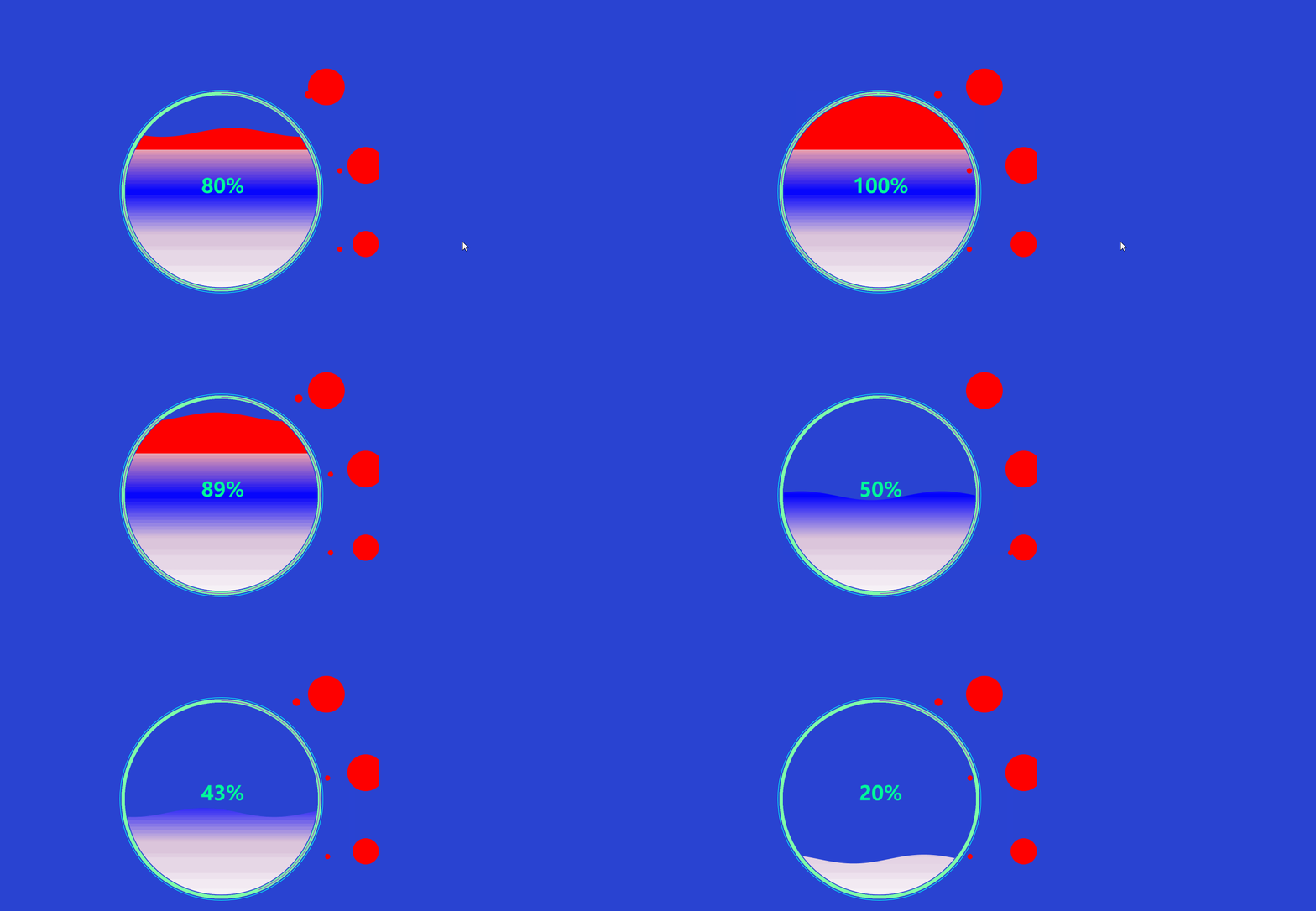
使用canvas实现360水球波动
代码如下:
<!DOCTYPE html>

<html lang="en">

<head>

    <meta charset="UTF-8">

        <title>test</title>

    <style>

      body {

        display: flex;

        flex-flow: column wrap;

        justify-content: center;

        align-items: center;

    }

    #circular {

     position: absolute;

    left: 500px;

    top: 400px;

    }

      #canvas_dom {

     position: absolute;

    left: 500px;

    top: 100px;

    }

 </style>

</head>

<body style="background-color: #0020cad6;">

<canvas id="circular" width="1000" height="1000">当前浏览器不支持canvas请升级!</canvas>

<canvas id="canvas_dom" width="1000" height="1000"></canvas>

</body>

<script>

    canvas = document.getElementById("circular");

    ctx = canvas.getContext("2d");

    canvas.width = 800;

    oH = canvas.height = 800;

    // 线宽

    lineWidth = 2;

    // 大半径

    r = (canvas.width / 2);

    cR = r - 10 * lineWidth;

    ctx.beginPath();

    ctx.lineWidth = lineWidth;

    // 水波动画初始参数

    axisLength = 2 * r - 16 * lineWidth;

    // Sin 图形长度

    unit = axisLength / 9;

    // 波浪宽

    range = .3

    // 浪幅

    nowrange = range;

    xoffset = 8 * lineWidth;

    // 数据量

    sp = 0;

    // 周期偏移量

    nowdata = 0;

    waveupsp = 0.006;

    // 水波上涨速度

    // 圆动画初始参数

    arcStack = [];

    // 圆栈

    bR = r - 8 * lineWidth;

    soffset = -(Math.PI / 2);

    // 圆动画起始位置

    circleLock = true;

    // 起始动画锁      // 获取圆动画轨迹点集

    for (var i = soffset; i < soffset + 2 * Math.PI; i += 1 / (8 * Math.PI)) {

        arcStack.push([r + bR * Math.cos(i), r + bR * Math.sin(i)])

    }

    // 圆起始点

    cStartPoint = arcStack.shift();

    ctx.strokeStyle = "#1c86d1";

    ctx.moveTo(cStartPoint[0], cStartPoint[1]);

    // 开始渲染

    render();

    var data = 0.5;

    setInterval(function(){

    data = Math.round(Math.random()*10) /10;

    }, 2000);

    function drawSine() {

        ctx.beginPath();

        ctx.save();

        var Stack = [];

        // 记录起始点和终点坐标

        for (var i = xoffset; i <= xoffset + axisLength; i += 20 / axisLength) {

            var x = sp + (xoffset + i) / unit;

            var y = Math.sin(x) * .2;

            var dx = i;

            var dy = 2 * cR * (1 - nowdata) + (r - cR) - (unit * y);

            ctx.lineTo(dx, dy);

            Stack.push([dx, dy])

        }

        // 获取初始点和结束点

        var startP = Stack[0]

        var endP = Stack[Stack.length - 1]

        ctx.lineTo(xoffset + axisLength, canvas.width);

        ctx.lineTo(xoffset, canvas.width);

        ctx.lineTo(startP[0], startP[1]);

        //水波的颜色

        // 创建渐变

        var grd=ctx.createLinearGradient(0,0,0,canvas.width);

        grd.addColorStop(0.3,"red");

        grd.addColorStop(0.3,"#EEA2AD");

        grd.addColorStop(0.5,"blue");

        grd.addColorStop(0.7,"#D8BFD8");

        grd.addColorStop(1,"white");

        // 填充渐变

        ctx.fillStyle=grd;

        ctx.fill();

        ctx.restore();

    }

    function drawText() {

        ctx.globalCompositeOperation = 'source-over';

        var size = 0.2 * cR;

        ctx.font = 'bold ' + size + 'px Microsoft Yahei';

        txt = (nowdata.toFixed(2) * 100).toFixed(0) + '%';

        var fonty = r + size / 2;

        var fontx = r - size * 0.8;

        //字体颜色

        ctx.fillStyle = "#00FA9A";

        ctx.textAlign = 'center';

        ctx.fillText(txt, r + 5, r + 5)

    }

    //最一层

    function drawCircle() {

        ctx.beginPath();

        ctx.lineWidth = 0;

        ctx.strokeStyle = '#00FFFF';

        //不要直接

        ctx.arc(r, r, cR + 7, 0, 2 * Math.PI);

        ctx.stroke();

        ctx.restore();

    }

    //第二层

    function grayCircle() {

        ctx.beginPath();

        //宽度

        ctx.lineWidth = 12;

        //颜色

        ctx.strokeStyle = '#7FFFAA';

        ctx.arc(r, r, cR - 5, 0, 2 * Math.PI);

        ctx.stroke();

        ctx.restore();

        ctx.beginPath();

    }

    //第二层进度圈

    function orangeCircle() {

        ctx.beginPath();

        //宽度

        ctx.lineWidth = 2;

        ctx.strokeStyle = '#af1cd1';

        //使用这个使圆环两端是圆弧形状

        ctx.lineCap = 'round';

        ctx.arc(r, r, cR - 5,  - (Math.PI / 2) , (nowdata * 360) * (Math.PI / 180.0) - (Math.PI / 2));

        ctx.stroke();

        ctx.save()

    }

    //裁剪中间水圈

    function clipCircle() {

        ctx.beginPath();

        ctx.arc(r, r, cR - 15, 0, 2 * Math.PI, false);

        ctx.clip();

    }

    //外员动态

    function wytd(){

        init_angle = 0;

        var small_x = Math.cos(init_angle)*80;

        var small_y = Math.sin(init_angle)*80;

        ctx.beginPath();

        ctx.translate(small_x,0);

        ctx.arc(0,0,10,0,Math.PI*2);

        ctx.closePath();

        ctx.fill();

        ctx.restore();

        init_angle = init_angle + Math.PI*2/360;

        if(init_angle >2 ){

        init_angle = 0;

        }

    }

    //渲染canvas

    function render() {

        ctx.clearRect(0, 0, canvas.width, canvas.height);

        drawCircle();

        grayCircle();

        //橘黄色进度圈//

        orangeCircle();

        //裁剪中间水圈

        clipCircle();

        let aa = 10;

        if (data >= 0.85) {

            if (nowrange > range / 4) {

                var t = range * 0.01;

                nowrange -= t;

            }

        } else if (data <= 0.1) {

            if (nowrange < range * 1.5) {

                var t = range * 0.01;

                nowrange += t;

            }

        } else {

            if (nowrange <= range) {

                var t = range * 0.01;

                nowrange += t;

            }

            if (nowrange >= range) {

                var t = range * 0.01;

                nowrange -= t;

            }

        }

        if ((data - nowdata) > 0) {

            nowdata += waveupsp;

        }

        if ((data - nowdata) < 0) {

            nowdata -= waveupsp

        }

        sp += 0.07;

        drawSine();

        // 写字

        drawText();

        requestAnimationFrame(render)

    }

</script>

<script type="text/javascript">

    var canvas_dom = document.getElementById("canvas_dom");

    var ctxfs = canvas_dom.getContext('2d');

    var unit_angle  = Math.PI*2/360;

    var init_angle = 0;

    function draw(){

        //清除位置

        ctxfs.clearRect(0,0,canvas_dom.width,canvas_dom.height);

        //第一个

        ctxfs.save();

        ctxfs.translate(500,300);

        ctxfs.fillStyle = "red";

        ctxfs.beginPath();

        ctxfs.arc(300,0,70,0,Math.PI*2,false);

        ctxfs.closePath();

        ctxfs.fill();

        var small_x = Math.cos(init_angle)*80;

        var small_y = Math.sin(init_angle)*80;

        ctxfs.beginPath();

        //只需要修改后面参数

        ctxfs.translate(small_x,20);

        //arc(移动左右位置,移动上下位置,大小,不需要修改,不需要修改) a

        ctxfs.arc(200,10,15,0,Math.PI*2);

        ctxfs.closePath();

        ctxfs.fill();

        ctxfs.restore();

        init_angle = init_angle + unit_angle;

        //第二个

        ctxfs.save();

        ctxfs.translate(650,600);

        ctxfs.fillStyle = "red";

        ctxfs.beginPath();

        ctxfs.arc(300,0,70,0,Math.PI*2,false);

        ctxfs.closePath();

        ctxfs.fill();

        var small_x = Math.cos(init_angle)*80;

        var small_y = Math.sin(init_angle)*80;

        ctxfs.beginPath();

        ctxfs.translate(small_x,0);

        ctxfs.arc(170,20,10,0,Math.PI*2);

        ctxfs.closePath();

        ctxfs.fill();

        ctxfs.restore();

        //第三个

        ctxfs.save();

        ctxfs.translate(650,900);

        ctxfs.fillStyle = "red";

        ctxfs.beginPath();

        ctxfs.arc(300,0,50,0,Math.PI*2,false);

        ctxfs.closePath();

        ctxfs.fill();

        var small_x = Math.cos(init_angle)*80;

        var small_y = Math.sin(init_angle)*80;

        ctxfs.beginPath();

        ctxfs.translate(small_x,0);

        ctxfs.arc(170,20,10,0,Math.PI*2);

        ctxfs.closePath();

        ctxfs.fill();

        ctxfs.restore();

        //第四个

        ctxfs.save();

        ctxfs.translate(500,1100);

        ctxfs.fillStyle = "red";

        ctxfs.beginPath();

        ctxfs.arc(300,0,70,0,Math.PI*2,false);

        ctxfs.closePath();

        ctxfs.fill();

        var small_x = Math.cos(init_angle)*80;

        var small_y = Math.sin(init_angle)*80;

        ctxfs.beginPath();

        ctxfs.translate(small_x,0);

        ctxfs.arc(170,20,10,0,Math.PI*2);

        ctxfs.closePath();

        ctxfs.fill();

        ctxfs.restore();

        init_angle = init_angle + unit_angle;

        window.requestAnimationFrame(draw);

    }

    //自执行函数

    (function(){

        draw();

    })();

</script>

</html>
使用canvas实现360水球波动的更多相关文章
- 利用Canvas实现360度浏览
前言:最近几个月来到新公司,主要从事移动端方面的开发,有时候也挺忙挺累的,于是就好一段时间没写博客了.其实自己在这几个月里,自己对canvas以及createjs和egret都有了一定程度上的认识与掌 ...
- HTML5 Canvas实现360度全景图
原文:http://blog.csdn.net/jia20003/article/details/17172571 很多购物网站现在都支持360实物全景图像,可以360度任意选择查看样品,这样 对购买 ...
- canvas点阵函数波动,类似飘带或水波
canvas动画利用函数波动特点制作水波动画 <canvas id="myCanvas" width="500" height="400&quo ...
- 【高级功能】使用canvas元素(第一部分)
1. 开始使用 canvas 元素 canvas 元素非常简单,这是指它所有的功能都体现在一个JavaScript对象上,因此该元素本身只有两个属性:width 和 height. canvas 元素 ...
- 【温故而知新-Javascript】使用canvas元素(第一部分)
1. 开始使用 canvas 元素 canvas 元素非常简单,这是指它所有的功能都体现在一个JavaScript对象上,因此该元素本身只有两个属性:width 和 height. canvas 元素 ...
- Android Canvas绘图详解(图文)
编辑推荐:稀土掘金,这是一个针对技术开发者的一个应用,你可以在掘金上获取最新最优质的技术干货,不仅仅是Android知识.前端.后端以至于产品和设计都有涉猎,想成为全栈工程师的朋友不要错过! Andr ...
- Android之canvas详解
首先说一下canvas类: Class Overview The Canvas class holds the "draw" calls. To draw something, y ...
- 【转】Android Canvas绘图详解(图文)
转自:http://www.jcodecraeer.com/a/anzhuokaifa/androidkaifa/2012/1212/703.html Android Canvas绘图详解(图文) 泡 ...
- WebRTC–getUserMedia & Canvas
下面是一个使用getUserMedia接口和Canvas的drawImage方法实现的截图功能(截取视频中的一帧). 基本思路是这样子的: getUserMedia获取一个MediaStream, s ...
随机推荐
- 树形dp专题总结
树形dp专题总结 大力dp的练习与晋升 原题均可以在网址上找到 技巧总结 1.换根大法 2.状态定义应只考虑考虑影响的关系 3.数据结构与dp的合理结合(T11) 4.抽直径解决求最长链的许多类问题( ...
- Object changed by Unknown
https://documentation.red-gate.com/soc7/troubleshooting/object-changed-by-unknown https://documentat ...
- 动态查找之二叉树查找 c++实现
算法思想 二叉搜索树(又称二叉查找树或二叉排序树)BST树 二叉查找树 二叉查找树,也称二叉搜索树,或二叉排序树.其定义也比较简单,要么是一颗空树,要么就是具有如下性质的二叉树: (1)若任意节点的左 ...
- Spring 事务小结
@Override@Transactionalpublic void add() { this.in();} public void in(){ NyOrder nyOrder=new NyOrder ...
- arcpy地理处理工具案例教程-生成范围-自动画框-深度学习样本提取-人工智能-AI
arcpy地理处理工具案例教程-生成范围-自动画框-深度学习样本提取-人工智能-AI 商务合作,科技咨询,版权转让:向日葵,135-4855_4328,xiexiaokui#qq.com 目的:对面. ...
- win7上手机ADB interface无法安装驱动
解决办法: https://blog.csdn.net/riyuexingchen1204/article/details/84594061
- nodejs相关框架
sails https://sailsjs.com/documentation/concepts koa koa 是由 Express 原班人马打造的,致力于成为一个更小.更富有表现力.更健壮的 ...
- Java13新特性 -- 新增 移除 废弃 已知问题等
新增 添加FileSystems.newFileSystem(Path, Map<String, ?>) Method 新的java.nio.ByteBuffer Bulk get/put ...
- matlab学习笔记12_2创建结构体数组,访问标量结构体,访问非标量结构体数组的属性,访问嵌套结构体中的数据,访问非标量结构体数组中多个元素的字段
一起来学matlab-matlab学习笔记12 12_2 结构体 创建结构体数组,访问标量结构体,访问非标量结构体数组的属性,访问嵌套结构体中的数据,访问非标量结构体数组中多个元素的字段 觉得有用的话 ...
- Python - importlib 模块
importlib 模块可以根据字符串来导入相应的模块 目录结构: 在根目录下创建 importlib_test.py 和 aaa/bbb.py bbb.py: class Person(object ...