
WPF 的 Application.Current.Dispatcher 中,为什么 Current 可能为 null
原文:WPF 的 Application.Current.Dispatcher 中,为什么 Current 可能为 null

在 WPF 程序中,可能会存在 Application.Current.Dispatcher.Xxx 这样的代码让一部分逻辑回到主 UI 线程。因为发现在调用这句代码的时候出现了 NullReferenceException,于是就有三位小伙伴告诉我说 Current 和 Dispatcher 属性都可能为 null。
然而实际上这里只可能 Current 为 null 而此上下文的 Dispatcher 是绝对不会为 null 的。(当然我们这里讨论的是常规编程手段,如果非常规手段,你甚至可以让实例的 this 为 null 呢……)
当你的应用程序退出时,所有 UI 线程的代码都不再会执行,因此这是安全的;但所有非 UI 线程的代码依然在继续执行,此时随时可能遇到 Application.Current 属性为 null。
由于本文所述的两个部分都略长,所以拆分成两篇博客,这样更容易理解。
- WPF 的 Application.Current.Dispatcher 中,Dispatcher 属性一定不会为 null
- WPF 的 Application.Current.Dispatcher 中,为什么 Current 可能为 null
本文内容
Application.Current 静态属性
源代码
Application 类型的源代码会非常长,所以这里就不贴了,可以前往这里查看:
其中,Current 返回的是 _appInstance 的静态字段。因此 _appInstance 字段为 null 的时机就是 Application.Current 为 null 的时机。
/// <summary>

///     The Current property enables the developer to always get to the application in

///     AppDomain in which they are running.

/// </summary>

static public Application Current

{

    get

    {

        // There is no need to take the _globalLock because reading a

        // reference is an atomic operation. Moreover taking a lock

        // also causes risk of re-entrancy because it pumps messages.

        return _appInstance;

    }

}
- 1
- 2
- 3
- 4
- 5
- 6
- 7
- 8
- 9
- 10
- 11
- 12
- 13
- 14
- 15
由于 _appInstance 字段是私有字段,所以仅需调查这个类本身即可找到所有的赋值时机。(反射等非常规手段需要排除在外,因为这意味着开发者是逗比——自己闯的祸不能怪 WPF 框架。)
赋值时机
_appInstance 的赋值时机有两处:
Application的实例构造函数(注意哦,是实例构造函数而不是静态构造函数);Application.DoShutdown方法。
在 Application 的实例构造函数中:
_appInstance的赋值是线程安全的,这意味着多个Application实例的构造不会因为线程安全问题导致_appInstance字段的状态不正确。- 如果
_appCreatedInThisAppDomain为true那么,将抛出异常,组织此应用程序域中创建第二个Application类型的实例。
/// <summary>

///     Application constructor

/// </summary>

/// <SecurityNote>

///    Critical: This code posts a work item to start dispatcher if in the browser

///    PublicOk: It is ok because the call itself is not exposed and the application object does this internally.

/// </SecurityNote>

[SecurityCritical]

public Application()

{

    // 省略了一部分代码。

    lock(_globalLock)

    {

        // set the default statics

        // DO NOT move this from the begining of this constructor

        if (_appCreatedInThisAppDomain == false)

        {

            Debug.Assert(_appInstance == null, "_appInstance must be null here.");

            _appInstance = this;

            IsShuttingDown    = false;

            _appCreatedInThisAppDomain = true;

        }

        else

        {

            //lock will be released, so no worries about throwing an exception inside the lock

            throw new InvalidOperationException(SR.Get(SRID.MultiSingleton));

        }

    }

    // 省略了一部分代码。

}
- 1
- 2
- 3
- 4
- 5
- 6
- 7
- 8
- 9
- 10
- 11
- 12
- 13
- 14
- 15
- 16
- 17
- 18
- 19
- 20
- 21
- 22
- 23
- 24
- 25
- 26
- 27
- 28
- 29
- 30
也就是说,此类型实际上是设计为单例的。在第一个实例构造出来之后,单例的实例即可开始使用。
后续赋值
此单例实例的唯一结束时机就是 Application.DoShutdown 方法。这是唯一将 _appInstance 赋值为 null 的代码。
/// <summary>

/// DO NOT USE - internal method

/// </summary>

///<SecurityNote>

///     Critical: Calls critical code: Window.InternalClose

///     Critical: Calls critical code: HwndSource.Dispose

///     Critical: Calls critical code: PreloadedPackages.Clear()

///</SecurityNote>

[SecurityCritical]

internal virtual void DoShutdown()

{

    // 省略了一部分代码。

    // Event handler exception continuality: if exception occurs in ShuttingDown event handler,

    // our cleanup action is to finish Shuttingdown.  Since Shuttingdown cannot be cancelled.

    // We don't want user to use throw exception and catch it to cancel Shuttingdown.

    try

    {

        // fire Applicaiton Exit event

        OnExit(e);

    }

    finally

    {

        SetExitCode(e._exitCode);

        // By default statics are shared across appdomains, so need to clear

        lock (_globalLock)

        {

            _appInstance = null;

        }

        _mainWindow = null;

        _htProps = null;

        NonAppWindowsInternal = null;

        // 省略了一部分代码。

    }

}
- 1
- 2
- 3
- 4
- 5
- 6
- 7
- 8
- 9
- 10
- 11
- 12
- 13
- 14
- 15
- 16
- 17
- 18
- 19
- 20
- 21
- 22
- 23
- 24
- 25
- 26
- 27
- 28
- 29
- 30
- 31
- 32
- 33
- 34
- 35
- 36
- 37
- 38
可以调用到此代码的公共 API 有:
Application.Shutdown实例方法- 导致
Window关闭的若干方法(InternalDispose) IBrowserHostServices.PostShutdown接口方法
因此,所有直接或间接调用到以上方法的地方都会导致 Application.Current 属性被赋值为 null。
对所写代码的影响
从以上的分析可以得知,只要你还能在 Application.DoShutdown 执行之后继续执行代码,那么这部分的代码都将面临着 Application.Current 为 null 风险。
那么,到底有哪些时机可能遇到 Application.Current 为 null 呢?这部分就与读者项目中所用的业务代码强相关了。
但是这部分业务代码会有一些公共特征帮助你判定你是否可能写出遭遇 Application.Current 为 null 的代码。
此特征是:此代码与 Application.Current 不在同一线程。
与 Application.Current 不在同一线程
对于 WPF 程序,你的多数代码可能是由用户交互产生,即便有后续代码的执行,也依然是从 UI 交互产生。这样的代码不会遇到 Application.Current 为 null 的情况。
但是,如果你的代码由非 UI 线程触发,例如在 Usb 设备改变、与其他端的通信、某些异步代码的回调等等,这些代码不受 Dispatcher 是否调度影响,几乎一定会执行。因此 Application.Current 就算赋值为 null 了,它们也不知道,依然会继续执行,于是就会遭遇 Application.Current 为 null。
这本质上是一个线程安全问题。
使用 Invoke/BeginInvoke/InvokeAsync 的代码不会出问题
Application.DoShutdown 方法被 ShutdownImpl 包装,且所有调用均从此包装进入,因此,所有可能导致 Application.Current 为 null 的代码,均会调用此方法,也就是说,会调用 Dispatcher.CriticalInvokeShutdown 实例方法。
/// <summary>

/// This method gets called on dispatch of the Shutdown DispatcherOperationCallback

/// </summary>

///<SecurityNote>

///  Critical: Calls critical code: DoShutdown, Dispatcher.CritcalInvokeShutdown()

///</SecurityNote>

[SecurityCritical]

private void ShutdownImpl()

{

    // Event handler exception continuality: if exception occurs in Exit event handler,

    // our cleanup action is to finish Shutdown since Exit cannot be cancelled. We don't

    // want user to use throw exception and catch it to cancel Shutdown.

    try

    {

        DoShutdown();

    }

    finally

    {

        // Quit the dispatcher if we ran our own.

        if (_ownDispatcherStarted == true)

        {

            Dispatcher.CriticalInvokeShutdown();

        }

        ServiceProvider = null;

    }

}
- 1
- 2
- 3
- 4
- 5
- 6
- 7
- 8
- 9
- 10
- 11
- 12
- 13
- 14
- 15
- 16
- 17
- 18
- 19
- 20
- 21
- 22
- 23
- 24
- 25
- 26
- 27
所有的关闭 Dispatcher 的调用有两类,Application 关闭时调用的是内部方法 CriticalInvokeShutdown。
- 立即关闭
CriticalInvokeShutdown,即以Send优先级Invoke关闭方法,而Send优先级调用Invoke几乎等同于直接调用(为什么是等同而不是直接调用?因为还需要考虑回到Dispatcher初始化时所在的线程)。 - 开始关闭
BeginInvokeShutdown,即以指定的优先级InvokeAsync关闭方法。
而关闭 Dispatcher 意味着所有使用 Invoke/BeginInvoke/InvokeAsync 的任务将终止。
//<SecurityNote>

//  Critical - as it accesses security critical data ( window handle)

//</SecurityNote>

[SecurityCritical]

private void ShutdownImplInSecurityContext(Object state)

{

    // 省略了一部分代码。

    // Now that the queue is off-line, abort all pending operations,

    // including inactive ones.

    DispatcherOperation operation = null;

    do

    {

        lock(_instanceLock)

        {

            if(_queue.MaxPriority != DispatcherPriority.Invalid)

            {

                operation = _queue.Peek();

            }

            else

            {

                operation = null;

            }

        }

        if(operation != null)

        {

            operation.Abort();

        }

    } while(operation != null);

    // 省略了一部分代码。

}
- 1
- 2
- 3
- 4
- 5
- 6
- 7
- 8
- 9
- 10
- 11
- 12
- 13
- 14
- 15
- 16
- 17
- 18
- 19
- 20
- 21
- 22
- 23
- 24
- 25
- 26
- 27
- 28
- 29
- 30
- 31
- 32
- 33
由于此终止代码在 Dispatcher 所在的线程执行,而所有 Invoke/BeginInvoke/InvokeAsync 代码也都在此线程执行,因此这些代码均不会并发。已经执行的代码会在此终止代码之前,而在此终止代码之后也不会再执行任何 Invoke/BeginInvoke/InvokeAsync 的任务了。
- 所有通过
Invoke/BeginInvoke/InvokeAsync或间接通过此方法(如 WPF 控件相关事件)调用的代码,均不会遭遇Application.Current为null。 - 所有在 UI 线程使用
async/await并使用默认上下文执行的代码,均不会遭遇Application.Current为null。(这意味着你没有使用.ConfigureAwait(false),详见在编写异步方法时,使用 ConfigureAwait(false) 避免使用者死锁 - walterlv。)
最简示例代码
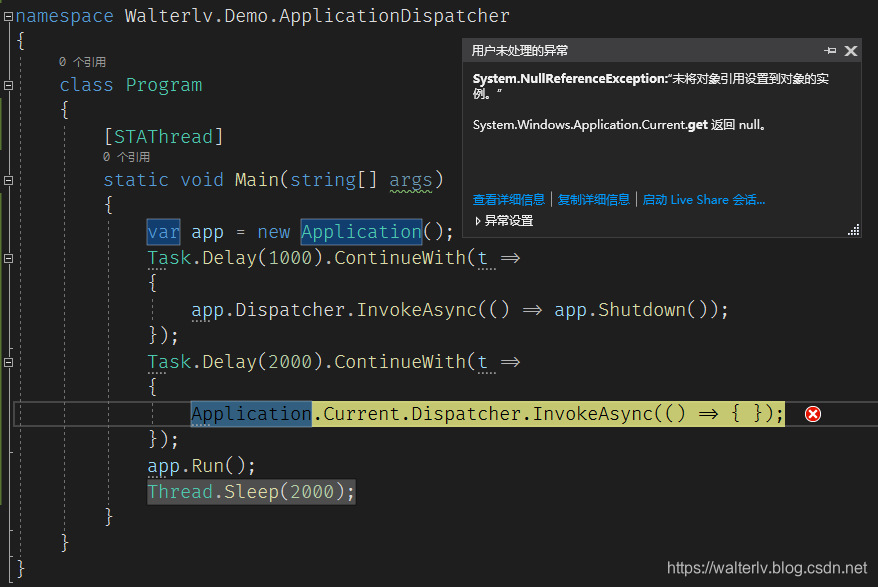
using System;

using System.Threading;

using System.Threading.Tasks;

using System.Windows;

namespace Walterlv.Demo.ApplicationDispatcher

{

    class Program

    {

        [STAThread]

        static void Main(string[] args)

        {

            var app = new Application();

            Task.Delay(1000).ContinueWith(t =>

            {

                app.Dispatcher.InvokeAsync(() => app.Shutdown());

            });

            Task.Delay(2000).ContinueWith(t =>

            {

                Application.Current.Dispatcher.InvokeAsync(() => { });

            });

            app.Run();

            Thread.Sleep(2000);

        }

    }

}
- 1
- 2
- 3
- 4
- 5
- 6
- 7
- 8
- 9
- 10
- 11
- 12
- 13
- 14
- 15
- 16
- 17
- 18
- 19
- 20
- 21
- 22
- 23
- 24
- 25
- 26
结论
总结以上所有的分析:
- 任何与
Application不在同一个线程的代码,都可能遭遇Application.Current为null。 - 任何与
Application在同一个线程的代码,都不可能遇到Application.Current为null。
这其实是一个线程安全问题。用所有业务开发者都可以理解的说法描述就是:
当你的应用程序退出时,所有 UI 线程的代码都不再会执行,因此这是安全的;但所有非 UI 线程的代码依然在继续执行,此时随时可能遇到 Application.Current 属性为 null。
因此,记得所有非 UI 线程的代码,如果需要转移到 UI 线程执行,记得判空:
private void OnUsbDeviceChanged(object sender, EventArgs e)

{

    // 记得这里需要判空,因为此上下文可能在非 UI 线程。

    Application.Current?.InvokeAsync(() => { });

}
- 1
- 2
- 3
- 4
- 5
Application.Dispatcher 实例属性
关于 Application.Dispatcher 是否可能为 null 的分析,由于比较长,请参见我的另一篇博客:
参考资料
我的博客会首发于 https://blog.walterlv.com/,而 CSDN 会从其中精选发布,但是一旦发布了就很少更新。
如果在博客看到有任何不懂的内容,欢迎交流。我搭建了 dotnet 职业技术学院 欢迎大家加入。

本作品采用知识共享署名-非商业性使用-相同方式共享 4.0 国际许可协议进行许可。欢迎转载、使用、重新发布,但务必保留文章署名吕毅(包含链接:https://walterlv.blog.csdn.net/),不得用于商业目的,基于本文修改后的作品务必以相同的许可发布。如有任何疑问,请与我联系。

WPF 的 Application.Current.Dispatcher 中,为什么 Current 可能为 null的更多相关文章
- WPF 的 Application.Current.Dispatcher 中,Dispatcher 属性一定不会为 null
原文:WPF 的 Application.Current.Dispatcher 中,Dispatcher 属性一定不会为 null 在 WPF 程序中,可能会存在 Application.Curren ...
- 2018-8-10-win10-uwp-Window.Current.Dispatcher中Current为null
title author date CreateTime categories win10 uwp Window.Current.Dispatcher中Current为null lindexi 201 ...
- win10 uwp Window.Current.Dispatcher中Current为null
本文说的是进行网络中异步界面出现的错误,可能带有一定的主观性和局限性,说的东西可能不对或者不符合每个人的预期.如果觉得我有讲的不对的,就多多包含,或者直接关掉这篇文章,但是请勿生气或者发怒吐槽,可以在 ...
- System.Windows.Application.Current.Dispatcher.BeginInvoke
System.Windows.Application.Current.Dispatcher.BeginInvoke(new Action(() => ...
- Dispatcher中Invoke与BeginInvoke
[同步]Invoke Application.Current.Dispatcher.Invoke(AutoIncreaseNumber); [异步]BeginInvoke Application.Cu ...
- WPF的Application类
本节主要介绍一下Application类的部分功能,我们首先来看一下如何使用Application类来加载一个窗口: 我们首先创建一个控制台程序,并引入相关的dll,然后修改Main()方法. [ST ...
- WPF之application对象
WPF:Application简介 Application是一个地址空间,在WPF中应用程序就是在System.Windows命名空间下的一个Application实例.一个应用程序只能对应一个App ...
- How to update WPF browser application manifest and xbap file with ‘mage.exe’
老外参考文章1 老外参考文章2 I created a WPF browser application MyApp then published it by ClickOnce in VS2008. ...
- 使用IE9、FireFox与Chrome浏览WPF Browser Application(.XBAP)的方式
最近开始写一些WPF的小Sample和文章,但是毕竟WPF应用程式不像Silverlight那么方便的只要装个Plugin就可以透过浏览器来看执行结果,因此把脑筋动到了改用WPF Browser Ap ...
随机推荐
- c博客06-结构
1.本章学习总结(2分) 1.1 学习内容总结 结构体如何定义.成员如何赋值 结构体数组排序做法 结构体指针怎么用 共用体.枚举类型做法 文件读写,文件中数据如何读进结构体数组 1.2 本章学习体会 ...
- 从Word到Latex文档
有时,从Word文档复制到Latex文档时会编译报错,这时要检查某些特殊字符.中文输入法下的字符有时无法正确编译,要用相应的英文输入法下的字符替代.拉丁字母.希腊字母应该用转义字符实现.
- 02-线性结构4 Pop Sequence (25 分)
Given a stack which can keep M numbers at most. Push N numbers in the order of 1, 2, 3, ..., N and p ...
- 梯形法求解常微分方程(c++)
#include<iostream> #include<iomanip> using namespace std; int main() { double x,y,yn,h,t ...
- Java获取当天、当前月、当前年(今年)的开始和结束时间戳
最近在做统计相关的功能的时候涉及到了获取当天的开始和结束的时间戳.当月和当年的开始结束时间戳,特此记录,以作备忘. 相关代码 package com.lingyejun.authenticator; ...
- python使用ldap3进行接口调用
把自己使用到的ldap调用的代码分享出来,希望大家可以参考 #!/usr/bin/python # -*- coding: utf-8 -*- """ @Time : 2 ...
- 滚动事件优化 passive
1.addEventListener参数 target.addEventListener(type, listener[, options]); target.addEventListener(typ ...
- layui的layer.open()方法查看缩略图 原图缩放
写在前面 需求是页面上的图片缩略图, 鼠标悬浮时显示原图片, 并按比例缩放. 操作步骤 官方文档 点击跳转 关键属性 1. type: 设置type=1, 以页面的形式展示图片 2. content ...
- 【Java】Spring之基于注释的容器配置(四)
注释是否比配置Spring的XML更好? 基于注释的配置的引入引发了这种方法是否比XML“更好”的问题.答案是每种方法都有其优点和缺点,通常,由开发人员决定哪种策略更适合他们.由于它们的定义方式,注释 ...
- EF Core基本使用
Mysql: nuget 安装 Pomelo.EntityFrameworkCore.MySql Microsoft.EntityFrameworkCore.Design csprj 修改: < ...