
Android课程---关于数据存储的学习(3)之数据库和事务
DataActivity3.java
package com.hanqi.test5;

import android.content.ContentValues;

import android.database.Cursor;

import android.database.sqlite.SQLiteDatabase;

import android.database.sqlite.SQLiteOpenHelper;

import android.os.Bundle;

import android.support.v7.app.AppCompatActivity;

import android.util.Log;

import android.view.View;

import android.widget.Toast;

public class DataActivity3 extends AppCompatActivity {

    @Override

    protected void onCreate(Bundle savedInstanceState) {

        super.onCreate(savedInstanceState);

        setContentView(R.layout.activity_data3);

    }

    //继承SQLiteOpenHelper

    class DBHelper extends SQLiteOpenHelper

    {

        //构造方法

        //name  数据库名

        //version  所创建的数据库版本号

        public DBHelper(String name,int version) {

            //调用父类的构造方法,写在第一行

            super(DataActivity3.this, name, null, version);

        }

        //在创建数据库时调用

        //回调方法

        //什么时候创建数据库:连接数据库的时候,如果数据文件不存在

        //只调用一次

        @Override

        public void onCreate(SQLiteDatabase db) {

            //1.创建数据库的语句

            String creatTable = "create table user(_id integer PRIMARY KEY AUTOINCREMENT NOT NULL,name varchar,age int)";

            db.execSQL(creatTable);

            //2.初始化数据

            ContentValues cv = new ContentValues();

            cv.put("name","房崇延");

            cv.put("age", 20);

            //如果不成功返回-1

            //第一个参数是表名

            //第二个参数是空列的默认值

            //第三个参数是字段和值的集合(key/value)

            long l = db.insert("user",null,cv);

            Toast.makeText(DataActivity3.this, "id = "+ l, Toast.LENGTH_LONG).show();

        }

        //升级数据库

        @Override

        public void onUpgrade(SQLiteDatabase db, int oldVersion, int newVersion) {

           //执行升级

            //update user set age = 27 where _id = ?

            //? 是占位符,然后给占位符赋值

            ContentValues cv = new ContentValues();

            cv.put("age", 27);

            int rowcount = db.update("user",cv,"_id=? and name=?",new String[]{"1","TOM"});

            Log.e("TAG","rowcount = "+rowcount);

        }

    }

    //创建数据库

    public void dt1_OnClick(View v)

    {

        //创建

        DBHelper dh = new DBHelper("test.db",1);

        //获取数据库实例

        SQLiteDatabase sd = dh.getWritableDatabase();

        sd.close();

    }

    //升级数据库

    public void dt2_OnClick(View v)

    {

       //创建  实现工具类

        DBHelper dh = new DBHelper("test.db",2);

        //连接数据库  获取数据库实例

        SQLiteDatabase sd = dh.getWritableDatabase();

        sd.close();

    }

    //插入数据

    public void dt3_OnClick(View v)

    {

        //创建

        DBHelper dh = new DBHelper("test.db",2);

        //获取数据库实例

        SQLiteDatabase sd = dh.getWritableDatabase();

        ContentValues cv = new ContentValues();

        cv.put("name","房子");

        cv.put("age", "18");

        long _id = sd.insert("user", null, cv);

        Log.e("TAG","_id = " + _id);

        sd.close();

    }

    //修改数据

    public void dt5_OnClick(View v)

    {

        //创建

        DBHelper dh = new DBHelper("test.db",2);

        //获取数据库实例

        SQLiteDatabase sd = dh.getWritableDatabase();

        ContentValues cv = new ContentValues();

        cv.put("name","房子1");

        int count = sd.update("user", cv, "_id >=3", null);

        Log.e("TAG", "updatecount = " + count);

        sd.close();

    }

    //修改数据2

    public void dt7_OnClick(View v)

    {

        //创建

        DBHelper dh = new DBHelper("test.db",2);

        //获取数据库实例

        SQLiteDatabase sd = dh.getWritableDatabase();

        //没有工具类时可以用下面这个方法  但是很繁琐

        // 连接

        //sd = SQLiteDatabase.openOrCreateDatabase("test.db",null);

        //判断是否建表了,是否升级了  不如工具类好用

        try {

            //1.开启事务

            sd.beginTransaction();

            ContentValues cv = new ContentValues();

            cv.put("age", "50");

            int count = sd.update("user", cv, "_id =2", null);

            //抛出异常

            boolean b = true;

            if (b) {

                throw new RuntimeException("出现异常了");

            }

            count += sd.update("user", cv, "_id =3", null);

            Log.e("TAG", "updatecount = " + count);

            //2.设置事务执行成功

            sd.setTransactionSuccessful();

            //提交

        }

        catch (Exception e)

        {

            //回滚

            e.printStackTrace();

            Toast.makeText(DataActivity3.this, e.getMessage(), Toast.LENGTH_SHORT).show();

        }

        //一定会被执行的代码

        finally {

        //3.结束事务,1)提交  2)回滚

        sd.endTransaction();

        sd.close();

        }

    }

    //删除数据

    public void dt6_OnClick(View v)

    {

        //创建

        DBHelper dh = new DBHelper("test.db",2);

        //获取数据库实例

        SQLiteDatabase sd = dh.getWritableDatabase();

        ContentValues cv = new ContentValues();

        int count = sd.delete("user","_id =4",null);

        Log.e("TAG", "deletecount = " + count);

        sd.execSQL("delete from user where _id =3");

        sd.close();

    }

    //查询数据

    public void dt4_OnClick(View v)

    {

        //创建

        DBHelper dh = new DBHelper("test.db",2);

        //获取数据库实例

        SQLiteDatabase sd = dh.getWritableDatabase();

        //全表查询

        Cursor cursor = sd.query("user", null, null, null, null, null, null);

        //Cursor 一开始会定位在第一条数据的上方

        //移动游标到数据的上面,提取数据后,再继续移动

        while (cursor.moveToNext())

        {

            //cursor.getInt(0);

             long _id = cursor.getLong(cursor.getColumnIndex("_id"));

            // 不知道具体列时,可以用这个相对麻烦的方法

            String name = cursor.getString(cursor.getColumnIndex("name"));

            int age = cursor.getInt(2);

            Log.e("TAG", "_id = " + _id + "name =" + name + "age = " + age);

        }

        cursor.close();

        sd.close();

    }

}
activity_data3.xml
<?xml version="1.0" encoding="utf-8"?>

<LinearLayout xmlns:android="http://schemas.android.com/apk/res/android"

    xmlns:tools="http://schemas.android.com/tools"

    android:layout_width="match_parent"

    android:layout_height="match_parent"

    android:paddingBottom="@dimen/activity_vertical_margin"

    android:paddingLeft="@dimen/activity_horizontal_margin"

    android:paddingRight="@dimen/activity_horizontal_margin"

    android:paddingTop="@dimen/activity_vertical_margin"

    tools:context="com.hanqi.test5.DataActivity3"

    android:orientation="vertical">

    <Button

        android:layout_width="match_parent"

        android:layout_height="wrap_content"

        android:text="创建数据库"

        android:onClick="dt1_OnClick"

        android:id="@+id/dt_1"/>

    <Button

        android:layout_width="match_parent"

        android:layout_height="wrap_content"

        android:text="升级数据库"

        android:onClick="dt2_OnClick"

        android:id="@+id/dt_2"/>

    <Button

        android:layout_width="match_parent"

        android:layout_height="wrap_content"

        android:text="增加数据"

        android:onClick="dt3_OnClick"

        android:id="@+id/dt_3"/>

    <Button

        android:layout_width="match_parent"

        android:layout_height="wrap_content"

        android:text="查询数据"

        android:onClick="dt4_OnClick"

        android:id="@+id/dt_4"/>

    <Button

        android:layout_width="match_parent"

        android:layout_height="wrap_content"

        android:text="修改数据"

        android:onClick="dt5_OnClick"

        android:id="@+id/dt_5"/>

    <Button

        android:layout_width="match_parent"

        android:layout_height="wrap_content"

        android:text="删除数据"

        android:onClick="dt6_OnClick"

        android:id="@+id/dt_6"/>

    <Button

        android:layout_width="match_parent"

        android:layout_height="wrap_content"

        android:text="事务操作"

        android:onClick="dt7_OnClick"

        android:id="@+id/dt_7"/>

</LinearLayout>
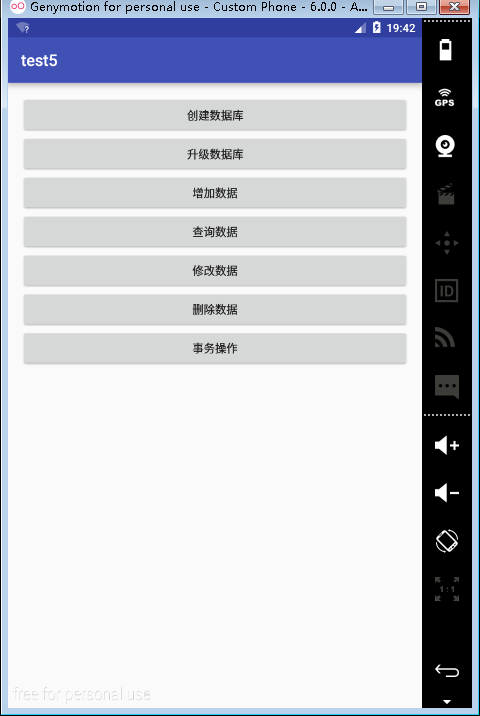
效果图:
Android课程---关于数据存储的学习(3)之数据库和事务的更多相关文章
- Android课程---关于数据存储的学习(2)
手机外部存储的学习 activity_data2.xml <?xml version="1.0" encoding="utf-8"?> <Li ...
- Android课程---关于数据存储的学习
activity_data1.xml <?xml version="1.0" encoding="utf-8"?> <LinearLayout ...
- Android课程---关于数据存储的学习之总结
- Android开发8:数据存储(二)——SQLite数据库和ContentProvider的使用
前言 啦啦啦各位小伙伴们许久不见了~学期末和过年期间自己忙着做其他事没能及时更新Android开发系列课程的博客,实在是罪过罪过~ 好啦~废话不多说,进入我们今天的主题.今天我们将和大家学习其他的数据 ...
- Android Learning:数据存储方案归纳与总结
前言 最近在学习<第一行android代码>和<疯狂android讲义>,我的感触是Android应用的本质其实就是数据的处理,包括数据的接收,存储,处理以及显示,我想针对这几 ...
- Android中的数据存储(二):文件存储 2017-05-25 08:16 35人阅读 评论(0) 收藏
文件存储 这是本人(菜鸟)学习android数据存储时接触的有关文件存储的知识以及本人自己写的简单地demo,为初学者学习和使用文件存储提供一些帮助.. 如果有需要查看SharedPreference ...
- 67.Android中的数据存储总结
转载:http://mp.weixin.qq.com/s?__biz=MzIzMjE1Njg4Mw==&mid=2650117688&idx=1&sn=d6c73f9f04d0 ...
- Android中的数据存储
Android中的数据存储主要分为三种基本方法: 1.利用shared preferences存储一些轻量级的键值对数据. 2.传统文件系统. 3.利用SQLite的数据库管理系统. 对SharedP ...
- Android五种数据存储方式
android 五种数据存储 :SharePreferences.SQLite.Contert Provider.File.网络存储 Android系统提供了四种存储数据方式.分别为:SharePre ...
随机推荐
- 忘记mysq rootl密码
忘记mysq rootl密码 1 mysql忘记root密码 1.1 查看mysql的进程 [root@mysql data]# cat /data/mysql.localdoma ...
- iOS 之各种Crash
1.*** Terminating app due to uncaught exception 'CALayerInvalidGeometry', reason: 'CALayer position ...
- 简单的php socket 实例
server: <?php set_time_limit(0); $ip = '127.0.0.1'; $port = 8888; // 1. 创建 if( ($sock = socket_cr ...
- Python 爬取网站资源文件
爬虫原理: 以下来自知乎解释 首先你要明白爬虫怎样工作.想象你是一只蜘蛛,现在你被放到了互联“网”上.那么,你需要把所有的网页都看一遍.怎么办呢?没问题呀,你就随便从某个地方开始,比如说人民日报的首页 ...
- Linux学习笔记(14)-进程通信|共享内存
在Linux中,共享内存是允许两个不相关的进程访问同一个逻辑内存的进程间通信方法,是在两个正在运行的进程之间共享和传递数据的一种非常有效的方式. 不同进程之间共享的内存通常安排为同一段物理内存.进程可 ...
- Linux学习笔记(13)-进程通信|命名管道
匿名管道只能在具有亲属关系的进程间通信,那么如果想要在不具有亲戚关系,想在陌生人之间通信,那又该怎么办呢? 别慌,Linux身为世界上*强大的操作系统,当然提供了这种机制,那便是命名管道-- 所谓命名 ...
- mac composer 安装
在命令行执行 curl -sS https://getcomposer.org/installer | php 如果没安装 curl 执行以下代码 php -r "readfile('htt ...
- Ubuntu安装Wildfly(原JBoss)并为其配置MySQL分布式数据源
注:JBoss在8.0版本后改名为WildFly,以JBoss命名的版本最高为7.1.1.Final,但JBoss7.1.1.Final不支持jdk1.8以上版本,如果在jdk1.8情况下安装JBos ...
- 一张图系列——从CreateProcess到main函数的过程
整体过程如下: 需要说明两点: 1.在XP中,新进程主线程的启动,会先执行一个用户态的APC,会执行ntdll!LdrInitializeThunk进行程序执行前的一些列初始化操作.其中很重要任务就是 ...
- mvn使用笔记
mvn命令格式: You must specify a valid lifecycle phase or a goal in the format <plugin-prefix>:< ...