
侯捷《C++面向对象开发》——动手实现自己的复数类
前言
最近在看侯捷的一套课程《C++面向对象开发》,刚看完第一节introduction之后就被疯狂圈粉。感觉侯捷所提及所重视的部分也正是我一知半解的知识盲区,我之前也写过一些C++面向对象的程序,不过正如侯捷所说,我还仅仅停留于Object-based层面,写程序时总是在想如何封装好一个类,而不是Object-oriented强调类与类之间关系的设计。
这门课程分为两部分,第一部分讲Object-based,第二部分讲Object-oriented;第一部分又分为两部分:带指针的类的封装和不带指针类的封装。
本文将以模板库中的complx复数类的部分内容为核心,在分析源代码的同时,讲解一些良好的代码风格和编程习惯,比如inline内联函数的使用、friend友元函数的使用、函数参数及返回值何时pass by value何时pass by reference等等。
部分代码
complex.h
 #ifndef __COMPLEX__

 #define __COMPLEX__

 class complex

 {

     public:

         complex(double r = , double i = )

             : re (r), im (i)

         { }

         complex& operator += (const complex&);

         double real () const { return re; }

         double imag () const { return im; }

     private:

         double re, im;

         friend complex& __doapl (complex*, const complex&);

 };

 #endif
complex.cpp
 #include "complex.h"

 #include <iostream>

 using namespace std;

 inline complex& __doapl(complex* ths, const complex& r)

 {

     ths->re += r.re;

     ths->im += r.im;

     return *ths;

 }

 inline complex& complex::operator += (const complex& r)

 {

     return __doapl (this, r);

 }

 inline double imag (const complex& x)

 {

   return x.imag ();

 }

 inline double real (const complex& x)

 {

   return x.real ();

 }

 inline complex operator + (const complex& x, const complex& y)

 {

     return complex (real (x) + real (y), imag (x) + imag (y));

 }

 inline complex operator + (const complex& x, double y)

 {

     return complex (real (x) + y, imag (x));

 }

 inline complex operator + (double x, const complex& y)

 {

     return complex (x + real (y), imag (y));

 }

 ostream& operator << (ostream& os, const complex& x)

 {

     return os << ' (' << real (x) << "," << imag (x) << ')';

 }
源码解析
一、complex.h
1.1 initialization list
         //程序1.1

         complex(double r = 0, double i = 0)

             : re (r), im (i)

         { }
构造函数参数缺省,比较常规。
值得注意的是,变量的初始化尽量放在初始化列表中(initialization list)。当然,完全可以在构造函数的函数体中赋值进行初始化。不过,侯捷指出,一个对象在产生过程中分为初始化和成功产生两部分,initialization list相当于在初始化过程中对变量赋值,而在函数体中赋值则是放弃了initialization list初始化这一过程,会降低效率。对于“性能榨汁机”的C++语言来讲,重视每个细节效率的重要性是毫无疑问的。
1.2参数及返回值传递方式
        //程序1.2 2

        complex& operator += (const complex&);
传递参数时,如果能用引用传递那么一定不要用值传递,因为值传递的过程中变量需要copy一份样本传入函数中,当参数很多或参数类型复杂时,会导致效率变慢。
其次,如果函数不会改变参数的值,一定要加const限定,在初学时养成良好的变成习惯尤为重要。
关于函数的返回值,同样是最好按引用传递,当然,有些情况无法按引用传递,这点将在2.3讲解。
其实,参数列表中还隐藏一个this,这点将在2.2讲解。
1.3友元函数
       //程序1.3

       friend complex& __doapl (complex*, const complex&);
我们可以看到,在complex.h文件的末尾定义了一个友元函数,友元函数打破了类的封装,它不是类的成员函数,却可以使用点操作符来获取类的private变量。当然,非友元函数也可以通过get函数来获取,不过速度会慢一些。
二、complex.cpp
2.1 友元函数及内联函数
//程序2.1

inline complex& __doapl(complex* ths, const complex& r)

{

    ths->re += r.re;

    ths->im += r.im;

    return *ths;

}
我们首先来分析一下这个友元函数,这里有两点值得探讨:
第一这个函数将r的实部和虚部加到ths上,r在函数体中值没用发生改变,所以使用const限定。
第二这个函数被设计成inline内联函数,我们都知道,内联函数是把代码块直接复制到函数需要调用的地方,通过省略函数调用这一过程来提高效率,那么我们为什么不将所有函数都设计成内联函数呢?其实我们的inline声明只是对编译器的一个建议,对于过于复杂的函数来讲,及时我们声明了inline,编译器也会调用执行。所以,对于一些“小巧”的函数,我们尽量设计为内联函数。
2.2 隐藏的“this”
//程序2.2

inline complex& complex::operator += (const complex& r)

{

    return __doapl (this, r);

}
操作符重载作为C++的特点之一,有令别的语言羡慕之处,当然也有些难以理解。
实际上,这个函数的参数还有一个隐藏的this,这个this就是函数调用者。

2.3 不能为reference的返回值
//程序2.3

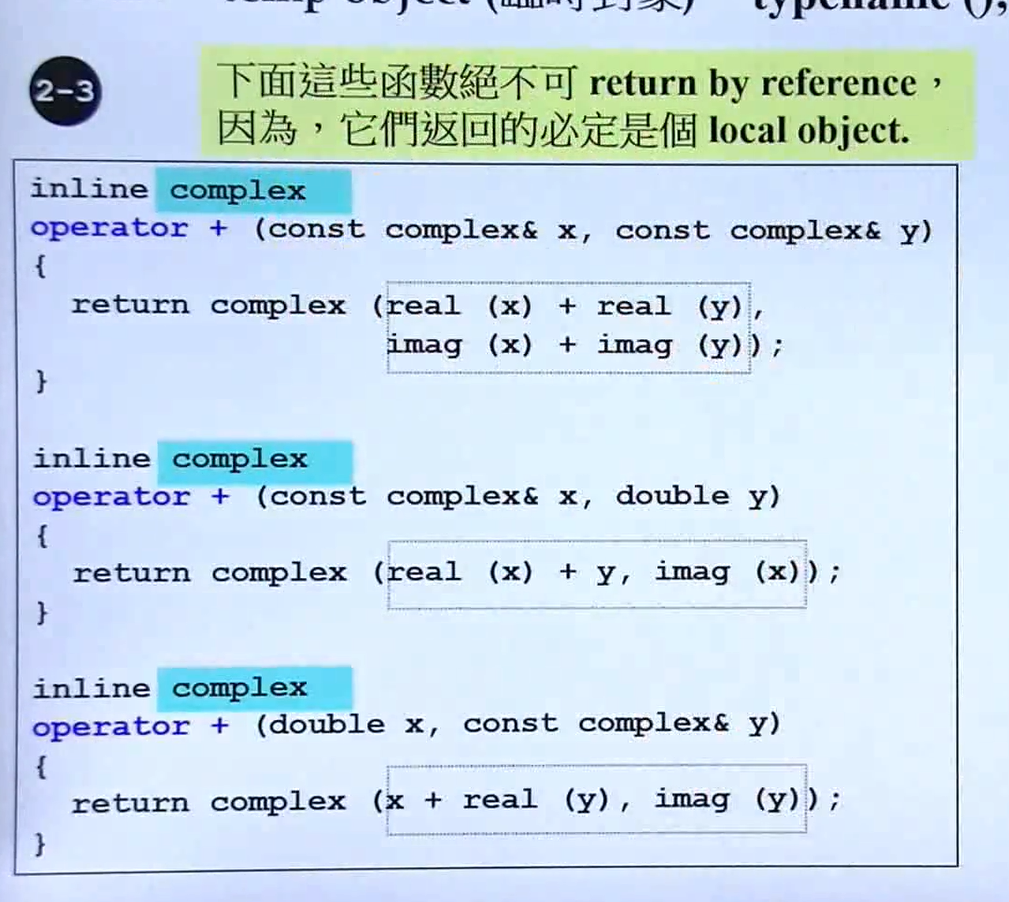
inline complex operator + (const complex& x, const complex& y)

{

    return complex (real (x) + real (y), imag (x) + imag (y));

}

inline complex operator + (const complex& x, double y)

{

    return complex (real (x) + y, imag (x));

}

inline complex operator + (double x, const complex& y)

{

    return complex (x + real (y), imag (y));

}
注意,这里函数的返回值不能返回reference,这其实是使用临时对象(typename ()),在函数体内定义变量,然后把这个变量的引用传递出去,函数结束后变量本体死亡,传出去的引用既没有意义了。
2.4 非成员函数的操作符重载
//程序2.4

ostream& operator << (ostream& os, const complex& x)

{

    return os << ' (' << real (x) << "," << imag (x) << ')';

}
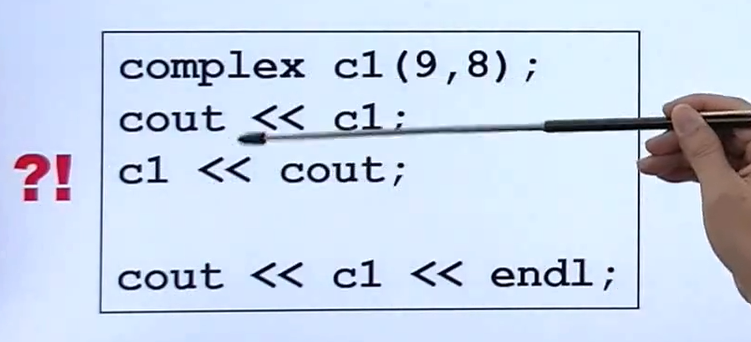
下面讲一下为什么有的操作符重载函数定义成非成员函数?
我们知道,操作符重载只作用在左边的操作数上,试想一下,如果把“<<”定义为成员函数,那每次调用岂不是要这样c1 << cout
完整代码
以上就是我在学习过程中特别注意的地方,下面给出complex类完整代码,只不过多了几种操作运算,大体思路完全一致。
complex.h
 #ifndef __MYCOMPLEX__

 #define __MYCOMPLEX__

 class complex;

 complex&

   __doapl (complex* ths, const complex& r);

 complex&

   __doami (complex* ths, const complex& r);

 complex&

   __doaml (complex* ths, const complex& r);

 class complex

 {

 public:

   complex (double r = , double i = ): re (r), im (i) { }

   complex& operator += (const complex&);

   complex& operator -= (const complex&);

   complex& operator *= (const complex&);

   complex& operator /= (const complex&);

   double real () const { return re; }

   double imag () const { return im; }

 private:

   double re, im;

   friend complex& __doapl (complex *, const complex&);

   friend complex& __doami (complex *, const complex&);

   friend complex& __doaml (complex *, const complex&);

 };

 inline complex&

 __doapl (complex* ths, const complex& r)

 {

   ths->re += r.re;

   ths->im += r.im;

   return *ths;

 }

 inline complex&

 complex::operator += (const complex& r)

 {

   return __doapl (this, r);

 }

 inline complex&

 __doami (complex* ths, const complex& r)

 {

   ths->re -= r.re;

   ths->im -= r.im;

   return *ths;

 }

 inline complex&

 complex::operator -= (const complex& r)

 {

   return __doami (this, r);

 }

 inline complex&

 __doaml (complex* ths, const complex& r)

 {

   double f = ths->re * r.re - ths->im * r.im;

   ths->im = ths->re * r.im + ths->im * r.re;

   ths->re = f;

   return *ths;

 }

 inline complex&

 complex::operator *= (const complex& r)

 {

   return __doaml (this, r);

 }

 inline double

 imag (const complex& x)

 {

   return x.imag ();

 }

 inline double

 real (const complex& x)

 {

   return x.real ();

 }

 inline complex

 operator + (const complex& x, const complex& y)

 {

   return complex (real (x) + real (y), imag (x) + imag (y));

 }

 inline complex

 operator + (const complex& x, double y)

 {

   return complex (real (x) + y, imag (x));

 }

 inline complex

 operator + (double x, const complex& y)

 {

   return complex (x + real (y), imag (y));

 }

 inline complex

 operator - (const complex& x, const complex& y)

 {

   return complex (real (x) - real (y), imag (x) - imag (y));

 }

 inline complex

 operator - (const complex& x, double y)

 {

   return complex (real (x) - y, imag (x));

 }

 inline complex

 operator - (double x, const complex& y)

 {

   return complex (x - real (y), - imag (y));

 }

 inline complex

 operator * (const complex& x, const complex& y)

 {

   return complex (real (x) * real (y) - imag (x) * imag (y),

                real (x) * imag (y) + imag (x) * real (y));

 }

 inline complex

 operator * (const complex& x, double y)

 {

   return complex (real (x) * y, imag (x) * y);

 }

 inline complex

 operator * (double x, const complex& y)

 {

   return complex (x * real (y), x * imag (y));

 }

 complex

 operator / (const complex& x, double y)

 {

   return complex (real (x) / y, imag (x) / y);

 }

 inline complex

 operator + (const complex& x)

 {

   return x;

 }

 inline complex

 operator - (const complex& x)

 {

   return complex (-real (x), -imag (x));

 }

 inline bool

 operator == (const complex& x, const complex& y)

 {

   return real (x) == real (y) && imag (x) == imag (y);

 }

 inline bool

 operator == (const complex& x, double y)

 {

   return real (x) == y && imag (x) == ;

 }

 inline bool

 operator == (double x, const complex& y)

 {

   return x == real (y) && imag (y) == ;

 }

 inline bool

 operator != (const complex& x, const complex& y)

 {

   return real (x) != real (y) || imag (x) != imag (y);

 }

 inline bool

 operator != (const complex& x, double y)

 {

   return real (x) != y || imag (x) != ;

 }

 inline bool

 operator != (double x, const complex& y)

 {

   return x != real (y) || imag (y) != ;

 }

 #include <cmath>

 inline complex

 polar (double r, double t)

 {

   return complex (r * cos (t), r * sin (t));

 }

 inline complex

 conj (const complex& x)

 {

   return complex (real (x), -imag (x));

 }

 inline double

 norm (const complex& x)

 {

   return real (x) * real (x) + imag (x) * imag (x);

 }

 ostream&

 operator << (ostream& os, const complex& x)

 {

   return os << '(' << real (x) << ',' << imag (x) << ')';

 }

 #endif   //__MYCOMPLEX__
complex_test.cpp
 #include <iostream>

 #include "complex.h"

 using namespace std;

 int main()

 {

   complex c1(, );

   complex c2(, );

   cout << c1 << endl;

   cout << c2 << endl;

   cout << c1+c2 << endl;

   cout << c1-c2 << endl;

   cout << c1*c2 << endl;

   cout << c1 /  << endl;

   cout << conj(c1) << endl;

   cout << norm(c1) << endl;

   cout << polar(,) << endl;

   cout << (c1 += c2) << endl;

   cout << (c1 == c2) << endl;

   cout << (c1 != c2) << endl;

   cout << +c2 << endl;

   cout << -c2 << endl;

   cout << (c2 - ) << endl;

   cout << ( + c2) << endl;

   return ;

 }
总结
作为初学者,一定要养成良好的编程习惯,正如侯捷所说:“一出手就是大家风范”。
侯捷《C++面向对象开发》——动手实现自己的复数类的更多相关文章
- 侯捷 c++面向对象程序设计
基础知识 基于对象:Object Based 面对的是单一class的设计. 面向对象:Object Oriented 面对的是多重classes的设计,涉及到类和类之间的关系. 课程中设计到两种不同 ...
- 面向对象开发C++快速入门视频教程 C++基础加实战视频教程
课程目录: ├<C++面向对象高级开发(上)> │ ├1.C++编程简介.mp4 │ ├2.头文件与类的声明.mp4 │ ├3.构造函数.mp4 │ ├4.参数传递与返回值.mp4 │ ├ ...
- 评侯捷的<深入浅出MFC>和李久进的<MFC深入浅出>
侯捷的<深入浅出mfc>相信大家都已经很熟悉了,论坛上也有很多介绍,这里我就不多说了. 而李久进的<mfc深入浅出>,听说的人可能就少得多.原因听说是这本书当时没有怎么宣传,而 ...
- 新手如何理解JS面向对象开发?
今天有时间讲讲我对面向对象的理解跟看法,尽量用通俗的语言来表达,多多指教! 如今前端开发已经越来越火了,对于前端开发的要求也是越来越高了,在面试中,经常有面试官会问:你对JS面向对象熟悉吗? 其实,也 ...
- 侯捷STL课程及源码剖析学习2: allocator
以STL 的运用角度而言,空间配置器是最不需要介绍的东西,它总是隐藏在一切组件(更具体地说是指容器,container)的背后,默默工作默默付出. 一.分配器测试 测试代码 #include < ...
- C++标准库(体系结构与内核分析)(侯捷第二讲)
一.OOP和GP的区别(video7) OOP:面向对象编程(Object-Oriented programming) GP:泛化编程(Generic programming) 对于OOP来说,我们要 ...
- Java面向对象编程 第一章 面向对象开发方法概述
一.软件开发经历的生命周期: ①软件分析 ②软件设计 ③软件编码 ④ 软件测试 ⑤ 软件部署 ⑥软件维护 二.为了提高软件开发效率,降低软件开发成本,一个优良的软件系统应该具备以下特点: ① 可重用性 ...
- Java面向对象 第一章 面向对象开发方法概述
一.软件开发经历的生命周期: ①软件分析 ②软件设计 ③软件编码 ④ 软件测试 ⑤ 软件部署 ⑥软件维护 二.为了提高软件开发效率,降低软件开发成本,一个优良的软件系统应该具备以下特点: ① 可重用性 ...
- ASP.NET的简单与面向对象开发
ASP.NET开发,一开始是为了超赶时间完成任务,只能把功能实现即可.如下面一个功能,在网页中有一个铵钮,用户点一点切换网页的图片,再点一点又切换回来.我们要怎样做?在铵钮事件中去变更图片的路径即可. ...
随机推荐
- pat1052. Linked List Sorting (25)
1052. Linked List Sorting (25) 时间限制 400 ms 内存限制 65536 kB 代码长度限制 16000 B 判题程序 Standard 作者 CHEN, Yue A ...
- Jetty数据同步使用
1. Jetty简介 Jetty 是一个开源的servlet容器,它为基于Java的web容器,例如JSP和servlet提供运行环境.Jetty是使用Java语言编写的,它的API以一组JAR包的形 ...
- 树莓派直连线连接PC
刚入手树莓派一天不到,SSH树莓派一直用的是路由+无线网卡的配置.想到明天就要出差了,本想把树莓派也带去,可宾馆的房间只有一个网口,通常都是兄弟们连接小型无线路由用的,连接树莓派似乎成了一个难题.于是 ...
- echarts自适应宽度
const myChartContainer = document.getElementById( id ); const resizeMyChartContainer = function () { ...
- css属性(常用属性整理)
摘要:本文是我在学习前端的过程中整理的一些常用css属性,部分是css3新增的,因能力有限,文中如有错误,欢迎提出,我会及时修改.希望对大家有帮助! CSS属性 CSS属性 1 1. css颜色属性 ...
- Vue编译时写在style中的路径问题
写在vue文件里面的style样式,在添加例如背景图片的时候,如果用的是相对路径,那么build出来的css文件的路径将会出错,导致找不到图片. 通过查找资料,在https://segmentfaul ...
- 栅格那点儿事(四D)
统计值与空值 在上一篇的内容里反复提到了一个统计值.那这个统计值是怎么来的,具体是干嘛用的呢? 统计值主要就是用于栅格数据的显示和重分类,顾名思义就是一个波段中所有像元值的一个统计信息,最大值,最小值 ...
- 进一步了解this和super
知乎上看到一问题很好,拿了与大家分享,原地址:https://www.zhihu.com/question/31548104. 问: JAVA 中this 和super与覆写冲突的问题? 实例一: 输 ...
- IO文件操作
× 目录 [1]IO文件的操作 [2]Directory类 [3]File类 [4]FileStream类 [5]文本文件的操作 一.IO文件的操作: .net中对文件操作,经常会用到这样几个类: ...
- [转]linux tcp/ip调优
LINUX tcp/ip性能调优 On 2011年03月15日, in linux, tips, by netoearth 在TCP/IP协议中,TCP协议提供可靠的连接服务,采用三次握手建立一个连接 ...