
java模拟生日发祝福
1.新建customer表生日都选为当天

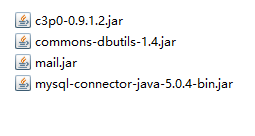
所需jar包
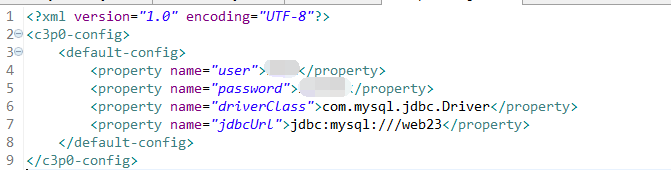
2.使用c3p0连接到数据的xml配置文件
3.连接数据库的工具类
package com.cc.birthday;

import java.sql.Connection;

import java.sql.ResultSet;

import java.sql.SQLException;

import java.sql.Statement;

import javax.sql.DataSource;

import com.mchange.v2.c3p0.ComboPooledDataSource;

public class DataSourceUtils {

    private static DataSource dataSource=new ComboPooledDataSource();

    private static ThreadLocal<Connection> t1=new ThreadLocal<Connection>();

    //直接可以获取一个连接池

    public static DataSource getDataSource(){

        return dataSource;

    }

    //获取连接对象

    public static Connection getConnection() throws SQLException{

        Connection con=t1.get();

        if(con==null){

            con=dataSource.getConnection();

            t1.set(con);

        }

        return con;

    }

    //开启事务

    public static void startTrasaction() throws SQLException {

        Connection con=getConnection();

        if(con!=null){

            con.setAutoCommit(false);

        }

    }

    //事务回滚

    public static void rollback() throws SQLException{

        Connection con =getConnection();

        if(con!=null){

            con.rollback();

        }

    }

    //提交并且 关闭资源及从ThreadLocal中释放

    public static void commitAndRelease() throws SQLException{

        Connection con=getConnection();

        if(con!=null){

            con.commit();

            con.close();

            t1.remove();

        }

    }

    //关闭资源方法

    public static void closeConnection() throws SQLException{

        Connection con=getConnection();

        if(con!=null){

            con.close();

        }

    }

    public static void closeStatement(Statement st) throws SQLException {

        if(st!=null){

            st.close();

        }

    }

    public static void closeResultSet(ResultSet rs) throws SQLException{

        if(rs!=null){

            rs.close();

        }

    }

}
4.发送邮件的工具类
package com.cc.mail;

import java.util.Properties;

import javax.mail.Authenticator;

import javax.mail.Message;

import javax.mail.MessagingException;

import javax.mail.PasswordAuthentication;

import javax.mail.Session;

import javax.mail.Transport;

import javax.mail.internet.AddressException;

import javax.mail.internet.InternetAddress;

import javax.mail.internet.MimeMessage;

import javax.mail.internet.MimeMessage.RecipientType;

public class MailUtils {

    //email:邮件发给谁  subject:主题  emailMsg:邮件的内容

    public static void sendMail(String email, String subject, String emailMsg)

            throws AddressException, MessagingException {

        // 1.创建一个程序与邮件服务器会话对象 Session

        Properties props = new Properties();

        props.setProperty("mail.transport.protocol", "SMTP");//发邮件的协议

        props.setProperty("mail.host", "smtp.163.com");//发送邮件的服务器地址

        props.setProperty("mail.smtp.auth", "true");// 指定验证为true

        // 创建验证器

        Authenticator auth = new Authenticator() {

            public PasswordAuthentication getPasswordAuthentication() {

                return new PasswordAuthentication("emailusername", "password");//发邮件的账号的验证

            }

        };

        Session session = Session.getInstance(props, auth);

        // 2.创建一个Message,它相当于是邮件内容

        Message message = new MimeMessage(session);

        message.setFrom(new InternetAddress("xxxxxx@163.com")); // 设置发送者

        message.setRecipient(RecipientType.TO, new InternetAddress(email)); // 设置发送方式与接收者

        message.setSubject(subject);//邮件的主题

        message.setContent(emailMsg, "text/html;charset=utf-8");

        // 3.创建 Transport用于将邮件发送

        Transport.send(message);

    }

}
5.customer实体类
package com.cc.birthday;

public class Customer {

    private int id;

    private String username;

    private String password;

    private String realname;

    private String birthday;

    private String email;

    public int getId() {

        return id;

    }

    public void setId(int id) {

        this.id = id;

    }

    public String getUsername() {

        return username;

    }

    public void setUsername(String username) {

        this.username = username;

    }

    public String getPassword() {

        return password;

    }

    public void setPassword(String password) {

        this.password = password;

    }

    public String getRealname() {

        return realname;

    }

    public void setRealname(String realname) {

        this.realname = realname;

    }

    public String getBirthday() {

        return birthday;

    }

    public void setBirthday(String birthday) {

        this.birthday = birthday;

    }

    public String getEmail() {

        return email;

    }

    public void setEmail(String email) {

        this.email = email;

    }

}
6.根据数据库查询结果使用调度器定时发送祝福邮件
package com.cc.birthday;

import java.sql.SQLException;

import java.text.SimpleDateFormat;

import java.util.Date;

import java.util.List;

import java.util.Timer;

import java.util.TimerTask;

import javax.mail.MessagingException;

import javax.servlet.ServletContextEvent;

import javax.servlet.ServletContextListener;

import org.apache.commons.dbutils.QueryRunner;

import org.apache.commons.dbutils.handlers.BeanListHandler;

import com.cc.birthday.Customer;

import com.cc.mail.MailUtils;

public class BirthdayListener implements ServletContextListener{

    @Override

    public void contextInitialized(ServletContextEvent sce) {

        // 当web应用启动开启任务调动---功能在用户的生日当天发送邮件

        //开启一个定时器

        Timer timer=new Timer();

        timer.scheduleAtFixedRate(new TimerTask() {

            @Override

            public void run() {

                // 为当前的生日的用户发邮件

                //1.获得今天过生日的人

                //获得今天的日期

                SimpleDateFormat format=new SimpleDateFormat("MM-dd");

                String currentDate=format.format(new Date());

                //根据当前时间从数据库查询今天过生日的人

                QueryRunner qr=new QueryRunner(DataSourceUtils.getDataSource());

                String sql="select * from customer where birthday like ?";

                List<Customer> customerList=null;

                try {

                     customerList = qr.query(sql, new BeanListHandler<Customer>(Customer.class),"%"+currentDate);

                } catch (SQLException e) {

                    // TODO Auto-generated catch block

                    e.printStackTrace();

                }

                //2.发邮件

                if(customerList!=null&&customerList.size()>0){

                    for(Customer c:customerList){

                    String emailMsg="亲爱的:"+c.getRealname()+",生日快乐!";

                    try {

                        MailUtils.sendMail(c.getEmail(), "happy..birthday", emailMsg);

                        System.out.println(c.getRealname()+"邮件发送完毕");

                    } catch (MessagingException e) {

                        // TODO Auto-generated catch block

                        e.printStackTrace();

                    }

                    }

                }

            }

        },new Date(),10*1000);

        //实际开发中起始时间是一个固定的时间

        //实际开发中间隔时间是1天

    }

    @Override

    public void contextDestroyed(ServletContextEvent sce) {

        // TODO Auto-generated method stub

    }

}

java模拟生日发祝福的更多相关文章
- Java模拟登录系统抓取内容【转载】
没有看考勤的习惯,导致我的一天班白上了,都是钱啊,系统也不发个邮件通知下.... 为了避免以后还有类似状况特别写了个java模拟登录抓取考勤内容的方法(部分代码来自网络),希望有人修改后也可以 ...
- websocket通信 实现java模拟一个client与webclient通信
发文原由: 熟悉socket通信的同学,对于socket模拟server与client,实现相互通信, 或者使用websocket与java模拟的websocket服务器通信(比如一个聊天室),对于这 ...
- 浏览器与服务器交互原理以及用java模拟浏览器操作v
浏览器应用服务器JavaPHPApache * 1,在HTTP的WEB应用中, 应用客户端和服务器之间的状态是通过Session来维持的, 而Session的本质就是Cookie, * 简单的讲,当浏 ...
- java模拟post请求发送json
java模拟post请求发送json,用两种方式实现,第一种是HttpURLConnection发送post请求,第二种是使用httpclient模拟post请求, 方法一: package main ...
- java 模拟qq源码
java 模拟qq源码: http://files.cnblogs.com/files/hujunzheng/QQ--hjzgg.zip
- java模拟开锁
java模拟开锁 service qq:928900200 Introduction to Computer Science II: CSCI142Fall 2014Lab #1Instructor: ...
- Jsoup实现java模拟登陆
Jsoup实现java模拟登陆 2013-10-29 14:52:05| 分类: web开发|举报|字号 订阅 下载LOFTER我的照片书 | 1:如何获取cookies. 1.1 ...
- [Java] 模拟HTTP的Get和Post请求
在之前,写了篇Java模拟HTTP的Get和Post请求的文章,这篇文章起源与和一个朋友砍飞信诈骗网站的问题,于是动用了Apache的comments-net包,也实现了get和post的http请求 ...
- Java模拟登陆02【转载】
在使用java访问URL时,如果该URL需要身份验证,那么就不能够直接访问,因为没有登陆.那么,如何解决这个问题呢? 方法是使用java模拟登陆,登陆后记录下cookie信息,在下次发起请求时 ...
随机推荐
- 深入理解Angular2变化监测和ngZone
转载自GitHub JTangming : https://github.com/JTangming/tm/issues/4 Angular应用程序通过组件实例和模板之间进行数据交互,也就是将组件的数 ...
- 玩转Openstack之Nova中的协同并发(一)
玩转Openstack之Nova中的协同并发(一) 前不久参加了个Opnstack的Meetup,其中有一个来自EasyStack的大大就Nova中的协同并发做了一番讲解,有所感触,本想当天就总结一下 ...
- Linux之Permission denied没有权限
在Linux上启动solr时,出现-bash: ./solr: Permission denied的问题. 最简单的解决方式: chmod 777 solr 傻瓜式直接赋予权限
- Python利器一之requests
Python利器一之requests 一.教程涉及开发语言.脚本.框架.数据库等内容 Python + requests 通过 pip 安装: pip install requests 通过 easy ...
- 孤荷凌寒自学python第六天 列表的嵌套与列表的主要方法
孤荷凌寒自学python第六天 列表的嵌套与列表的主要方法 (完整学习过程屏幕记录视频地址在文末,手写笔记在文末) (同步的语音笔记朗读:https://www.ximalaya.com/keji/1 ...
- (原、整)Unreal源码 CoreUbject- Uobject
(原.整) Unreal源码 CoreUbject- Uobject 类别 [随笔分类]Unreal源码搬山 @author:白袍小道 随缘那啥 这里还是属于UE ...
- STL之queue&stack使用简介
queue 队列也是一个线性存储表,与后进先出的堆栈不同,元素数据的插入在表的一端进行,在另一端删除,从而构成了一个先进先出(First In First Out) 表.插入一端称为队尾,删除一 ...
- Spring 笔记(一)概念梳理
概念 预备知识 1. POJO POJO是Plain Old Java Object的缩写,是软件开发大师Martin Fowler提出的一个概念,指的是一个普通Java类.也就说,你随便编写一个Ja ...
- 【bzoj4822/bzoj1935】[Cqoi2017]老C的任务/[Shoi2007]Tree 园丁的烦恼 树状数组
原文地址:http://www.cnblogs.com/GXZlegend/p/6825530.html bzoj4822 题目描述 老 C 是个程序员. 最近老 C 从老板那里接到了一个任务 ...
- InputStream 、 InputStreamReader 、 BufferedReader
1.InputStream.OutputStream 处理字节流的抽象类 InputStream 是字节输入流的所有类的超类,一般我们使用它的子类,如FileInputStream等. OutputS ...