
2017.7.10 Redis报错:DENIED Redis is running in protected mode
参考来自:
DENIED Redis is running in protected mode
完整错误信息:
 Caused by: redis.clients.jedis.exceptions.JedisDataException:

 DENIED Redis is running in protected mode because protected mode is enabled, no bind address was specified,
   no authentication password is requested to clients.

 In this mode connections are only accepted from the loopback interface.

 If you want to connect from external computers to Redis you may adopt one of the following solutions:

  1) Just disable protected mode sending the command 'CONFIG SET protected-mode no' from the loopback interface by connecting to Redis from the same host the server is running, however MAKE SURE Redis is not publicly accessible from internet if you do so. Use CONFIG REWRITE to make this change permanent.

  2) Alternatively you can just disable the protected mode by editing the Redis configuration file, and setting the protected mode option to 'no', and then restarting the server.

  3) If you started the server manually just for testing, restart it with the '--protected-mode no' option.

  4) Setup a bind address or an authentication password.

 NOTE: You only need to do one of the above things in order for the server to start accepting connections from the outside.

2017.7.27 又遇到了这个错误,之前明明将protected-mode改为了no,就ok的。
原因是:之前redis的服务端和客户端都是在本机上,现在客户端在其他机器上,访问redis就出错了。
因此采取了第4种。设置redis的密码。
操作过程:
(1)开启168.2.237.207上的redis
(2)在88环境上连接168.2.237.207上的redis,出错
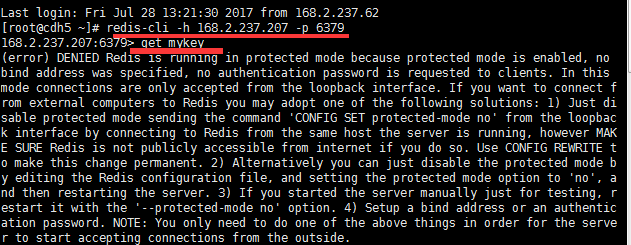
(3)在168.2.237.207上开一个redis的客户端,连接本机的redis,并且设置密码。

(4)回到88环境,重新连接redis,报错提示:NOAUTH Authentication required。

(5)输入密码,连接成功。
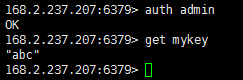
但这里有一个问题:一旦redis服务器重启,又报这个DENIED Redis is running in protected mode的错误了。每次重启后都要重新设置密码才能在别的机器上成功连接。
有没有只设置一次密码就ok的办法?
2017.7.10 Redis报错:DENIED Redis is running in protected mode的更多相关文章
- docker启动redis报错 oO0OoO0OoO0Oo Redis is starting oO0OoO0OoO0Oo
docker启动redis报错 1:C 17 Jun 08:18:04.613 # oO0OoO0OoO0Oo Redis is starting oO0OoO0OoO0Oo1:C 17 Jun 08 ...
- Redis报错:redis.exceptions.ResponseError: MISCONF Redis is configured to save RDB snap
首先找到出现错误的原因: redis.exceptions.ResponseError: MISCONF Redis is configured to save RDB snapshots, but ...
- redis报错MISCONF Redis is configured to save RDB snapshots, but is currently not able to persist
解决方法:通过redis-cli连接到服务器后执行以下命令: config set stop-writes-on-bgsave-error no 注意:这种方法只是忽略了问题,并没有解决问题,具体问题 ...
- 使用Lua 脚本实现redis 分布式锁,报错:ERR Error running script (call to f_8ea1e266485534d17ddba5af05c1b61273c30467): @user_script:10: @user_script: 10: Lua redis() command arguments must be strings or integers .
在使用SpringBoot开发时,使用RedisTemplate执行 redisTemplate.execute(lockScript, redisList); 发现报错: ERR Error run ...
- redis报错解决
1.Connecting to node 127.0.0.17000 [ERR] Sorry, can't connect to node 192.168.1.917000 redis集群:Conne ...
- mac brew install redis 报错
mac brew install redis 报错 /usr/local/opt/php55/bin/phpize /usr/local/opt/php55/bin/phpize: line 61: ...
- redis报错Windows error 0x70(a large memory)
redis报错Windows error 0x70 redis 嫌弃你内存不够了,就给你不开第二个实例. The Windows version of Redis allocates a large ...
- redis 报错及解决
报错: (error) MISCONF Redis is configured to save RDB snapshots, but it is currently not able to persi ...
- filebeat output redis 报错 i/o timeout
filebeat output redis 报错 i/o timeout 先把报错内容贴出来. ERROR redis/client. go: Failed to RPUSH to redis li ...
随机推荐
- Codeforces755D PolandBall and Polygan
题目戳这里 我们只需要计算每增加一条线后穿过了几条已有的线即可.为了方便,我们令\(K \le N/2\),并且给每条线一个方向,即\(x\)到\((x+K) \; mod \; N\).然后我们假设 ...
- bzoj 2671 莫比乌斯反演
Calc Time Limit: 10 Sec Memory Limit: 128 MBSubmit: 451 Solved: 234[Submit][Status][Discuss] Descr ...
- bzoj1264 [AHOI2006]基因匹配Match 树状数组+lcs
1264: [AHOI2006]基因匹配Match Time Limit: 10 Sec Memory Limit: 162 MBSubmit: 1255 Solved: 835[Submit][ ...
- Python学习笔记(Django篇)——2、创建第一个django应用
在helloworld工程的基础上,我们准备创建第一个基于web的django应用,把这个应用名字命名为demo 首先,是如何创建这个应用包,当然第一选择我们可以进入到cmd中,执行如下命令 py ...
- theMatrix代码雨效果
做了一个代码雨效果放在个人主页: https://lanleilin.github.io/lanGallery/index.html 代码: <!DOCTYPE html> <ht ...
- [04]JS获取文件大小方法
</pre><pre name="code" class="html"><input id="file" ty ...
- hdu 6114 百度之星复赛B T1
Chess Problem Description 車是中国象棋中的一种棋子,它能攻击同一行或同一列中没有其他棋子阻隔的棋子. 一天,小度在棋盘上摆起了许多車……他想知道,在一共N×M个点的矩形棋盘中 ...
- RadioGroup和RadioButton(单选框)
1.布局文件 <LinearLayout xmlns:android="http://schemas.android.com/apk/res/android" xmlns:t ...
- CSS控制图片显示区域
优化页面响应速度,减少页面向服务端请求图片次数,有时候可能会将多个小图合并到一张图中,用的时候通过css控制显示的区域,比如:上传一张人物图片到服务器检测人脸,最后在页面上列出所有识别出来的人脸,实现 ...
- 2018年最重要的HTML5开发手册,传播正能量
今天给大家推荐这个HTML5开发手册,希望能帮助正在学习web前端的人,鄙人也是刚学习前端没多久,借助于一点资讯平台能够结识更多前端大牛,这是我的web前端/HTML5/javscript技术学习群: ...