
WAMP设置
当安装好WAMP后,windows右下角会出现WAMP Server的图标,如图所示!
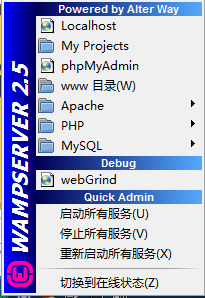
当中集成了PHP开发的常用功能。
Localhost:表示启动浏览器打开本地首页
My Projects:项目文件夹(目前没有任何作用)
phpMyAdmin:MySql Web管理工具。
Apache:Apache服务器管理相关内容,有版本管理,服务管理,模块管理,虚拟目录管理,配置文件,日志文件。
PHP:PHP相关管理,版本,设置和扩展。
MySQL:MySQL相关管理,版本,服务,MySql控制台,配置文件,日志。
WebGrid:调试窗口
快速设置:启动、关闭、重启所有服务。
切换在线状态:是否能被外部访问,在线表示可以访问,离线表示只能被本机访问。
一、修改WAMP默认的文本编辑器
1、在WAMP根目录中打开wampmanager.conf文件。
将:
editor = "notepad.exe"
修改为:
editor = "C:\Program Files\Notepad++\notepad++.exe"
然后保存,重新启动WAMP。
二、配置WAMP网站根目录。
1、首先在F:盘新建一个Demo文件夹,用来存放网站代码。
2、修改Apache的中httpd.conf中
修改:
DocumentRoot "D:/php/wamp/www/" 为 DocumentRoot "F:/Demo/"
<Directory "D:/php/wamp/www/"> 为 <Directory "F:/Demo/">
注意:所有配置文件修改后,都必须重新启动服务。
这时Apache中的文件就已经修改完成,就可以通过localhost访问F:/Demo中的文件了。
但是WAMP菜单中的www目录还没有改变,如果需要改变WAMP菜单中的目录,还需要修改WAMP安装目录下的wampmanager.ini和wampmanager.tpl文件。
3、修改wampmanager.ini文件。
搜索"menu.left";将
Type: item; Caption: "www 目录"; Action: shellexecute; FileName: "D:/php/wamp/www"; Glyph: 2
修改为:
Type: item; Caption: "Demo目录"; Action: shellexecute; FileName: "F:/Demo"; Glyph: 2
4、修改wampmanager.tpl文件
搜索"menu.left";将:
Type: item; Caption: "${w_wwwDirectory}"; Action: shellexecute; FileName: "${wwwDir}"; Glyph: 2
修改为:
Type: item; Caption: "Demo目录"; Action: shellexecute; FileName: "F:/Demo"; Glyph: 2
修改后重新启动WAMP。
三、WAMP多站点的配置
第1步,修改httpd.conf,增加8080端口的监听
#Listen 12.34.56.78:80
Listen 80
Listen 8080
第2步,修改virtual hosts的配置,同样在httpd.conf这个文件中。
# Virtual hosts
#Include conf/extra/httpd-vhosts.conf
#修改为
# Virtual hosts
Include conf/extra/httpd-vhosts.conf
第3步,增加虚拟主机配置,修改httpd-vhosts.conf文件。
#
# Use name-based virtual hosting.
#
NameVirtualHost *:80
NameVirtualHost *:8080
#
# VirtualHost example:
# Almost any Apache directive may go into a VirtualHost container.
# The first VirtualHost section is used for all requests that do not
# match a ServerName or ServerAlias in any <VirtualHost> block.
#
<VirtualHost *:80>
ServerAdmin webmaster@dummy-host.example.com
DocumentRoot "C:/wamp/www/"
ServerName dummy-host.example.com
ServerAlias www.dummy-host.example.com
ErrorLog "logs/dummy-host.example.com-error.log"
CustomLog "logs/dummy-host.example.com-access.log" common
<Directory "C:/wamp/www/">
Options Indexes FollowSymLinks
AllowOverride All
Order allow,deny
Allow from all
</Directory>
</VirtualHost>
<VirtualHost *:8080>
ServerAdmin webmaster@dummy-host.example.com
DocumentRoot "C:/wamp/www2/"
ServerName dummy-host.example.com
ServerAlias www.dummy-host.example.com
ErrorLog "logs/dummy-host.example.com-error.log"
CustomLog "logs/dummy-host.example.com-access.log" common
<Directory "C:/wamp/www2/">
Options Indexes FollowSymLinks
AllowOverride All
Order allow,deny
Allow from all
</Directory>
</VirtualHost>
第4步,重启apache,就可以看到效果了
四、添加本地域名访问
1、修改httpd-vhosts.conf文件。
<VirtualHost *:80>
DocumentRoot "D:\php\wamp\www\test01"
ServerName test1.com
</VirtualHost>
<VirtualHost *:80>
DocumentRoot "D:\php\wamp\www\test02"
ServerName test2.com
</VirtualHost>
2、修改hosts文件
C:\Windows\System32\drivers\etc\hosts
添加:
127.0.0.1 test1.com
127.0.0.1 test2.com
在hosts中只能使用默认端口绑定域名,也就是只能绑定80端口,指定其他端口后就无法访问。
WAMP设置的更多相关文章
- wamp设置本地访问路径为a.com
我们在用wamp进行本地建站时经常会碰到页面样式无法正常加载,这是因为没有正确加载css路径,那我们就用wamp设置本地访问路径为a.com指向本地的一个虚拟空间,如何操作呢?下面就跟随ytkah一起 ...
- wamp设置自定义域名访问php网站
wamp是一个在window系统下很不错的php开发套件,一般我都是使用此套件在本地进行开发和测试的 特别是alias功能特别好,可以同时开发N个php网站而不互相影响 但alias有一个问题,它其实 ...
- Wamp设置虚拟目录
1. 默认安装 wamp后,工作目录为"..../wamp/www" 也就是PHP文件只有放在此目录下才能打得开,打开Apache的配置文件httpd.conf可以看到: 这么两行 ...
- wamp设置mysql默认编码
来自:http://www.cnsecer.com/5984.html wamp下MySQL的默认编码是Latin1,不支持中文,要支持中文的话需要把数据库的默认编码修改为gbk或者utf8. 这里推 ...
- wamp设置实现本机IP或者局域网访问 (转)
<Directory /> Options FollowSymLinks AllowOverride None Order deny,allow Allow from all #以前是De ...
- wamp设置实现本机IP或者局域网访问
在 httpd.conf 中查找 Allow from 127.0.0.1 Order Deny,Allow Deny from all Allow from 127.0.0.1 在此下面加上 All ...
- Wamp 设置 www 目录
打开httpd.conf,搜索wwwroot 和 directory 直接改为新目录即可. 对于wamp3是无效的,可以这样解决: “You need to change these values a ...
- WAMP设置默认访问目录
打开httpd.conf 1.修改:DocumentRoot "F:/Project/Php" 2.修改 <Directory "F:/Project/Php&qu ...
- wamp配置虚拟主机
================================================================= 来源参考一:http://wenku.baidu.com/link? ...
随机推荐
- Android 的保活的两种解决方案
原文链接:http://blog.csdn.net/pan861190079/article/details/72773549 详细的阐述了 Android 的保活的两种解决方案 —— 由panhao ...
- 自定义View Layout过程 (3)
目录 目录 1. 知识基础 具体请看我写的另外一篇文章:(1)自定义View基础 - 最易懂的自定义View原理系列 2. 作用 计算View视图的位置. 即计算View的四个顶点位置:Left.To ...
- 题(NOIP模拟赛Round #10)
题目描述: 有一张的地图,其中的地方是墙,的地方是路.有两种操作: 给出个地点,询问这个地点中活动空间最大的编号.若询问的位置是墙,则活动空间为:否则活动空间为询问地点通过四联通能到达的点的个数.如果 ...
- Windows环境Vim编辑器如何执行Ruby代码
1.下载 Ruby 1.8.5(2006-8-25) for Windows: 在网页http://www.rubychina.net/downloads/ 上找到 --〉Ruby on Windo ...
- Matlab,C++存取二进制
1,Matlab存储二进制 load Wall.dat %读取数据,数组名为Wall fid=fopen('Wall','wb'); %打开一个文件,二进制写入 fwrite(fid,Wall','f ...
- springBoot Ribbon Hystrix
1.依赖包引入 <!-- 引入关于 hystrix的依赖 --> <dependency> <groupId>org.springframework.cloud&l ...
- html5进阶之canvas图像基础
1.首先还是使用之前讲过的Image()函数来预加载图像. 在调用图像之前,需创建一个事件监听器,为其保证图像已经正确的加载. 如下图: 监听图片已经正确加载 2.把图像显示在画布上面,这里将不再使用 ...
- 推荐一个国内的免费公共静态cdn
https://cdn.baomitu.com/ 更新速度比bootcdn要快,收录的库也很齐全.
- HDU 5915 The Fastest Runner Ms. Zhang (CCPC2016 长春 E题,分类讨论 + 求字典序最小的直径 + 数据结构寻找最小值)
题目链接 CCPC2016 Changchun Problem E 题意 给定一个$n$个点$n$条边的无向图,现在从某一点$s$出发,每个点都经过一遍,最后在$t$点停止,经过的边数为$l$ ...
- codevs——1553 互斥的数
时间限制: 1 s 空间限制: 128000 KB 题目等级 : 黄金 Gold 题解 题目描述 Description 有这样的一个集合,集合中的元素个数由给定的N决定,集合的元素为N个不同 ...