
[CSS] Transforms
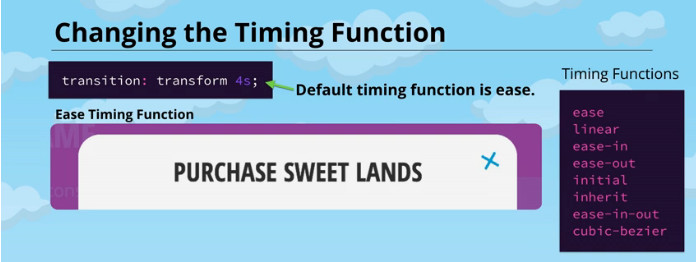
Degrees and Turns
Degrees are just one value that can be set to a rotate transform to determine how much rotation should be applied. Fill in the blank with another value that accomplishes the same rotation as the code below but doesn't use degrees.
div {

  transform: rotate(360deg);

}

div {

  transform: rotate(1turn);

}
A Sugary Spinning Icon
.modal-close {

  font-size: 200%;

  right: 15px;

  top:;

  position: absolute;

  transition: transform 2s ease-out;

}

.modal-close:hover{

    transform: rotate(1turn)

}
<!DOCTYPE>
<html lang='en'>
<head>
<meta charset='utf-8'>
<title>Cosplay Happenings</title>
<link href='level2-4.css' rel='stylesheet' type='text/css'>
</head>
<body>
<!-- Nav -->
<nav class='nav'>
<div class='cell'>
<a class='nav-logo' href='/'>
<div class='shing'>
<img src='logo.png' alt='Sweet Lands' />
</div>
</a>
<ul class='nav-menu'>
<li><a href='#retweets'>Retweets</a></li>
<li><a href='#pictures'>Pictures</a></li>
<li><a href='#event'>Upcoming</a></li>
</ul>
</div>
</nav> <!-- Header -->
<header class='header'>
<div class='cell well'>
<h1 class='header-title'>Cosplay Happenings</h1>
<p class='header-subtitle'>Welcome to our candy-coated community!</p>
</div>
</header> <!-- Most Retweeted -->
<section class='retweets' id='retweets'>
<div class='cell well'>
<h2>Most Retweeted</h2>
<div class='retweet group'>
<img src='unicorn.jpg' alt='Unicorn' width='200' height='200' />
<p>
Sparkles the Unicorn saunters down the Lemony Brick Road and
prances past the Soda Pop River! Her majestic horn points the way
to the Frosting Fortress, as her glittery mane and tail sway in the
bubblegum breeze.
</p>
</div>
<div class='retweet group'>
<img src='fairy.jpg' alt='Fairy' width='200' height='200' />
<p>
Who’s that there in the Candy Corn Fields? Why, it’s Sarsaparilla
the Sherbet Sprite! He’s thoughtfully pondering which treat to
partake of next. The Lollipop Forest is in the distance, in case he
needs a place to rest his sweet head.
</p>
</div>
</div>
</section> <!-- Purchase -->
<section class='pictures' id='pictures'>
<div class='cell well'>
<h2>Pictures</h2>
<ul class='pictures-list group'>
<li><img src='group-01.jpg' alt='Group' width='200' height='200' /></li>
<li><img src='cupcake.jpg' alt='Cupcake' width='200' height='200' /></li>
<li><img src='rainbow.jpg' alt='Rainbow' width='200' height='200' /></li>
<li><img src='donut.jpg' alt='Donut' width='200' height='200' /></li>
<li><img src='dog.jpg' alt='Dog' width='200' height='200' /></li>
<li><img src='fairy.jpg' alt='Fairy' width='200' height='200' /></li>
<li><img src='unicorn.jpg' alt='Unicorn' width='200' height='200' /></li>
<li><img src='group-02.jpg' alt='Group' width='200' height='200' /></li>
</ul>
</div>
</section> <!-- Contact -->
<section class='event' id='event'>
<div class='cell well'>
<h2>Upcoming Event</h2>
<div class='event-content'>
<img src='sweetlandia.png' alt='SweetLandia' width='200' />
<h3>SweetLandia</h3>
<p>
Once upon a time, there was a magical place called Sweet Lands — a
world we may now only travel to in our imaginations. But one
weekend every year, when the sugar cane stalks bend toward the east
and the cotton candy is at its swirliest, the Sweetlandia
convention brings this wondrous world within reach! So join
Sparkles, Pierre, and the rest of the gang for a meeting of the
sweet-minded in sunny Omaha, Nebraska! It’s sure to be your
sweetest adventure yet.
</p>
<div class='event-action'>
<a href='#' class='btn buy-button'>
<span class='top content'>Register Now!</span>
<span class='bottom content'>Hurry, Limited Space!</span>
</a>
</div>
</div>
</div>
</section> <!-- Register Modal --> <div class='modal-overlay'></div>
<div class='modal'>
<div class='modal-header'>
<a class='modal-close' href='#' aria-label='Close'>×</a>
<h3>Register</h3>
</div>
<div class='modal-content'>
<form class='form' action=''>
<fieldset class='form-field'>
<!-- <label class='form-label' for='type'>CC Type</label> -->
<select class='cs-select cs-skin-elastic' name='type'>
<option value='visa'>Visa</option>
<option value='mastercard'>MasterCard</option>
<option value='american_express'>American Express</option>
</select>
</fieldset> <fieldset class='form-field'>
<input class='form-input' type='text' id='number' />
<label class='form-label' for='number'>CC Number</label>
</fieldset> <fieldset class='form-field'>
<input class='form-input' type='text' id='expiration' />
<label class='form-label' for='expiration'>CC Expiration</label>
</fieldset> <div class='form-submit'>
<input class='btn' type='Submit' value='Submit' />
</div>
</form>
</div>
</div>
<script src='application.min.js'></script>
</body>
</html>
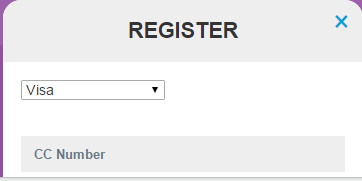
Label Color and Position and Size
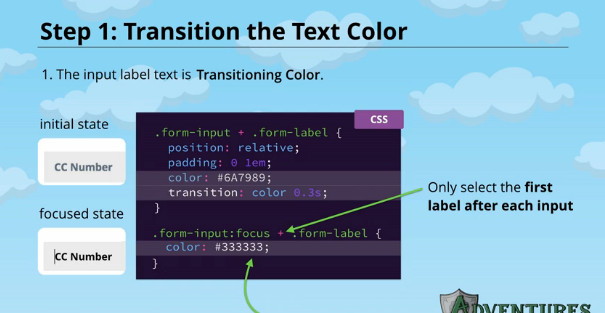
.form-input + .form-label {

  color: #6A7989;

    transition: all 0.3s;

}

.form-input:focus + .form-label {

  color: #333333;

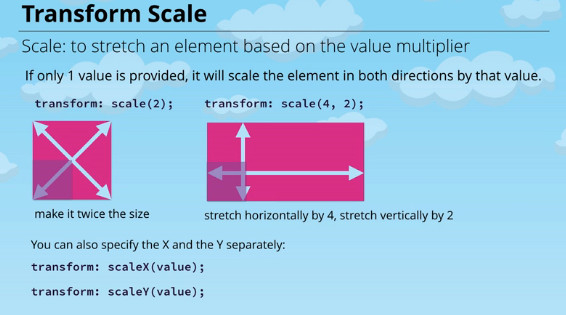
  transform: translateY(-40px) scale(0.8);

}
<!DOCTYPE>
<html lang='en'>
<head>
<meta charset='utf-8'>
<title>Cosplay Happenings</title>
<link href='level2-6.css' rel='stylesheet' type='text/css'>
</head>
<body>
<!-- Nav -->
<nav class='nav'>
<div class='cell'>
<a class='nav-logo' href='/'>
<div class='shing'>
<img src='logo.png' alt='Sweet Lands' />
</div>
</a>
<ul class='nav-menu'>
<li><a href='#retweets'>Retweets</a></li>
<li><a href='#pictures'>Pictures</a></li>
<li><a href='#event'>Upcoming</a></li>
</ul>
</div>
</nav> <!-- Header -->
<header class='header'>
<div class='cell well'>
<h1 class='header-title'>Cosplay Happenings</h1>
<p class='header-subtitle'>Welcome to our candy-coated community!</p>
</div>
</header> <!-- Most Retweeted -->
<section class='retweets' id='retweets'>
<div class='cell well'>
<h2>Most Retweeted</h2>
<div class='retweet group'>
<img src='unicorn.jpg' alt='Unicorn' width='200' height='200' />
<p>
Sparkles the Unicorn saunters down the Lemony Brick Road and
prances past the Soda Pop River! Her majestic horn points the way
to the Frosting Fortress, as her glittery mane and tail sway in the
bubblegum breeze.
</p>
</div>
<div class='retweet group'>
<img src='fairy.jpg' alt='Fairy' width='200' height='200' />
<p>
Who’s that there in the Candy Corn Fields? Why, it’s Sarsaparilla
the Sherbet Sprite! He’s thoughtfully pondering which treat to
partake of next. The Lollipop Forest is in the distance, in case he
needs a place to rest his sweet head.
</p>
</div>
</div>
</section> <!-- Purchase -->
<section class='pictures' id='pictures'>
<div class='cell well'>
<h2>Pictures</h2>
<ul class='pictures-list group'>
<li><img src='group-01.jpg' alt='Group' width='200' height='200' /></li>
<li><img src='cupcake.jpg' alt='Cupcake' width='200' height='200' /></li>
<li><img src='rainbow.jpg' alt='Rainbow' width='200' height='200' /></li>
<li><img src='donut.jpg' alt='Donut' width='200' height='200' /></li>
<li><img src='dog.jpg' alt='Dog' width='200' height='200' /></li>
<li><img src='fairy.jpg' alt='Fairy' width='200' height='200' /></li>
<li><img src='unicorn.jpg' alt='Unicorn' width='200' height='200' /></li>
<li><img src='group-02.jpg' alt='Group' width='200' height='200' /></li>
</ul>
</div>
</section> <!-- Contact -->
<section class='event' id='event'>
<div class='cell well'>
<h2>Upcoming Event</h2>
<div class='event-content'>
<img src='sweetlandia.png' alt='SweetLandia' width='200' />
<h3>SweetLandia</h3>
<p>
Once upon a time, there was a magical place called Sweet Lands — a
world we may now only travel to in our imaginations. But one
weekend every year, when the sugar cane stalks bend toward the east
and the cotton candy is at its swirliest, the Sweetlandia
convention brings this wondrous world within reach! So join
Sparkles, Pierre, and the rest of the gang for a meeting of the
sweet-minded in sunny Omaha, Nebraska! It’s sure to be your
sweetest adventure yet.
</p>
<div class='event-action'>
<a href='#' class='btn buy-button'>
<span class='top content'>Register Now!</span>
<span class='bottom content'>Hurry, Limited Space!</span>
</a>
</div>
</div>
</div>
</section> <!-- Register Modal --> <div class='modal-overlay'></div>
<div class='modal'>
<div class='modal-header'>
<a class='modal-close' href='#' aria-label='Close'>×</a>
<h3>Register</h3>
</div>
<div class='modal-content'>
<form class='form' action=''>
<fieldset class='form-field'>
<!-- <label class='form-label' for='type'>CC Type</label> -->
<select class='cs-select cs-skin-elastic' name='type'>
<option value='visa'>Visa</option>
<option value='mastercard'>MasterCard</option>
<option value='american_express'>American Express</option>
</select>
</fieldset> <fieldset class='form-field'>
<input class='form-input' type='text' id='number' />
<label class='form-label' for='number'>CC Number</label>
</fieldset> <fieldset class='form-field'>
<input class='form-input' type='text' id='expiration' />
<label class='form-label' for='expiration'>CC Expiration</label>
</fieldset> <div class='form-submit'>
<input class='btn' type='Submit' value='Submit' />
</div>
</form>
</div>
</div>
<script src='application.min.js'></script>
</body>
</html>
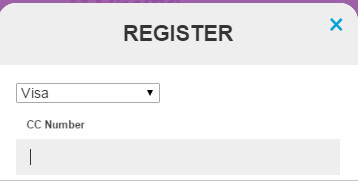
Change the transform to transition over 0.3s and the color over 0.5s.
.form-input + .form-label {

  position: relative;

  padding: 0 1em;

  cursor: text;

  color: #6A7989;

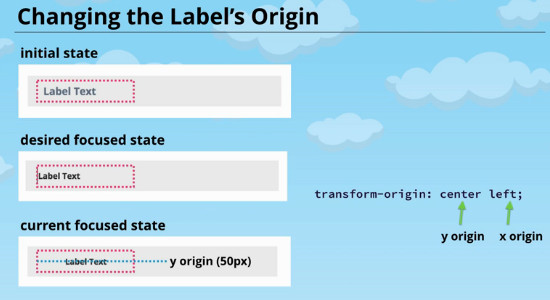
  transform-origin: left center;

  transition: transform 0.3s, color 0.5s;

}

.form-input:focus + .form-label {

  color: #333333;

  transform: translateY(-40px) scale(0.8);

}
[CSS] Transforms的更多相关文章
- CSS 3 学习——transform 3D转换渲染
以下内容根据官方规范翻译,没有翻译关于SVG变换的内容和关于矩阵计算的内容. 一般情况下,元素在一个无景深无立体感的平面(flat plane)上渲染,这个平面就是其包含块所处的平面.同时,页面上的其 ...
- 用CSS开启硬件加速来提高网站性能
国外一篇文章,有点意思,转载过来,准备尝试下~ 中文地址:http://www.cnblogs.com/rubylouvre/p/3471490.html 原文地址:http://blog.teamt ...
- Head First Html and CSS学习笔记之CSS
第七章 CSS入门 元素的许多属性都可以设置样式,太多了,记不住,可以参考<CSS Pocket Reference>. 外部样式表,<link type = "text/ ...
- 前端开发教程:使用 CSS3 Transforms 构建圆形导航
在本教程中我将告诉你如何使用 CSS 变换来创建圆形导航.教程逐一讲解实现这个样式将要涉及一些基本的数学知识并配合 CSS 变换来创建这些样式.不过不用担心,这里用到的数学知识真的是很简单的.教程使用 ...
- 用CSS开启硬件加速来提高网站性能(转)
翻译文章,原文地址:http://blog.teamtreehouse.com/increase-your-sites-performance-with-hardware-accelerated-cs ...
- 用CSS变形创建圆形导航
http://www.w3cplus.com/css3/building-a-circular-navigation-with-css-transforms.html 本文由陈毅根据SARA SOUE ...
- 使用CSS完成元素居中的七种方法
在网页布局中元素水平居中比元素垂直居中要简单不少,同时实现水平居中和垂直居中往往是最难的.现在是响应式设计的时代,我们很难确切的知道元素的准确高度和宽度,所以一些方案不大适用.据我所知, 在CSS中至 ...
- 实用css小技巧
display应用 在取消了ul/ol的默认样式{padding:0;list-style-type:none;}的时候:ul的li设置成了行内块(display:inline-block)的话,这时 ...
- 一些实用而又记不住的css技巧
user-select 禁止用户选中文本 div { user-select: none; /* Standard syntax */ } 清除手机tap事件后element 时候出现的一个高亮 * ...
随机推荐
- 或许有一两点你不知的C语言特性
关键字篇 volatile关键字 鲜为人知的关键字之一volatile,表示变量是'易变的',之所以会有这个关键字,主要是消除编译优化带来的一些问题,看下面的代码 ; int b = a; int c ...
- 用gtest实现数据驱动的单元测试
//使用gtest进行数据驱动的单元测试 #include <gtest/gtest.h> #include <iostream> #include <vector> ...
- WPF之 XAML集合项简单演示
我们直接通过xaml文件演示一个简单的xaml集合项: <Window x:Class="WPF_XAML集合项.MainWindow" xmlns="http:/ ...
- ARM的STRB和LDRB指令分析
一.SDRAM 1.存储结构 SDRAM的内部是一个存储阵列.阵列就如同表格一样,将数据“填”进去.在数据读写时和表格的检索原理一样,先指定一个行(Row),再指定一个列 (Column),我们就可以 ...
- 打造轻量级自动化测试框架WebZ
一.什么是WebZ WebZ是我用Python写的“关键字驱动”的自动化测试框架,基于WebDriver. 设计该框架的初衷是:用自动化测试让测试人员从一些简单却重复的测试中解放出来.之所以用“关键字 ...
- theano中的logisticregression代码学习
1 class LogisticRegression (object): 2 def __int__(self,...): 3 4 #定义一些与逻辑回归相关的各种函数 5 6 def method1( ...
- Jquery的attr属性
在JS中设置节点的属性与属性值用到setAttribute(),获得节点的属性与属性值用到getAttribute(),而在jquery中,用一个attr()就可以全部搞定了,赞一个先 ^^ jque ...
- Android - N级树形结构实现
目前已经实现3级之内的任意级树形结构展示(如果想增加更多级,需要扩展排序算法),并支持单选和多选(使用不同的适配器). 实现使用的控件:ListView 首先,最重要的应该是数据源的格式,支持树形结构 ...
- 【CF】304 E. Soldier and Traveling
基础网络流,增加s和t,同时对于每个结点分裂为流入结点和流出结点.EK求最大流,判断最大流是否等于当前总人数. /* 304E */ #include <iostream> #includ ...
- Spark安装和配置
hadoop2的安装教程 Spark可以直接安装在hadoop2上面,主要是安装在hadoop2的yarn框架上面 安装Spark之前需要在每台机器上安装Scala,根据你下载的Spark版本,选择对 ...