
(9/18)重学Standford_iOS7开发_动画、自动布局_课程笔记
最近开始实习,没多少时间更新了=_=
第九课:
1、上节课demo:Dropit完整实现
https://github.com/NSLogMeng/Stanford_iOS7_Study/commit/cfc24c2c4300185d972cf151872d313414a48d32
2、Autolayout
比较简单请参照课件截图https://github.com/NSLogMeng/Stanford_iOS7_Study/blob/master/Slides/Lecture%209%20Slides.pdf
课程实现方法为在storyboard中可视化实现,本文再介绍两种方法:
①NSLayoutConstraint
+(instancetype)constraintWithItem:(id)view1

                                      attribute:(NSLayoutAttribute)attr1

                                     relatedBy:(NSLayoutRelation)

                             relation toItem:(id)view2

                                      attribute:(NSLayoutAttribute)attr2

                                     multiplier:(CGFloat)multiplier constant:(CGFloat)c;

//约束:item1.attribute =(>=,<=related) multiplier * item2.attribute + constant

//使用UIView添加约束

- (void)addConstraint:(NSLayoutConstraint *)constraint
②Visual Format Language(VFL)
官方文档很简单易懂
语法:
| 含义 | 语法 | 含义 | 语法 |
| 水平方向 | H: | 关系 | >=,<=,== |
| 垂直方向 | V: | 空间,间隙 | - |
| Views | [view] | 优先级 | @value |
| superView | | |
举例:
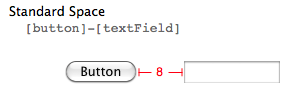


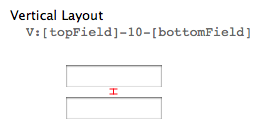
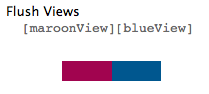
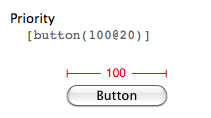
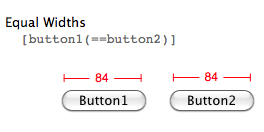

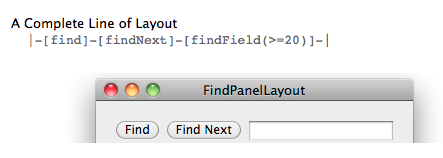
代码实现举例:
- (void)viewDidLoad {

    [super viewDidLoad];

    // Do any additional setup after loading the view, typically from a nib.

    UIButton *button1 = [[UIButton alloc] init];

    button1.backgroundColor = [self randomColor];

    [button1 setTitle:@"button1" forState:UIControlStateNormal];

    button1.translatesAutoresizingMaskIntoConstraints = NO;//手动创建的代码使用VFL必须更改此属性

    button1.layer.cornerRadius = 4.0f;

    [self.view addSubview:button1];

    [self.view addConstraints:[NSLayoutConstraint constraintsWithVisualFormat:@"H:|-[button1]-|" options: metrics:nil views:NSDictionaryOfVariableBindings(button1)]];

    [self.view addConstraints:[NSLayoutConstraint constraintsWithVisualFormat:@"V:|-20-[button1(width)]" options: metrics:@{@"width" : @} views:NSDictionaryOfVariableBindings(button1)]];

    UIButton *button2 = [[UIButton alloc] init];

    button2.backgroundColor = [self randomColor];

    [button2 setTitle:@"button2" forState:UIControlStateNormal];

    button2.translatesAutoresizingMaskIntoConstraints = NO;//手动创建的代码使用VFL必须更改此属性

    button2.layer.cornerRadius = 4.0f;

    [self.view addSubview:button2];

    [self.view addConstraints:[NSLayoutConstraint constraintsWithVisualFormat:@"H:|-[button2]-|" options: metrics:nil views:NSDictionaryOfVariableBindings(button2)]];

    [self.view addConstraints:[NSLayoutConstraint constraintsWithVisualFormat:@"V:[button1]-44-[button2(30)]" options: metrics:nil views:NSDictionaryOfVariableBindings(button1,button2)]];

    UITabBar *tabBar = [[UITabBar alloc] init];

    tabBar.barTintColor = [UIColor colorWithRed:/255.0f green:/255.0f blue:/255.0f alpha:1.0f];

    tabBar.translatesAutoresizingMaskIntoConstraints = NO;//手动创建的代码使用VFL必须更改此属性

    UITabBarItem *item1 = [[UITabBarItem alloc] init];

    [item1 setTitle:@"item1"];

    UITabBarItem *item2 = [[UITabBarItem alloc] init];

    [item2 setTitle:@"item2"];

    UITabBarItem *item3 = [[UITabBarItem alloc] init];

    [item3 setTitle:@"item3"];

    tabBar.items = @[item1,item2,item3];

    [self.view addSubview:tabBar];

    [self.view addConstraints:[NSLayoutConstraint constraintsWithVisualFormat:@"H:|[tabBar]|" options: metrics:nil views:NSDictionaryOfVariableBindings(tabBar)]];

    [self.view addConstraints:[NSLayoutConstraint constraintsWithVisualFormat:@"V:[tabBar(45)]|" options: metrics:nil views:NSDictionaryOfVariableBindings(tabBar)]];

    [button1 addTarget:self action:@selector(touchButton1) forControlEvents:UIControlEventTouchDown];

}
注意:①代码创建的view要加 button1.translatesAutoresizingMaskIntoConstraints = NO;才能生效
②metrics存储VFL中可变量的值(字典),可以参考button1的约束
③views参数对应VFL中View的值(通过NSDictionaryOfVariableBindings(...)实现)
3、作业
还没做=_=,后面补。
课程视频地址:网易公开课:http://open.163.com/movie/2014/1/B/P/M9H7S9F1H_M9H80K2BP.html
或者iTunes U搜索standford课程
(9/18)重学Standford_iOS7开发_动画、自动布局_课程笔记的更多相关文章
- (1/18)重学Standford_iOS7开发_iOS概述_课程笔记
写在前面:上次学习课程对iOS还是一知半解,由于缺乏实践,看公开课的视频有时不能很好地领会知识.带着问题去学习永远是最好的方法,接触一段时间iOS开发以后再来看斯坦福iOS公开课,又会有许多新的发现, ...
- (3/18)重学Standford_iOS7开发_Objective-C_课程笔记
第三课: 本节课主要是游戏实现的demo,因此我将把课程中简单的几个编程技巧提取出来,重点介绍如何自己实现作业中的要求. 纸牌游戏实现: ①游戏的进行是模型的一部分(理解什么是模型:Model = W ...
- (8/18)重学Standford_iOS7开发_协议、block、动画_课程笔记
第八课: 1.协议 另一种安全处理id类型的方式如:id <MyProtocol> obj a.声明 //协议一般放于.h文件中或者在类的.h文件中 @protocol Foo <X ...
- (6/18)重学Standford_iOS7开发_控制器多态性、导航控制器、选项卡栏控制器_课程笔记
终于有时间跟新了,两周时间复(yu)习(xi)了5门考试累觉不爱...... ------------------------------------------------------------- ...
- (7/18)重学Standford_iOS7开发_视图、绘制、手势识别_课程笔记
第七课: 1.View 一般来说,视图是一个构造块,代表屏幕上一块矩形区域,定义了一个坐标空间,并在其中绘制及添加触控事件等. ①视图的层级关系 一个视图只能有一个父视图,可以有多个子视图 - ( - ...
- (4/18)重学Standford_iOS7开发_框架和带属性字符串_课程笔记
第四课(干货课): (最近要复习考试,有点略跟不上节奏,这节课的内容还是比较重要的,仔细理解掌握对今后的编程会有很大影响) 本节课主要涉及到Foundation和UIKit框架,基本都是概念与API知 ...
- (5/18)重学Standford_iOS7开发_视图控制器生命周期_课程笔记
第五课: 1.UITextView @property (nonatomic, readonly) NSTextStorage *textStorage;//注意为只读属性,因此不能直接更改内容,NS ...
- (2/18)重学Standford_iOS7开发_Xcode_课程笔记
第二课: 1.惰性初始化 -(ObjectType *)example { f(!_example) example =[[ObjectType alloc] init]; return _examp ...
- 重学 Java 设计模式:实战外观模式「基于SpringBoot开发门面模式中间件,统一控制接口白名单场景」
作者:小傅哥 博客:https://bugstack.cn 沉淀.分享.成长,让自己和他人都能有所收获! 一.前言 你感受到的容易,一定有人为你承担不容易 这句话更像是描述生活的,许许多多的磕磕绊绊总 ...
随机推荐
- android app修改包名
change package nameA.使用到得工具 notepad++,everything搜索工具(C:\Users\Administrator\Desktop\MusicScanResu ...
- http://jinnianshilongnian.iteye.com/blog/2018936
http://jinnianshilongnian.iteye.com/blog/2018936
- SPRING IN ACTION 第4版笔记-第二章WIRING BEANS-006-当构造函数有集合时的注入
一.当构造函数有集合时,只能用<CONSTRUCTOR-ARG>,不能用C-NAMESPACE 二. 1. package soundsystem.collections; import ...
- Qt 子窗口内嵌到父窗口中(无边框附体show即可)good
有时需要把一个子窗口内嵌进入父窗口当中. 我们可以这样做 1.新建一个QWidget 或者QDialog的子类 ClassA(父类为ClassB) 2.在新建类的构造函数中添加设置窗口属性 setWi ...
- Highcharts实例
<%@ page language="java" import="java.util.*" pageEncoding="UTF-8"% ...
- ICMP 实现
以下代码取自 kernel- . [数据结构] struct icmp_control { void (*handler)(struct sk_buff *skb); //icmp处理函数,根据icm ...
- java学习多线程之死锁
形成死锁的前提是同步代码块嵌套. 什么是死锁?当一个线程拿到锁以后在这个锁内部的代码需要访问另一段的代码的时候另外一个程序的锁被另外一个线程拿到,这样的话,就造成了两个锁互不想让程序没法往下执行的这种 ...
- 简单的单页c#生成静态页源码
protected void BtGroup_ServerClick(object sender, EventArgs e) { //产业群首页 ...
- 【转】调整mac电脑鼠标移动速度
原文网址:https://www.zhihu.com/question/19579075 作者:陆猛链接:https://www.zhihu.com/question/19579075/answer/ ...
- 最小生成树之Prim算法,Kruskal算法
Prim算法 1 .概览 普里姆算法(Prim算法),图论中的一种算法,可在加权连通图里搜索最小生成树.意即由此算法搜索到的边子集所构成的树中,不但包括了连通图里的所有顶点(英语:Vertex (gr ...