
cocos2d-x 绘制基本图元
转自:http://4137613.blog.51cto.com/4127613/754729
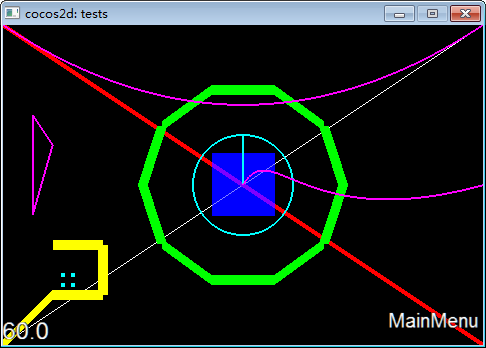
第一部分:基本图形绘制
void DrawPrimitivesTest::draw()

{

    CCLayer::draw();

    CCSize s = CCDirector::sharedDirector()->getWinSize();

        // draw a simple line

        // The default state is:

        // Line Width: 1

        // color: 255,255,255,255 (white, non-transparent)

        // Anti-Aliased

        glEnable(GL_LINE_SMOOTH);

        ccDrawLine( CCPointMake(, ), CCPointMake(s.width, s.height) );

        // line: color, width, aliased

        // glLineWidth > 1 and GL_LINE_SMOOTH are not compatible

        //注意:线宽>1 则不支持GL_LINE_SMOOTH

        // GL_SMOOTH_LINE_WIDTH_RANGE = (1,1) on iPhone

        glDisable(GL_LINE_SMOOTH);

        glLineWidth( 5.0f );

        /*glColor4ub(255,0,0,255);*/

        glColor4f(1.0, 0.0, 0.0, 1.0);

        ccDrawLine( CCPointMake(, s.height), CCPointMake(s.width, ) );

        // TIP:

        // If you are going to use always the same color or width, you don't

        // need to call it before every draw

        //

        // Remember: OpenGL is a state-machine.

        // draw big point in the center

        // 注意:cocos2dx绘制的是方块点

        glPointSize();

        /*glColor4ub(0,0,255,128);*/

        glColor4f(0.0, 0.0, 1.0, 0.5);

        ccDrawPoint( CCPointMake(s.width / , s.height / ) );

        // draw 4 small points

        // 注意:cocos2dx绘制的是方块点

        CCPoint points[] = { CCPointMake(,), CCPointMake(,), CCPointMake(,), CCPointMake(,) };

        glPointSize();

        /*glColor4ub(0,255,255,255);*/

        glColor4f(0.0, 1.0, 1.0, 1.0);

        ccDrawPoints( points, );

        // draw a green circle with 10 segments

        glLineWidth();

        /*glColor4ub(0, 255, 0, 255);*/

        glColor4f(0.0, 1.0, 0.0, 1.0);

       //参数依次是:中心点,半径,角度,分段数,是否连接中心点

        ccDrawCircle( CCPointMake(s.width/,  s.height/), , , , false);

        // draw a green circle with 50 segments with line to center

        glLineWidth();

        /*glColor4ub(0, 255, 255, 255);*/

        glColor4f(0.0, 1.0, 1.0, 1.0);

        ccDrawCircle( CCPointMake(s.width/, s.height/), , CC_DEGREES_TO_RADIANS(), , true);

        // open yellow poly

        /*glColor4ub(255, 255, 0, 255);*/

        glColor4f(1.0, 1.0, 0.0, 1.0);

        glLineWidth();

        CCPoint vertices[] = { CCPointMake(,), CCPointMake(,), CCPointMake(,), CCPointMake(,), CCPointMake(,) };

        //参数依次是:点数组,点数量,是否封闭

        ccDrawPoly( vertices, , false);

        // closed purple poly

        /*glColor4ub(255, 0, 255, 255);*/

        glColor4f(1.0, 0.0, 1.0, 1.0);

        glLineWidth();

        CCPoint vertices2[] = { CCPointMake(,), CCPointMake(,), CCPointMake(,) };

        ccDrawPoly( vertices2, , true);

        // draw quad bezier path

          //绘制有一个控制点的贝塞尔曲线

       ccDrawQuadBezier(CCPointMake(,s.height), CCPointMake(s.width/,s.height/), CCPointMake(s.width,s.height), );

       // draw cubic bezier path

       //绘制有两个控制点的贝塞尔曲线

       ccDrawCubicBezier(CCPointMake(s.width/, s.height/), CCPointMake(s.width/+,s.height/+), CCPointMake(s.width/+,s.height/-),CCPointMake(s.width, s.height/),);

        //恢复opengl的正常参数

        // restore original values

        glLineWidth();

        /*glColor4ub(255,255,255,255);*/

        glColor4f(1.0, 1.0, 1.0, 1.0);

        glPointSize();

}
// Create a label and initialize with string "Hello World".

CCLabelTTF* pLabel = CCLabelTTF::labelWithString("Hello World", "Thonburi", );

CC_BREAK_IF(! pLabel);

// Get window size and place the label upper.

CCSize size = CCDirector::sharedDirector()->getWinSize();

pLabel->setPosition(ccp(size.width / , size.height - ));

// Add the label to HelloWorld layer as a child layer.

this->addChild(pLabel, );
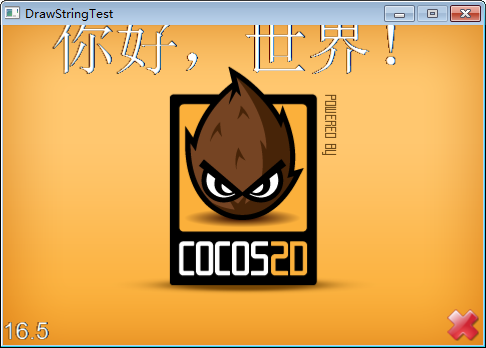
CCLabelTTF* pLabel = CCLabelTTF::labelWithString("你好,世界", "Thonburi", );

void HelloWorldLayer::draw()

{

        CCLayer::draw();

       CCSize s = CCDirector::sharedDirector()->getWinSize();

        glEnable(GL_LINE_SMOOTH);

        ccDrawLine( CCPointMake(, s.height/), CCPointMake(s.width, s.height/) );

        ccDrawLine( CCPointMake(s.width/, ), CCPointMake(s.width/, s.height) );

}
然后,我们重写绘制字体函数,将坐标修改为屏幕正中
pLabel->setPosition(ccp(size.width / , size.height/));
.png)

// 3. Add add a splash screen, show the cocos2d splash image.

CCSprite* pSprite = CCSprite::spriteWithFile("HelloWorld.png");

CC_BREAK_IF(! pSprite);

// Place the sprite on the center of the screen

pSprite->setFlipX(true); //可以手动设置图形旋转和镜像,而不是使用Action,因为有许多Action是个过程,而不是直接显示结果

pSprite->setRotation();

pSprite->setPosition(ccp(size.width/, size.height/));

// Add the sprite to HelloWorld layer as a child layer.

this->addChild(pSprite, );
绘制后的效果如下:

cocos2d-x 绘制基本图元的更多相关文章
- WebGL学习笔记二——绘制基本图元
webGL的基本图元点.线.三角形 gl.drawArrays(mode, first,count) first,代表从第几个点开始绘制即顶点的起始位置 count,代表绘制的点的数量. mode,代 ...
- 【转】cocos2d-x学习笔记03:绘制基本图元
第一部分:基本图形绘制 cocos2dx封装了大量opengl函数,用于快速绘制基本图形,这些代码的例子在,tests\DrawPrimitivesTest目录下 注意,该方法是重载node的draw ...
- Cocos2d 利用继承Draw方法制作可显示三维数据(宠物三维等)的三角形显示面板
很久没有写博客了,这段时间比较忙,又是搬家又是做自己的项目,还有太多琐碎的事情缠身,好不容易抽出时间把最近自己做的一些简单例子记录一下. 在我的项目中,我需要一个显示面板来显示游戏中的一个三维数据,例 ...
- Modern OpenGL用Shader拾取VBO内单一图元的思路和实现(2)
Modern OpenGL用Shader拾取VBO内单一图元的思路和实现(2) 上一篇里介绍了Color-Coded Picking的思路和最基本的实现.在处理GL_POINTS时已经没有问题,但是处 ...
- Direct基础学习系列3 绘制+实例
3.1.1顶点缓存 索引缓存 放置在显存中能够加快绘制速度 创建顶点缓存 HRESULT CreateVertexBuffer( UINT Length, //为缓存分配的字节数 DWORD Usag ...
- osg 基本几何图元
转自:osg 基本几何图元 //osg 基本几何图元 // ogs中所有加入场景中的数据都会加入到一个Group类对象中,几何图元作为一个对象由osg::Geode类来组织管理. // 绘制几何图元对 ...
- Direct3D中的绘制
1.顶点缓存和索引缓存 一个顶点缓存是一个包含顶点数据的连续内存空间:一个索引缓存是一个包含索引数据的连续内存空间. 顶点缓存用接口IDirect3DVertexBuffer9表示:索引缓存用接口ID ...
- 如何在Cocos2D 1.0 中掩饰一个精灵(四)
大熊猫猪·侯佩原创或翻译作品.欢迎转载,转载请注明出处. 如果觉得写的不好请告诉我,如果觉得不错请多多支持点赞.谢谢! hopy ;) 为了完成需要的效果,我们将使用如下策略: 我们将首先绘制掩饰精灵 ...
- (转)GPU图形绘制管线
摘抄“GPU Programming And Cg Language Primer 1rd Edition” 中文名“GPU编程与CG语言之阳春白雪下里巴人”第二章. 图形绘制管线描述GPU渲染流程, ...
随机推荐
- BZOJ 1738: [Usaco2005 mar]Ombrophobic Bovines 发抖的牛
Description 约翰的牛们非常害怕淋雨,那会使他们瑟瑟发抖.他们打算安装一个下雨报警器,并且安排了一个撤退计划.他们需要计算最少的让所有牛进入雨棚的时间. 牛们在农场的F(1≤F≤200 ...
- Unity3d与android通信
原地址:http://www.cnblogs.com/alongu3d/p/3661077.html unity3d与android的通信,从网上搜索了一些文章,发现我的始终不成功!后来调试通了,现在 ...
- HDU4528+BFS
/* bfs+标记状态 如何记录状态是关键!! */ #include<stdio.h> #include<string.h> #include<stdlib.h> ...
- HDU3368+枚举
题意看不懂的直接看百度百科对黑白棋的解释... 做法:分情况讨论,一共8个方向. /* 搜索 */ #include<stdio.h> #include<string.h> ; ...
- Cocos2d-x 3.2编译Android程序错误的解决方案
最近的升级Cocos2d-x 3.2正式版.iOS不管是什么程序编译问题,使用结果cocos compile -p android编译APK计划.结果悲剧,出现以下错误. Android NDK: I ...
- *[topcoder]AstronomicalRecords
http://community.topcoder.com/stat?c=problem_statement&pm=12804&rd=15706 首先A和B的长度都不一定一样,里面的元 ...
- java web路径的问题
对于<form action="/xx"> 和 <a href='/xx'> 其中,xx相应的为网站根目录 一般网站为虚拟目录,所以要 写成 /web应 ...
- Drawable(3)Color State List Resource
注意 Color State List Resource 与 Color不同,前者是颜色状态表.根据不同状态显示不同颜色,它是State list,里面有多种颜色,后者只是一个颜色. Color St ...
- 【POJ】1054 The Troublesome Frog
题目是非常经典的搜索+剪枝.题意简言之就是,青蛙需要沿着直线踩着踏点通过田地,并且踏点需要至少为3.问哪条路径青蛙踩坏的作物最多.很好的一个条件是青蛙每次移动都是等间距的.题目需要注意将其排序. #i ...
- 转载:10个实用的但偏执的Java编程技术
在沉浸于编码一段时间以后(比如说我已经投入近20年左右的时间在程序上了),你会渐渐对这些东西习以为常.因为,你知道的…… 任何事情有可能出错,没错,的确如此. 这就是为什么我们要采用“防御性编程”,即 ...