
SpringMVC09异常处理和类型转化器
public class User {

    private String name;

    private Integer age;

    public String getName() {

        return name;

    }

    public void setName(String name) {

        this.name = name;

    }

    public Integer getAge() {

        return age;

    }

    public void setAge(Integer age) {

        this.age = age;

    }

    public User(String name, Integer age) {

        super();

        this.name = name;

        this.age = age;

    }

    public User() {

        super();

    }

    @Override

    public String toString() {

        return "User [name=" + name + ", age=" + age + "]";

    }

}
User实体类
对应的异常处理类
public class UserException extends Exception {

    public UserException() {

        super();

    }

    public UserException(String message) {

        super(message);

    }

}
User异常类
public class NameException extends UserException {

    public NameException() {

        super();

    }

    public NameException(String message) {

        super(message);

    }

}
name异常类
public class AgeException extends UserException {

    public AgeException() {

        super();

    }

    public AgeException(String message) {

        super(message);

    }

}
age异常类
@Controller

@RequestMapping("/user")

public class MyController {

    /**

     * 跳转到/list

     * Model:跳转list方法时 携带的数据

     * @throws UserException

     */

    @RequestMapping(value = "/add")

    public String add(User user, Model mv) throws UserException {

        System.out.println("进入了add......");

        // 01.模拟异常 System.out.println(5 / 0);

        // 02.模拟异常  name

        if (!user.getName().equals("admin")) {

            throw new NameException("用户名错误!");

        }

        // 03.模拟异常 age

        if (user.getAge() > 50) {

            throw new AgeException("年龄不合法!");

        }

        mv.addAttribute("name", user.getName()).addAttribute("age",

                user.getAge());

        return "redirect:list";

    }

    @RequestMapping(value = "/list")

    public String list(User user) {

        System.out.println("进入了list......");

        System.out.println(user.getName());

        System.out.println(user.getAge());

        return "/success.jsp";

    }

}
对应的controller代码
<?xml version="1.0" encoding="UTF-8"?>

<beans xmlns="http://www.springframework.org/schema/beans"

    xmlns:mvc="http://www.springframework.org/schema/mvc"

    xmlns:context="http://www.springframework.org/schema/context"

    xmlns:xsi="http://www.w3.org/2001/XMLSchema-instance"

    xsi:schemaLocation="

        http://www.springframework.org/schema/beans

        http://www.springframework.org/schema/beans/spring-beans-3.0.xsd

        http://www.springframework.org/schema/mvc

        http://www.springframework.org/schema/mvc/spring-mvc-3.0.xsd

        http://www.springframework.org/schema/context

        http://www.springframework.org/schema/context/spring-context-3.0.xsd">

<!-- 配置需要扫描的包 -->

<context:component-scan base-package="cn.bdqn.controller"/>

<!-- 开启注解 -->

<mvc:annotation-driven/>

<!-- 设置异常处理 -->

<bean class="org.springframework.web.servlet.handler.SimpleMappingExceptionResolver">

   <!-- 01.出现异常时 跳转的界面-->

    <property name="defaultErrorView" value="/errors/error.jsp"/>

    <!-- 02.给用户提示信息 -->

    <property name="exceptionAttribute" value="ex"/>

    <!-- 03.自定义的异常跳转界面  -->

    <property name="exceptionMappings">

     <props>

       <prop key="cn.bdqn.exception.NameException">/errors/nameError.jsp</prop>

       <prop key="cn.bdqn.exception.AgeException">/errors/ageError.jsp</prop>

     </props>

    </property>

</bean>
springmvc-servlet.xml文件
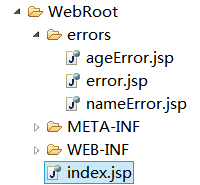
需要的界面
  <body>

  <form action="user/add" method="post">

  <!-- 必须是User类中对应的属性名 -->

    用户名:<input type="text"  name="name">

     年龄:<input type="text"  name="age">

  <button type="submit">提交</button>

  </form>

  </body>
index.jsp
  <body>

   <h1>错误界面</h1>

   ${ex.message}

  </body>
error.jsp
  <body>

   <h1>name错误界面</h1>

   ${ex.message}

  </body>
nameError.jsp
  <body>

   <h1>age错误界面</h1>

   ${ex.message}

  </body>
ageError.jsp
====================自定义异常处理器===========================
/**

 * 自定义的异常处理器  implements HandlerExceptionResolver

 */

public class MyExceptionResolver implements HandlerExceptionResolver {

    /**

     * handler:就是我们的controller

     * ex:controller出现的异常信息

     */

    public ModelAndView resolveException(HttpServletRequest request,

            HttpServletResponse response, Object handler, Exception ex) {

        ModelAndView mv = new ModelAndView();

        mv.addObject("ex", ex);// 保存异常信息

        mv.setViewName("/errors/error.jsp"); // 其他异常处理

        if (ex instanceof NameException) {

            mv.setViewName("/errors/nameError.jsp");

        }

        if (ex instanceof AgeException) {

            mv.setViewName("/errors/ageError.jsp");

        }

        return mv;

    }

}
创建自定义的异常处理器
<?xml version="1.0" encoding="UTF-8"?>

<beans xmlns="http://www.springframework.org/schema/beans"

    xmlns:mvc="http://www.springframework.org/schema/mvc"

    xmlns:context="http://www.springframework.org/schema/context"

    xmlns:xsi="http://www.w3.org/2001/XMLSchema-instance"

    xsi:schemaLocation="

        http://www.springframework.org/schema/beans

        http://www.springframework.org/schema/beans/spring-beans-3.0.xsd

        http://www.springframework.org/schema/mvc

        http://www.springframework.org/schema/mvc/spring-mvc-3.0.xsd

        http://www.springframework.org/schema/context

        http://www.springframework.org/schema/context/spring-context-3.0.xsd">

<!-- 配置需要扫描的包 -->

<context:component-scan base-package="cn.bdqn.controller"/>

<!-- 开启注解 -->

<mvc:annotation-driven/>

<!-- 设置自定义的异常处理器-->

<bean class="cn.bdqn.controller.MyExceptionResolver"/>

</beans>
修改springmvc-servlet.xml
其他代码不需要更改!测试即可!
===================使用注解的方式实现异常处理=======================
删除上个例子中xml文件 配置的自定义异常处理器
/**

 *03.提取出来一个处理异常的类

 */

@Controller

public class BaseController { // 专门来处理 异常的

    @ExceptionHandler

    // 其他的异常

    public ModelAndView defaultException(Exception ex) {

        ModelAndView mv = new ModelAndView();

        mv.addObject("ex", ex);// 保存异常信息

        mv.setViewName("/errors/error.jsp"); // 其他异常处理

        return mv;

    }

    @ExceptionHandler(NameException.class)

    // name的异常

    public ModelAndView nameException(Exception ex) {

        ModelAndView mv = new ModelAndView();

        mv.addObject("ex", ex);// 保存异常信息

        mv.setViewName("/errors/nameError.jsp");

        return mv;

    }

    @ExceptionHandler(AgeException.class)

    // age的异常

    public ModelAndView ageException(Exception ex) {

        ModelAndView mv = new ModelAndView();

        mv.addObject("ex", ex);// 保存异常信息

        mv.setViewName("/errors/ageError.jsp");

        return mv;

    }

}
BaseController
@Controller

@RequestMapping("/user")

public class MyController extends BaseController {

    /**

     * 跳转到/list

     * Model:跳转list方法时 携带的数据

     * @throws UserException

     */

    @RequestMapping(value = "/add")

    public String add(User user, Model mv) throws UserException {

        System.out.println("进入了add......");

        // 01.模拟异常

        // System.out.println(5 / 0);

        // 02.模拟异常 name

        if (!user.getName().equals("admin")) {

            throw new NameException("用户名错误!");

        }

        // 03.模拟异常 age

        if (user.getAge() > 50) {

            throw new AgeException("年龄不合法!");

        }

        mv.addAttribute("name", user.getName()).addAttribute("age",

                user.getAge());

        return "redirect:list";

    }

    @RequestMapping(value = "/list")

    public String list(User user) {

        System.out.println("进入了list......");

        System.out.println(user.getName());

        System.out.println(user.getAge());

        return "/success.jsp";

    }

    /**

     * 01.所有的异常的都在一个方法中 处理

    @ExceptionHandler

    public ModelAndView resolveException(Exception ex) {

        ModelAndView mv = new ModelAndView();

        mv.addObject("ex", ex);// 保存异常信息

        mv.setViewName("/errors/error.jsp"); // 其他异常处理

        if (ex instanceof NameException) {

            mv.setViewName("/errors/nameError.jsp");

        }

        if (ex instanceof AgeException) {

            mv.setViewName("/errors/ageError.jsp");

        }

        return mv;

    }*/

    /**

     * 02.针对于每个异常

    @ExceptionHandler

    // 其他的异常

    public ModelAndView defaultException(Exception ex) {

        ModelAndView mv = new ModelAndView();

        mv.addObject("ex", ex);// 保存异常信息

        mv.setViewName("/errors/error.jsp"); // 其他异常处理

        return mv;

    }

    @ExceptionHandler(NameException.class)

    // name的异常

    public ModelAndView nameException(Exception ex) {

        ModelAndView mv = new ModelAndView();

        mv.addObject("ex", ex);// 保存异常信息

        mv.setViewName("/errors/nameError.jsp");

        return mv;

    }

    @ExceptionHandler(AgeException.class)

    // age的异常

    public ModelAndView ageException(Exception ex) {

        ModelAndView mv = new ModelAndView();

        mv.addObject("ex", ex);// 保存异常信息

        mv.setViewName("/errors/ageError.jsp");

        return mv;

    } */

}
Controller中的代码
==================类型转化器============================
<%@ page language="java" import="java.util.*" pageEncoding="UTF-8"%>

<%

String path = request.getContextPath();

String basePath = request.getScheme()+"://"+request.getServerName()+":"+request.getServerPort()+path+"/";

%>

<!DOCTYPE HTML>

<html>

  <head>

    <base href="<%=basePath%>">

    <title>My JSP 'index.jsp' starting page</title>

    <meta http-equiv="pragma" content="no-cache">

    <meta http-equiv="cache-control" content="no-cache">

    <meta http-equiv="expires" content="0">

    <meta http-equiv="keywords" content="keyword1,keyword2,keyword3">

    <meta http-equiv="description" content="This is my page">

    <!--

    <link rel="stylesheet" type="text/css" href="styles.css">

    -->

  </head>

  <body>

  ${ex.message}

  <form action="user/login" method="post">

  <!-- 必须是User类中对应的属性名 -->

    出生日期:<input type="text"  name="birthday" value="${birthday}"> ${birthdayError}<br/>

     年龄:<input type="text"  name="age" value="${age}"> ${ageError}

  <button type="submit">提交</button>

  </form>

  </body>

</html>
index.jsp页面
@Controller

@RequestMapping("/user")

public class MyController {

    /**

     * 登录

     * Date  能自动类型转换        2015/    02/02

     */

    @RequestMapping(value = "/login")

    public ModelAndView login(int age, Date birthday) {

        System.out.println("进入了login......");

        System.out.println(age);

        System.out.println(birthday);

        ModelAndView mv = new ModelAndView();

        mv.addObject("age", age).addObject("birthday", birthday)

                .setViewName("/success.jsp");

        return mv;

    }

    /**

     * TypeMismatchException 类型转换不了的时候  抛出的异常

     * HttpServletRequest request:数据的回显

     * Exception ex:给用户提示

     */

    @ExceptionHandler(TypeMismatchException.class)

    public ModelAndView exceptionAge(HttpServletRequest request, Exception ex) {

        ModelAndView mv = new ModelAndView();

        String age = request.getParameter("age");

        String birthday = request.getParameter("birthday");

        // 让用户看到错误的信息

        String message = ex.getMessage();

        if (message.contains(age)) {

            mv.addObject("ageError", "年龄输入有误!");

        }

        if (message.contains(birthday)) {

            mv.addObject("birthdayError", "日期输入有误!");

        }

        mv.addObject("age", age).addObject("birthday", birthday)

                .addObject("ex", ex).setViewName("/index.jsp");

        return mv;

    }

}
Controller
/**

 *

 * 自定义的类型转化器

 *  @param <S> the source type  前台表单中肯定是string

 * @param <T> the target type

 *

 * public interface Converter<S, T> {

 */

public class MyDateConverter implements Converter<String, Date> {

    /**

     * source:前台传递来的字符串

     */

    public Date convert(String source) {

        // 类型转化

        SimpleDateFormat sdf = getDate(source);

        Date parse = null;

        try {

            parse = sdf.parse(source);

        } catch (ParseException e) {

            e.printStackTrace();

        }

        return parse;

    }

    /**

     * @param source 传递来的日期格式的字符串

     *

     */

    private SimpleDateFormat getDate(String source) {

        SimpleDateFormat sdf = new SimpleDateFormat();

        // 判断

        if (Pattern.matches("^\\d{4}-\\d{2}-\\d{2}$", source)) {

            sdf = new SimpleDateFormat("yyyy-MM-dd");

        } else if (Pattern.matches("^\\d{4}/\\d{2}/\\d{2}$", source)) {

            sdf = new SimpleDateFormat("yyyy/MM/dd");

        } else if (Pattern.matches("^\\d{4}\\d{2}\\d{2}$", source)) {

            sdf = new SimpleDateFormat("yyyyMMdd");

        } else {

            /**

             * 都不匹配了   就让它抛出 TypeMismatchException异常

             *     public TypeMismatchException(Object value, Class<?> requiredType) {

             * vallue 值能对应requiredType 类型 就不会出现异常

             *  我们就得写一个不能转换的

             */

            throw new TypeMismatchException("", Date.class);

        }

        return sdf;

    }

}
类型转化器代码
public class User {

    private String name;

    private Date birthday;

    private Integer age;

    public String getName() {

        return name;

    }

    public void setName(String name) {

        this.name = name;

    }

    public Integer getAge() {

        return age;

    }

    public void setAge(Integer age) {

        this.age = age;

    }

    @Override

    public String toString() {

        return "User [name=" + name + ", birthday=" + birthday + ", age=" + age

                + "]";

    }

    public User(String name, Date birthday, Integer age) {

        super();

        this.name = name;

        this.birthday = birthday;

        this.age = age;

    }

    public Date getBirthday() {

        return birthday;

    }

    public void setBirthday(Date birthday) {

        this.birthday = birthday;

    }

    public User() {

        super();

    }

}
需要的User实体类
<?xml version="1.0" encoding="UTF-8"?>

<beans xmlns="http://www.springframework.org/schema/beans"

    xmlns:mvc="http://www.springframework.org/schema/mvc"

    xmlns:context="http://www.springframework.org/schema/context"

    xmlns:xsi="http://www.w3.org/2001/XMLSchema-instance"

    xsi:schemaLocation="

        http://www.springframework.org/schema/beans

        http://www.springframework.org/schema/beans/spring-beans-3.0.xsd

        http://www.springframework.org/schema/mvc

        http://www.springframework.org/schema/mvc/spring-mvc-3.0.xsd

        http://www.springframework.org/schema/context

        http://www.springframework.org/schema/context/spring-context-3.0.xsd">

<!-- 配置需要扫描的包 -->

<context:component-scan base-package="cn.bdqn.controller"/>

<!-- 开启注解 -->

<mvc:annotation-driven conversion-service="conversionService"/>

<!-- 注册我们自己创建的类型转换器  -->

<bean  id="myDateConverter" class="cn.bdqn.controller.MyDateConverter"/>

<!-- 创建一个类型转换器工厂 来加载我们自己创建的类型转换器  -->

<bean id="conversionService" class="org.springframework.context.support.ConversionServiceFactoryBean">

   <property name="converters">

     <set>

      <ref bean="myDateConverter"/><!--如果需要配置多个类型转化器  只需要增加 ref节点 -->

     </set>

   </property>

</bean>

</beans>
springmvc-servlet.xml文件
  <body>

  <h1>webroot   success页面</h1>

  ${birthday}<br/>

  ${age}

  </body>
success.jsp页面
======================初始化类型绑定===================
在上面的例子中修改xml文件内容! 也就是把之前的类型转换器 删掉
<?xml version="1.0" encoding="UTF-8"?>

<beans xmlns="http://www.springframework.org/schema/beans"

    xmlns:mvc="http://www.springframework.org/schema/mvc"

    xmlns:context="http://www.springframework.org/schema/context"

    xmlns:xsi="http://www.w3.org/2001/XMLSchema-instance"

    xsi:schemaLocation="

        http://www.springframework.org/schema/beans

        http://www.springframework.org/schema/beans/spring-beans-3.0.xsd

        http://www.springframework.org/schema/mvc

        http://www.springframework.org/schema/mvc/spring-mvc-3.0.xsd

        http://www.springframework.org/schema/context

        http://www.springframework.org/schema/context/spring-context-3.0.xsd">

<!-- 配置需要扫描的包 -->

<context:component-scan base-package="cn.bdqn.controller"/>

<!-- 开启注解 -->

<mvc:annotation-driven/>

</beans>
springmvc-servlet.xml文件内容
修改controller中的代码
@Controller

@RequestMapping("/user")

public class MyController {

    /**

     * 登录

     * Date  能自动类型转换        2015/    02/02

     */

    @RequestMapping(value = "/login")

    public ModelAndView login(int age, Date birthday) {

        System.out.println("进入了login......");

        System.out.println(age);

        System.out.println(birthday);

        ModelAndView mv = new ModelAndView();

        mv.addObject("age", age).addObject("birthday", birthday)

                .setViewName("/success.jsp");

        return mv;

    }

    /**

     * 初始化参数的绑定

     * binder.registerCustomEditor(Date.class, new CustomDateEditor(df, true))

     * Date.class:需要转换成的类型

     * new CustomDateEditor:类型编辑器

     * true代表 允许日期格式为空

     */

    @InitBinder

    public void initBinder(WebDataBinder binder) {

        DateFormat df = new SimpleDateFormat("yyyy-MM-dd"); // 只能匹配这种格式

        binder.registerCustomEditor(Date.class, new CustomDateEditor(df, true));

    }

}
匹配一种日期格式的controller
之后可以运行 测试!
创建自己定义的类型编辑器 来完成多种日期格式的绑定
/**

 *

 * 自定义的类型编辑器

 */

public class MyDateEditor extends PropertiesEditor {

    @Override

    public void setAsText(String source) throws IllegalArgumentException {

        SimpleDateFormat sdf = getDate(source);

        Date parse = null;

        // 类型转化

        try {

            parse = sdf.parse(source);

            setValue(parse);

        } catch (ParseException e) {

            e.printStackTrace();

        }

    }

    /**

     * @param source 传递来的日期格式的字符串

     *

     */

    private SimpleDateFormat getDate(String source) {

        SimpleDateFormat sdf = new SimpleDateFormat();

        // 判断

        if (Pattern.matches("^\\d{4}-\\d{2}-\\d{2}$", source)) {

            sdf = new SimpleDateFormat("yyyy-MM-dd");

        } else if (Pattern.matches("^\\d{4}/\\d{2}/\\d{2}$", source)) {

            sdf = new SimpleDateFormat("yyyy/MM/dd");

        } else if (Pattern.matches("^\\d{4}\\d{2}\\d{2}$", source)) {

            sdf = new SimpleDateFormat("yyyyMMdd");

        } else {

            /**

             * 都不匹配了   就让它抛出 TypeMismatchException异常

             *     public TypeMismatchException(Object value, Class<?> requiredType) {

             * vallue 值能对应requiredType 类型 就不会出现异常

             *  我们就得写一个不能转换的

             */

            throw new TypeMismatchException("", Date.class);

        }

        return sdf;

    }

}
MyDateEditor
修改controller中的代码
package cn.bdqn.controller;

import java.util.Date;

import org.springframework.stereotype.Controller;

import org.springframework.web.bind.WebDataBinder;

import org.springframework.web.bind.annotation.InitBinder;

import org.springframework.web.bind.annotation.RequestMapping;

import org.springframework.web.servlet.ModelAndView;

@Controller

@RequestMapping("/user")

public class MyController {

    /**

     * 登录

     * Date  能自动类型转换        2015/    02/02

     */

    @RequestMapping(value = "/login")

    public ModelAndView login(int age, Date birthday) {

        System.out.println("进入了login......");

        System.out.println(age);

        System.out.println(birthday);

        ModelAndView mv = new ModelAndView();

        mv.addObject("age", age).addObject("birthday", birthday)

                .setViewName("/success.jsp");

        return mv;

    }

    /**

     * 初始化参数的绑定

     * binder.registerCustomEditor(Date.class, new CustomDateEditor(df, true))

     * Date.class:需要转换成的类型

     * new CustomDateEditor:类型编辑器

     * true代表 允许日期格式为空

    @InitBinder

    public void initBinder(WebDataBinder binder) {

        DateFormat df = new SimpleDateFormat("yyyy-MM-dd"); // 只能匹配这种格式

        binder.registerCustomEditor(Date.class, new CustomDateEditor(df, true));

    }*/

    /**

     * 绑定多种日期格式

     */

    @InitBinder

    public void initBinder(WebDataBinder binder) {

        // 使用自己定义的类型编辑器new MyDateEditor()

        binder.registerCustomEditor(Date.class, new MyDateEditor());

    }

}
Controller代码
其他代码不动 测试 即可!
SpringMVC09异常处理和类型转化器的更多相关文章
- jQuery源码分析系列(36) : Ajax - 类型转化器
什么是类型转化器? jQuery支持不同格式的数据返回形式,比如dataType为 xml, json,jsonp,script, or html 但是浏览器的XMLHttpRequest对象对数据的 ...
- struts2类型转化器详解(带例子)
Struts2有两种类型转化器: 一种局部,一种全局. 如何实现: 第一步:定义转化器 第二部:注册转化器 下面做一个局部类型转化器的实例. 我们在上面一片日志说过有个变量date类型的.只有我们输入 ...
- Spring mvc @initBinder 类型转化器的使用
一.单日期格式 因为是用注解完完成的后台访问,所以必须在大配置中配置包扫描器: 1.applicactionContext.xml <?xml version="1.0" e ...
- struts2 自定义类型转化 第三弹
1.Struts2的类型转化,对于8种原生数据类型以及Date,String等常见类型,Struts2可以使用内建的类型转化器实现自动转化:但对于自定义的对象类型来说,就需要我们自己指定类型转化的的方 ...
- SpringBoot(十七):SpringBoot2.1.1数据类型转化器Converter
什么场景下需要使用类型化器Converter? springboot2.1.1在做Restful Api开发过程中往往希望接口直接接收date类型参数,但是默认不加设置是不支持的,会抛出异常:系统是希 ...
- Spring MVC请求参数绑定 自定义类型转化 和获取原声带额servlet request response信息
首先还在我们的框架的基础上建立文件 在domian下建立Account实体类 import org.springframework.stereotype.Controller; import org. ...
- C#定义类型转化 及 格式化字符串
operator 关键字 operator 关键字用来重载内置运算符,或提供类/结构声明中的用户定义转换.它可以定义不同类型之间采用何种转化方式和转化的结果. operator用于定义类型转化时可采用 ...
- 《精通C#》自定义类型转化-扩展方法-匿名类型-指针类型(11.3-11.6)
1.类型转化在C#中有很多,常用的是int类型转string等,这些都有微软给我们定义好的,我们需要的时候直接调用就是了,这是值类型中的转化,有时候我们还会需要类类型(包括结构struct)的转化,还 ...
- 自定义Retrofit转化器Converter
我们来看一下Retrofit的使用 interface TestConn { //这里的Bitmap就是要处理的类型 @GET("https://ss0.baidu.com/73F1bjeh ...
随机推荐
- 测试最新的log4cplus1.1.2版
#include "stdafx.h" #include <sstream> class AB{ public: void do_test() { ...
- Spring+SpringMVC+Mybatis+MAVEN+Eclipse+项目完整环境搭建
1.新建一个Maven项目,创建父项目. 2.创建子项目模块 3.创建javaWeb项目 4.创建后的项目目录结构 5.Maven文件配置 parent父项目pom.xml文件配置 <?xml ...
- 136 Single Number(找唯一数Medium)
题目意思:一个int数组,有一个数只出现一次,其他数均出现两次,找到这个唯一数 知识普及:~:非运算,单目运算符1为0,0为1; &:与运算,都为1则为1,否则为0 |:或运算,全为0则为 ...
- log4net编译后命名空间找不到的问题
log4net编译后命名空间找不到的问题问题:工程A添加dll引用后,可以在代码中引入log4net的命名空间.工程B引用A.A能编译成功,B不能编译成功,提示找不到命名空间. 解决: 点击项目属性- ...
- VS2013安装过程截图
================================================================ VS 2013 中新增了很多提高开发人员工作效率的新功能,比如自动补全 ...
- PHP文件类型检查类-比较全的
在CSDN上淘来的一个文件类型的类,还不错,留下自己看! <? /** * 检证文件类型类 * * @author */ class FileTypeValidation { // 文件类型,不 ...
- CodeForces 474B(标记用法)
CodeForces 474B Time Limit:1000MS Memory Limit:262144KB 64bit IO Format:%I64d & %I64u Descript ...
- 转:cookie和session(二)——php应用
文章来自于:http://blog.csdn.net/half1/article/details/21650211 本文将介绍cookie在session在php中的基本用法. 1.cookie ...
- Android调用 Webservice报org.ksoap2.serialization.SoapPrimitive(转)
android Webservice开发的时候一般情况下大家接受webservice服务器返回值的时候都是使用SoapObject soapObject = (SoapObject) envelope ...
- -_-#微信内置JavaScript API WeixinJSBridge
微信相关的 js 操作:分享.网络.菜单 微信内置JsAPI之WeixinJSBridge微信WeixinJSBridge API续