
MYSQL简单安装配置
有用的URL:
http://www.cnblogs.com/zeroone/articles/2298942.html
http://blog.csdn.net/h1017597898/article/details/9815987
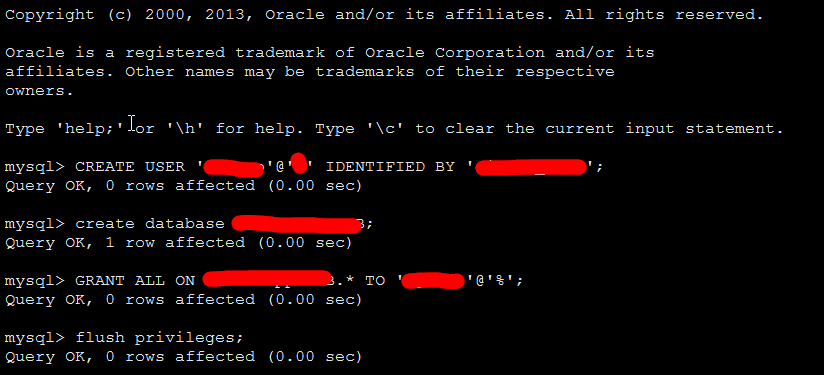
安装之后,新建用户及密码,新建数据库,分配权限
mysql> CREATE USER 'user'@'%' IDENTIFIED BY 'password';
Query OK,  rows affected (0.00 sec)

mysql> create database DB;
Query OK,  row affected (0.00 sec)

mysql>create database DB default character set utf8 collate utf8_general_ci; (为了DJANGO操作中文不乱码)
Query OK, 1 row affected (0.00 sec)
rows affected ( rows affected (0.00 sec)
YUM安装的MYSQL之后,第一次启动时的安全配置:
PLEASE REMEMBER TO SET A PASSWORD FOR THE MySQL root USER !
To do so, start the server, then issue the following commands:

/usr/bin/mysqladmin -u root password 'new-password'
/usr/bin/mysqladmin -u root -h cnsz141539 password 'new-password'

Alternatively you can run:
/usr/bin/mysql_secure_installation

which will also give you the option of removing the test
databases and anonymous user created by default.  This is
strongly recommended for production servers.

See the manual for more instructions.

You can start the MySQL daemon with:
cd /usr ; /usr/bin/mysqld_safe &

You can test the MySQL daemon with mysql-test-run.pl
cd /usr/mysql-test ; perl mysql-test-run.pl

Please report any problems with the /usr/bin/mysqlbug script!
如果要将MYSQL放入SERVICE服务,相应的脚本为:
#!/bin/sh
#
# mysqld    This shell script takes care of starting and stopping
#        the MySQL subsystem (mysqld).
#
# chkconfig: -
# description:    MySQL database server.
# processname: mysqld
# config: /etc/my.cnf
# pidfile: /var/run/mysqld/mysqld.pid
### BEGIN INIT INFO
# Provides: mysqld
# Required-Start: $local_fs $remote_fs $network $named $syslog $time
# Required-Stop: $local_fs $remote_fs $network $named $syslog $time
# Short-Description: start and stop MySQL server
# Description: MySQL database server
### END INIT INFO

# Source function library.
. /etc/rc.d/init.d/functions

# Source networking configuration.
. /etc/sysconfig/network

exec="/usr/bin/mysqld_safe"
prog="mysqld"

# Set timeouts here so they can be overridden from /etc/sysconfig/mysqld
STARTTIMEOUT=
STOPTIMEOUT=

[ -e /etc/sysconfig/$prog ] && . /etc/sysconfig/$prog

lockfile=/var/lock/subsys/$prog

# extract value of a MySQL option from config files
# Usage: get_mysql_option SECTION VARNAME DEFAULT
# result is returned in $result
# We use my_print_defaults which prints all options from multiple files,
# with the more specific ones later; hence take the last match.
get_mysql_option(){
    result=`/usr/bin/my_print_defaults `
    if [ -z "$result" ]; then
        # not found, use default
        result="$3"
    fi
}

get_mysql_option mysqld datadir "/var/lib/mysql"
datadir="$result"
get_mysql_option mysqld socket "$datadir/mysql.sock"
socketfile="$result"
get_mysql_option mysqld_safe log-error "/var/log/mysqld.log"
errlogfile="$result"
get_mysql_option mysqld_safe pid-file "/var/run/mysqld/mysqld.pid"
mypidfile="$result"

start(){
    [ -x $exec ] || exit
    # check to see if it's already running
    MYSQLDRUNNING=
    if [ -f "$mypidfile" ]; then
    MYSQLPID=`>/dev/null`
    if [ -n "$MYSQLPID" ] && [ -d "/proc/$MYSQLPID" ] ; then
        MYSQLDRUNNING=
    fi
    fi
    RESPONSE=`/usr/bin/mysqladmin --socket=>&`
     ] && [ $? =  ]; then
    # already running, do nothing
    action $"Starting $prog: " /bin/true
    ret=
     ] && echo "$RESPONSE" | grep -q "Access denied for user"
    then
    # already running, do nothing
    action $"Starting $prog: " /bin/true
    ret=
    else
        # prepare for start
    >/dev/null
     ]; then
         # failed to touch log file, probably insufficient permissions
        action $"Starting $prog: " /bin/false
        return
    fi
    chown mysql:mysql "$errlogfile"
     "$errlogfile"
    [ -x /sbin/restorecon ] && /sbin/restorecon "$errlogfile"
    if [ ! -d "$datadir/mysql" ] ; then
        # First, make sure $datadir is there with correct permissions
        if [ ! -e "$datadir" -a ! -h "$datadir" ]
        then

        fi
        chown mysql:mysql "$datadir"
         "$datadir"
        [ -x /sbin/restorecon ] && /sbin/restorecon "$datadir"
        # Now create the database
        action $"Initializing MySQL database: " /usr/bin/mysql_install_db --datadir="$datadir" --user=mysql
        ret=$?
        chown -R mysql:mysql "$datadir"
         ] ; then
        return $ret
        fi
    fi
    chown mysql:mysql "$datadir"
     "$datadir"
    # We check if there is already a process using the socket file,
    # since otherwise this init script could report false positive
    # result and mysqld_safe would remove the socket file, which
    # actually uses a different daemon.
    if fuser "$socketfile" &>/dev/null ; then
        echo "Socket file $socketfile exists. Is another MySQL daemon already running with the same unix socket?"
        action $"Starting $prog: " /bin/false
        return
    fi
    # Pass all the options determined above, to ensure consistent behavior.
    # In many cases mysqld_safe would arrive at the same conclusions anyway
    # but we need to be sure.  (An exception is that we don't force the
    # log-error setting, since this script doesn't really depend on that,
    # and some users might prefer to configure logging to syslog.)
    # Note: set --basedir to prevent probes that might trigger SELinux
    # alarms, per bug #
    $exec   --datadir="$datadir" --socket="$socketfile" \
        --pid-file="$mypidfile" \
        --basedir=/usr --user=mysql >/dev/>& &
    safe_pid=$!
    # Spin for a maximum of N seconds waiting for the server to come up;
    # exit the loop immediately if mysqld_safe process disappears.
    # Rather than assuming we know a valid username, accept an "access
    # denied" response as meaning the server is functioning.
    ret=
    TIMEOUT="$STARTTIMEOUT"
     ]; do
        RESPONSE=`/usr/bin/mysqladmin --socket=>&`
        mret=$?
         ]; then
        break
        fi
        # exit codes ,  (EXIT_CANNOT_CONNECT_TO_SERVICE) are expected,
        # anything else suggests a configuration error
         -a $mret -ne  ]; then
        echo "$RESPONSE"
        echo "Cannot check for MySQL Daemon startup because of mysqladmin failure."
        ret=
        break
        fi
        echo "$RESPONSE" | grep -q "Access denied for user" && break
         $safe_pid >/dev/null; then
        echo "MySQL Daemon failed to start."
        ret=
        break
        fi

        let TIMEOUT=${TIMEOUT}-
    done
     ]; then
        echo "Timeout error occurred trying to start MySQL Daemon."
        ret=
    fi
     ]; then
        action $"Starting $prog: " /bin/true
        >&
        touch $lockfile
    else
        action $"Starting $prog: " /bin/false
    fi
    fi
    return $ret
}

stop(){
    if [ ! -f "$mypidfile" ]; then
        # not running; per LSB standards this is "ok"
        action $"Stopping $prog: " /bin/true
        return
    fi
    MYSQLPID=`>/dev/null`
    if [ -n "$MYSQLPID" ]; then
        /bin/>&
        ret=$?
         ]; then
        TIMEOUT="$STOPTIMEOUT"
         ]; do
            /bin/ >& || break

            let TIMEOUT=${TIMEOUT}-
        done
         ]; then
            echo "Timeout error occurred trying to stop MySQL Daemon."
            ret=
            action $"Stopping $prog: " /bin/false
        else
            rm -f $lockfile
            rm -f "$socketfile"
            action $"Stopping $prog: " /bin/true
        fi
        else
        action $"Stopping $prog: " /bin/false
        fi
    else
        # failed to read pidfile, probably insufficient permissions
        action $"Stopping $prog: " /bin/false
        ret=
    fi
    return $ret
}

restart(){
    stop
    start
}

condrestart(){
    [ -e $lockfile ] && restart || :
}

# See how we were called.
case "$1" in
  start)
    start
    ;;
  stop)
    stop
    ;;
  status)
    status -p "$mypidfile" $prog
    ;;
  restart)
    restart
    ;;
  condrestart|try-restart)
    condrestart
    ;;
  reload)
    exit
    ;;
  force-reload)
    restart
    ;;
  *)
    echo $"Usage: $0 {start|stop|status|restart|condrestart|try-restart|reload|force-reload}"
    exit
esac

exit $?
MYSQL简单安装配置的更多相关文章
- tftp服务器简单安装配置
tftp服务器最简单安装配置 1.安装tftp-server sudo apt-get install tftpd-hpa sudo apt-get install tftp-hpa(如果不需要客户端 ...
- [mysql]brew 安装 配置 操作 mysql(中文问题)
mac 下卸载mysqldmg mac下mysql的DMG格式安装内有安装文件,却没有卸载文件--很郁闷的事. 网上搜了一下,发现给的方法原来得手动去删. 很多文章记述要删的文件不完整,后来在stac ...
- 阿里云服务器 ECS 部署lamp:centos+apache+mysql+php安装配置方法 (centos7)
阿里云服务器 ECS 部署lamp:centos+apache+mysql+php安装配置方法 (centos7) 1.效果图 1 2. 部署步骤 1 1. mysql安装附加(centos7) 7 ...
- java:安装tomcat8/tomcat9(简单安装配置)
java:安装tomcat8/tomcat9(简单安装配置) pache-tomcat-8.5.23(免安装板) 1.安装完成后右击我的电脑—属性—高级系统设置—环境变量, 在系统变量中添加以下变量 ...
- Mysql主从安装配置
Mysql主从安装配置 环境: 主从服务器上的MySQL数据库版本同为5.1.34 主机IP:192.168.0.1 从机IP:192.168.0.2 一. MySQL主服务器配置 1.编辑配置 ...
- mysql主从复制安装配置
mysql主从复制安装配置 基础设置准备 #操作系统: centos6.5 #mysql版本: 5.7 #两台虚拟机: node1:192.168.182.111(主) node2:192.168.1 ...
- 记一次 mysql主从复制安装配置 过程
mysql主从复制安装配置 1.centos安装及准备 去centos官网下载相应source版本的镜像文件并在vmware中安装,安装中会遇到填写installation source,输入以下即可 ...
- 虚拟机+apache+php+mysql 环境安装配置
虚拟机的安装:直接下一步即可,注意修改路径. 安装完成后新建虚拟机,直接下一步.如果选择镜像文件后出现错误,可以试着去修改电脑bios中的虚拟化设置,改为enable,如下图: apache安装: 1 ...
- Linux(Ubuntu) Mysql的安装配置例子以及常用命令
1.安装配置例子 有空再写 2.注意事项 (1)启动mysql 在/etc/mysql 目录下 service mysql start 新版本是(service mysqld start ) (2 ...
随机推荐
- servlet和手动创建servlet,断点调试
1. 什么是Servlet Servlet是一种用Java语言编写的Web应用组件 Servlet主要用于动态网页输出,扩展了Web服务器的功能 Servlet由Servlet容器进行管理 2. ...
- 黑马程序员-File类+递归的简单应用
Java File类 Java.io.File Java文件类以抽象的方式代表文件名和目录路径名.该类主要用于文件和目录的创建.文件的查找和文件的删除等. File对象代表磁盘中实际存在的文件和目 ...
- Android - Unable to execute dex: Multiple dex files define
这种提示的意思是说,引用的文件重复了.在引用json解析库中,clean工程的时候,报错说: Unable to execute dex: Multiple dex files define Lorg ...
- QVW中实现日期区间的选择功能!
QV在日期的选择上不是很灵活,日期区段的选择可以在列表框中直接用鼠标拖拉区段,如果跨周期比较长了还是不是很方便啦. 下面介绍的方式是完全实现了起始日期的选择功能. 注:日期这个字段在抽取的时候一定要格 ...
- 隐藏TabBar的一些方法小结(适用与各种情况)
在项目中经常遇到隐藏tabBar,实力很多种方法,可以解决不同情况下问题 使用中涉及到view的层次关系,下面的使用方法 1.2不做说明:在使用3.4方法时注意要在tabBar所在的rootView中 ...
- UITableView中容易忽略的知识点
1.取消余下的分割线 tableView.tableFooterView = UIView() 2.分割线顶格 override func viewDidLayoutSubviews() { self ...
- 使用switch case语句来显示月份的对应天数
方法一:控制台输入月份 package com.liaojianya.chapter1; import java.util.Scanner; /** * This program demonstrat ...
- 对有状态bean和无状态bean的理解(转)
现实中,很多朋友对两种session bean存在误解,认为有状态是实例一直存在,保存每次调用后的状态,并对下一次调用起作用,而认为无状态是每次调用实例化一次,不保留用户信息.仔细分析并用实践检验后, ...
- COM简单应用示例
使用com技术开发模式进行的示例. com技术关键部分源码:主要将所有接口都写入到这个文件中 testinterface.h #ifndef TESTINTERFACE_H #define TESTI ...
- CSS+Javascript的那些框架
CSS CSS 制作框架 SASS http://www.oschina.net/p/sass Blueprint http://www.oschina.net/p/blueprintcss Ela ...