
MYSQL简单安装配置
有用的URL:
http://www.cnblogs.com/zeroone/articles/2298942.html
http://blog.csdn.net/h1017597898/article/details/9815987
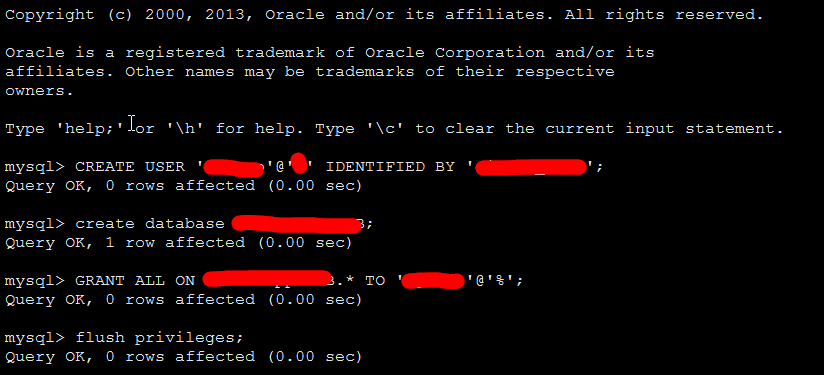
安装之后,新建用户及密码,新建数据库,分配权限
mysql> CREATE USER 'user'@'%' IDENTIFIED BY 'password';
Query OK,  rows affected (0.00 sec)

mysql> create database DB;
Query OK,  row affected (0.00 sec)

mysql>create database DB default character set utf8 collate utf8_general_ci; (为了DJANGO操作中文不乱码)
Query OK, 1 row affected (0.00 sec)
rows affected ( rows affected (0.00 sec)
YUM安装的MYSQL之后,第一次启动时的安全配置:
PLEASE REMEMBER TO SET A PASSWORD FOR THE MySQL root USER !
To do so, start the server, then issue the following commands:

/usr/bin/mysqladmin -u root password 'new-password'
/usr/bin/mysqladmin -u root -h cnsz141539 password 'new-password'

Alternatively you can run:
/usr/bin/mysql_secure_installation

which will also give you the option of removing the test
databases and anonymous user created by default.  This is
strongly recommended for production servers.

See the manual for more instructions.

You can start the MySQL daemon with:
cd /usr ; /usr/bin/mysqld_safe &

You can test the MySQL daemon with mysql-test-run.pl
cd /usr/mysql-test ; perl mysql-test-run.pl

Please report any problems with the /usr/bin/mysqlbug script!
如果要将MYSQL放入SERVICE服务,相应的脚本为:
#!/bin/sh
#
# mysqld    This shell script takes care of starting and stopping
#        the MySQL subsystem (mysqld).
#
# chkconfig: -
# description:    MySQL database server.
# processname: mysqld
# config: /etc/my.cnf
# pidfile: /var/run/mysqld/mysqld.pid
### BEGIN INIT INFO
# Provides: mysqld
# Required-Start: $local_fs $remote_fs $network $named $syslog $time
# Required-Stop: $local_fs $remote_fs $network $named $syslog $time
# Short-Description: start and stop MySQL server
# Description: MySQL database server
### END INIT INFO

# Source function library.
. /etc/rc.d/init.d/functions

# Source networking configuration.
. /etc/sysconfig/network

exec="/usr/bin/mysqld_safe"
prog="mysqld"

# Set timeouts here so they can be overridden from /etc/sysconfig/mysqld
STARTTIMEOUT=
STOPTIMEOUT=

[ -e /etc/sysconfig/$prog ] && . /etc/sysconfig/$prog

lockfile=/var/lock/subsys/$prog

# extract value of a MySQL option from config files
# Usage: get_mysql_option SECTION VARNAME DEFAULT
# result is returned in $result
# We use my_print_defaults which prints all options from multiple files,
# with the more specific ones later; hence take the last match.
get_mysql_option(){
    result=`/usr/bin/my_print_defaults `
    if [ -z "$result" ]; then
        # not found, use default
        result="$3"
    fi
}

get_mysql_option mysqld datadir "/var/lib/mysql"
datadir="$result"
get_mysql_option mysqld socket "$datadir/mysql.sock"
socketfile="$result"
get_mysql_option mysqld_safe log-error "/var/log/mysqld.log"
errlogfile="$result"
get_mysql_option mysqld_safe pid-file "/var/run/mysqld/mysqld.pid"
mypidfile="$result"

start(){
    [ -x $exec ] || exit
    # check to see if it's already running
    MYSQLDRUNNING=
    if [ -f "$mypidfile" ]; then
    MYSQLPID=`>/dev/null`
    if [ -n "$MYSQLPID" ] && [ -d "/proc/$MYSQLPID" ] ; then
        MYSQLDRUNNING=
    fi
    fi
    RESPONSE=`/usr/bin/mysqladmin --socket=>&`
     ] && [ $? =  ]; then
    # already running, do nothing
    action $"Starting $prog: " /bin/true
    ret=
     ] && echo "$RESPONSE" | grep -q "Access denied for user"
    then
    # already running, do nothing
    action $"Starting $prog: " /bin/true
    ret=
    else
        # prepare for start
    >/dev/null
     ]; then
         # failed to touch log file, probably insufficient permissions
        action $"Starting $prog: " /bin/false
        return
    fi
    chown mysql:mysql "$errlogfile"
     "$errlogfile"
    [ -x /sbin/restorecon ] && /sbin/restorecon "$errlogfile"
    if [ ! -d "$datadir/mysql" ] ; then
        # First, make sure $datadir is there with correct permissions
        if [ ! -e "$datadir" -a ! -h "$datadir" ]
        then

        fi
        chown mysql:mysql "$datadir"
         "$datadir"
        [ -x /sbin/restorecon ] && /sbin/restorecon "$datadir"
        # Now create the database
        action $"Initializing MySQL database: " /usr/bin/mysql_install_db --datadir="$datadir" --user=mysql
        ret=$?
        chown -R mysql:mysql "$datadir"
         ] ; then
        return $ret
        fi
    fi
    chown mysql:mysql "$datadir"
     "$datadir"
    # We check if there is already a process using the socket file,
    # since otherwise this init script could report false positive
    # result and mysqld_safe would remove the socket file, which
    # actually uses a different daemon.
    if fuser "$socketfile" &>/dev/null ; then
        echo "Socket file $socketfile exists. Is another MySQL daemon already running with the same unix socket?"
        action $"Starting $prog: " /bin/false
        return
    fi
    # Pass all the options determined above, to ensure consistent behavior.
    # In many cases mysqld_safe would arrive at the same conclusions anyway
    # but we need to be sure.  (An exception is that we don't force the
    # log-error setting, since this script doesn't really depend on that,
    # and some users might prefer to configure logging to syslog.)
    # Note: set --basedir to prevent probes that might trigger SELinux
    # alarms, per bug #
    $exec   --datadir="$datadir" --socket="$socketfile" \
        --pid-file="$mypidfile" \
        --basedir=/usr --user=mysql >/dev/>& &
    safe_pid=$!
    # Spin for a maximum of N seconds waiting for the server to come up;
    # exit the loop immediately if mysqld_safe process disappears.
    # Rather than assuming we know a valid username, accept an "access
    # denied" response as meaning the server is functioning.
    ret=
    TIMEOUT="$STARTTIMEOUT"
     ]; do
        RESPONSE=`/usr/bin/mysqladmin --socket=>&`
        mret=$?
         ]; then
        break
        fi
        # exit codes ,  (EXIT_CANNOT_CONNECT_TO_SERVICE) are expected,
        # anything else suggests a configuration error
         -a $mret -ne  ]; then
        echo "$RESPONSE"
        echo "Cannot check for MySQL Daemon startup because of mysqladmin failure."
        ret=
        break
        fi
        echo "$RESPONSE" | grep -q "Access denied for user" && break
         $safe_pid >/dev/null; then
        echo "MySQL Daemon failed to start."
        ret=
        break
        fi

        let TIMEOUT=${TIMEOUT}-
    done
     ]; then
        echo "Timeout error occurred trying to start MySQL Daemon."
        ret=
    fi
     ]; then
        action $"Starting $prog: " /bin/true
        >&
        touch $lockfile
    else
        action $"Starting $prog: " /bin/false
    fi
    fi
    return $ret
}

stop(){
    if [ ! -f "$mypidfile" ]; then
        # not running; per LSB standards this is "ok"
        action $"Stopping $prog: " /bin/true
        return
    fi
    MYSQLPID=`>/dev/null`
    if [ -n "$MYSQLPID" ]; then
        /bin/>&
        ret=$?
         ]; then
        TIMEOUT="$STOPTIMEOUT"
         ]; do
            /bin/ >& || break

            let TIMEOUT=${TIMEOUT}-
        done
         ]; then
            echo "Timeout error occurred trying to stop MySQL Daemon."
            ret=
            action $"Stopping $prog: " /bin/false
        else
            rm -f $lockfile
            rm -f "$socketfile"
            action $"Stopping $prog: " /bin/true
        fi
        else
        action $"Stopping $prog: " /bin/false
        fi
    else
        # failed to read pidfile, probably insufficient permissions
        action $"Stopping $prog: " /bin/false
        ret=
    fi
    return $ret
}

restart(){
    stop
    start
}

condrestart(){
    [ -e $lockfile ] && restart || :
}

# See how we were called.
case "$1" in
  start)
    start
    ;;
  stop)
    stop
    ;;
  status)
    status -p "$mypidfile" $prog
    ;;
  restart)
    restart
    ;;
  condrestart|try-restart)
    condrestart
    ;;
  reload)
    exit
    ;;
  force-reload)
    restart
    ;;
  *)
    echo $"Usage: $0 {start|stop|status|restart|condrestart|try-restart|reload|force-reload}"
    exit
esac

exit $?
MYSQL简单安装配置的更多相关文章
- tftp服务器简单安装配置
tftp服务器最简单安装配置 1.安装tftp-server sudo apt-get install tftpd-hpa sudo apt-get install tftp-hpa(如果不需要客户端 ...
- [mysql]brew 安装 配置 操作 mysql(中文问题)
mac 下卸载mysqldmg mac下mysql的DMG格式安装内有安装文件,却没有卸载文件--很郁闷的事. 网上搜了一下,发现给的方法原来得手动去删. 很多文章记述要删的文件不完整,后来在stac ...
- 阿里云服务器 ECS 部署lamp:centos+apache+mysql+php安装配置方法 (centos7)
阿里云服务器 ECS 部署lamp:centos+apache+mysql+php安装配置方法 (centos7) 1.效果图 1 2. 部署步骤 1 1. mysql安装附加(centos7) 7 ...
- java:安装tomcat8/tomcat9(简单安装配置)
java:安装tomcat8/tomcat9(简单安装配置) pache-tomcat-8.5.23(免安装板) 1.安装完成后右击我的电脑—属性—高级系统设置—环境变量, 在系统变量中添加以下变量 ...
- Mysql主从安装配置
Mysql主从安装配置 环境: 主从服务器上的MySQL数据库版本同为5.1.34 主机IP:192.168.0.1 从机IP:192.168.0.2 一. MySQL主服务器配置 1.编辑配置 ...
- mysql主从复制安装配置
mysql主从复制安装配置 基础设置准备 #操作系统: centos6.5 #mysql版本: 5.7 #两台虚拟机: node1:192.168.182.111(主) node2:192.168.1 ...
- 记一次 mysql主从复制安装配置 过程
mysql主从复制安装配置 1.centos安装及准备 去centos官网下载相应source版本的镜像文件并在vmware中安装,安装中会遇到填写installation source,输入以下即可 ...
- 虚拟机+apache+php+mysql 环境安装配置
虚拟机的安装:直接下一步即可,注意修改路径. 安装完成后新建虚拟机,直接下一步.如果选择镜像文件后出现错误,可以试着去修改电脑bios中的虚拟化设置,改为enable,如下图: apache安装: 1 ...
- Linux(Ubuntu) Mysql的安装配置例子以及常用命令
1.安装配置例子 有空再写 2.注意事项 (1)启动mysql 在/etc/mysql 目录下 service mysql start 新版本是(service mysqld start ) (2 ...
随机推荐
- hadoop错误org.apache.hadoop.util.DiskChecker$DiskErrorException Could not find any valid local directory for
错误: org.apache.hadoop.util.DiskChecker$DiskErrorException: Could not find any valid local directory ...
- 将Java应用注册为后台服务
项目中有一个java应用程序,交付后用户要求要把这个程序做成后台服务程序,即:系统启动后该程序可以自动启动,并且在前台不要出现运行窗口,维护人员只要在“服务管理”(Windows)中选择启动或停止即可 ...
- Android开发之适配器-ListView适配器的重复数据
适配器是Android中的数据与View视图的桥梁,作用就是将数据通过适配器显示到对应的View视图上. 工作中,在用ListView做适配器数据时候,有些人肯定碰见过,如何优化效率,但是又出现重复数 ...
- 输入一个字符串,去掉重复的字符,并按ASCII值排序-华为机试
import java.util.Scanner; //输入字符串,去掉重复的字符,并按ASSIC码值排序 public class quChong { public static void main ...
- Spring声明式事务(xml配置事务方式)
Spring声明式事务(xml配置事务方式) >>>>>>>>>>>>>>>>>>>& ...
- 基于PHP的cURL快速入门
cURL 是一个利用URL语法规定来传输文件和数据的工具,支持很多协议,如HTTP.FTP.TELNET等.最爽的是,PHP也支持 cURL 库.本文将介绍 cURL 的一些高级特性,以及在PHP中如 ...
- (转)Spring 读书笔记-----使用Spring容器(一)
Spring有两个核心接口:BeanFactory和ApplicationContext,其中ApplicationContext是BeanFactory的子接口.他们都可代表Spring容器,Spr ...
- 自己写的SqlHelper
using System; using System.Collections.Generic; using System.Configuration; using System.Data; using ...
- oracle redo日志维护
环境 OS:Red Hat Linux As 5 DB:10.2.0.1 1.添加日志组 alter database add logfile group 4 ('/u01/app/oracle/or ...
- iOS8 iPad Warning: Attempt to present <UIImagePickerController:xxxx > on xxxx which is already presenting (null)
解决方法: /* I think this is because in iOS 8, alert views and action sheets are actually presented view ...