
Unity3D学习笔记(二十五):Json
using System.Collections;

using System.Collections.Generic;

using UnityEngine;

public class WriteClassToJson

{

    //练习:把Json写成类

    //{

    //    "name":"小明",

    //    "age":80,

    //    "isMan":false

    //}

    public class People

    {

        public string name;

        public int age;

        public bool isMan;

    }

    //{

    //    "name":"小明",

    //    "students":["A","B","C","D"]

    //}

    public class Teacher

    {

        public string name;

        //public string[] students;

        public List<string> students;

    }

    //{

    //    "name":"小明",

    //    "Car":{"name":"名图","color":"write","number":74110}

    //}

    public class PeopleCar

    {

        public string name;

        public Car car;

    }

    public class Car

    {

        public string name;

        public string color;

        public int number;

    }

    //{

    //    "name":"小明",

    //    "house":

    //            [

    //                {"address":"门头沟","size":10}

    //                {"address":"珠海","size":80}

    //                {"address":"地中海","size":800}

    //            ]

    //}

    public class PeopleHouse

    {

        public string name;

        public List<House> house;

    }

    public class House

    {

        public string address;

        public float size;

    }

    //{

    //    "name":"小明",

    //    "friend":

    //            [

    //                ["哈士奇","中华田园犬","藏獒"],

    //                ["羊腰子","猪腰子","牛腰子"]

    //            ]

    //}

    public class PeopleFriend

    {

        public string name;

        public List<List<string>> friend;

    }

    //练习:把类写成Json

    //写出a,b,c,d对象的Json

    class Program

    {

        static void Main(string[] args)

        {

            A a = new A();

            a.name = "小明";

            a.id = ;

            a.sex = false;

            //{

            //    "name":"小明",

            //    "id":1111112,

            //    "sex":false

            //}

            B b = new B();

            b.name = "小明";

            b.items = new List<string>() { "狗", "车", "腰子" };

            //{

            //    "name":"小明",

            //    "items":[ "狗", "车", "腰子"]

            //}

            C c = new C();

            c.name = "小明";

            c.a = new A();

            c.a.name = "小花";

            c.a.id = ;

            c.a.sex = true;

            c.b = new B();

            c.b.name = "骚粉";

            c.b.items = new List<string>() { "狗", "车", "腰子" };

            //{

            //    "name":"小明",

            //    "a":{ "name":"小花","id":21,"sex":true }

            //    "b":{ "name":"骚粉","items":[ "狗", "车", "腰子"] }

            //}

            D d = new D();

            d.name = "小明";

            d.items = new List<DItem>() { new DItem("房子", ), new DItem("车", ), new DItem("狗", ) };

            //{

            //    "name":"小明",

            //    "items":

            //    [

            //        { "name":"房子", "id":1 },

            //        { "name":"车", "id":2 },

            //        { "name":"狗", "id":3 }

            //    ]

            //}

            E e = new E();

            e.name = "小明";

            e.type = EType.B;

            //{

            //    "name":"小明",

            //    "type":1

            //}

        }

    }

    public class A

    {

        public string name;

        public int id;

        public bool sex;

    }

    public class B

    {

        public string name;

        public List<string> items;

    }

    public class C

    {

        public string name;

        public A a;

        public B b;

    }

    public class D

    {

        public string name;

        public List<DItem> items;

    }

    public class DItem

    {

        public string name;

        public int id;

        public DItem(string name, int id)

        {

            this.name = name;

            this.id = id;

        }

    }

    public class E

    {

        public string name;

        public EType type;

    }

    public enum EType

    {

        A,

        B,

        C,

        D

    }

}
{

    "playerName": "尼古拉斯·明",

    "maxHP": 1000.0,

    "currentHP": 300.0,

    "maxExp": 1000.0,

    "currentExp": 800.0,

    "level": ,

    "gold": ,

    "diamonds":

}
using System.Collections;

using System.Collections.Generic;

using UnityEngine;

public class PlayerData

{

    public float atk;

    public float defanse;

    public float thump;

    public float hp;

    public float atmpk;

    public float anger;

}

public class A

{

    void CreatePlayerData()

    {

        PlayerData data = new PlayerData();

        data.atk = ;

        data.defanse = ;

        data.thump = ;

        data.hp = ;

        data.atmpk = ;

        data.anger = ;

    }

}

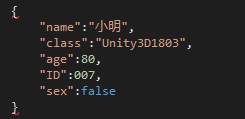
//{

//    "name":"小明",

//    "class":"Unity3D1803",

//    "age":80,

//    "ID":007,

//    "sex":false

//}

//{

//    "items":["血瓶","蓝瓶","复活币","材料1","材料2"]

//}

////Object类型的数组

//{

//    "array":["name","age",18,true,false]

//}


using System.Collections;

using System.Collections.Generic;

using UnityEngine;

public class ObjectToJson : MonoBehaviour {

       // Use this for initialization

       void Start () {

        TestObjectToJson obj = new TestObjectToJson();

        //把对象转换成Json字符串,第二个参数是否格式化输出

        string str = JsonUtility.ToJson(obj, true);

        Debug.Log(str);

    }

       // Update is called once per frame

       void Update () {

       }

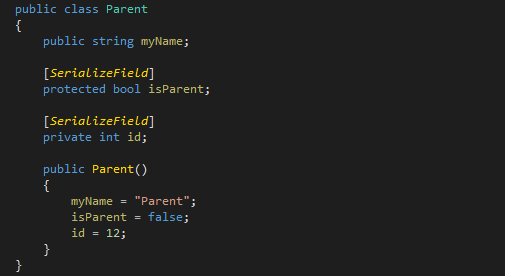
    public class Parent

    {

        public string myName;

        [SerializeField]

        protected bool isParent;

        [SerializeField]

        private int id;

        public Parent()

        {

            myName = "Parent";

            isParent = false;

            id = ;

        }

    }

    public class TestObjectToJson: Parent

    {

        public string name;

        public int age;

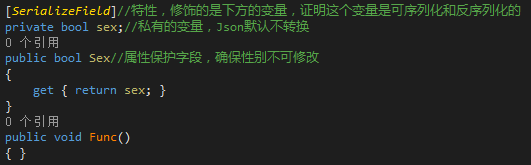
        [SerializeField]//特性,修饰的是下方的变量,证明这个变量是可序列化和反序列化的

        private bool sex;//私有的变量,Json默认不转换

        public bool Sex//属性保护字段,确保性别不可修改

        {

            get { return sex; }

        }

        public void Func()

        { }

        public List<string> list;

        [SerializeField]

        private Friend friend;//如果类对象是私有的,还需要添加加[SerializeField]

        public MyStruct stt;

        public MyType type;

        public Friend f1;

        public TestObjectToJson()

        {

            this.name = "小明";

            this.age = ;

            this.sex = false;

            list = new List<string>() {"哈士奇", "大金毛", "博美", "泰日天" };

            friend = new Friend();

            stt = new MyStruct(, true, "Struct");

            type = MyType.B;

            f1 = null;

        }

    }

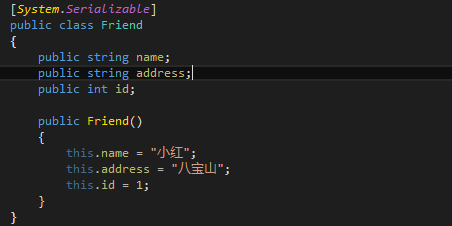
    [System.Serializable]//当一个类作为变量类型的时候,需要在定义类的时候,在类的上方加[System.Serializable]

    public class Friend

    {

        public string name;

        public string address;

        public int id;

        public Friend()

        {

            this.name = "小红";

            this.address = "八宝山";

            this.id = ;

        }

    }

    [System.Serializable]

    public struct MyStruct

    {

        public int id;

        public bool isStruct;

        private string name;

        public MyStruct(int id, bool isStruct, string name)

        {

            this.id = id;

            this.isStruct = isStruct;

            this.name = name;

        }

    }

    public enum MyType

    {

        A,

        B,

        C

    }

}
结构体,和类相同,需要在定义结构体的时候,添加[System.Serializable]
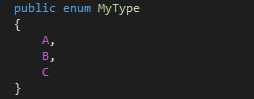
枚举,枚举类型会自动转换成int数值
using System.Collections;

using System.Collections.Generic;

using UnityEngine;

public class JsonToObject : MonoBehaviour {

       // Use this for initialization

       void Start () {

              string json =

            "{" +

            "\"weight\":0.5," +

            "\"name\":\"小明\"," +

            "\"age\":\"18\"," +

            "\"id\":\"1\"," +

            "\"list\":[1,2,3,4,5]," +

            "\"cl\":{\"name\":\"小花\",\"type\":\"2\"}" +

            "}";

        TestJsonToObject obj = JsonUtility.FromJson<TestJsonToObject>(json);

        obj.Print();

    }

       // Update is called once per frame

       void Update () {

       }

    public class TestJsonToObject

    {

        public string name;

        public int age;

        [SerializeField]

        private int id;

        [SerializeField]

        private float weight;

        public bool sex;

        public List<int> list;

        public MyClass cl;

        public MyType type;

        public void Print()

        {

            Debug.Log("name:" + this.name);

            Debug.Log("age:" + this.age);

            Debug.Log("id:" + this.id);

            Debug.Log("weight:" + this.weight);

            for (int i = ; i < list.Count; i++)

            {

                Debug.Log("list:" + list[i]);

            }

            Debug.Log("cl:" + cl.name);

            Debug.Log("type:" + this.type);

        }

    }

    [System.Serializable]

    public class MyClass

    {

        public string name;

    }

    public enum MyType

    {

        A,

        B,

        C

    }

}
using System.Collections;

using System.Collections.Generic;

using UnityEngine;

using System.IO;

public class SaveManager

{

    private static SaveManager instance;

    public static SaveManager Instance

    {

        get

        {

            if (instance == null)

            {

                instance = new SaveManager();

            }

            return instance;

        }

    }

    private SaveManager() { }

    /// <summary>

    /// 游戏一启动初始化数据

    /// </summary>

    public void InitData()

    {

        Debug.Log("初始化数据");

        //从文件中读取数据解析成PlayerData对象, 再把解析完成的对象给PlayerData的单例

        Debug.Log(Application.streamingAssetsPath);

        //Application.persistentDataPath

        string playerJson = FileTools.ReadFile(Application.streamingAssetsPath + @"\PlayerData.txt");

        Debug.Log(playerJson);

        if (playerJson == "")

        {

            //如果Json为“”

        }

        else

        {

            PlayerData data = JsonUtility.FromJson<PlayerData>(playerJson);

            //把从Json中解析的对象给PlayerData的单例

            PlayerData.SetInstance(data);

        }

    }

    /// <summary>

    /// 关闭游戏保存数据

    /// </summary>

    public void SaveData()

    {

        Debug.Log("存储数据");

        //在关系游戏时,需要把最新的数据写入到文件中去

        //1.把对象转换成Json

        string json = JsonUtility.ToJson(PlayerData.Instance, true);

        //2.把转换之后的json写入到文件中

        FileTools.WriteFile(Application.streamingAssetsPath + @"\PlayerData.txt", json);

    }

}
GameManager,继承Mono,管理启动关闭
using System.Collections;

using System.Collections.Generic;

using UnityEngine;

public class GameManager : MonoBehaviour

{

    // Use this for initialization

    void Awake()

    {

        DontDestroyOnLoad(gameObject);//保证任何场景都有GameManager

        //游戏一开始初始化数据

        SaveManager.Instance.InitData();

    }

    void OnDestroy()

    {

        //因为他在场景切换的时候是不销毁的,所以如果OnDestroy被调用了,一定是关闭游戏的时候

        //游戏关闭的时候需要调用 存档

        SaveManager.Instance.SaveData();

    }

}
FileTools,工具类,负责读取和写入,using System.IO;
using System.Collections;

using System.Collections.Generic;

using UnityEngine;

using System.IO;

/// <summary>

/// 这个类的作用,就是读取和写入数据

/// </summary>

public static class FileTools

{

    /// <summary>

    /// 从文件中读取数据

    /// </summary>

    /// <param name="path"></param>

    /// <returns></returns>

    public static string ReadFile(string path)

    {

        if (!File.Exists(path))

        {

            return "";

        }

        string json = "";

        StreamReader sr = new StreamReader(path, System.Text.Encoding.UTF8);

        try

        {

            json = sr.ReadToEnd();

        }

        catch (System.Exception e)

        {

            Debug.Log(e.ToString());

        }

        sr.Close();

        return json;

    }

    /// <summary>

    /// 把内容写入到文件中

    /// </summary>

    /// <param name="path"></param>

    /// <param name="json"></param>

    public static void WriteFile(string path, string json)

    {

        if (!File.Exists(path))

        {

            FileStream fs = File.Create(path);

            fs.Close();

        }

        StreamWriter sw = new StreamWriter(path, false, System.Text.Encoding.UTF8);

        try

        {

            sw.Write(json);

        }

        catch (System.Exception e)

        {

            Debug.Log(e.ToString());

        }

        sw.Close();

    }

}

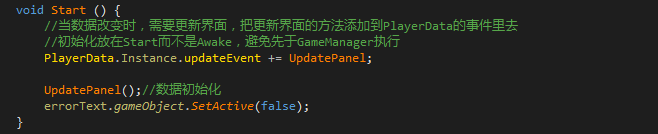
数据初始化问题
Unity3D学习笔记(二十五):Json的更多相关文章
- python3.4学习笔记(二十五) Python 调用mysql redis实例代码
python3.4学习笔记(二十五) Python 调用mysql redis实例代码 #coding: utf-8 __author__ = 'zdz8207' #python2.7 import ...
- Java基础学习笔记二十五 MySQL
MySQL 在dos中操作mysql 连接mysql命令: mysql -uroot -p密码 ,连接OK,会出现mysql> 对数据库的操作 创建一个库 create database 库名 ...
- Java学习笔记二十五:Java面向对象的三大特性之多态
Java面向对象的三大特性之多态 一:什么是多态: 多态是同一个行为具有多个不同表现形式或形态的能力. 多态就是同一个接口,使用不同的实例而执行不同操作. 多态性是对象多种表现形式的体现. 现实中,比 ...
- angular学习笔记(二十五)-$http(3)-转换请求和响应格式
本篇主要讲解$http(config)的config中的tranformRequest项和transformResponse项 1. transformRequest: $http({ transfo ...
- PHP学习笔记二十五【类的继承】
<?php //定义父类 class Stu{ public $name; protected $age; protected $grade; private $address;//私有变量不会 ...
- Unity3D学习笔记(十五):寻路系统
动画生硬切换:animation.play();//极少使用,常用融合方法 动画融合淡入:animation.CrossFade(“Idle”, 0.2f);//0.2f为与前一动画的融合百分比为20 ...
- python3.4学习笔记(二十四) Python pycharm window安装redis MySQL-python相关方法
python3.4学习笔记(二十四) Python pycharm window安装redis MySQL-python相关方法window安装redis,下载Redis的压缩包https://git ...
- python3.4学习笔记(二十六) Python 输出json到文件,让json.dumps输出中文 实例代码
python3.4学习笔记(二十六) Python 输出json到文件,让json.dumps输出中文 实例代码 python的json.dumps方法默认会输出成这种格式"\u535a\u ...
- 学习笔记:CentOS7学习之二十五:shell中色彩处理和awk使用技巧
目录 学习笔记:CentOS7学习之二十五:shell中色彩处理和awk使用技巧 25.1 Shell中的色彩处理 25.2 awk基本应用 25.2.1 概念 25.2.2实例演示 25.3 awk ...
- Nodejs学习笔记(十五)--- Node.js + Koa2 构建网站简单示例
目录 前言 搭建项目及其它准备工作 创建数据库 创建Koa2项目 安装项目其它需要包 清除冗余文件并重新规划项目目录 配置文件 规划示例路由,并新建相关文件 实现数据访问和业务逻辑相关方法 编写mys ...
随机推荐
- sitecore系统教程之Item快速了解
项目是Sitecore网站的基本构建块.项目可以表示构成网页的任何类型的信息,例如,一段文本,媒体文件,布局等. 项目始终具有名称,唯一标识项目的ID,并且它基于定义项目包含的字段的模板.此外,项目可 ...
- JavaScript--常用的输出方式
1.alert("要输出的内容"); 在浏览器中弹出一个对话框,然后把要输出的内容展示出来 2.document.write("要输出的内容"); ...
- jQuery事件--change([[data],fn])、on(events,[selector],[data],fn)和hover([over,]out)
change([[data],fn]) 概述 当元素的值发生改变时,会发生 change 事件. 该事件仅适用于文本域(text field),以及 textarea 和 select 元素.当用于 ...
- 用django统计代码行数+注释行数
实现统计代码行数: 1.首先在url.py中配置 from django.conf.urls import url from django.contrib import admin from app0 ...
- 安卓apk的编译与反编译
原文:https://blog.csdn.net/baidu_33870664/article/details/80186945 android基于java的,而java反编译工具很强悍,所以对正常a ...
- Linux基础命令---显示登录用户w
w 显示哪些用户登录,并且显示用户在干什么.报头按此顺序显示当前时间.系统运行时间.当前登录用户数以及过去1.5和15分钟的系统平均负载.接着为每个用户显示以下条目:登录名.TTY名称.远程主机.登录 ...
- 转:【专题三】自定义Web服务器
前言: 经过前面的专题中对网络层协议和HTTP协议的简单介绍相信大家对网络中的协议有了大致的了解的, 本专题将针对HTTP协议定义一个Web服务器,我们平常浏览网页通过在浏览器中输入一个网址就可以看到 ...
- 前端框架VUE----node.js的简单介绍
一.什么是node.js? 它是可以运行JavaScript的服务平台,可以吧它当做一门后端程序,只是它的开发语言是JavaScript 二.安装 1.node.js的特性: - 非阻塞IO模型 - ...
- plsql登录报错身份证明检索失败
找到sqlnet.ora文件 在Oracle安装目录下 \product\12.2.0\dbhome_1\network\admin 把 SQLNET.AUTHENTICATION_S ...
- 虚拟继承C++
C++中虚拟继承的概念 为了解决从不同途径继承来的同名的数据成员在内存中有不同的拷贝造成数据不一致问题,将共同基类设置为虚基类.这时从不同的路径继承过来的同名数据成员在内存中就只有一个拷贝,同一个函数 ...