
【译】第5节---Code First约定
原文:http://www.entityframeworktutorial.net/code-first/code-first-conventions.aspx
我们在上一节中已经看到了EF Code-First如何从领域域类创建DB表。 在这里,我们将了解默认的Code-First约定。
什么是约定?
约定是一组默认规则,用于在使用Code-First时自动配置基于领域域类定义的概念模型。 Code-First约定在System.Data.Entity.ModelConfiguration.Conventions命名空间中定义。
让我们看看各种Code-First约定的概述。
类型发现
在上一节中,我们为想要成为模型的一部分的类创建了一个具有DbSet属性的上下文类。 Code-First将为包含为DbSet属性的类创建表,正如我们在上一节中所看到的那样。
Code-First还包括这些类中包含的任意引用类型,即使引用的类型在不同的程序集中定义。
例如,以下Student实体类包括Teacher类的引用。 但是,context类不包括Teacher作为DbSet属性。
public class Student

{

    public Student()

    {

    }

    public int StudentID { get; set; }

    public string StudentName { get; set; }

    public DateTime DateOfBirth { get; set; }

    public byte[]  Photo { get; set; }

    public decimal Height { get; set; }

    public float Weight { get; set; }

    public Teacher Teacher { get; set; }

    public Standard Standard { get; set; }

}

public class Teacher

{

    public Teacher()

    {

    }

    public int TeacherId { get; set; }

    public string TeacherName { get; set; }

}
以下是一个上下文类,不包括Teacher作为DbSet属性(实体集)
namespace EF_Code_First_Tutorials

{

    public class SchoolContext: DbContext

    {

        public SchoolContext(): base()

        {

        }

        public DbSet<Student> Students { get; set; }

        public DbSet<Standard> Standards { get; set; }

    }

}
因此,即使Teacher不被包含在上下文类中的实体集中,Code-First将包含在概念模型中,并为其创建一个DB表,如下所示。
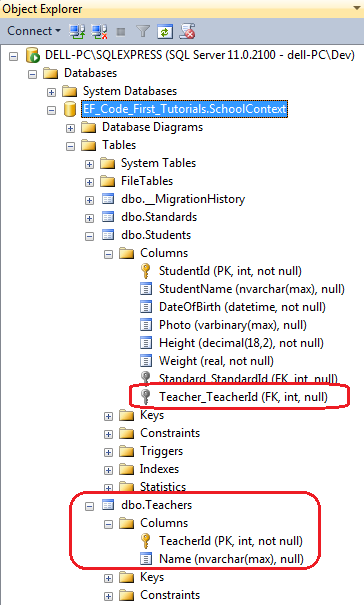
即使上下文类只包含基类作为DbSet属性,Code-First也包括派生类。
类型发现的约定是:
- Code-First包括在上下文类中定义为DbSet属性的类型。
- 代码首先包括实体类型中包含的引用类型,即使它们在不同的程序集中定义。
- Code-First包括派生类,即使只将基类定义为DbSet属性。
主键约定
在上一节中,我们已经看到Code-First在每个表中自动创建一个主键。
主键的默认约定是,如果属性名称为Id或<ClassName> Id(不区分大小写),则Code-First将为属性创建一个主键。
主键属性的数据类型可以是任何东西,但是如果主键属性的类型是数字或GUID,则它将被配置为标识列。
如果您定义了除Id或<ClassName> Id以外的键属性,那么将抛出ModelValidationException。 例如,考虑以下标准(Standard )类:
public class Standard

{

    public Standard()

    {

    }

    public int StdId { get; set; }

    public string StandardName { get; set; }

    public IList<Student> Students { get; set; }

}
像上面的代码中看到的那样,Standard类定义了StdId 键属性。 实体框架将抛出以下异常:
'System.Data.Entity.ModelConfiguration.ModelValidationException' occurred in EntityFramework.dll
EntityType 'Standard' has no key defined. Define the key for this EntityType.
如果要将StdId定义为主键,则必须使用DataAnnotations或Fluent API将其配置为主键。 我们将在后面的教程中看到如何做。
关系约定
Code-First使用导航属性推断两个实体之间的关系。导航属性可以是简单的引用类型或集合类型。
例如,我们在Standard类中定义了标准导航属性,并在Standard类中定义了ICollection <Student>导航属性。 因此,Code First通过在Students表中插入Standard_StandardId外键列,自动创建标准和学生DB表之间的一对多关系。
public class Student

{

    public Student()

    {

    }

    public int StudentID { get; set; }

    public string StudentName { get; set; }

    public DateTime DateOfBirth { get; set; }

    public byte[]  Photo { get; set; }

    public decimal Height { get; set; }

    public float Weight { get; set; }

    //Navigation property

    public Standard Standard { get; set; }

}

public class Standard

{

    public Standard()

    {

    }

    public int StandardId { get; set; }

    public string StandardName { get; set; }

    //Collection navigation property

    public IList<Student> Students { get; set; }

}
上述实体使用Standard_StandardId外键创建了以下关系:
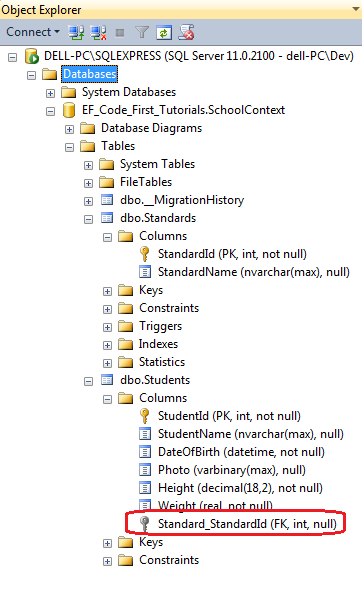
因此,关系的默认代码第一约定自动插入带有导航属性名称_导航属性类型的主键名称的外键。比如:Standard_StandardId。
外键约定
上面已经看到,当遇到导航属性时,Code First会自动插入一个外键。建议在关系的从属结尾附加一个外键属性。 请考虑以下示例:
public class Student

{

    public Student()

    {

    }

    public int StudentID { get; set; }

    public string StudentName { get; set; }

    public DateTime DateOfBirth { get; set; }

    public byte[]  Photo { get; set; }

    public decimal Height { get; set; }

    public float Weight { get; set; }

    //Foreign key for Standard

    public int StandardId { get; set; }

    public Standard Standard { get; set; }

}

public class Standard

{

    public Standard()

    {

    }

    public int StandardId { get; set; }

    public string StandardName { get; set; }

    public IList<Student> Students { get; set; }

    }
在上面的代码中可以看到,Student类包括外键StandardId,它是Standard类中的key属性。
现在,Code First将在Students类中创建StandardId列,而不是Standard_StandardId列,如下所示:
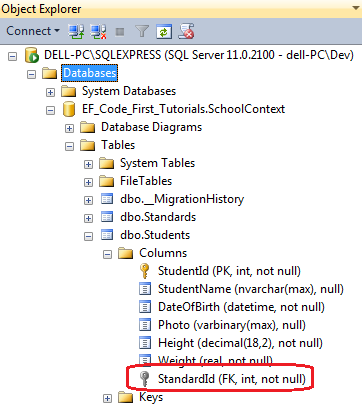
请注意,在上图中,StandardId外键不为空。 这是因为int数据类型不可空。
Code First首先根据外键的可空性来推断关系的多样性。如果属性为空,那么该关系将被注册为null。 否则,该关系注册为NOT NULL。
将StudentId属性的数据类型从int修改为上面的Student类中的Nullable <int>,以在“学生”表中创建一个可空的外键列。
复杂类型约定
Code First为不包含key属性,并且还没有使用DataAnnotation或Fluent API注册主键的类创建复杂类型。
默认Code First约定
下面列出了Code First的默认约定:
1.表名:实体类名称+“s”
2.主键:id或类名+id(不区分大小写)
3.外键:默认情况下,EF将查找与主体实体主键名称相同名称的外键属性。如果不存在,则会创建外键为:导航属性_实体主键名称。(见上文示例)
4.可空列:所有引用类型和可空类型(nullable )
5.不可空列:主键和不可空列
6.数据库列顺序:按照实体类的顺序创建,主键会移动到第一个位置
7.属性映射到数据库:默认所有的属性都会映射到数据库,可以使用[NotMapped]特性进行排除
8.级联删除:所有关系类型默认开启
下表列出了C#数据类型映射到SQL数据类型,和主键列数据类型和长度:
| C# DataType | Related DB Column DataType | PK Column DataType & Length |
|---|---|---|
| int | int | int, Identity column increment by 1 |
| string | nvarchar(Max) | nvarchar(128) |
| decimal | decimal(18,2) | decimal(18,2) |
| float | real | real |
| byte[] | varbinary(Max) | varbinary(128) |
| datetime | datetime | datetime |
| bool | bit | bit |
| byte | tinyint | tinyint |
| short | smallint | smallint |
| long | bigint | bigint |
| double | float | float |
| char | No mapping | No mapping |
| sbyte | No mapping (throws exception) |
No mapping |
| object | No mapping | No mapping |
这是Code First约定的概述。
可以使用DataAnnotation或Fluent API覆盖这些约定。 此外,可以使用EF6.0+为应用程序定义自定义约定。
【译】第5节---Code First约定的更多相关文章
- Code First 约定
Code First 约定 借助 Code First,可通过使用 C# 或 Visual Basic .NET 类来描述模型.模型的基本形状可通过约定来检测.约定是规则集,用于在使用 Code Fi ...
- Entity Framework 6新特性:全局性地自定义Code First约定
2012年12月11日,Entity Framework已经发布了Entity Framework 6 Alpha2,因项目需要,目前已使用了其中的两个特性,今天就来介绍一下第一个特性:全局性地自定义 ...
- EF6.0 自定义Code First约定
自定义Code First约定有三种方式,分别是:Lightweight Conventions(轻量级约定).Configuration Conventions(配置型约定).Model-based ...
- EntityFramWork(3 code First 约定)
Code First 约定 借助 Code First,可通过使用 C# 或 Visual Basic .NET 类来描述模型.模型的基本形状可通过约定来检测.约定是规则集,用于在使用 Code ...
- EntityFramework Code-First 简易教程(二)-------Code First约定
Code First 约定 在前一篇中,我们已经知道了EF Code-First怎样从模型类(domain classes)中创建数据库表,下面,我们开始学习默认的Code-First约定. 什么是约 ...
- 【EF】Entity Framework 6新特性:全局性地自定义Code First约定
应用场景 场景一:EF Code First默认使用类名作为表名,如果我们需要给表名加个前缀,例如将类名Category映射到表Shop_Category.将Product映射到Shop_Produc ...
- Code First约定-数据注释
通过实体框架Code First,可以使用您自己的域类表示 EF 执行查询.更改跟踪和更新函数所依赖的模型.Code First 利用称为“约定先于配置”的编程模式.这就是说,Code First 将 ...
- 【译】第43节---EF6-自定义约定
原文:http://www.entityframeworktutorial.net/entityframework6/custom-conventions-codefirst.aspx Code-Fi ...
- Entity Framework Code First约定
Code First使你能够通过C# 或者 Visual Basic .NET来描述模型,模型的基本规则通过使用约定来进行检查,而约定就是一系列内置的规则. 在Code First中基于类的定义通过一 ...
随机推荐
- [转载]css代码优化的12个技巧
1.ID 规则2.Class 规则3.标签规则4.通用规则对效率的普遍认识是从Steve Souders在2009年出版的<高性能网站建设进阶指南>开始,虽然该书中罗列的更加详细,但你也可 ...
- ajax实现图片上传
1.创建formData表单,模拟表单传递数据(formData有兼容性问题) var formData = new FormData();2.获取到相应的元素 var jobName = $(&qu ...
- ubuntu_查看software
感谢原博主的分享 ubuntu安装和查看已安装 说明:由于图形化界面方法(如Add/Remove... 和Synaptic Package Manageer)比较简单,所以这里主要总结在终端通过命令行 ...
- 第三节 深入JavaScript
函数的返回值:(把函数体内的数据传出到函数体外) 什么是函数的返回值:函数执行结果.可以没有返回值 一种函数应该只返回一种类型的值 函数传参:(与函数返回值相反,把外面数据传入函数体内) 可变参(不定 ...
- 每日linux命令学习-rpm命令
rpm命令 rpm是一款强大的Redhat软件包管理工具,可创建.安装.查询.验证.升级和卸载每个软件包,软件包是存储文件,包括需要安装的文件和名称.版本.说明等报信息. rpm默认支持7种操作模式, ...
- Oracle之现有表上建新表、操作符、字符函数
#PLSQL技术培训15页PPT利用现有表创建表(百度) 说明:做新操作前要对旧表备份 具体百度 语法: create table <new_table_name> as select ...
- linux 安装 ImageMagick 和 imagick 扩展
使用命令安装 1.依次运行以下命令 yum install ImageMagick yum install ImageMagick-devel yum install php-pear 安装php-p ...
- alert.log中的minact-scn: useg scan erroring out with error e:376警告
早上,开发说昨晚一台服务器的undo好像有异常,早上上去一看,库停了,正常startup之后,随手crud了一把,都正常.去看alert.log日志,发现undo某个数据块访问报I/O读错误,如下: ...
- mint-ui之datetime-picker使用
一基本使用<template> <mt-datetime-picker ref="picker" type="time" v-model=&q ...
- opencv学习之路(10)、ROI与mask掩码
一.ROI #include<opencv2/opencv.hpp> using namespace cv; void main(){ Mat img=imread("E://0 ...