
[Python] 06 - Modules --> Packages
故事背景
阶级关系
1. Programs are composed of modules.
2. Modules contain statements.
3. Statements contain expressions.
4. Expressions create and process objects.
Package 用来管理 modules。
教学大纲
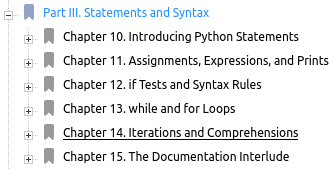
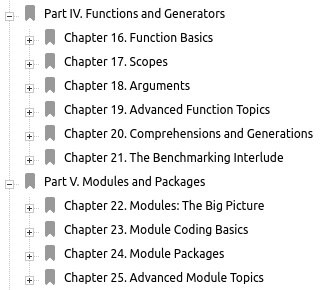
Modules
"Imports" 基础概念
导入module的过程
1. Find the module’s file.
2. Compile it to byte code (if needed). 【Python解释器已经把编译的字节码放在__pycache__文件夹中,*.pyc 文件】
3. Run the module’s code to build the objects it defines.
寻址策略
1. The home directory of the program # 项目路径
2. PYTHONPATH directories (if set) # 设置路径
3. Standard library directories # 系统路径
4. The contents of any .pth files (if present)
5. The site-packages home of third-party extensions
设置Python系统路径
查看 PYTHONPATH
>>> import sys

>>> sys.path

['', '/usr/local/anaconda3/lib/python35.zip', '/usr/local/anaconda3/lib/python3.5', '/usr/local/anaconda3/lib/python3.5/plat-linux', '/usr/local/anaconda3/lib/python3.5/lib-dynload', '/home/unsw/.local/lib/python3.5/site-packages', '/usr/local/anaconda3/lib/python3.5/site-packages', '/usr/local/anaconda3/lib/python3.5/site-packages/Mako-1.0.7-py3.5.egg', '/usr/local/anaconda3/lib/python3.5/site-packages/Sphinx-1.5.1-py3.5.egg', '/usr/local/anaconda3/lib/python3.5/site-packages/textteaser-0.3-py3.5.egg', '/usr/local/anaconda3/lib/python3.5/site-packages/requests-1.2.3-py3.5.egg', '/usr/local/anaconda3/lib/python3.5/site-packages/sputnik-0.9.3-py3.5.egg']
设置 PYTHONPATH
>>> import sys

>>> sys.path.append("C:\Python34\PCI_Code\chapter2")

>>> from recommendations import critics

>>>
C:\Python34\PCI_Code\chapter2>python

>>> from recommendations import *

>>>
"Imports" 使用法则
from <范围> import <功能> as <别名>
模块的属性查看
尝试查看下np的属性。
>>> import numpy as np

>>> list(np.__dict__.keys())

['add_docstring', 'longlong', 'geomspace', '__all__', 'moveaxis', 'character', 'unicode', 'fromstring', 'asarray_chkfinite', 'void', 'find_common_type', 'triu_indices', '_mat', 'uint64', 'get_printoptions', 'WRAP', 'recfromcsv', '_globals', 'PackageLoader', 'FPE_UNDERFLOW', 'require', 'isneginf', 'uintc', 'fill_diagonal', 'select', 'inexact', 'issubsctype', 'trunc', 'insert', 'CLIP', 'savetxt', 'int_asbuffer', 'log1p', 'base_repr', 'stack', 'in1d', 'Infinity', 'int32', 'ERR_IGNORE', 'str_', 'iscomplex', 'diag_indices', 'sinc', 'pv', 'info', 'float64', 'fv', 'timedelta64', 'floor', 'concatenate', 'einsum_path', 'ogrid', 'NaN', '__cached__', 'tile', 'testing', 'poly1d', 'ScalarType', 'numarray', 'atleast_1d', 'i0', 'object0', 'arccosh', 'isscalar', 'polysub', 'isclose', 'PZERO', 'tan', 's_', 'clongfloat', 'bitwise_not', 'ushort', 'rint', 'prod', 'inf', 'uint0', 'inner', 'sort_complex', 'amax', 'int16', 'fastCopyAndTranspose', 'real_if_close', 'not_equal', 'lib', 'SHIFT_INVALID', 'median', 'packbits', 'max', 'longfloat', 'bytes0', 'linalg', 'dot', 'float128', 'unicode_', 'interp', 'absolute', 'result_type', 'FPE_INVALID', 'mean', 'frombuffer', 'true_divide', 'nancumprod', 'float_', 'hypot', 'typename', 'percentile', 'savez_compressed', 'put', 'recarray', 'PINF', 'square', 'real', 'unpackbits', 'str0', 'remainder', 'polyadd', 'ones', 'uint32', 'sin', 'maximum', 'matrix', 'nbytes', 'safe_eval', 'datetime_data', 'rank', 'nanargmin', 'RankWarning', 'loads', 'str', 'string_', 'subtract', 'cumprod', 'amin', 'deg2rad', 'e', 'blackman', 'arccos', 'seterr', 'unique', 'sctype2char', 'recfromtxt', 'exp2', 'FLOATING_POINT_SUPPORT', 'deprecate_with_doc', 'sinh', 'bool', 'disp', 'seterrcall', 'finfo', 'repeat', 'add_newdocs', 'equal', 'UFUNC_PYVALS_NAME', 'frompyfunc', 'pmt', 'ravel', 'roots', 'extract', 'isin', 'unwrap', 'tri', 'genfromtxt', 'ix_', 'bitwise_and', 'sctypeDict', 'any', 'complex_', 'nonzero', 'iscomplexobj', 'swapaxes', 'flexible', 'mod', 'ptp', 'nan_to_num', 'sys', 'TooHardError', 'mafromtxt', 'asfortranarray', 'byte_bounds', 'cumsum', '__version__', 'uintp', 'ERR_PRINT', 'nanstd', 'hsplit', 'einsum', 'array_split', 'fabs', 'print_function', 'add_newdoc', 'arctan', 'half', 'ERR_LOG', 'broadcast_to', 'reshape', 'ComplexWarning', 'pkgload', 'MachAr', 'copyto', 'hamming', 'float16', 'polyint', 'issubdtype', 'ascontiguousarray', 'VisibleDeprecationWarning', 'RAISE', 'unravel_index', 'logical_xor', 'complex128', 'ctypeslib', 'tril', 'complexfloating', 'complex64', 'alen', 'ceil', '__name__', 'union1d', 'reciprocal', 'greater', 'zeros_like', 'polyval', 'irr', 'rad2deg', 'busdaycalendar', 'NAN', 'c_', 'bitwise_or', 'record', 'ndfromtxt', '__git_revision__', 'ERR_DEFAULT', 'fft', 'typecodes', 'kron', 'logical_and', 'is_busday', 'show_config', 'pi', 'frexp', 'number', 'rate', 'FPE_OVERFLOW', 'sort', 'where', 'ALLOW_THREADS', 'ipmt', 'modf', 'set_numeric_ops', 'typeNA', 'bitwise_xor', 'MAY_SHARE_BOUNDS', 'NINF', 'generic', 'mask_indices', 'MAXDIMS', 'take', 'intersect1d', 'matmul', 'isnat', 'place', 'searchsorted', 'argwhere', '__builtins__', 'deprecate', 'sctypeNA', 'isrealobj', '_import_tools', 'logspace', 'alltrue', 'array_str', 'test', 'array_equal', 'asscalar', 'obj2sctype', 'nanprod', 'poly', 'empty', 'arange', '__doc__', 'arcsin', 'promote_types', 'ma', 'polyfit', 'partition', 'ubyte', 'busday_count', 'set_printoptions', 'eye', 'longdouble', 'log', 'ModuleDeprecationWarning', 'geterrobj', 'fromiter', 'ppmt', 'block', 'log10', 'conj', 'rec', 'euler_gamma', 'add_newdoc_ufunc', 'sctypes', 'compress', 'ones_like', 'broadcast', 'conjugate', 'rot90', 'logical_not', 'apply_along_axis', 'round', 'vsplit', 'cross', '__file__', 'polymul', 'roll', 'logaddexp', 'sqrt', 'trapz', 'zeros', 'little_endian', 'may_share_memory', 'single', 'abs', 'resize', 'trace', '__loader__', 'fromregex', 'mgrid', 'spacing', 'vander', 'expand_dims', 'min', 'source', 'object', 'sign', 'fromfile', 'atleast_3d', 'get_include', 'tril_indices', '__package__', 'setbufsize', 'isreal', 'shape', 'ndarray', 'nanmax', 'newaxis', 'choose', 'Inf', 'tril_indices_from', 'infty', 'lookfor', 'negative', 'warnings', 'division', 'isfortran', 'log2', 'round_', 'degrees', 'array', 'average', 'split', 'argsort', 'column_stack', 'setxor1d', 'diagflat', 'compat', '_distributor_init', 'gradient', 'multiply', 'signbit', 'polyder', 'isnan', 'arctanh', 'SHIFT_DIVIDEBYZERO', 'UFUNC_BUFSIZE_DEFAULT', 'ediff1d', 'apply_over_axes', 'nanpercentile', 'indices', 'ERR_RAISE', 'digitize', 'datetime64', '__path__', 'float', 'SHIFT_UNDERFLOW', 'minimum', 'memmap', 'npv', 'fmod', 'int8', 'kaiser', 'vdot', 'arctan2', 'typeDict', 'cfloat', 'r_', 'int0', 'bincount', 'nested_iters', 'compare_chararrays', 'uint16', 'flatiter', 'tracemalloc_domain', 'ndindex', 'heaviside', 'convolve', 'flip', 'cov', 'triu_indices_from', 'arcsinh', 'row_stack', 'flatnonzero', 'identity', 'int64', 'bool8', 'dstack', 'cosh', 'meshgrid', 'loadtxt', 'fromfunction', 'lexsort', 'oldnumeric', 'nditer', 'squeeze', 'index_exp', 'floor_divide', 'tensordot', 'absolute_import', 'argpartition', 'geterr', 'Tester', 'invert', 'count_nonzero', 'nan', 'BUFSIZE', 'positive', 'mat', 'transpose', 'intp', 'csingle', 'delete', 'rollaxis', 'MAY_SHARE_EXACT', 'setdiff1d', 'singlecomplex', 'nanvar', 'corrcoef', 'iinfo', 'ERR_CALL', 'integer', 'histogramdd', 'savez', 'clip', 'allclose', 'nanmin', 'emath', 'argmax', 'fmax', 'histogram2d', 'core', 'common_type', 'load', 'piecewise', 'vectorize', 'complex256', 'nancumsum', 'flipud', 'logical_or', 'argmin', 'ldexp', 'signedinteger', 'bmat', 'mintypecode', 'bool_', 'less_equal', 'ERR_WARN', 'char', 'correlate', 'matrixlib', 'math', 'errstate', 'less', 'bytes_', 'asmatrix', 'NZERO', 'SHIFT_OVERFLOW', 'datetime_as_string', 'get_array_wrap', 'array_repr', 'diag', 'issctype', 'isinf', 'ndim', 'ravel_multi_index', 'maximum_sctype', 'triu', 'save', 'asanyarray', 'nansum', 'ufunc', 'hanning', 'expm1', 'imag', 'diagonal', 'ulonglong', '__spec__', 'geterrcall', 'nanargmax', 'full', 'chararray', 'msort', 'trim_zeros', 'random', 'std', 'int', 'FPE_DIVIDEBYZERO', 'cos', 'nanmean', 'min_scalar_type', 'greater_equal', 'True_', 'left_shift', 'linspace', 'set_string_function', 'floating', 'fmin', 'vstack', 'issubclass_', 'fliplr', 'logaddexp2', 'busday_offset', 'right_shift', 'iterable', 'bartlett', 'nanmedian', 'hstack', 'float_power', 'atleast_2d', 'isfinite', '_NoValue', 'full_like', 'short', 'ndenumerate', 'sometrue', 'shares_memory', 'asarray', 'angle', 'product', 'object_', 'cumproduct', 'uint8', 'array2string', 'var', 'dtype', 'diag_indices_from', 'histogram', 'unsignedinteger', 'divmod', 'can_cast', 'long', 'isposinf', 'array_equiv', 'putmask', 'add', 'nper', 'sum', 'polynomial', 'int_', 'complex', 'nextafter', 'polydiv', 'binary_repr', 'clongdouble', 'exp', 'cdouble', 'pad', 'intc', 'size', 'around', 'diff', 'asfarray', 'version', 'fix', 'outer', 'empty_like', 'float32', 'cbrt', 'getbufsize', '__config__', 'append', 'all', 'longcomplex', 'AxisError', 'seterrobj', 'format_parser', 'void0', 'False_', 'double', 'broadcast_arrays', 'who', 'dsplit', 'copy', 'power', 'copysign', 'uint', 'divide', 'cast', 'byte', 'DataSource', 'tanh', 'mirr', 'bench', '__NUMPY_SETUP__', 'radians']

>>>
list(np.__dict__.keys())
dir()的子集 __dict__
Python 下一切皆对象,每个对象都有多个属性(attribute),Python对属性有一套统一的管理方案。与dir()的区别:
- dir()是一个函数,返回的是list;
__dict__是一个字典,键为属性名,值为属性值;- dir()用来寻找一个对象的所有属性,包括
__dict__中的属性,__dict__是dir()的子集;
设置“被导入”标记
表示:让自己能用(当然自己能用),也能让其他人导入使用(具有了函数的“被调用”的功能)。
Ref: https://www.cnblogs.com/alan-babyblog/p/5147770.html
(1) 自己使用
没必要显示文件名,显示__main__就好啦。
# module.py

def main():

  print "we are in %s"%__name__

if __name__ == '__main__':    # 是作为主程序调用

    main()
打印结果:
”we are in __main__“
(2) 供他人导入使用
显示整体的文件名,module name。
# anothermodle.py

from module import main

main()
打印结果:
we are in module
Packages
为何需要 “package”
“导入”方式
三种常规方式
Ref: Python中import, from...import,import...as 的区别
[1] 导入全部
import datetime

print(datetime.datetime.now())
[2] 按需导入
from datetime import datetime

print(datetime.now())
[3] 起个别名
import datetime as dt

print(dt.datetime.now())
reload() 函数
Goto: http://www.runoob.com/python/python-func-reload.html
reload 会重新加载已加载的模块,但原来已经使用的实例还是会使用旧的模块,而新生产的实例会使用新的模块;

reload 后还是用原来的内存地址;

reload 不支持 from ××× import ××× 格式的模块进行重新加载。
Python 3.0
from imp import reload

reload(module)
加载"自定义模块"
Ref: http://www.cnitblog.com/seeyeah/archive/2009/03/15/55440.html
[1] 同级目录
`-- src

    |-- mod1.py

    `-- test1.py
test1.py要使用,则:
import mod1

or

from mod1 import *;
[2] 子目录
`-- src

    |-- mod1.py

    |-- mod2

    |   `-- mod2.py
    |    -- __init__.py

    `-- test1.py
需要在mod2文件夹中建立空文件__init__.py文件 (也可以在该文件中自定义输出模块接口);然后使用:
from mod2.mod2 import *
or
import mod2.mod2
[3] 表亲目录
`-- src

    |-- mod1.py

    |-- mod2

    |   `-- mod2.py
    |    -- __init__.py

    |-- sub

    |   `-- test2.py

    `-- test1.py
首先需要在mod2下建立__init__.py文件 (同(2)),src下不必建立该文件。
import sys

sys.path.append("..")  # <----

import mod1

import mod2.mod2
结论:
上述例子其实已经提及了包的概念,有点命名空间的意思。
这也解释了package存在的必要性。
package 概念
__init__ 文件的 "作用"
三个作用
__init__.py文件 的作用有如下几点:
1) 初始化模块:相当于class中的 def __init__(self):函数。
2) 把所在目录当作一个package处理
3) from-import 语句导入子包时需要用到它。 如果没有用到, 他们可以是空文件。
构成 package 的要素
__init__.py 文件用于组织包(package)。这里首先需要明确包(package)的概念。什么是包(package)?
简单来说,包是含有 python模块 的文件夹。一个 python模块(module)为一个py文件,里面写有函数和类。包(package)是为了更好的管理模块(module),相当于多个模块的父节点。
当文件夹下有__init__.py时,表示:当前文件夹是一个package,其下的多个module统一构成一个整体。
这些module 都可以通过同一个 package 引入代码中。
__init__ 文件的 "设置"
Ref: python的包 - Tiffany's world 提出了三个问题。
静态调用
[问题一] 使一个目录变成包,如何 import
# 设计一个包:Sound,且内部包含各个子模块

Sound/               包

|-- Effects          Sound的一个子包

|   |-- __init__.py

|   |-- errors.py

|   `-- iobuffer.py

|-- Filters          Sound的一个子包

|   |-- __init__.py

|   |-- dolby.py

|   |-- equalizer.py

|   |-- karaoke.py

|   `-- vocoder.py

|-- Utils            Sound的一个子包

|   |-- __init__.py

|   |-- echo.py

|   |-- reverse.py

|   `-- surround.py

`-- __init__.py      文件夹下放一个__init__.py文件, 则此文件夹为包
需要用到 Sound/Utils/echo.py,则:
import Sound.Utils.echo
[问题二] 导入包中的哪些子模块?
__all__变量 指定的是指此包被import * 的时候, 哪些模块会被import进来。
[1] 如果,空文件:
Sound/__init__.py 是一个空文件,则:
>>> from Sound import *

>>> dir()

['__builtins__', '__doc__', '__name__']
[2] 如果,加一行:
__all__ = ['Effects', 'Filters', 'Utils']
如下可见对外暴露出了更多的接口:
>>> from Sound import *

>>> dir()

['Effects', 'Filters', 'Utils', '__builtins__', '__doc__', '__name__']
在这里,有必要关注下“包”中自定义属性的理解。
动态调用
[问题三] __init__.py 的 __path__ 变量。
之前的是静态调用模块中的方法,以下介绍的是“动态的策略"。
Sound/Utils/

 |-- Linux        目录下没有__init__.py文件, 不是包, 只是一个普通目录

 |   `-- echo.py  "I'm Linux.echo"

 |-- Windows      目录下没有__init__.py文件, 不是包, 只是一个普通目录

 |   `-- echo.py  "I'm Windows.echo"

 |-- __init__.py

 |-- echo.py     "I'm Sound.Utils.echo"

 |-- reverse.py

 `-- surround.py
[1] 只调用外层 echo.py,则 __init__.py 为空即可。
>>> import Sound.Utils.echo

I'm Sound.Utils.echo
[2] 想调用所有的echo.py,则填写 __init__.py 如下。
import sys

import os

print "Sound.Utils.__init__.__path__ before change:", __path__   # path显示出了 __init__文件所在的(默认)路径

dirname = __path__[0]

if sys.platform[0:5] == 'linux':

        __path__.insert( 0, os.path.join(dirname, 'Linux') )

else:

        __path__.insert( 0, os.path.join(dirname, 'Windows') )

print "Sound.Utils.__init__.__path__ AFTER change:", __path__
执行结果如下:【注意,这里只执行了第一个,就不执行后面的echo了】
>>> import Sound.Utils.echo

Sound.Utils.__init__.__path__ before change: ['Sound/Utils']

Sound.Utils.__init__.__path__ AFTER change:  ['Sound/Utils/Linux', 'Sound/Utils']

I'm Linux.echo
Call C++
调用动态库 .so
From: Python调用Linux下的动态库(.so)
(1) 生成.so:.c to .so
lolo@-id:workme$ gcc -Wall -g -fPIC -c linuxany.c -o linuxany.o

lolo@-id:workme$ ls

linux  linuxany.c  linuxany.o

lolo@-id:workme$ gcc -shared linuxany.o -o linuxany.so

lolo@-id:workme$ ls

libmax.so  linux  linuxany.c  linuxany.o  linuxany.so
(2) 调用.so:Python call .so
#!/usr/bin/python from ctypes import *
import os
//参数为生成的.so文件所在的绝对路径
libtest = cdll.LoadLibrary(os.getcwd() + '/linuxany.so')
//直接用方法名进行调用
libtest.display('Hello,I am linuxany.com')
print libtest.add(,)
(3) 可能遇到的问题:
version `GLIBC_2.27' not found
Download updated version from: https://mirror.freedif.org/GNU/libc/
传参转化表
Ref: python调用动态链接库的基本过程【链接写的不错】
- 类型转化表
python传参给C函数时,可能会因为python传入实参与C函数形参类型不一致会出现问题( 一般int, string不会有问题,float要注意 )

- Python [list] --> C [array]
提前把array传入,然后在C函数中修改。
import ctypes

pyarray = [, , , , ]

carrary = (ctypes.c_int * len(pyarray)) (*pyarray)

print so.sum_array(carray, len(pyarray))
返回值,其实一样道理,只是:返回时再把 c array 转换为 np.array
pyarray = [,,,,,,,]

carray = (ctypes.c_int*len(pyarray))(*pyarray)

so.modify_array(carray, len(pyarray))

print np.array(carray)  // <----
- 形参方式
"传参" 前定义函数接口。
Ref: Python OpenCV pass mat ptr to c++ code
import ctypes

import numpy as np

from numpy.ctypeslib import ndpointer

pyarray = np.array([,,,,,,,], dtype="int32")  # numpy中的数据类型指定很重要,即dtype的设定
so      = ctypes.CDLL('./sum.so')

fun          = so.modify_array
/* 告知对方,将要传递怎么样的参数 */

fun.argtypes = [ndpointer(ctypes.c_int), ctypes.c_int]

fun.restype  = None

fun(pyarray, len(pyarray))

print( np.array(pyarray) )
图片的传入传出
- 内外的格式不同
Python numpy image 转换为 C pointer 的方法。
所以,一定要确保numpy image是numpy array数据类型
image = cv2.imread("xxx.jpg");
- 强制转化保证格式安全
(1) Crop之后的格式data有点问题,例如:
image = whl_img[y1:y2, x1:x2]
crop之后的numpy image的type虽然也为numpy array,但实际传入的image data却不正确
(2) 统一解决方案:
image = numpy.array(image)
- 一个具体的例子
可见,即使参数解决,返回值依然是个问题。返回值也通过 uint8_t* 处理,注意代表的内存段最好不会被自动回收,例如:static。
static thread_local Mat tag;

ImageWrapper ScanBuff(uint8_t* data, size_t Width, size_t Height)

{

  Mat OldFrame= Mat(Height, Width, CV_8UC3, data);
  ... ...
}
一些有参考价值的代码。
#!/usr/bin/python

#import os

import cv2

import numpy as np

import numpy.ctypeslib as npct

from   ctypes import *

import ctypes

import numpy as np

from numpy.ctypeslib import ndpointer

objectPath = './lolo.bmp'

img = cv2.imread(objectPath)

img_row = img_height = img.shape[0]

img_col = img_width  = img.shape[1]

print('img_row: %d, img_col: %d' % (img_row, img_col) )

##################################################################################

# https://stackoverflow.com/questions/37073399/python-opencv-pass-mat-ptr-to-c-code

# https://www.cnblogs.com/fariver/p/6573112.html


# (1) 定义这是一个怎样的指针

ucharPtr = npct.ndpointer(dtype=np.uint8, ndim=1, flags='CONTIGUOUS')

# (2) 加载动态库和函数

CONST_LIB_PATH = '../lib/linux/libtagdetect.so'

so = cdll.LoadLibrary( CONST_LIB_PATH )

#fun = so.ScanBuffer

fun = so['ScanBuffer']


# (3) 定义参数的类型

fun.argtypes = [ucharPtr, ctypes.c_int, ctypes.c_int]

fun.restype  = None

# (4) 自定义一个符合条件的fake image

in_image = np.zeros( (img_row, img_col), np.uint8, order='C' ).ravel()

print(in_image.shape)

# (5) 执行动态库内的函数

fun(in_image, img_width, img_height)
调用C++中的类
因为python不能直接调用C++中的类,所以必须把C++中的类转换为C的接口
转换原则
- 所有的C++关键字及其特有的使用方式均不能出现在.h文件里,.h中仅有C函数的包装函数声明
- 在class.cpp中实现对类的成员函数接口转换的函数,包括对类内成员的读写函数get() and set()
- 如果要在包装函数中要实例化对象,尽量用new constructor()的将对象的内存实例化在堆中,否则对象会被析构
- 记得在所有包含函数声明的文件中加入以下关键字,声明该函数为C函数,否则该函数的符号不会记录在二进制文件中
#ifdef __cplusplus

extern "C" {

#endif

  xxxxxx function declaration xxxxx

#ifdef __cplusplus

}

#endif
脚本参数处理
举个栗子
#!/usr/bin/env python

# -*- coding:utf-8 -*-

import os

import sys

import logging

from datetime import datetime

from argparse import ArgumentParser

g_bucket = "gs://tfobd_2020_bucket"

def load_template_file():

    script_dir = os.path.dirname(os.path.abspath(__file__))

    temp_file = os.path.join(script_dir, '..', 'template', 'pipeline.config.template')

    with open(temp_file) as f:

        template = f.read()

    return template

def show_logging(level=logging.INFO):

    logger = logging.getLogger()

    h = logging.StreamHandler(stream=sys.stderr)

    h.setFormatter(

        logging.Formatter(

            fmt="%(asctime)s-line:%(lineno)d-%(levelname)s-%(message)s"

        )

    )

    logger.addHandler(h)

    logger.setLevel(level)

def check_options():

    global g_bucket

    if options.gcp_bucket:

        g_bucket = "gs://{}".format(options.gcp_bucket)

    if options.exp_name is None:

        date_time = datetime.now().strftime("%Y%m%d_%H%M%S")

        options.exp_name = "laava_{}".format(date_time)

    if options.data_dir is None:

        options.data_dir = "{}/{}_data".format(g_bucket, options.exp_name)

    else:

        options.data_dir = "{}/{}".format(g_bucket, options.data_dir)

    if options.train_dir is None:

        options.train_dir = "{}/{}_train".format(g_bucket, options.exp_name)

    else:

        options.train_dir = "{}/{}".format(g_bucket, options.train_dir)

    if options.checkpoint_file is None:

        options.checkpoint_file = "{}/{}".format(options.data_dir, 'model.ckpt')

    else:

        options.checkpoint_file = "{}/{}".format(g_bucket, options.checkpoint_file)

    if options.train_input_path is None:

        options.train_input_path = "{}/{}".format(options.data_dir, "train.record")

    else:

        options.train_input_path = "{}/{}".format(g_bucket, options.train_input_path)

    if options.train_label_map_path is None:

        options.train_label_map_path = "{}/{}".format(options.data_dir, "object-detection.pbtxt")

    else:

        options.train_label_map_path = "{}/{}".format(g_bucket, options.train_label_map_path)

    if options.test_input_path is None:

        options.test_input_path = "{}/{}".format(options.data_dir, "test.record")

    else:

        options.test_input_path = "{}/{}".format(g_bucket, options.test_input_path)

    if options.test_label_map_path is None:

        options.test_label_map_path = "{}/{}".format(options.data_dir, "object-detection.pbtxt")

    else:

        options.test_label_map_path = "{}/{}".format(g_bucket, options.test_label_map_path)

def generate_config_file(template):

    new_config = template

    new_config = new_config.replace('{num_classes}', str(options.num_classes))

    new_config = new_config.replace('{fine_tune_checkpoint}', options.checkpoint_file)

    new_config = new_config.replace('{num_steps}', str(options.total_steps))

    new_config = new_config.replace('{train_input_path}', options.train_input_path)

    new_config = new_config.replace('{train_label_map_path}', options.train_label_map_path)

    new_config = new_config.replace('{eval_input_path}', options.test_input_path)

    new_config = new_config.replace('{eval_label_map_path}', options.test_label_map_path)

    new_config = new_config.replace('{delay}', str(options.delay_steps))

    return new_config

def make_exp_dir(exp_name):

    cur_dir = os.path.dirname(os.path.abspath(__file__))

    exp_dir = os.path.join(cur_dir, '..', 'experiment', exp_name)

    os.makedirs(exp_dir, exist_ok=True)

    return exp_dir

def fsave_config(config, fpath):

    fpath = fpath if fpath else 'pipeline.config'

    with open(fpath, 'w') as f:

        f.write(config)

def main(options, arguments):

    show_logging()

    check_options()

    exp_dir = make_exp_dir(options.exp_name)

    template = load_template_file()

    new_config = generate_config_file(template)

    fpath = os.path.join(exp_dir, 'pipeline.config')

    fsave_config(new_config, fpath)


if __name__ == "__main__":

    option_0 = {'name': ('-n', '--exp-name'), 'nargs': '?',

                'help': '实验名称'}

    option_1 = {'name': ('-d', '--data-dir'), 'nargs': '?',

                'help': 'GCP上实验数据所在目录'}

    option_2 = {'name': ('-t', '--train-dir'), 'nargs': '?',

                'help': 'GCP上训练结果所在目录(相对路径)'}

    option_3 = {'name': ('-c', '--num-classes'), 'nargs': '?', 'default': 10,

                'help': '分类类别'}

    option_4 = {'name': ('-1', '--checkpoint-file'), 'nargs': '?',

                'help': 'GCP上预训练模型文件相对路径'}

    option_5 = {'name': ('-2', '--train-input-path'), 'nargs': '?',

                'help': 'GCP上训练数据文件相对路径'}

    option_6 = {'name': ('-3', '--train-label-map-path'), 'nargs': '?',

                'help': 'GCP上训练数据标签映射文件相对路径'}

    option_7 = {'name': ('-4', '--test-input-path'), 'nargs': '?',

                'help': 'GCP上测试数据文件相对路径'}

    option_8 = {'name': ('-5', '--test-label-map-path'), 'nargs': '?',

                'help': 'GCP上测试数据标签映射文件相对路径'}

    option_9 = {'name': ('-6', '--total-steps'), 'nargs': '?', 'type': int, 'default': 4000,

                'help': '训练总轮数'}

    option_X = {'name': ('-7', '--delay-steps'), 'nargs': '?', 'type': int, 'default': 500}

    option_g = {'name': ('-g', '--gcp-bucket'), 'nargs': '?'}

    options = [option_0, option_1, option_2, option_3,

               option_4, option_5, option_6, option_7,

               option_8, option_9, option_X, option_g]


    parser = ArgumentParser()

    for option in options:

        param = option['name']

        del option['name']

        parser.add_argument(*param, **option)

    options = parser.parse_args()

    arguments = sys.argv

    # 两个参数:解释器,参数内容

    main(options, arguments)
End.
[Python] 06 - Modules --> Packages的更多相关文章
- Pytest执行用例报Hint: make sure your test modules/packages have valid Python names.
近日,使用Pytest+Appium 实现APP端UI自动化,遇到Pytest收集用例失败的情况. 报错信息如下: test_room.py:None (test_room.py) ImportErr ...
- pytest框架执行自动化测试时使用pycharm正常运行,使用cmd或Terminal报错:Hint: make sure your test modules/packages have valid Python names.
问题描述: 使用pytest框架做接口自动化测试时,在测试用例所在的.py文件下使用pycharm的run功能可以正常跑用例,使用cmd运行窗口或Terminal则报下图中的错误: Hint: mak ...
- Python 安装modules问题及import问题
>>>modules问题 在学习Python的数据可视化时,安装了matplotlib,在安装完成后还特意在终端测试了一下,结果显示能正常import 但是在sublime Text ...
- [深入Python]sys.modules
Python中所有加载到内存的模块都放在sys.modules.当import一个模块时首先会在这个列表中查找是否已经加载了此模块,如果加载了则只是将模块的名字加入到正在调用import的模块的Loc ...
- python sys.modules模块
sys.modules是一个全局字典,该字典是python启动后就加载在内存中.每当程序员导入新的模块,sys.modules都将记录这些模块.字典sys.modules对于加载模块起到了缓冲的作用. ...
- python sys.modules 和 sys.path 及 __name__
1.sys.modules 存放已经缓存的模块 值是dict 2.sys.path 搜索路径 值是list 3.if __name__= __main__ 可以看成python的程序入口,如果直接执行 ...
- Spock - Document -06 - Modules
Modules Peter Niederwieser, The Spock Framework TeamVersion 1.1 Guice Module Integration with the Gu ...
- python 06函数
python中函数定义方法: def test(x): "The function definitions" x+=1 return x def:定义函数的关键字test:函数名( ...
- python 06 8/28-8/30
六 函数的返回值,使用return返回数据,可以同时返回多个数据,将会以元组的形式返回到函数的调用处.return 具有返回数据和中止程序的作用! return 后不加任何数据则返回None ,判定为 ...
随机推荐
- 简单的三道shell例题
problem: 1. 输入一个ip列表文件,文件每行为以tab键分隔的两列,分别为一个ip段的起始ip和结束ip,ip均为点分形式.要求将该文件中各ip段包含的每一个有效ip以非点分形式输出到一个文 ...
- J-Link GDB Server Command
J-Link GDB Server - SEGGER Hilden, Germany – September 15th, 2011 – SEGGER Microcontroller today ann ...
- 用delphi制作无界面的activex控件
首先,您要了解: •COM的基本原理 •能被网页调用的非可视ActiveX控件必须是一种至少实现了IOleObject接口的TAutoObject组件 •利用Delphi向导生成的ActiveX控件必 ...
- apache2.4多站点配置
原来是跑单站,现在想跑多站,配置不算复杂,记录一下: 用默认的httpd.conf修改,去掉两个vhost的注释 servername指定任意一个合法的域名 如果是python,配置wsgi 修改ex ...
- [Python设计模式] 第9章 如何准备多份简历——原型模式
github地址:https://github.com/cheesezh/python_design_patterns 题目 设计一个简历类,必须有姓名,可以设置性别和年龄,即个人信息,可以设置曾就职 ...
- [BetterExplained]为什么你应该(从现在开始就)写博客
(一)为什么你应该(从现在开始就)写博客 用一句话来说就是,写一个博客有很多好处,却没有任何明显的坏处.(阿灵顿的情况属于例外,而非常态,就像不能拿抽烟活到一百岁的英国老太太的个例来反驳抽烟对健康的极 ...
- 【strpos】php的strpos的坑,记一次
php > var_dump(strpos('开始23测试ceshi', '测试')); int(8) php > var_dump(mb_strpos('开始23测试ceshi', '测 ...
- 【转载】JAVA基础:注解
原文:https://www.cnblogs.com/xdp-gacl/p/3622275.html#undefined 一.认识注解 注解(Annotation)很重要,未来的开发模式都是基于注解的 ...
- SNFAutoupdater通用自动升级组件V2.0
1.组件介绍 C/S构的特点是能充分发挥客户端的处理能力,很多工作可以由客户端处理后再提交给服务器,对应的优点就是客户端响应速度快模式客户端以其强大的功能,丰富的表现力受到相当大部分用户的青睐,但是客 ...
- 大数高精度计算库gmp简介
1.编译安装,我用的ubuntu18.04 $sudo apt-get install m4 //默认没安装,gmp用这个 $tar -jvxf gmp-.tar.bz2 //解压 $cd gmp- ...