
Vue SSR 配合Java的Javascript引擎j2v8实现服务端渲染2创建Vue2+webpack4项目
前提
安装好nodejs并配置好环境变量,最好是 node10,https://nodejs.org/en/download/
参考我之前的文章
开始
初始化项目
首先创建一个文件夹webapp,并使用yarn初始化
yarn init完整命令
➜  main git:(j2v8-version) ✗ mkdir webapp
➜  main git:(j2v8-version) ✗ cd webapp
➜  webapp git:(j2v8-version) ✗ pwd
/mnt/c/Users/Terwer/IdeaProjects/jvue/src/main/webapp
➜  webapp git:(j2v8-version) ✗ yarn init
yarn init v1.13.0
question name (webapp): jvue
question version (1.0.0):
question description: Next light-weight,responsive project With Vue,webpack,Spring Boot and eclipse j2v8 Script engine for server-side-rendering
question entry point (index.js): server.js
question repository url:
question author: Terwer
question license (MIT):
question private:
success Saved package.json
Done in 317.09s.
➜  webapp git:(j2v8-version) ✗
初始化类库
➜  webapp git:(j2v8-version) ✗ yarn
yarn install v1.13.0
info No lockfile found.
[1/4] Resolving packages...
[2/4] Fetching packages...
[3/4] Linking dependencies...
[4/4] Building fresh packages...

success Saved lockfile.
安装项目依赖
yarn add vue vue-router安装webpack打包
yarn add -D webpack webpack-cli项目结构
所有源码放在src子文件下
app.js : 项目入口
import Vue from "vue";
import App from "./App.vue";
new Vue({
  el: "#app",
  render: h => h(App)
});App.vue: 根组件
<template>
  <div>
    <h1>Hello World!</h1>
  </div>
</template>pages: 页面,每个文件对应一个路由
components: 子组件
router: 路由配置
store: vuex配置(稍后添加)
config: 项目配置
eslint美化代码
yarn add -D eslint babel-eslint eslint-config-google eslint-loader eslint-plugin-html eslint-plugin-vue @vue/eslint-config-prettier.eslintrc.js
const config = require("./config");

module.exports = {
  root: true,
  env: {
    node: true
  },
  extends: [
    "google",
    "eslint:recommended",
    "plugin:vue/essential",
    "@vue/prettier"
  ],
  // required to lint *.vue files
  plugins: ["html"],
  settings: {
    "import/resolver": {
      webpack: {
        config: "build/webpack.base.conf.js"
      }
    }
  },
  // add your custom rules here
  rules: {
    "no-console": "off",

    // allow debugger; instruction during development
    "no-debugger": config.isProduction ? 2 : 0,

    "no-unused-vars": [
      2,
      {
        vars: "local",
        args: "none"
      }
    ],
    semi: ["error", "always"],

    // don"t require comma in the last line of an object/dictionary declaration
    "comma-dangle": ["error", "never"],

    // force space after and before curly braces in object/dict declarations
    "object-curly-spacing": ["error", "always"],

    // ignore max-len for comments
    "max-len": [
      "error",
      {
        code: 100,
        ignoreComments: true,
        ignoreTrailingComments: true,
        ignoreUrls: true,
        ignoreStrings: true
      }
    ],

    // force "===" in comparisons when ambiguous
    eqeqeq: ["error", "smart"],

    // force double quotes
    quotes: ["error", "double"],

    "require-jsdoc": 1,

    "new-cap": ["error", { capIsNew: false }]
  },
  parserOptions: {
    sourceType: "module",
    parser: "babel-eslint"
  }
};
package.json 添加命令
"lint": "eslint --ext .js,.vue,.html --ignore-path .gitignore --ignore-pattern !.eslintrc.js --ignore-pattern !.babelrc.js . --fix --color",webpack项目打包配置
安装 vue-loader
yarn add -D vue-loader vue-template-compiler vue-style-loader css-loader首先配置非服务端渲染
安装 webpack-dev-server 以及 html-webpack-plugin
yarn add -D webpack-dev-server html-webpack-pluginwebpack.nossr.config.js
const { VueLoaderPlugin } = require("vue-loader");
const HtmlWebpackPlugin = require("html-webpack-plugin");
module.exports = {
  mode: "development",
  node: {
    fs: "empty",
    module: "empty"
  },
  entry: "./src/app.js",
  module: {
    rules: [
      {
        test: /\.vue$/,
        use: "vue-loader"
      }
    ]
  },
  plugins: [
    new VueLoaderPlugin(),
    new HtmlWebpackPlugin({
      template: "./public/index.ejs",
      title: "Next Vue SSR Project for Java j2v8 Script engine",
      favicon: "./public/favicon.ico",
      inject: true
    })
  ],
  devServer: {
    host: "0.0.0.0",
    port: 8888
  }
};
package.json 添加命令
"nossr": "webpack-dev-server --config build/webpack.nossr.config.js --progress"查看结果
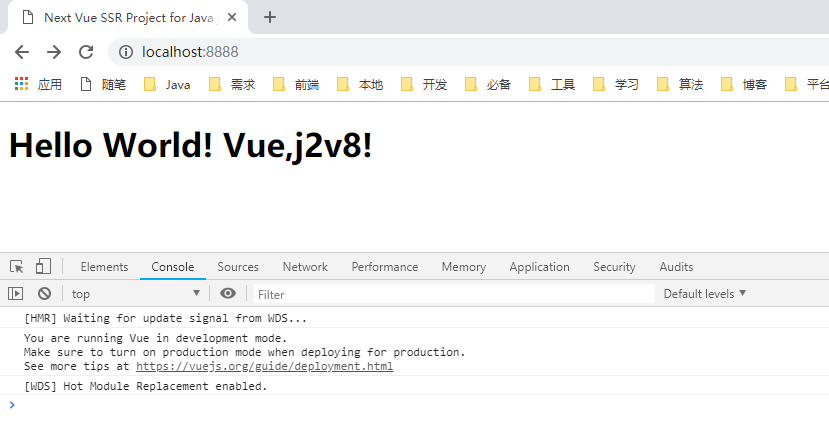
运行 yarn nossr ,查看结果
Vue SSR 配合Java的Javascript引擎j2v8实现服务端渲染2创建Vue2+webpack4项目的更多相关文章
- Vue SSR配合Java的Javascript引擎j2v8实现服务端渲染1概述
原文地址 http://www.terwergreen.com/post/vue-ssr-j2v8-1.html 初步实现方案探索(Node环境) // 第 1 步:创建一个 Vue 实例 const ...
- Vue SSR 配合Java的Javascript引擎j2v8实现服务端渲染3配置webpack支持ssr
安装 cross-env yarn add -D cross-env 安装 html-webpack-plugin yarn add -D html-webpack-plugin 安装 webpack ...
- Vue SSR 配合Java的Javascript引擎j2v8实现服务端渲染4支持构建bundle
安装 webpack-node-externals yarn add -D webpack-node-externals
- Vue、Nuxt服务端渲染,NodeJS全栈项目,面试小白的博客系统~~
Holle,大家好,我是李白!! 一时兴起的开源项目,到这儿就告一段落了. 这是一个入门全栈之路的小项目,从设计.前端.后端.服务端,一路狂飙的学习,发量正在欣喜若狂~~ 接触过WordPress,H ...
- Vue(服务端渲染)
一.前言 1.服务端渲染图解 2.简介服务端渲染 ...
- 【分享】Vue 资源典藏(UI组件、开发框架、服务端、辅助工具、应用实例、Demo示例)
Vue 资源典藏,包括:UI组件 开发框架 服务端 辅助工具 应用实例 Demo示例 element ★11612 - 饿了么出品的Vue2的web UI工具套件 Vux ★7503 - 基于Vue和 ...
- 使用 PHP 来做 Vue.js 的 SSR 服务端渲染
对于客户端应用来说,服务端渲染是一个热门话题.然而不幸的是,这并不是一件容易的事,尤其是对于不用 Node.js 环境开发的人来说. 我发布了两个库让 PHP 从服务端渲染成为可能.spatie/se ...
- 服务端渲染 数据驱动 不是渲染后的网页,而是一个由html和Javascript组成的app ssr 隐藏接口服务器
小结: 1. 服务端渲染主要的工作是把组件渲染为服务器端的 HTML 字符串,将它们直接发送到浏览器,最后将静态标记"混合"为客户端上完全交互的应用程序. 服务器给到客户端的已经是 ...
- Vue 爬坑之路(十一)—— 基于 Nuxt.js 实现服务端渲染(SSR)
直接使用 Vue 构建前端单页面应用,页面源码时只有简单的几行 html,这并不利于网站的 SEO,这时候就需要服务端渲染 2016 年 10 月 25 日,zeit.co 背后的团队对外发布了一个 ...
随机推荐
- 讲一讲MySQL如何防止“老鼠屎”类型的SQL语句
[原谅我标题党了] 当然不可能有哪一个SQL语句会这么出名,以至于大家叫它“老鼠屎”:但是有一些SQL语句确实主是做着这样的事:由于程序的 局部性原理,数据库会把常用的数据缓存到内存中,对于这种场景通 ...
- mac 安装memcached以及启动memcached
参考链接:https://blog.csdn.net/whereismatrix/article/details/50485570
- PCA主成份分析学习记要
前言 主成份分析,简写为PCA(Principle Component Analysis).用于提取矩阵中的最主要成分,剔除冗余数据,同时降低数据纬度.现实世界中的数据可能是多种因数叠加的结果,如果这 ...
- 【读书笔记】Data_Mining_with_R---Chapter_2_Predicting Algae Blooms
本书概要 <Data Mining with R>这本书通过实例,并结合R讲解数据挖掘技术.本书的核心理念就是"Learning it by doing".本书分5章, ...
- 9-8-B树-查找-第9章-《数据结构》课本源码-严蔚敏吴伟民版
课本源码部分 第9章 查找 - B树 ——<数据结构>-严蔚敏.吴伟民版 源码使用说明 链接☛☛☛ <数据结构-C语言版>(严蔚敏,吴伟民版)课本源码+习题集 ...
- Netflix开源类库archaius(一)概述
archaius是什么,能做什么? archaius是Netflix公司开源项目之一,基于java的配置管理类库,主要用于多配置存储的动态获取.主要功能是对apache common configur ...
- linux每日命令(12):nl命令
nl命令在linux系统中用来计算文件中行号.nl 可以将输出的文件内容自动的加上行号!其默认的结果与 cat -n 有点不太一样, nl 可以将行号做比较多的显示设计,包括位数与是否自动补齐 0 等 ...
- Thrift 源码学习一——源码结构
Thrift 客户端与服务端的交互图 源码结构 传输层 TTransport: TTransport:客户端传输层抽象基础类,read.write.flush.close 等方法 TSocket 与 ...
- SwingWorker
Swing应用程序员常见的错误是误用Swing事件调度线程(Event DispatchThread,EDT).他们要么从非UI线程访问UI组件:要么不考虑事件执行顺序:要么不使用独立任务线程而在ED ...
- 还原Stack操作
下午看到一题.给定两个int[]数组,int[] org和int[] res, 分别代表一串数字,和这串数字经过stack的push 和 pop操作之后的数字,让返回一个String, String里 ...