
easyui combobox 动态加载数据C#
    <script type="text/javascript" src="Scripts/jquery-1.8.2.min.js"></script>

    <link type="text/css" rel="Stylesheet" href="jquery-easyui-1.6.11/themes/default/easyui.css" />

    <link type="text/css" rel="Stylesheet" href="jquery-easyui-1.6.11/themes/icon.css" />

    <script type="text/javascript" src="jquery-easyui-1.6.11/jquery.min.js"></script>

    <script type="text/javascript" src="jquery-easyui-1.6.11/jquery.easyui.min.js"></script>

    <script type="text/javascript">

        $(function () {

            $.ajax({

                type: "Post",

                url: "easyuiComboBox.aspx/GetBrowser",

//                data: "{}",

                contentType: "application/json;charset=utf-8",

                dataType: "json",

                success: function (data) {

                    $('#first_catalogue').combobox({

                        data: eval(data.d), //eval(data.d)将JSON的字符串解析成JSON数据格式

                        valueField: 'value',

                        textField: 'text',

                        groupField: 'group',

                        required: true,

                        editable: false,

                        onLoadSuccess: function () {

                            //加载完成后,设置选中第一项

                            var val = $(this).combobox("getData");

                            //设置第一个值为选中值

                            $(this).combobox("select", val[0].text);

                        },

                        onChange: function () { //getValue,getText分别获取value值,text

                            var val = $('#first_catalogue').combobox("getText"); alert(val);

                        }

                    });

                },

                error: function (err) {

                    alert(JSON.parse(err.responseText).Message);

                }

            });

        });

    </script>
html
<input class="easyui-combobox" id="first_catalogue" style="width: 30%;" value="--请选择所属分类--">
后台代码
        [WebMethod]

        public static string GetBrowser()

        {

            string json = "[{\"value\":\"f20\",\"text\":\"Firefox 2.0 or higher\",\"group\":\"Firefox\"}" +

                ",{\"value\":\"f15\",\"text\":\"Firefox 1.5.x\",\"group\":\"Firefox\"}," +

                "{\"value\":\"f10\",\"text\":\"Firefox 1.0.x\",\"group\":\"Firefox\"}," +

                "{\"value\":\"ie7\",\"text\":\"Microsoft Internet Explorer 7.0 or higher\",\"group\":\"Microsoft Internet Explorer\"}" +

                ",{\"value\":\"ie6\",\"text\":\"Microsoft Internet Explorer 6.x\",\"group\":\"Microsoft Internet Explorer\"}]";

            return json;

            //List<Browser> browsers=new List<Browser>();

            //Browser b= new Browser();

            //b.value ="f20";

            //b.text ="Firefox 2.0 or higher";

            //b.group="Firefox";

            //browsers.Add(b);

            //JavaScriptSerializer jsSerializer = new JavaScriptSerializer();

            //return jsSerializer.Serialize(browsers);

}
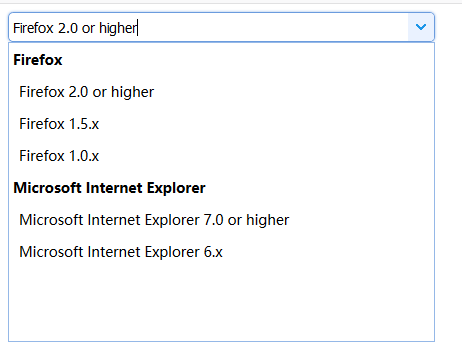
显示效果
easyui combobox 动态加载数据C#的更多相关文章
- easyui combobox 动态加载数组数据
怕自己忘了,记录下来以后用方便 html部分 <input id="rzcode" name="businesItemId" style="wi ...
- easyui datagrid 动态加载数据 渲染问题,表格错位问题
$('#dg').datagrid({ url:'datagrid_data.json', columns:[[ {field:'code',title:'Code',width:100}, {fie ...
- easyui combobox 动态加载的两种方法
reload 方法 javascript代码 //指定id 和 text 否则始终选择第一个 $('#contact_city').combobox({ valueField:'id', textFi ...
- extjs Combobox动态加载数据问题,mode:local 还是remote
var fabircTypeDs = new Ext.data.Store({ proxy: new Ext.data.HttpProxy({ url: 'province.do' }), reade ...
- 42.extjs Combobox动态加载数据问题,mode:local 还是remote
问题: Java代码 var fabircTypeDs = new Ext.data.Store({ proxy: new Ext.data.HttpProxy({ url: 'province. ...
- Easyui combobox 怎么加载数据
说明:开发环境 vs2012 asp.net mvc4 c# 1.效果图 2.HTML代码 <%@ Page Language="C#" AutoEventWireup=&q ...
- AppCan学习笔记----关闭页面listview动态加载数据
AppCan页面关闭 AppCan 的页面是由两个HTML组成,如果要完全关闭的话需要在主HTML eg.index.html中关闭,关闭方法:appcan.window.close(-1); 管道 ...
- [JS前端开发] js/jquery控制页面动态加载数据 滑动滚动条自动加载事件
页面滚动动态加载数据,页面下拉自动加载内容 相信很多人都见过瀑布流图片布局,那些图片是动态加载出来的,效果很好,对服务器的压力相对来说也小了很多 有手机的相信都见过这样的效果:进入qq空间,向下拉动空 ...
- 微信小程序(五) 利用模板动态加载数据
利用模板动态加载数据,其实是对上一节静态数据替换成动态数据:
随机推荐
- ROS中.launch文件的remap标签详解
https://www.cnblogs.com/LiuQiang921202/p/7679943.html
- 查看线程的进程id
import os from threading import Thread def f1(n): print(n) print('%d号线程的id是%s'%(n,os.getpid())) if _ ...
- BZOJ 1150 - 数据备份Backup - [小顶堆][CTSC2007]
题目链接:https://www.lydsy.com/JudgeOnline/problem.php?id=1150 Time Limit: 10 Sec Memory Limit: 162 M De ...
- hbase与hive集成:hive读取hbase中数据
1.创建hbase jar包到hive lib目录软连接 hive需要jar包: hive-hbase-handler-0.13.1-cdh5.3.6.jar zookeeper-3.4.5-cdh5 ...
- AngularJs $watch监听模型变化
$watch是一个scope函数,用于监听模型变化,当你的模型部分发生变化时它会通知你. $watch(watchExpression, listener, objectEquality); 举个栗子 ...
- rabbitmq集群部署及配置
消息中间件rabbitmq,一般以集群方式部署,主要提供消息的接受和发送,实现各微服务之间的消息异步.本篇将以rabbitmq+HA方式进行部署. 一.原理介绍 rabbitmq是依据erlang的分 ...
- git bash 命名
git log -p -2 我们常用 -p 选项展开显示每次提交的内容差异,用 -2 则仅显示最近的两次更新. git diff HEAD git clean -df 恢复到最后一次提交的改动: gi ...
- DER、CRT、CER、PEM格式的证书及转换
一.证书和编码 X.509证书,其核心是根据RFC 5280编码或数字签名的数字文档. 实际上,术语X.509证书通常指的是IETF的PKIX证书和X.509 v3证书标准的CRL 文件,即如RFC ...
- 前端 HTML form表单标签 select标签 option 下拉框
<select></select> select里面通常跟option配合使用 <!DOCTYPE html> <html lang="en&quo ...
- 5 jmeter性能测试小小的实战
项目描述 被测网址:www.sogou.com指标:相应时间以及错误率场景:线程数 20.Ramp-Up Period(in seconds) 10.循环次数 10 测试步骤 1.打开jmeter工具 ...