
easyui combobox 动态加载数据C#
    <script type="text/javascript" src="Scripts/jquery-1.8.2.min.js"></script>

    <link type="text/css" rel="Stylesheet" href="jquery-easyui-1.6.11/themes/default/easyui.css" />

    <link type="text/css" rel="Stylesheet" href="jquery-easyui-1.6.11/themes/icon.css" />

    <script type="text/javascript" src="jquery-easyui-1.6.11/jquery.min.js"></script>

    <script type="text/javascript" src="jquery-easyui-1.6.11/jquery.easyui.min.js"></script>

    <script type="text/javascript">

        $(function () {

            $.ajax({

                type: "Post",

                url: "easyuiComboBox.aspx/GetBrowser",

//                data: "{}",

                contentType: "application/json;charset=utf-8",

                dataType: "json",

                success: function (data) {

                    $('#first_catalogue').combobox({

                        data: eval(data.d), //eval(data.d)将JSON的字符串解析成JSON数据格式

                        valueField: 'value',

                        textField: 'text',

                        groupField: 'group',

                        required: true,

                        editable: false,

                        onLoadSuccess: function () {

                            //加载完成后,设置选中第一项

                            var val = $(this).combobox("getData");

                            //设置第一个值为选中值

                            $(this).combobox("select", val[0].text);

                        },

                        onChange: function () { //getValue,getText分别获取value值,text

                            var val = $('#first_catalogue').combobox("getText"); alert(val);

                        }

                    });

                },

                error: function (err) {

                    alert(JSON.parse(err.responseText).Message);

                }

            });

        });

    </script>
html
<input class="easyui-combobox" id="first_catalogue" style="width: 30%;" value="--请选择所属分类--">
后台代码
        [WebMethod]

        public static string GetBrowser()

        {

            string json = "[{\"value\":\"f20\",\"text\":\"Firefox 2.0 or higher\",\"group\":\"Firefox\"}" +

                ",{\"value\":\"f15\",\"text\":\"Firefox 1.5.x\",\"group\":\"Firefox\"}," +

                "{\"value\":\"f10\",\"text\":\"Firefox 1.0.x\",\"group\":\"Firefox\"}," +

                "{\"value\":\"ie7\",\"text\":\"Microsoft Internet Explorer 7.0 or higher\",\"group\":\"Microsoft Internet Explorer\"}" +

                ",{\"value\":\"ie6\",\"text\":\"Microsoft Internet Explorer 6.x\",\"group\":\"Microsoft Internet Explorer\"}]";

            return json;

            //List<Browser> browsers=new List<Browser>();

            //Browser b= new Browser();

            //b.value ="f20";

            //b.text ="Firefox 2.0 or higher";

            //b.group="Firefox";

            //browsers.Add(b);

            //JavaScriptSerializer jsSerializer = new JavaScriptSerializer();

            //return jsSerializer.Serialize(browsers);

}
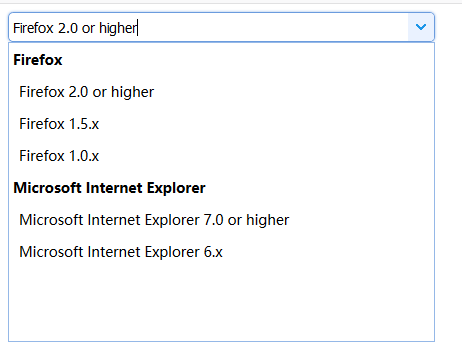
显示效果
easyui combobox 动态加载数据C#的更多相关文章
- easyui combobox 动态加载数组数据
怕自己忘了,记录下来以后用方便 html部分 <input id="rzcode" name="businesItemId" style="wi ...
- easyui datagrid 动态加载数据 渲染问题,表格错位问题
$('#dg').datagrid({ url:'datagrid_data.json', columns:[[ {field:'code',title:'Code',width:100}, {fie ...
- easyui combobox 动态加载的两种方法
reload 方法 javascript代码 //指定id 和 text 否则始终选择第一个 $('#contact_city').combobox({ valueField:'id', textFi ...
- extjs Combobox动态加载数据问题,mode:local 还是remote
var fabircTypeDs = new Ext.data.Store({ proxy: new Ext.data.HttpProxy({ url: 'province.do' }), reade ...
- 42.extjs Combobox动态加载数据问题,mode:local 还是remote
问题: Java代码 var fabircTypeDs = new Ext.data.Store({ proxy: new Ext.data.HttpProxy({ url: 'province. ...
- Easyui combobox 怎么加载数据
说明:开发环境 vs2012 asp.net mvc4 c# 1.效果图 2.HTML代码 <%@ Page Language="C#" AutoEventWireup=&q ...
- AppCan学习笔记----关闭页面listview动态加载数据
AppCan页面关闭 AppCan 的页面是由两个HTML组成,如果要完全关闭的话需要在主HTML eg.index.html中关闭,关闭方法:appcan.window.close(-1); 管道 ...
- [JS前端开发] js/jquery控制页面动态加载数据 滑动滚动条自动加载事件
页面滚动动态加载数据,页面下拉自动加载内容 相信很多人都见过瀑布流图片布局,那些图片是动态加载出来的,效果很好,对服务器的压力相对来说也小了很多 有手机的相信都见过这样的效果:进入qq空间,向下拉动空 ...
- 微信小程序(五) 利用模板动态加载数据
利用模板动态加载数据,其实是对上一节静态数据替换成动态数据:
随机推荐
- vue + vue-router+vuex+elementUI开发环境搭建
先在npm中安装vue脚手架, //先安装国内镜像源 npm install -g cnpm --registry=https://registry.npm.taobao.org //安装vue cn ...
- .NET Core开发日志——Middleware
熟悉ASP.NET架构的开发者一定对于HTTP Modules与HTTP Handlers不陌生.两者的作用主要是对网络请求执行特定的处理工作.而在.NET Core中,它们都被Middleware( ...
- 如何迁移完整SQL数据库到另外一台服务器
如何迁移完整SQL数据库到另外一台服务器: https://jingyan.baidu.com/album/9f7e7ec080d1b36f28155422.html?picindex=1
- cc2640 细节展示
1. 对于 cc2640内部有两个单片机,一个m3负责内核,另一个是一个16位单片机,应该是msp430可以替代主机完成一些数据采集,adc采集,iic等等功能,传感器软件内部可以进行外设配置,并使用 ...
- win10 Java环境变量,hadoop 环境变量
妈呀,今天又重装了系统.需要装上java环境. 安装环境老百度,然后老掉坑.(path 路经) 1,新建环境变量 JAVA_HOME 2, 新建 CLASSPATH 环境变量 .;%JAVA_HOME ...
- [No000012E]WPF(6/7):概念绑定
WPF 的体系结构,标记扩展,依赖属性,逻辑树/可视化树,布局,转换等.今天,我们将讨论 WPF 最重要的一部分——绑定.WPF 带来了优秀的数据绑定方式,可以让我们绑定数据对象,这样每次对象发生更改 ...
- CSS3 transform 属性
CSS3 transform 属性 语法: transform: none|transform-functions; 值 描述 none 定义不进行转换. matrix(n,n,n,n,n,n) 定义 ...
- RabbitMQ的Vhost,Exchange,Queue原理分析
Vhost分析 RabbitMQ的Vhost主要是用来划分不同业务模块.不同业务模块之间没有信息交互. Vhost之间相互完全隔离,不同Vhost之间无法共享Exchange和Queue.因此Vhos ...
- ascii码值
ascii码值#0 空值 即null#8 退格键#13 回车键
- SYSAUX表空间如何清理
############################################################ 操作方案################################### ...