
常见的ORACLE语句
基本

--新建表:

create table table1( id varchar(300) primary key, name varchar(200) not null);

--插入数据

insert into table1 (id,name) values ('aa','bb');

--更新数据

update table1 set id = 'bb' where id='cc';

--删除数据

delete from table1 where id ='cc';

--删除表

drop table table1;

--修改表名:

alter table table1 rename to table2;

--表数据复制:

insert into table1 (select * from table2);

--复制表结构:

create table table1 select * from table2 where 1>1;

--复制表结构和数据:

create table table1 select * from table2;

--复制指定字段:

create table table1 as select id, name from table2 where 1>1;

--条件查询:

select id,name (case gender when 0 then '男' when 1 then ‘女’ end  ) gender from  table1
数学函数
--绝对值:abs()

   select abs(-2) value from dual;          --(2)

--取整函数(大):ceil()

   select ceil(-2.001) value from dual;       --(-2)

--取整函数(小):floor()

   select floor(-2.001) value from dual;       --(-3)

--取整函数(截取):trunc()

   select trunc(-2.001) value from dual;       -- (-2)

--四舍五入:round()

   select round(1.234564,4) value from dual;       --(1.2346)

--取平方:Power(m,n)

   select power(4,2) value from dual;       --(16)

--取平方根:SQRT()

   select sqrt(16) value from dual;       --(4)

--取随机数:dbms_random(minvalue,maxvalue)

   select dbms_random.value() from dual;  (默认是0到1之间)

 select dbms_random.value(2,4) value from dual;  (2-4之间随机数)

--取符号:Sign()

  select sign(-3) value from dual; --(-1)

  select sign(3) value from dual; --(1)

--取集合的最大值:greatest(value)

   select greatest(-1,3,5,7,9) value from dual;       --(9)

--取集合的最小值:least(value)

   select least(-1,3,5,7,9) value from dual;       --(-1)

--处理Null值:nvl(空值,代替值)

   select  nvl(null,10) value from dual;       --(10)


   select nvl(score,10) score from student;
rownum相关
--rownum小于某个数时可以直接作为查询条件(注意oracle不支持select top)

select * from student where rownum <3;

--查询rownum大于某个数值,需要使用子查询,并且rownum需要有别名

select * from(select rownum rn ,id,name from student) where rn>2;

select * from (select rownum rn, student.* from student) where rn >3;

--区间查询

select * from (select rownum rn, student.* from student) where rn >3 and rn<6;

--排序+前n条

select * from (select rownum rn, t.* from ( select d.* from DJDRUVER d order  by drivernumber)t )p where p.rn<10;

--排序+区间查询1

select * from (select rownum rn, t.* from ( select d.* from DJDRIVER d order by DJDRIVER_DRIVERTIMES)t )p where p.rn<9 and p.rn>6;

--排序+区间查询2

select * from (select rownum rn, t.* from ( select d.* from DJDRIVER d order by DJDRIVER_DRIVERTIMES)t where rownum<9 )p where p.rn>6;--效率远高于方式一
分页查询
(假设每页显示10条)
不包含排序:
--效率低

select * from (select rownum rn, d.* from DJDRIVER d  )p where p.rn<=20 and p.rn>=10;

select * from (select rownum rn, d.* from DJDRIVER d  )p where p.rn between 10 and 20;

--效率高

select * from (select rownum rn, d.* from DJDRIVER d where rownum<=20 )p where p.rn>=10;
包含排序:
--排序+区间查询1(效率低)

select * from (select rownum rn, t.* from ( select d.* from DJDRIVER d order by DJDRIVER_DRIVERTIMES)t )p where p.rn<=20 and p.rn>=10;

select * from (select rownum rn, t.* from ( select d.* from DJDRIVER d order by DJDRIVER_DRIVERTIMES)t )p where p.rn between 10 and 20;

--排序+区间查询2(效率高)

select * from (select rownum rn, t.* from ( select d.* from DJDRIVER d order by DJDRIVER_DRIVERTIMES)t where rownum<=20 )p where p.rn>=10;
时间处理
1. to_char和to_date基本使用
--日期

--年 yyyy yyy yy year

--月 month mm mon month

--日+星期  dd ddd(一年中第几天) dy day

--小时  hh hh24

--分 mi

--秒 ss
eg1:
select to_char(sysdate,'yyyy-mm-dd hh24:mi:ss')currenttime,

       to_char(sysdate,'yyyy') year,

       to_char(sysdate,'mm') month,

       to_char(sysdate,'dd') day,

       to_char(sysdate,'day') week,

       to_char(sysdate,'hh24')hour,

       to_char(sysdate,'mi') minute,

       to_char(sysdate,'ss') second

from dual;

eg2:
select to_date('2009-07-04 05:02:01','yyyy-mm-dd hh24:mi:ss')currenttime,

       to_char(to_date('2009-07-04 05:02:01','yyyy-mm-dd hh24:mi:ss'),'yyyy')year,

       to_char(to_date('2009-07-04 05:02:01','yyyy-mm-dd hh24:mi:ss'),'mm')month,

       to_char(to_date('2009-07-04 05:02:01','yyyy-mm-dd hh24:mi:ss'),'dd') day,

       to_char(to_date('2009-07-04 05:02:01','yyyy-mm-dd hh24:mi:ss'),'day') week,

       to_char(to_date('2009-07-04 05:02:01','yyyy-mm-dd hh24:mi:ss'),'day','NLS_DATE_LANGUAGE=American') week, --设置语言

       to_char(to_date('2009-07-04 05:02:01','yyyy-mm-dd hh24:mi:ss'),'hh24')hour,

       to_char(to_date('2009-07-04 05:02:01','yyyy-mm-dd hh24:mi:ss'),'mi') minute,

       to_char(to_date('2009-07-04 05:02:01','yyyy-mm-dd hh24:mi:ss'),'ss') second

from dual;

2)months_between
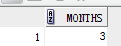
 select months_between(to_date('03-31-2014','MM-DD-YYYY'),to_date('12-31-2013','MM-DD-YYYY')) "MONTHS"

 FROM DUAL;
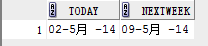
3)next_day
select sysdate today, next_day(sysdate,6) nextweek from dual;
4)时间区间
eg:
select cardid, borrowdate from borrow where to_date(borrowdate,'yyyy-mm-dd hh24:mi:ss')  between

to_date('2014-02-01 00:00:00','yyyy-mm-dd hh24:mi:ss') and

to_date('2014-05-01 00:00:00','yyyy-mm-dd hh24:mi:ss');
5)interval
select to_char(sysdate,'yyyy-mm-dd hh24:mi:ss') currenttime,

       to_char(sysdate - interval '7' year,'yyyy-mm-dd hh24:mi:ss') intervalyear,

       to_char(sysdate - interval '7' month,'yyyy-mm-dd hh24:mi:ss') intervalMonth,

       to_char(sysdate - interval '7' day,'yyyy-mm-dd hh24:mi:ss') intervalday,

       to_char(sysdate - interval '7' hour,'yyyy-mm-dd hh24:mi:ss') intervalHour,

       to_char(sysdate - interval '7' minute,'yyyy-mm-dd hh24:mi:ss') intervalMinute,

       to_char(sysdate - interval '7' second,'yyyy-mm-dd hh24:mi:ss') intervalSecond

  from dual;

6)add_months
select add_months(sysdate,12) newtime from dual;
7)extract
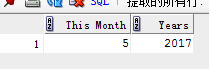
 select extract(month from sysdate) "This Month",

extract(year from add_months(sysdate,36)) " Years" from dual;
字符函数
--字符函数

select substr('abcdefg',1,5)substr,                     --字符串截取

       instr('abcdefg','bc') instr,                     --查找子串

       'Hello'||'World' concat,                         --连接

       trim('  wish  ') trim,                           --去前后空格

       rtrim('wish  ') rtrim,                           --去后面空格

       ltrim('  wish') ltrim,                           --去前面空格

       trim(leading 'w' from 'wish') deleteprefix,      --去前缀

       trim(trailing 'h' from 'wish') deletetrailing,   --去后缀

       trim('w' from 'wish') trim1,

       ascii('A') A1,

       ascii('a') A2,                                   --ascii(转换为对应的十进制数)

       chr(65) C1,

       chr(97) C2,                                      --chr(十进制转对应字符)

       length('abcdefg') len,                           --length

       lower('WISH')lower,

       upper('wish')upper,

       initcap('wish')initcap,                            --大小写变换

       replace('wish1','1','youhappy') replace,           --替换

       translate('wish1','1','y')translate,               --转换,对应一位(前面的位数大于等于后面的位数)

       translate('wish1','sh1','hy')translate1,

       concat('11','22') concat                     --连接

from dual;

to_number
--to_number(expr)

--to_number(expr,format)

--to_number(expr,format,'nls-param')

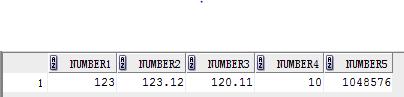
select to_number('0123')number1,            --converts a string to number

       trunc(to_number('0123.123'),2) number2,

       to_number('120.11','999.99') number3,
     to_number('0a','xx') number4,        --converts a hex number to decimal

       to_number(100000,'xxxxxx') number5

from dual;
聚合函数
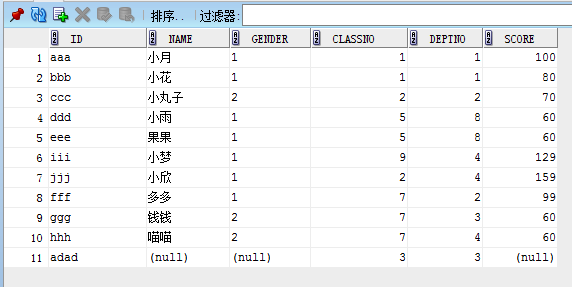
student表如下:
count:
--count (distinct|all)

select count(1) as count from student;--效率最高

select count(*) as count from student;

select count(distinct score) from student;
语句1结果:11
avg
--avg (distinct|all)

select avg(score) score from student;

select avg(distinct score) from student;

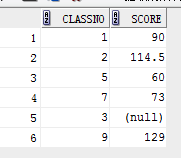
select classno,avg(score) score from student group by classno;
语句3输出结果:
max
--max (distinct|all)

select max(score) from student;

select classno, max(score) score from student group by classno;
min
--min (distinct|all)

select min(score) from student;

select classno, min(score) score from student group by classno;
stddev(standard deviation)标准差
--stddev

select stddev(score) from student;

select classno, stddev(score) score from student group by classno;
sum
--sum

select sum(score) from student;

select classno, sum(score) score from student group by classno;
median--中位数
--median

select median(score) from student;

select classno, median(score) score from student group by classno;
案例1--学生选课
1. 创建表 stu(学生表),course(课程表),选课表(s_c)
--创建表

create table STU

(

  id   NUMBER not null,

  name VARCHAR2(255)

) ;

create table COURSE

(

  id  NUMBER not null,

  coursename VARCHAR2(255)

) ;

create table S_C

(

  sid    NUMBER,

  cid    NUMBER,

  score NUMBER

);
2.插入数据
--插入数据

Insert into STU (ID,NAME) values (1,'wish');

Insert into STU (ID,NAME) values (2,'rain');

Insert into STU (ID,NAME) values (3,'july');

Insert into STU (ID,NAME) values (4,'joey');

Insert into COURSE (ID,COURSENAME) values (1,'math');

Insert into COURSE (ID,COURSENAME) values (2,'english');

Insert into COURSE (ID,COURSENAME) values (3,'Japanese');

Insert into COURSE (ID,COURSENAME) values (4,'chinese');

Insert into S_C (SID,CID,SCORE) values (1,1,80);

Insert into S_C (SID,CID,SCORE) values (1,2,90);

Insert into S_C (SID,CID,SCORE) values (2,4,100);

Insert into S_C (SID,CID,SCORE) values (4,4,90);

Insert into S_C (SID,CID,SCORE) values (4,1,100);

Insert into S_C (SID,CID,SCORE) values (4,3,80);

Insert into S_C (SID,CID,SCORE) values (4,2,80);

Insert into S_C (SID,CID,SCORE) values (2,1,90);

Insert into S_C (SID,CID,SCORE) values (2,4,100);

Insert into S_C (SID,CID,SCORE) values (3,1,60);
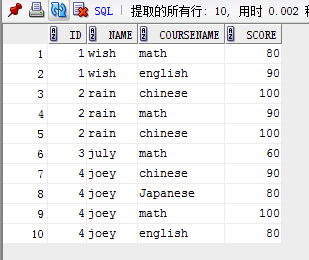
3.查询学生选课情况
with vt as

(select s.id,s.name,c.coursename,sc.score from stu s, course c, s_c sc where s.id=sc.sid and c.id=sc.cid)

select * from vt order by id;
结果:
案例2--图书馆借阅
1.创建表: 图书(book),读者(reader),借阅(borrow)
--创建表 book

create table book(

  bookId  varchar2(30),   --图书总编号

  sortid varchar2(30),    --分类号

  bookname varchar2(100), --书名

  author varchar2(30),    --作者

  publisher varchar2(100),--出版单位

  price number(6,2)       --价格

  );

--创建表 reader

create table reader (

  cardId varchar2(30),  --借书证号

  org varchar2(100),    --单位

  name varchar2(100),   --姓名

  gender varchar2(2),   --性别

  title varchar2(30),   --职称

  address varchar2(100) --地址

);

--创建表 borrow

create table borrow(

    cardId varchar2(30),  --借书证号

  bookId  varchar2(30),   --图书总编号

  borrowDate varchar2(30) --借阅时间

);
2.插入数据
--插入数据-book

insert into book (bookId,sortid,bookname,author,publisher,price)

values ('aaa','a1','gone with the wind','CA','renmin','103');

insert into book (bookId,sortid,bookname,author,publisher,price)

values ('bbb','a2','the little prince','CB','jixie','30');

insert into book (bookId,sortid,bookname,author,publisher,price)

values ('ccc','a3','the ordinary world','CC','renmin','130');

insert into book (bookId,sortid,bookname,author,publisher,price)

values ('ddd','a4','the little women','CA','dianzi','110');

--插入数据-reader

insert into reader(cardid, org, name,gender, title, address)

values ('xxx','A','wish','1','student','bupt');

insert into reader(cardid, org, name,gender, title, address)

values ('uuu','A','luna','1','student','bupt');

insert into reader(cardid, org, name,gender, title, address)

values ('vvv','B','harry','1','student','bupt');

insert into reader(cardid, org, name,gender, title, address)

values ('www','C','chander','2','professor','bupt');

insert into reader(cardid, org, name,gender, title, address)

values ('yyy','A','joey','2','student','bupt');

insert into reader(cardid, org, name,gender, title, address)

values ('zzz','B','richard','2','student','bupt');

insert into reader(cardid, org, name,gender, title, address)

values ('OOO','A','micheal','2','student','bupt');

insert into reader(cardid, org, name,gender, title, address)

values ('ppp','A','richal','2','student','bupt');

insert into reader(cardid, org, name,gender, title, address)

values ('abp','A','michal','2','student','bupt');

insert into reader(cardid, org, name,gender, title, address)

values ('ccp','A','mike','2','student','bupt');

--插入数据-borrow

insert into borrow(cardid,bookid,borrowdate) values('xxx','aaa','2014-4-29');

insert into borrow(cardid,bookid,borrowdate) values('xxx','bbb','2014-4-29');

insert into borrow(cardid,bookid,borrowdate) values('xxx','ccc','2014-4-28');

insert into borrow(cardid,bookid,borrowdate) values('yyy','ccc','2014-4-28');

insert into borrow(cardid,bookid,borrowdate) values('yyy','ddd','2014-4-27');

insert into borrow(cardid,bookid,borrowdate) values('yyy','aaa','2014-4-27');

insert into borrow(cardid,bookid,borrowdate) values('zzz','bbb','2014-4-28');

insert into borrow(cardid,bookid,borrowdate) values('zzz','ddd','2014-4-27');

insert into borrow(cardid,bookid,borrowdate) values('zzz','aaa','2014-4-27');

insert into borrow(cardid,bookid,borrowdate) values('uuu','bbb','2014-4-28');

insert into borrow(cardid,bookid,borrowdate) values('uuu','ddd','2014-4-27');

insert into borrow(cardid,bookid,borrowdate) values('uuu','aaa','2014-4-27');

insert into borrow(cardid,bookid,borrowdate) values('uuu','ccc','2014-4-26');

insert into borrow(cardid,bookid,borrowdate) values('vvv','bbb','2014-4-28');

insert into borrow(cardid,bookid,borrowdate) values('vvv','ddd','2014-4-27');

insert into borrow(cardid,bookid,borrowdate) values('www','aaa','2014-4-27');

insert into borrow(cardid,bookid,borrowdate) values('www','ccc','2014-4-26');
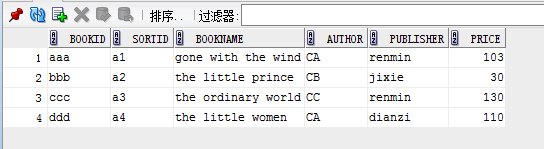
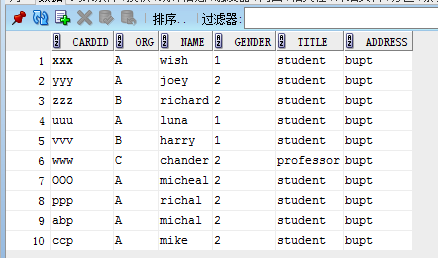
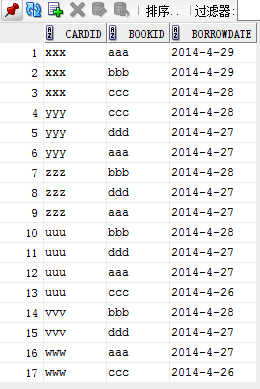
表信息如下:
book------> reader-------> borrow
3. 查询A单位借阅图书的读者人数和人员详细信息
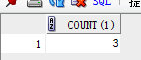
人数:
with vt1 as

(select cardid from reader where reader.org='A')

select count(1) from vt1 where exists (select cardid from borrow where borrow.cardid=vt1.cardid);
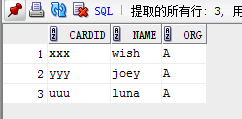
详细信息:
with vt1 as

(select cardid,name,org from reader where reader.org='A')

select cardid,name,org from vt1 where exists (select cardid from borrow where borrow.cardid=vt1.cardid);
4.查询借书证号尾字符为'p'的读者
select cardid, name, org from reader where cardid like '%p';
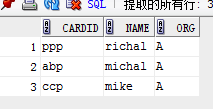
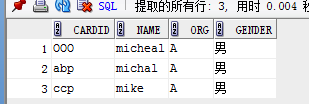
5. 查询名字以m开头的女性读者,‘1’显示为女,‘2’显示为男
select cardid, name, org,

case when gender='1' then '女' when gender='2' then '男' else '其他' end gender

from reader where name like 'm%';
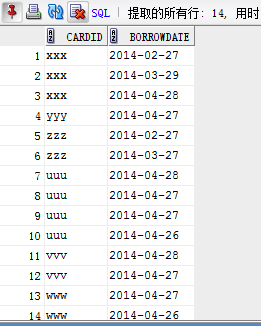
6. 2014年2-4月借过书的读者
1)查询满足条件的读者(仅包含cardid)--未去重
方式一:
select cardid, borrowdate from borrow where to_char(to_date(borrowdate,'yyyy-mm-dd'),'yyyy')='2014'

and to_char(to_date(borrowdate,'yyyy-mm-dd'),'mm')>='02'

and to_char(to_date(borrowdate,'yyyy-mm-dd'),'mm')<='04';
方式二:
select cardid, borrowdate from borrow where to_char(to_date(borrowdate,'yyyy-mm-dd'),'yyyy')='2014'  --查询

and to_char(to_date(borrowdate,'yyyy-mm-dd'),'yyyy-mm')>='2014-02'

and to_char(to_date(borrowdate,'yyyy-mm-dd'),'yyyy-mm')<='2014-04';
方式三:
select cardid, borrowdate from borrow where to_date(borrowdate,'yyyy-mm-dd hh24:mi:ss')  between

to_date('2014-02-01 00:00:00','yyyy-mm-dd hh24:mi:ss') and

to_date('2014-05-01 00:00:00','yyyy-mm-dd hh24:mi:ss');
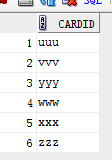
2) 查询+去重
select distinct cardid from borrow where to_char(to_date(borrowdate,'yyyy-mm-dd'),'yyyy')='2014'  --查询+去重

and to_char(to_date(borrowdate,'yyyy-mm-dd'),'yyyy-mm')>='2014-02'

and to_char(to_date(borrowdate,'yyyy-mm-dd'),'yyyy-mm')<='2014-04';
select distinct cardid from borrow where to_date(borrowdate,'yyyy-mm-dd hh24:mi:ss')  between

to_date('2014-02-01 00:00:00','yyyy-mm-dd hh24:mi:ss') and

to_date('2014-05-01 00:00:00','yyyy-mm-dd hh24:mi:ss');
3)查询+去重+读者姓名等信息
with vt1 as

(select distinct cardid from borrow where to_char(to_date(borrowdate,'yyyy-mm-dd'),'yyyy')='2014'

and to_char(to_date(borrowdate,'yyyy-mm-dd'),'yyyy-mm')>='2014-02'

and to_char(to_date(borrowdate,'yyyy-mm-dd'),'yyyy-mm')<='2014-04')

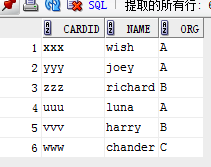
select cardid, name,org from reader where exists (select cardid from vt1 where vt1.cardid=reader.cardid);
常见的ORACLE语句的更多相关文章
- [转载]T-SQL(Oracle)语句查询执行顺序
原文链接:http://blog.sina.com.cn/s/blog_61c006ea0100mlgq.html sql语法的分析是从右到左,where子句中的条件书写顺序,基本上对sql性能没有影 ...
- 性能测试常用Oracle语句
性能测试常用Oracle语句 显示数据库当前的连接数 select count(*) from v$process; 显示数据库最大连接数: select value from v$parameter ...
- oracle语句随笔
oracle语句随笔 dmp数据的导入. ; --创建用户 GRANT CONNECT,RESOURCE,DBA TO memsspc; --赋值权限 --cmd 中导入命令 IMP memsspc@ ...
- 53个Oracle语句优化规则详解(转)
Oracle sql 性能优化调整 1. 选用适合的ORACLE优化器 ORACLE的优化器共有3种:a. RULE (基于规则) b. COST (基于成本) c. CHOOSE ...
- Oracle语句优化1
Oracle语句优化1 优化就是选择最有效的方法来执行SQL语句.Oracle优化器选择它认为最有效的 方法来执行SQL语句. 1. IS NULL和IS NOT ...
- 常见的if语句shell脚本
常见的if语句shell脚本 author :headsen chen 2017-10-17 15:00:07 1,cat if.sh 2, cat if2.sh
- oracle语句insert into select如何加后续插入条件
oracle语句insert into select如何加后续插入条件 2014-01-21 10:48匿名 分类:其他编程语言 | 浏览 2746 次 oracle中有批量插入语句insert i ...
- Oracle 语句中“||”代表什么啊?
Oracle 语句中“||”代表什么啊? Oracle 语句中“||”代表什么啊?跟ServerSQL中的字符串的连接符“+”是一个概念么? 1. 恩是的 是一个含义...select '1'||'2 ...
- Oracle语句中IN和=的区别有哪些?
Oracle语句中IN和=的区别有: 1.首先应用范围不一样:in 可以理解为是范围内的选择:= 只有一个.例如: select sno, sname from t1 where sno in ('s ...
随机推荐
- dp入门(LIS,LCS)
LCS
- x盒子
0换成1切回
- Ubuntu 18.04 休眠后无法唤醒的解决办法
解决办法:安装laptop-mode-tools工具包. 1.检查是否安装了grep laptop-mode-tools 工具包 $ dpkg -l | grep laptop-mode-tools ...
- HDU 4638 Group(莫队)题解
题意:n个数,每个数有一个值,每次询问一个区间,问你这个区间能分成连续的几段(比如7 1 2 8 就是两端 1 2 和 7 8) 思路:莫队.因为L.R移动顺序wa了20发...问了一下别人,都是先扩 ...
- html 之 浮动(待补充)
通过设置float 样式属性来决定区块标签的浮动 问题:区块与非区块浮动的特点(左右) 区块与区块浮动的特点(左右) ie浏览器与谷歌等浏览器的效果差异
- c# Database类的使用
参考资料http://ansonlh.iteye.com/blog/1689009 搜索:c# DatabaseFactory类
- python运维小技巧
以下实验均在Linux上进行 1.一秒钟启动一个下载服务器 python版本 python2: #python -m SimpleHTTPServer Serving HTTP on 0.0.0.0 ...
- ArrayList.clear、=null、new Arraylist之间的对比区别
参考博文 1.使用ArrayList的对象方法clear() List list = new ArrayList(); List list1 = list; list.add(1); list.add ...
- JSONObject的parseArray方法作用。
该方法将字符串数据转换成集合对象. String dep_tree = JedisUtils.getInstance().get(CacheConstant.DEP_TREE, user.getId( ...
- vi/vim 基本使用方法
vi/vim 基本使用方法本文介绍了vi (vim)的基本使用方法,但对于普通用户来说基本上够了!i/vim的区别简单点来说,它们都是多模式编辑器,不同的是vim 是vi的升级版本,它不仅兼容vi的所 ...