
.Net Core MongoDB 简单操作。
一:MongoDB 简单操作类。这里引用了MongoDB.Driver。
using MongoDB.Bson;

using MongoDB.Driver;

using System;

using System.Collections.Generic;

using System.Linq;

using System.Threading.Tasks;

namespace WebEFCodeFirst.MongoDBPro

{

    public class MongoDBOperation<T> where T : class

    {

        private static MongoDBOperation<T> mongoDBOperation = null;

        private static readonly object lockobject = new object();

        private MongoClient mongoClient { get; set; }

        private IMongoDatabase db { get; set; }

        private IMongoCollection<BsonDocument> collection { get; set; }

        private IEnumerable<BsonDocument> documents { get; set; }

        private MongoDBOperation()

        {

            mongoClient = new MongoClient("mongodb://localhost:27017");

            db = mongoClient.GetDatabase("db");

            collection = db.GetCollection<BsonDocument>("londb");

        }

        public static MongoDBOperation<T> GetMongoDBInstance()

        {

            if (mongoDBOperation == null)

            {

                lock (nameof(MongoDBOperation<T>))// lockobject)

                {

                    if (mongoDBOperation == null)

                    {

                        mongoDBOperation = new MongoDBOperation<T>();

                    }

                }

            }

            return mongoDBOperation;

        }

        /// <summary>

        /// 同步插入数据

        /// </summary>

        /// <param name="document"></param>

        /// <returns></returns>

        public bool InsertOneData(BsonDocument document)

        {

            try

            {

                if (collection != null)

                {

                    collection.InsertOne(document);

                    return true;

                }

                else

                {

                    return false;

                }

            }

            catch (Exception ex)

            {

                return false;

            }

        }

        /// <summary>

        /// 异步插入

        /// </summary>

        /// <param name="document"></param>

        /// <returns></returns>

        public async Task<bool> InsertAsyncOneData(BsonDocument document)

        {

            try

            {

                if (collection != null)

                {

                    await collection.InsertOneAsync(document);

                    return true;

                }

                else

                {

                    return false;

                }

            }

            catch (Exception ex)

            {

                return false;

            }

        }

        /// <summary>

        /// 同步插入多条数据

        /// </summary>

        /// <param name="documents"></param>

        /// <returns></returns>

        public bool InsertManyData(IEnumerable<BsonDocument> documents)

        {

            try

            {

                //documents = Enumerable.Range(0, 100).Select(i => new BsonDocument("counter", i));

                if (collection != null)

                {

                    collection.InsertMany(documents);

                    return true;

                }

                else

                {

                    return false;

                }

            }

            catch (Exception ex)

            {

                return false;

            }

        }

        /// <summary>

        /// 同步插入多条数据

        /// </summary>

        /// <param name="documents"></param>

        /// <returns></returns>

        public async Task<bool> InsertAsyncManyData(IEnumerable<BsonDocument> documents)

        {

            try

            {

                //documents = Enumerable.Range(0, 100).Select(i => new BsonDocument("counter", i));

                if (collection != null)

                {

                    await collection.InsertManyAsync(documents);

                    return true;

                }

                else

                {

                    return false;

                }

            }

            catch (Exception ex)

            {

                return false;

            }

        }

        /// <summary>

        /// 查找有数据。

        /// </summary>

        /// <returns></returns>

        public List<BsonDocument> FindData()

        {

            return collection.Find(new BsonDocument()).ToList();

        }

        /// <summary>

        /// 取排除_id字段以外的数据。然后转换成泛型。

        /// </summary>

        /// <returns></returns>

        public List<BsonDocument> FindAnsyncData()

        {

            var projection = Builders<BsonDocument>.Projection.Exclude("_id");

            var document = collection.Find(new BsonDocument()).Project(projection).ToListAsync().Result;

            return document;

        }

        /// <summary>

        /// 按某些列条件查询

        /// </summary>

        /// <param name="bson"></param>

        /// <returns></returns>

        public List<BsonDocument> FindFilterlData(BsonDocument bson)

        {

            var buildfilter = Builders<BsonDocument>.Filter;

            FilterDefinition<BsonDocument> filter = null;

            foreach (var bs in bson)

            {

                filter = buildfilter.Eq(bs.Name, bs.Value);

            }

            //filter = buildfilter.Eq("name", "MongoDBTest");

            var documents = collection.Find(filter).ToList();

            return documents;

        }

        /// <summary>

        /// 返回受影响行

        /// </summary>

        /// <returns></returns>

        public long DeleteData()

        {

            //删除count大于0的文档。

            var filter = Builders<BsonDocument>.Filter.Gt("count",);

            DeleteResult deleteResult = collection.DeleteMany(filter);

            return deleteResult.DeletedCount;

        }

        /// <summary>

        /// 根据id更新文档中单条数据。

        /// </summary>

        /// <param name="_id"></param>

        /// <param name="bson"></param>

        public UpdateResult UpdateOneData(string _id,BsonDocument bson)

        {

            //修改条件(相当于sql where)

            FilterDefinition<BsonDocument> filter = Builders<BsonDocument>.Filter.Eq("name", "MongoDB");

            UpdateDefinition<BsonDocument> update = null;

            foreach (var bs in bson)

            {

                if (bs.Name.Equals("name"))

                {

                    update = Builders<BsonDocument>.Update.Set(bs.Name, bs.Value);

                }

            }

            //UpdateDefinition<BsonDocument> update = Builders<BsonDocument>.Update.Set("name", bson[0].ToString());

            UpdateResult result = collection.UpdateOne(filter, update);//默认更新第一条。

            return result;

        }

    }

}
二:控制器类
using System.Collections.Generic;

using System.Threading.Tasks;

using Microsoft.AspNetCore.Mvc;

using MongoDB.Bson;

using WebEFCodeFirst.Models;

using WebEFCodeFirst.MongoDBPro;

namespace WebEFCodeFirst.Controllers

{

    public class MongoDBController : Controller

    {

        private MongoDBOperation<BsonDocument> mongo = null;

        public MongoDBController()

        {

            mongo = MongoDBOperation<BsonDocument>.GetMongoDBInstance();

        }

        public ActionResult Index()

        {

            var document = new BsonDocument

            {

                { "name", "MongoDB" },

                { "type", "Nosql" },

                { "count",  },

            };

            List<MongodbModel> mdlist = new List<MongodbModel>();

            //MongodbModel model = new MongodbModel();

            if (mongo != null)

            {

                //long result = mongo.DeleteData();//删除

                //mongo.InsertOneData(document);//插入一行数据

                List<BsonDocument> document1 = mongo.FindAnsyncData();

                //List<BsonDocument> list = mongo.FindData();

                //mongo.UpdateOneData(list[0]["_id"].ToString(), document);

                //BsonDocument 支持索引查询。

                ViewData["name"] = document1[]["name"].ToString();

                ViewData["type"] = document1[]["type"].ToString();

                ViewBag.Name = document1[]["name"].ToString();

                ViewBag.Type = document1[]["type"].ToString();

                for (int i = ; i < document1.Count; i++)

                {

                    MongodbModel model = new MongodbModel();

                    model.name = document1[i]["name"].ToString();

                    model.type1 = document1[i]["type"].ToString();

                    model.count = document1[i]["count"].ToString();

                    mdlist.Add(model);

                }

            }

            //return PartialView("/*_MongoDBPartial*/", mdlist);

            return View(mdlist);

        }

        public IActionResult querymongodb(string dbname)//[FromBody] object paras)// string[] arr)

        {

            //if (arr.Length <= 0)

            //{

            //    return null;

            //}

            dbname = Request.Query["dbname"].ToString();// Get请求

            //dbname = Request.Form["dbname"].ToString();//POST请求

            if (string.IsNullOrEmpty(dbname.ToString()))

            {

                return null;

            }

            var document = new BsonDocument

            {

                { "name", dbname.ToString() },

                { "type", "DB"},

            };

            List<MongodbModel> mdlist = new List<MongodbModel>();

            if (mongo != null)

            {

                List<BsonDocument> document1 = mongo.FindFilterlData(document);

                for (int i = ; i < document1.Count; i++)

                {

                    MongodbModel model = new MongodbModel();

                    model.name = document1[i]["name"].ToString();

                    model.type1 = document1[i]["type"].ToString();

                    model.count = document1[i]["count"].ToString();

                    mdlist.Add(model);

                }

            }

            return PartialView("_MongoDBPartial", mdlist);

            //return View(mdlist);

        }

        [HttpPost]

        public IActionResult querymon(string dbname)

        {

            dbname = Request.Form["dbname"].ToString();

            var document = new BsonDocument

            {

                { "name", dbname },

                { "type", dbname},

            };

            List<MongodbModel> mdlist = new List<MongodbModel>();

            if (mongo != null)

            {

                List<BsonDocument> document1 = mongo.FindFilterlData(document);

                for (int i = ; i < document1.Count; i++)

                {

                    MongodbModel model = new MongodbModel();

                    model.name = document1[i]["name"].ToString();

                    model.type1 = document1[i]["type"].ToString();

                    model.count = document1[i]["count"].ToString();

                    mdlist.Add(model);

                }

            }

            return PartialView("_MongoDBPartial", mdlist);

            //return View(mdlist);

        }

        [HttpPost]

        public IActionResult OnPostSearchquerymon(string dbname2)

        {

            if (string.IsNullOrEmpty(dbname2))

            {

                return null;

            }

            var document = new BsonDocument

            {

                { "name", dbname2 },

                { "type", "DB"},

            };

            List<MongodbModel> mdlist = new List<MongodbModel>();

            if (mongo != null)

            {

                List<BsonDocument> document1 = mongo.FindFilterlData(document);

                for (int i = ; i < document1.Count; i++)

                {

                    MongodbModel model = new MongodbModel();

                    model.name = document1[i]["name"].ToString();

                    model.type1 = document1[i]["type"].ToString();

                    model.count = document1[i]["count"].ToString();

                    mdlist.Add(model);

                }

            }

            return View(mdlist);

        }

        public IActionResult Create()

        {

            return View();

        }

        [HttpPost]

        public async Task<IActionResult> Create(string dbname)

        {

            dbname = Request.Form["dbname"].ToString();

            string dbtye = Request.Form["dbtye"].ToString();

            string dbcount = Request.Form["dbcount"].ToString();

            if (string.IsNullOrEmpty(dbname))

            {

                return RedirectToAction(nameof(Index));

            }

            var document = new BsonDocument

            {

                { "name", dbname },

                { "type", dbtye},

                { "count",dbcount},

            };

            if (mongo != null)

            {

                await mongo.InsertAsyncOneData(document);

            }

            return RedirectToAction(nameof(Index));

        }

    }

}
三:视图
@model IEnumerable<WebEFCodeFirst.Models.MongodbModel>

<style>

    th, td {

        padding: 3px;

    }

</style>

<script src="~/lib/jquery/dist/jquery.min.js"></script>

<script src="~/lib/jquery/dist/jquery.js"></script>

<p>

    <h3> <a asp-action="Create">注册</a> </h3>

</p>

<div class="row">

    <p></p>

    <div class="col-md-12">

        <form action="post">

            <div class="row-fluid">

                名称:<input type="text" id="dbname"  name="dbname2" value=@ViewBag.Name />

                类型:<input type="text" id="dbtype" value=@ViewBag.Name />

                <input type="button" asp-controller="MongoDB" asp-action="querymon" id="mongodbtest" value="查询" />

                <input type="button" asp-page-handler="Searchquerymon" id="mongodbte" value="查询handler" />

                <input type="submit" id="sbquery" value="查询sub" />

            </div>

            <div class="table table-striped" id="datamain">

                @Html.Partial("/Views/Shared/_MongoDBPartial.cshtml", Model)@*页面load时候。*@

            </div>

        </form>

        <p></p>

        <ul id="messages" style="list-style-type:none;"></ul>

    </div>

</div>

<script>

    //新增数据。2018.3.23 14:38

    // Ajax Get方法。

    $(document).ready(function () {

        $("#mongodbte").click(function () {

            var txtNo1 = $("#dbname").val();

            var txtName1 = $("#dbtype").val();

            var model = [];

            model.push($("#dbname").val(), $("#dbtype").val());

            $.ajax({

                url: "/MongoDB/querymongodb",//规定发送请求的 URL。默认是当前页面

                data: { dbname: model.toString() }, //json时,一定要是key-value.规定要发送到服务器的数据

                type: "GET",//规定请求的类型(GET 或 POST)。

                contentType: "json",//"application/json;charset=utf-8",//数据类型必须有,指定发给服务端的数据格式。

                async: true,//异步处理

                success: function (datas) {

                    $("#datamain").html(datas);

                    //console.log(datas);

                },

                error: function (datas) {

                    alert("刷新失败!");

                }

            });//ajax()方法要放在事件中调用。

        });

    });

    //Ajax Post方法 2018.3.24 14:12

    $(document).ready(function () {

        $("#mongodbtest").click(function () {

            var txtNo1 = $("#dbname").val();

            var txtName1 = $("#dbtype").val();

            var model = [];

            model.push($("#dbname").val(), $("#dbtype").val());

            $.ajax({

                url: "/MongoDB/querymon",//规定发送请求的 URL。默认是当前页面

                data: { dbname: txtNo1, dbtye: txtName1 }, //json时,一定要是key-value.规定要发送到服务器的数据

                type: "POST",//规定请求的类型(GET 或 POST)。

                contentType: "application/x-www-form-urlencoded",//Post用这种类型,//数据类型必须有,指定发给服务端的数据格式。

                async: true,//异步处理

                success: function (datas) {

                    $("#datamain").html(datas);

                    //console.log(datas); .net core 自带log4

                },

                error: function (datas) {

                    alert("刷新失败!");

                }

            });//ajax()方法要放在事件中调用。

        });

    });

</script>
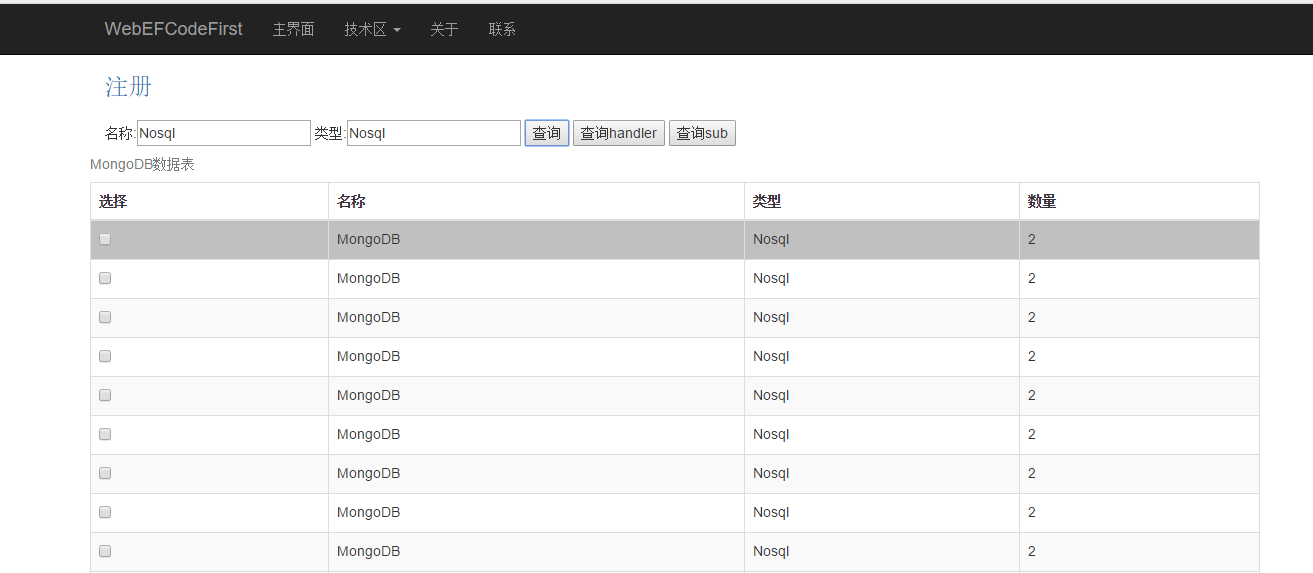
四:效果图
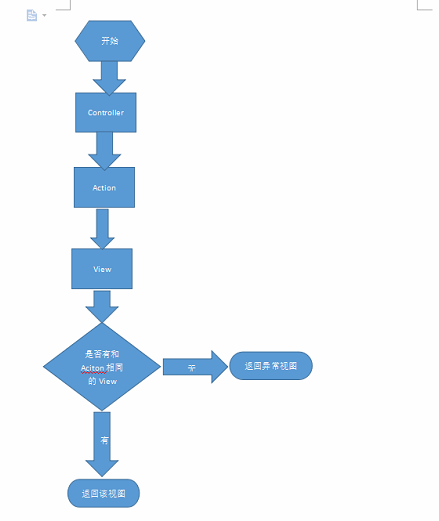
附加:
默认情况下控制器和视图关系:
.Net Core MongoDB 简单操作。的更多相关文章
- MongoDB简单操作
Hadoop核心技术厂商Cloudera将在2014/06推出hadoop Ecosystem与MongoDB的整合产品,届时MongoDB与ipmala及hbase,hive一起用; 开源linux ...
- MongoDB 简单操作
MongoDB操作 之 原生ORM,根本不存在SQL语句,数据之间不存在联系 查看数据库(查看磁盘中的数据库) > show databases; 使用数据库 > use local 创建 ...
- Node js MongoDB简单操作
//win7环境下node要先安装MongoDB的相关组件(非安装MongoDB数据库),在cmd命令行进入node项目目录后执行以下语句 //npm install mongodb //创建连接 v ...
- MongoDB简单操作(java版)
新建maven项目,添加依赖: <dependency> <groupId>org.mongodb</groupId> <artifactId>mong ...
- C# Asp.net中简单操作MongoDB数据库(一)
需要引用MongoDB.Driver.dll.MongoDB.Driver.core.dll.MongoDB.Bson.dll三个dll. 1.数据库连接: public class MongoDb ...
- C# 对MongoDB 进行增删改查的简单操作
C# 对MongoDB 进行增删改查的简单操作 下面演示下C#操作MongoDB驱动的简单的增删改查代码 运用到的MongoDB支持的C#驱动,当前版本为1.6.0 1,连接数据库 /// & ...
- C# Asp.net中简单操作MongoDB数据库(二)
C# Asp.net中简单操作MongoDB数据库(一) , mongodb数据库连接可以回顾上面的篇幅. 1.model类: public class BaseEntity { /// < ...
- Golang 对MongoDB的操作简单封装
使用MongoDB的Go驱动库 mgo,对MongoDB的操作做一下简单封装 初始化 操作没有用户权限的MongoDB var globalS *mgo.Session func init() { s ...
- MongoDB数据库简单操作
之前学过的有mysql数据库,现在我们学习一种非关系型数据库 一.简介 MongoDB是一款强大.灵活.且易于扩展的通用型数据库 MongoDB 是由C++语言编写的,是一个基于分布式文件存储的开源数 ...
随机推荐
- 云计算之路-阿里云上:3个manager节点异常造成 docker swarm 集群宕机
今天 11:29 - 11:39 左右,docker swarm 集群 3 个 manager 节点同时出现异常,造成整个集群宕机,由此给您带来很大的麻烦,请您谅解. 受此次故障影响的站点有:博问,闪 ...
- mycat操作MySQL第一篇:全局表
1.安装mycat,点击bin下面startup_nowrap.bat启动 2.客户端连接mycat:server.xml里面的 <!--连接mycat用户名和密码.数据库--> < ...
- angular路由详解三(路由参数传递)
我们经常用路由传递参数,路由主要有三种方式: 第一种:在查询参数中传递数据 {path:"address/:id"} => address/1 => Activa ...
- STM32F10x的启动汇编分析
;******************** (C) COPYRIGHT 2009 STMicroelectronics ********************;* File Name ...
- 深入解析条件变量(condition variables)
深入解析条件变量 什么是条件变量(condition variables) 引用APUE中的一句话: Condition variables are another synchronization m ...
- WordPress评论时一键填入昵称、邮箱和网址
现在很多博客都启用了多说,可是依然有很多博主坚守着wordpress或其主题自带的评论框,这样,每当我们访问这些博客时,发现精彩的内容或者 找到共鸣时.抑或只是想挑逗一下博主,准备在评论处爽爽的来一发 ...
- SDP(13): Scala.Future - far from completion,绝不能用来做甩手掌柜
在前面几篇关于数据库引擎的讨论里很多的运算函数都返回了scala.Future类型的结果,因为我以为这样就可以很方便的实现了non-blocking效果.无论任何复杂的数据处理操作,只要把它们包在一个 ...
- 【django之博客系统开发】
一.项目简介 使用django开发一套博客系统,参考博客园. 需求如下: 项目结构: 二.全部代码 from django.db import models # Create your models ...
- u-boot的SPL源码流程分析
上次梳理了一下SPL的基本概念和代码总体思路,这次就针对代码跑的流程做个梳理.SPL中,入口在u-boot-spl.lds中 ENTRY(_start) SECTIONS { .text : { __ ...
- Quikapp快应用开发入门
快应诞生背景 微信的小程序使得很多原来需要调动APP的场景不复存在,正式由于微信小程序的冲击,3月20日,华为联手九大手机厂商,共同举办了“快应用”标准启动发布会.“快应用”是几家手机厂商基于硬件平台 ...