
.Net Core MongoDB 简单操作。
一:MongoDB 简单操作类。这里引用了MongoDB.Driver。
using MongoDB.Bson;

using MongoDB.Driver;

using System;

using System.Collections.Generic;

using System.Linq;

using System.Threading.Tasks;

namespace WebEFCodeFirst.MongoDBPro

{

    public class MongoDBOperation<T> where T : class

    {

        private static MongoDBOperation<T> mongoDBOperation = null;

        private static readonly object lockobject = new object();

        private MongoClient mongoClient { get; set; }

        private IMongoDatabase db { get; set; }

        private IMongoCollection<BsonDocument> collection { get; set; }

        private IEnumerable<BsonDocument> documents { get; set; }

        private MongoDBOperation()

        {

            mongoClient = new MongoClient("mongodb://localhost:27017");

            db = mongoClient.GetDatabase("db");

            collection = db.GetCollection<BsonDocument>("londb");

        }

        public static MongoDBOperation<T> GetMongoDBInstance()

        {

            if (mongoDBOperation == null)

            {

                lock (nameof(MongoDBOperation<T>))// lockobject)

                {

                    if (mongoDBOperation == null)

                    {

                        mongoDBOperation = new MongoDBOperation<T>();

                    }

                }

            }

            return mongoDBOperation;

        }

        /// <summary>

        /// 同步插入数据

        /// </summary>

        /// <param name="document"></param>

        /// <returns></returns>

        public bool InsertOneData(BsonDocument document)

        {

            try

            {

                if (collection != null)

                {

                    collection.InsertOne(document);

                    return true;

                }

                else

                {

                    return false;

                }

            }

            catch (Exception ex)

            {

                return false;

            }

        }

        /// <summary>

        /// 异步插入

        /// </summary>

        /// <param name="document"></param>

        /// <returns></returns>

        public async Task<bool> InsertAsyncOneData(BsonDocument document)

        {

            try

            {

                if (collection != null)

                {

                    await collection.InsertOneAsync(document);

                    return true;

                }

                else

                {

                    return false;

                }

            }

            catch (Exception ex)

            {

                return false;

            }

        }

        /// <summary>

        /// 同步插入多条数据

        /// </summary>

        /// <param name="documents"></param>

        /// <returns></returns>

        public bool InsertManyData(IEnumerable<BsonDocument> documents)

        {

            try

            {

                //documents = Enumerable.Range(0, 100).Select(i => new BsonDocument("counter", i));

                if (collection != null)

                {

                    collection.InsertMany(documents);

                    return true;

                }

                else

                {

                    return false;

                }

            }

            catch (Exception ex)

            {

                return false;

            }

        }

        /// <summary>

        /// 同步插入多条数据

        /// </summary>

        /// <param name="documents"></param>

        /// <returns></returns>

        public async Task<bool> InsertAsyncManyData(IEnumerable<BsonDocument> documents)

        {

            try

            {

                //documents = Enumerable.Range(0, 100).Select(i => new BsonDocument("counter", i));

                if (collection != null)

                {

                    await collection.InsertManyAsync(documents);

                    return true;

                }

                else

                {

                    return false;

                }

            }

            catch (Exception ex)

            {

                return false;

            }

        }

        /// <summary>

        /// 查找有数据。

        /// </summary>

        /// <returns></returns>

        public List<BsonDocument> FindData()

        {

            return collection.Find(new BsonDocument()).ToList();

        }

        /// <summary>

        /// 取排除_id字段以外的数据。然后转换成泛型。

        /// </summary>

        /// <returns></returns>

        public List<BsonDocument> FindAnsyncData()

        {

            var projection = Builders<BsonDocument>.Projection.Exclude("_id");

            var document = collection.Find(new BsonDocument()).Project(projection).ToListAsync().Result;

            return document;

        }

        /// <summary>

        /// 按某些列条件查询

        /// </summary>

        /// <param name="bson"></param>

        /// <returns></returns>

        public List<BsonDocument> FindFilterlData(BsonDocument bson)

        {

            var buildfilter = Builders<BsonDocument>.Filter;

            FilterDefinition<BsonDocument> filter = null;

            foreach (var bs in bson)

            {

                filter = buildfilter.Eq(bs.Name, bs.Value);

            }

            //filter = buildfilter.Eq("name", "MongoDBTest");

            var documents = collection.Find(filter).ToList();

            return documents;

        }

        /// <summary>

        /// 返回受影响行

        /// </summary>

        /// <returns></returns>

        public long DeleteData()

        {

            //删除count大于0的文档。

            var filter = Builders<BsonDocument>.Filter.Gt("count",);

            DeleteResult deleteResult = collection.DeleteMany(filter);

            return deleteResult.DeletedCount;

        }

        /// <summary>

        /// 根据id更新文档中单条数据。

        /// </summary>

        /// <param name="_id"></param>

        /// <param name="bson"></param>

        public UpdateResult UpdateOneData(string _id,BsonDocument bson)

        {

            //修改条件(相当于sql where)

            FilterDefinition<BsonDocument> filter = Builders<BsonDocument>.Filter.Eq("name", "MongoDB");

            UpdateDefinition<BsonDocument> update = null;

            foreach (var bs in bson)

            {

                if (bs.Name.Equals("name"))

                {

                    update = Builders<BsonDocument>.Update.Set(bs.Name, bs.Value);

                }

            }

            //UpdateDefinition<BsonDocument> update = Builders<BsonDocument>.Update.Set("name", bson[0].ToString());

            UpdateResult result = collection.UpdateOne(filter, update);//默认更新第一条。

            return result;

        }

    }

}
二:控制器类
using System.Collections.Generic;

using System.Threading.Tasks;

using Microsoft.AspNetCore.Mvc;

using MongoDB.Bson;

using WebEFCodeFirst.Models;

using WebEFCodeFirst.MongoDBPro;

namespace WebEFCodeFirst.Controllers

{

    public class MongoDBController : Controller

    {

        private MongoDBOperation<BsonDocument> mongo = null;

        public MongoDBController()

        {

            mongo = MongoDBOperation<BsonDocument>.GetMongoDBInstance();

        }

        public ActionResult Index()

        {

            var document = new BsonDocument

            {

                { "name", "MongoDB" },

                { "type", "Nosql" },

                { "count",  },

            };

            List<MongodbModel> mdlist = new List<MongodbModel>();

            //MongodbModel model = new MongodbModel();

            if (mongo != null)

            {

                //long result = mongo.DeleteData();//删除

                //mongo.InsertOneData(document);//插入一行数据

                List<BsonDocument> document1 = mongo.FindAnsyncData();

                //List<BsonDocument> list = mongo.FindData();

                //mongo.UpdateOneData(list[0]["_id"].ToString(), document);

                //BsonDocument 支持索引查询。

                ViewData["name"] = document1[]["name"].ToString();

                ViewData["type"] = document1[]["type"].ToString();

                ViewBag.Name = document1[]["name"].ToString();

                ViewBag.Type = document1[]["type"].ToString();

                for (int i = ; i < document1.Count; i++)

                {

                    MongodbModel model = new MongodbModel();

                    model.name = document1[i]["name"].ToString();

                    model.type1 = document1[i]["type"].ToString();

                    model.count = document1[i]["count"].ToString();

                    mdlist.Add(model);

                }

            }

            //return PartialView("/*_MongoDBPartial*/", mdlist);

            return View(mdlist);

        }

        public IActionResult querymongodb(string dbname)//[FromBody] object paras)// string[] arr)

        {

            //if (arr.Length <= 0)

            //{

            //    return null;

            //}

            dbname = Request.Query["dbname"].ToString();// Get请求

            //dbname = Request.Form["dbname"].ToString();//POST请求

            if (string.IsNullOrEmpty(dbname.ToString()))

            {

                return null;

            }

            var document = new BsonDocument

            {

                { "name", dbname.ToString() },

                { "type", "DB"},

            };

            List<MongodbModel> mdlist = new List<MongodbModel>();

            if (mongo != null)

            {

                List<BsonDocument> document1 = mongo.FindFilterlData(document);

                for (int i = ; i < document1.Count; i++)

                {

                    MongodbModel model = new MongodbModel();

                    model.name = document1[i]["name"].ToString();

                    model.type1 = document1[i]["type"].ToString();

                    model.count = document1[i]["count"].ToString();

                    mdlist.Add(model);

                }

            }

            return PartialView("_MongoDBPartial", mdlist);

            //return View(mdlist);

        }

        [HttpPost]

        public IActionResult querymon(string dbname)

        {

            dbname = Request.Form["dbname"].ToString();

            var document = new BsonDocument

            {

                { "name", dbname },

                { "type", dbname},

            };

            List<MongodbModel> mdlist = new List<MongodbModel>();

            if (mongo != null)

            {

                List<BsonDocument> document1 = mongo.FindFilterlData(document);

                for (int i = ; i < document1.Count; i++)

                {

                    MongodbModel model = new MongodbModel();

                    model.name = document1[i]["name"].ToString();

                    model.type1 = document1[i]["type"].ToString();

                    model.count = document1[i]["count"].ToString();

                    mdlist.Add(model);

                }

            }

            return PartialView("_MongoDBPartial", mdlist);

            //return View(mdlist);

        }

        [HttpPost]

        public IActionResult OnPostSearchquerymon(string dbname2)

        {

            if (string.IsNullOrEmpty(dbname2))

            {

                return null;

            }

            var document = new BsonDocument

            {

                { "name", dbname2 },

                { "type", "DB"},

            };

            List<MongodbModel> mdlist = new List<MongodbModel>();

            if (mongo != null)

            {

                List<BsonDocument> document1 = mongo.FindFilterlData(document);

                for (int i = ; i < document1.Count; i++)

                {

                    MongodbModel model = new MongodbModel();

                    model.name = document1[i]["name"].ToString();

                    model.type1 = document1[i]["type"].ToString();

                    model.count = document1[i]["count"].ToString();

                    mdlist.Add(model);

                }

            }

            return View(mdlist);

        }

        public IActionResult Create()

        {

            return View();

        }

        [HttpPost]

        public async Task<IActionResult> Create(string dbname)

        {

            dbname = Request.Form["dbname"].ToString();

            string dbtye = Request.Form["dbtye"].ToString();

            string dbcount = Request.Form["dbcount"].ToString();

            if (string.IsNullOrEmpty(dbname))

            {

                return RedirectToAction(nameof(Index));

            }

            var document = new BsonDocument

            {

                { "name", dbname },

                { "type", dbtye},

                { "count",dbcount},

            };

            if (mongo != null)

            {

                await mongo.InsertAsyncOneData(document);

            }

            return RedirectToAction(nameof(Index));

        }

    }

}
三:视图
@model IEnumerable<WebEFCodeFirst.Models.MongodbModel>

<style>

    th, td {

        padding: 3px;

    }

</style>

<script src="~/lib/jquery/dist/jquery.min.js"></script>

<script src="~/lib/jquery/dist/jquery.js"></script>

<p>

    <h3> <a asp-action="Create">注册</a> </h3>

</p>

<div class="row">

    <p></p>

    <div class="col-md-12">

        <form action="post">

            <div class="row-fluid">

                名称:<input type="text" id="dbname"  name="dbname2" value=@ViewBag.Name />

                类型:<input type="text" id="dbtype" value=@ViewBag.Name />

                <input type="button" asp-controller="MongoDB" asp-action="querymon" id="mongodbtest" value="查询" />

                <input type="button" asp-page-handler="Searchquerymon" id="mongodbte" value="查询handler" />

                <input type="submit" id="sbquery" value="查询sub" />

            </div>

            <div class="table table-striped" id="datamain">

                @Html.Partial("/Views/Shared/_MongoDBPartial.cshtml", Model)@*页面load时候。*@

            </div>

        </form>

        <p></p>

        <ul id="messages" style="list-style-type:none;"></ul>

    </div>

</div>

<script>

    //新增数据。2018.3.23 14:38

    // Ajax Get方法。

    $(document).ready(function () {

        $("#mongodbte").click(function () {

            var txtNo1 = $("#dbname").val();

            var txtName1 = $("#dbtype").val();

            var model = [];

            model.push($("#dbname").val(), $("#dbtype").val());

            $.ajax({

                url: "/MongoDB/querymongodb",//规定发送请求的 URL。默认是当前页面

                data: { dbname: model.toString() }, //json时,一定要是key-value.规定要发送到服务器的数据

                type: "GET",//规定请求的类型(GET 或 POST)。

                contentType: "json",//"application/json;charset=utf-8",//数据类型必须有,指定发给服务端的数据格式。

                async: true,//异步处理

                success: function (datas) {

                    $("#datamain").html(datas);

                    //console.log(datas);

                },

                error: function (datas) {

                    alert("刷新失败!");

                }

            });//ajax()方法要放在事件中调用。

        });

    });

    //Ajax Post方法 2018.3.24 14:12

    $(document).ready(function () {

        $("#mongodbtest").click(function () {

            var txtNo1 = $("#dbname").val();

            var txtName1 = $("#dbtype").val();

            var model = [];

            model.push($("#dbname").val(), $("#dbtype").val());

            $.ajax({

                url: "/MongoDB/querymon",//规定发送请求的 URL。默认是当前页面

                data: { dbname: txtNo1, dbtye: txtName1 }, //json时,一定要是key-value.规定要发送到服务器的数据

                type: "POST",//规定请求的类型(GET 或 POST)。

                contentType: "application/x-www-form-urlencoded",//Post用这种类型,//数据类型必须有,指定发给服务端的数据格式。

                async: true,//异步处理

                success: function (datas) {

                    $("#datamain").html(datas);

                    //console.log(datas); .net core 自带log4

                },

                error: function (datas) {

                    alert("刷新失败!");

                }

            });//ajax()方法要放在事件中调用。

        });

    });

</script>
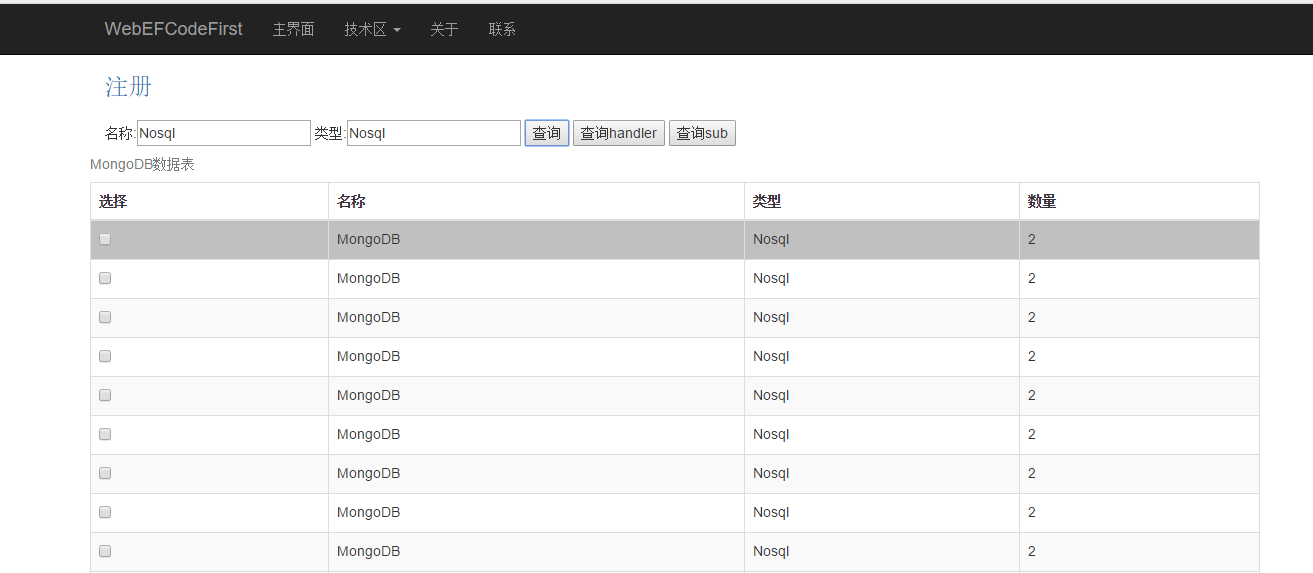
四:效果图
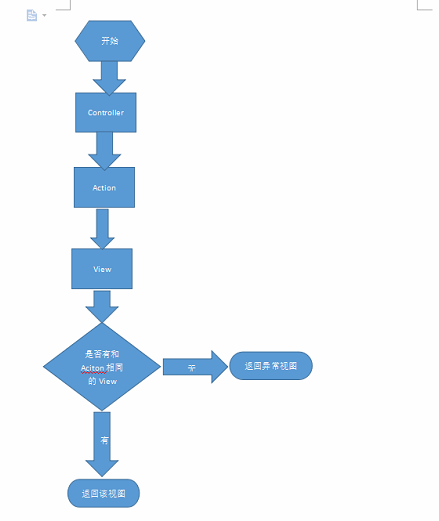
附加:
默认情况下控制器和视图关系:
.Net Core MongoDB 简单操作。的更多相关文章
- MongoDB简单操作
Hadoop核心技术厂商Cloudera将在2014/06推出hadoop Ecosystem与MongoDB的整合产品,届时MongoDB与ipmala及hbase,hive一起用; 开源linux ...
- MongoDB 简单操作
MongoDB操作 之 原生ORM,根本不存在SQL语句,数据之间不存在联系 查看数据库(查看磁盘中的数据库) > show databases; 使用数据库 > use local 创建 ...
- Node js MongoDB简单操作
//win7环境下node要先安装MongoDB的相关组件(非安装MongoDB数据库),在cmd命令行进入node项目目录后执行以下语句 //npm install mongodb //创建连接 v ...
- MongoDB简单操作(java版)
新建maven项目,添加依赖: <dependency> <groupId>org.mongodb</groupId> <artifactId>mong ...
- C# Asp.net中简单操作MongoDB数据库(一)
需要引用MongoDB.Driver.dll.MongoDB.Driver.core.dll.MongoDB.Bson.dll三个dll. 1.数据库连接: public class MongoDb ...
- C# 对MongoDB 进行增删改查的简单操作
C# 对MongoDB 进行增删改查的简单操作 下面演示下C#操作MongoDB驱动的简单的增删改查代码 运用到的MongoDB支持的C#驱动,当前版本为1.6.0 1,连接数据库 /// & ...
- C# Asp.net中简单操作MongoDB数据库(二)
C# Asp.net中简单操作MongoDB数据库(一) , mongodb数据库连接可以回顾上面的篇幅. 1.model类: public class BaseEntity { /// < ...
- Golang 对MongoDB的操作简单封装
使用MongoDB的Go驱动库 mgo,对MongoDB的操作做一下简单封装 初始化 操作没有用户权限的MongoDB var globalS *mgo.Session func init() { s ...
- MongoDB数据库简单操作
之前学过的有mysql数据库,现在我们学习一种非关系型数据库 一.简介 MongoDB是一款强大.灵活.且易于扩展的通用型数据库 MongoDB 是由C++语言编写的,是一个基于分布式文件存储的开源数 ...
随机推荐
- kubernetes dashboard backend源码剖析
dashboard架构主要由一个API handler 和 五个manager构成: API handler用来处理来自客户的http请求,不同的path路由到不同的的handler处理,使用的是go ...
- Micropython TurnipBit 青少年入门编程 交通灯实验
不知道大家小时候对红绿灯的原理有什么研究过,我是农村的孩子直到初中才见到真实的红绿灯,当时我记得很清楚,在那个路口站了五六分钟就盯着红绿灯变换,搞不清原理,只觉得神奇.现在想来实在可笑,今天写这个的很 ...
- 构造方法里的super()方法
为什么经常会遇到有的构造函数会有super(),而有的却没有,其实super就比如 对数函数,log的底数为10,如果为10 ,我们可写可不写,如果不为10,那么我们就要加上底数 在子类构造方法中,s ...
- QT 5.9版本 使用MSVC2015编译时出现中文字符乱码问题的解决方法
解决方法主要分为两种: 1.在项目->Project Settings ->编辑器 ->文件编码中使用System 2.对于中文字符,使用QString::fromLocal8Bit ...
- UWP 创建动画的极简方式 — LottieUWP
提到 UWP 中创建动画,第一个想到的大多都是 StoryBoard.因为 UWP 和 WPF 的界面都是基于 XAML 语言的,所以实现 StoryBoard 会非常方便. 来看一个简单的 Stor ...
- JavaScript编码规范(1)
参考的是百度公司的JS规范,分为两部分.这是第一部分 [建议] JavaScript 文件使用无 BOM 的 UTF-8 编码. 空格 [强制] 二元运算符两侧必须有一个空格,一元运算符与操作对象之间 ...
- 通过IF({1,0}和VLOOKUP函数实现Excel的双条件多条件查找的方法
在Excel中,通过VLOOKUP函数可以查找到数据并返回数据.不仅能跨表查找,同时,更能跨工作薄查找. 但是,VLOOKUP函数一般情况下,只能实现单条件查找. 如果想通过VLOOKUP函数来实现双 ...
- Centos7数据实时同步
Rsync+inotify 功能要求 通过rsync+inotify将数据库指定目录实时同步到备份服务器. 环境说明 M:192.168.10.11 数据库服务器 S:192.168.10.13 备份 ...
- 我的linux一万小时
这不是一篇鸡汤文,因为我并没有在使用 Linux 一万小时后成为 Linux 达人,甚至在很多方面,我连新手都算不上.我走的这些弯路能篇成一本很有参考价值的反面教材,下面,我在www.itxdl.cn ...
- hi-nginx-1.3.4编译安装
hi-nginx既是 web 服务器,也是 application 服务器.它开源在https://github.com/webcpp/hi-nginx 它是NGINX的超集,因此与编译NGINX稍有 ...