
webpack,配置,上手,例子
1.webpack是什么?
2.为什么要用webpack?
3.怎么用webpack?
webpack是什么?
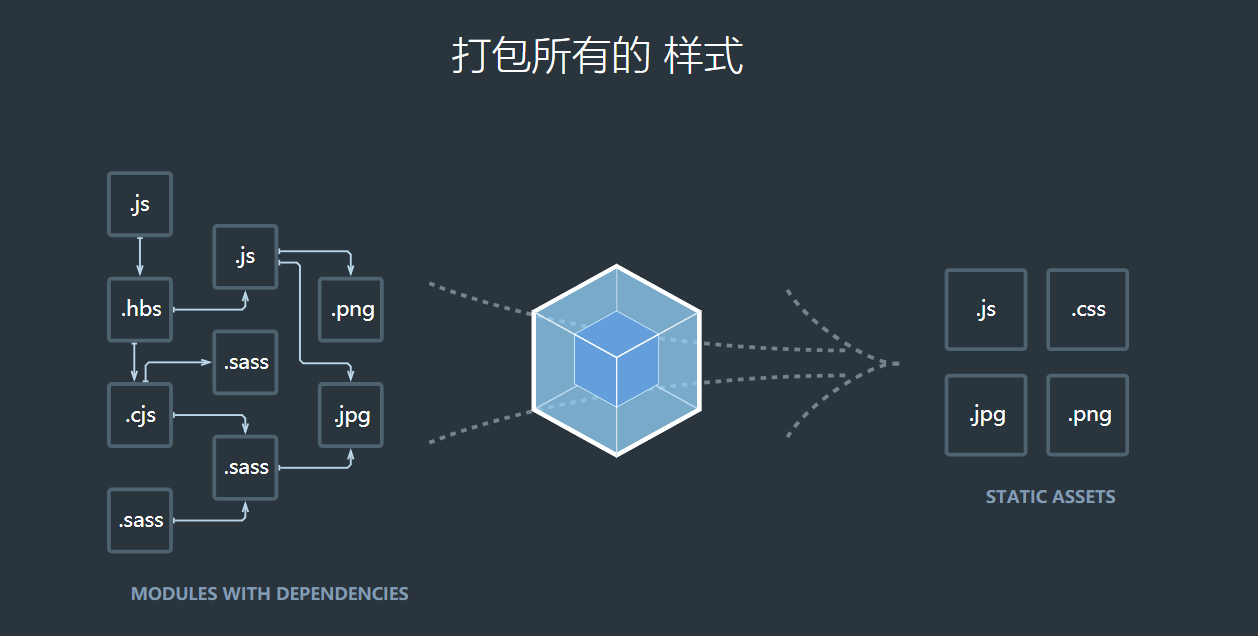
答:webpack是前端模块化应用和开发的打包工具,解决前端模块依赖的工具。打包所有的脚本,图片,css。
为什么要用webpack?
答:使用webpack可以让前端开发变得工程化和模块化,方便前端开发,提高开发速率。
webpack的主要优点是:模块化。
缺点是配置繁琐。
怎么使用webpack?
答:参考官网文档:https://webpack.js.org/concepts/
或者中文文档:https://www.webpackjs.com/concepts/
看完后还不知道怎么用?请看我的使用例子。
本例中使用webpack的目的:
1.前端开发独立于后端使用webpack-dev-server,将页面可在本地查看,webpack-dev-server中的proxy,代理后端借口
2.用webpack的loader解析.vue后缀的文件
3.配置webpack的热更新,使得修改前端代码,页面自动更新
4.利用webpack-merge区分开发环境的配置和生产环境的配置
5.自动解析生产页面
webpack依赖webpack.config文件,生产环境和开发环境对应不用的位置文件,共同的配置文件放在一起

src 目录
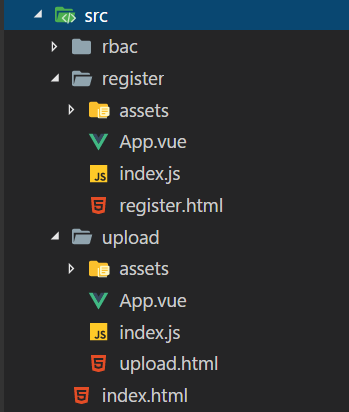
package.json文件中的配置
  "scripts": {

    "dev": "cross-env NODE_ENV=development webpack-dev-server --open --hot --config ./webpack_config/webpack.config.development.js",

    "build": "cross-env NODE_ENV=production webpack --progress --hide-modules --config ./webpack_config/webpack.config.production.js"

  },
webpack.config.common.js中的配置
var path = require('path')

var webpack = require('webpack')

const HtmlWebpackPlugin = require('html-webpack-plugin')

const ManifestPlugin = require('webpack-manifest-plugin');

var glob = require('glob')

var files = glob.sync(path.resolve(__dirname, '../src/*/index.js'));

var newEntries = {};

const config = {

    entry: {

        vendor: [

            './public/bower_components/jquery/dist/jquery.js',

            './public/bower_components/bootstrap/dist/css/bootstrap.css',

            './public/bower_components/bootstrap/dist/js/bootstrap.js'

        ]

    },

    output: {

        path: path.resolve(__dirname, '../public/vue_dist/'),

        publicPath: '/vue_dist/',

        filename: '[name].js'

    },

    module: {

        rules: [{

                test: /\.css$/,

                use: [

                    'vue-style-loader',

                    'css-loader'

                ],

            },

            {

                test: /\.scss$/,

                use: [

                    'vue-style-loader',

                    'css-loader',

                    'sass-loader'

                ],

            },

            {

                test: /\.sass$/,

                use: [

                    'vue-style-loader',

                    'css-loader',

                    'sass-loader?indentedSyntax'

                ],

            },

            {

                test: /\.vue$/,

                loader: 'vue-loader',

                options: {

                    loaders: {

                        // Since sass-loader (weirdly) has SCSS as its default parse mode, we map

                        // the "scss" and "sass" values for the lang attribute to the right configs here.

                        // other preprocessors should work out of the box, no loader config like this necessary.

                        'scss': [

                            'vue-style-loader',

                            'css-loader',

                            'sass-loader'

                        ],

                        'sass': [

                            'vue-style-loader',

                            'css-loader',

                            'sass-loader?indentedSyntax'

                        ]

                    }

                    // other vue-loader options go here

                }

            },

            {

                test: /\.js$/,

                loader: 'babel-loader',

                exclude: /node_modules/

            },

            {

                test: /\.(png|jpg|jpeg|gif|eot|ttf|woff|woff2|svg|svgz)(\?.+)?$/,

                use: [{

                    loader: 'url-loader',

                    options: {

                        limit: 10000

                    }

                }]

            },

            {

                test: path.resolve(__dirname, '../public/bower_components/jquery/dist/jquery.js'),

                use: [{

                    loader: 'expose-loader',

                    options: 'jQuery'

                }, {

                    loader: 'expose-loader',

                    options: '$'

                }]

            }

        ]

    },

    plugins: [

        new ManifestPlugin()

    ],

    resolve: {

        alias: {

            'vue$': 'vue/dist/vue.esm.js'

        },

        extensions: ['*', '.js', '.vue', '.json']

    },

    performance: {

        hints: false

    }

}

console.log(files + '------------files-------------------------');

files.forEach(function(f) {

    var name = /.*\/(.*?\/index)\.js/.exec(f)[1]; //register/main这样的文件名

    console.log(name + '------------name-------------------------');

    newEntries[name] = f;

});

console.log(newEntries + '------------newEntries-------------------------');

config.entry = Object.assign({}, config.entry, newEntries);

module.exports = config;
webpack.config.development.js 配置文件
const merge = require('webpack-merge');

const common = require('./webpack.config.common.js');

const path = require('path');

const HtmlWebpackPlugin = require('html-webpack-plugin')

const webpack = require('webpack')

var glob = require('glob')

var files = glob.sync(path.resolve(__dirname, '../src/*/index.js'));

var plugins = [];

files.forEach(function(f) {

    var name = /.*\/(.*?\/index)\.js/.exec(f)[1]; //register/main这样的文件名

    var plug = new HtmlWebpackPlugin({

        filename: path.resolve(__dirname, '../public/vue_dist/' + name + '.html'),

        chunks: ['vendor', name],

        template: path.resolve(__dirname, '../src/index.html'),

        inject: true

    });

    plugins.push(plug);

});

plugins.push(

    new webpack.optimize.CommonsChunkPlugin({

        names: ['vendor']

    }));

module.exports = merge(common, {

    plugins: plugins,

    devtool: '#eval-source-map',

    devServer: {

        historyApiFallback: true,

        noInfo: true,

        overlay: true,

        port: 8080,

        host: 'localhost',

        publicPath:'/vue_dist',

        proxy: [{

            context: ["/upload", "/phone",'/register','/users'],

            target: "http://127.0.0.1:3000",

        }],

        openPage: 'vue_dist/upload/index.html'

    },

    output: {

        path: path.resolve(__dirname, '../public/vue_dist/'),

        publicPath: '/vue_dist',

        filename: '[name].js'

    },

});
webpack.config.production.js 配置文件
const merge = require('webpack-merge');

const common = require('./webpack.config.common.js');

const path = require('path');

var webpack = require('webpack')

const CleanWebpackPlugin = require('clean-webpack-plugin');

const HtmlWebpackPlugin = require('html-webpack-plugin')

var fillter = ['upload']

var glob = require('glob')

var files = glob.sync(path.resolve(__dirname, '../src/*/index.js'));

var plugins = [];

files.forEach(function(f) {

    var name = /.*\/(.*?\/index)\.js/.exec(f)[1]; //register/main这样的文件名

    var c = false;

    for (let f = 0; f < fillter.length; f++) {

        const element = fillter[f];

        if (name.indexOf(element) > -1) {

            c = true;

            break;

        }

    }

    if (!c) {

        var plug = new HtmlWebpackPlugin({

            filename: path.resolve(__dirname, '../public/vue_dist/' + name + '.html'),

            chunks: [name],

            template: path.resolve(__dirname, '../src/index.html'),

            inject: true

        });

        plugins.push(plug);

    }

});

plugins.push(

    new CleanWebpackPlugin(['vue_dist'], {

        // Absolute path to your webpack root folder (paths appended to this)

        // Default: root of your package

        root: path.resolve(__dirname, '../public/'),

        // Write logs to console.

        verbose: true,

        // Use boolean "true" to test/emulate delete. (will not remove files).

        // Default: false - remove files

        dry: false,

        // If true, remove files on recompile.

        // Default: false

        watch: false,

        // Instead of removing whole path recursively,

        // remove all path's content with exclusion of provided immediate children.

        // Good for not removing shared files from build directories.

        exclude: ['files', 'to', 'ignore'],

        // allow the plugin to clean folders outside of the webpack root.

        // Default: false - don't allow clean folder outside of the webpack root

        allowExternal: false,

        // perform clean just before files are emitted to the output dir

        // Default: false

        beforeEmit: false

    })

)

module.exports = merge(common, {

    devtool: '#eval-source-map',

    plugins: plugins

});

if (process.env.NODE_ENV === 'production') {

    module.exports.devtool = '#source-map'

        // http://vue-loader.vuejs.org/en/workflow/production.html

    module.exports.plugins = (module.exports.plugins || []).concat([

        new webpack.DefinePlugin({

            'process.env': {

                NODE_ENV: '"production"'

            }

        }),

        new webpack.optimize.UglifyJsPlugin({

            sourceMap: true,

            compress: {

                warnings: false

            }

        }),

        new webpack.LoaderOptionsPlugin({

            minimize: true

        })

    ])

}
用到的插件:
CleanWebpackPlugin 删除目录专用
HtmlWebpackPlugin Plugin that simplifies creation of HTML files to serve your bundles
webpack-merge 合并webpack.config 文件
glob 找到匹配的文件
ManifestPlugin Webpack plugin for generating asset manifests. 生成打包列表like this
{
"register/index.js": "/vue_dist/register/index.js",
"register/index.js.map": "/vue_dist/register/index.js.map",
"upload/index.js": "/vue_dist/upload/index.js",
"upload/index.js.map": "/vue_dist/upload/index.js.map",
"vendor.js": "/vue_dist/vendor.js",
"vendor.js.map": "/vue_dist/vendor.js.map",
"element-icons.ttf": "/vue_dist/6f0a76321d30f3c8120915e57f7bd77e.ttf",
"glyphicons-halflings-regular.woff2": "/vue_dist/448c34a56d699c29117adc64c43affeb.woff2",
"glyphicons-halflings-regular.woff": "/vue_dist/fa2772327f55d8198301fdb8bcfc8158.woff",
"glyphicons-halflings-regular.ttf": "/vue_dist/e18bbf611f2a2e43afc071aa2f4e1512.ttf",
"glyphicons-halflings-regular.svg": "/vue_dist/89889688147bd7575d6327160d64e760.svg",
"glyphicons-halflings-regular.eot": "/vue_dist/f4769f9bdb7466be65088239c12046d1.eot"
}
expose-loader 解决全局变量的问题 like jQuery 和 $ 对应
webpack 配置总结
webpack配置目的,自动打包,热加载,快速开发,将需要的部分配置好自动打包
打包策略
首先,项目打包策略遵循以下几点原则:
选择合适的打包粒度,生成的单文件大小不要超过500KB
充分利用浏览器的并发请求,同时保证并发数不超过6
尽可能让浏览器命中304,频繁改动的业务代码不要与公共代码打包
避免加载太多用不到的代码,层级较深的页面进行异步加载
基于以上原则,我选择的打包策略如下:
第三方库如vue、jquery、bootstrap打包为一个文件
公共组件如弹窗、菜单等打包为一个文件
工具类、项目通用基类打包为一个文件
各个功能模块打包出自己的入口文件
各功能模块作用一个SPA,子页面进行异步加载
webpack配置
entry 入口文件,多入口。apps/question/index这样的,则会生成对应的目录结构
output 打包后的出口文件
plugin 插件
rules 文件处理
devserver 开发服务器,可代理接口,方便与后台开发
.....
0.约定开发目录结构
1.多入口,多出口,按需要的文件夹生成打包后的文件 glob
2.生产环境和开发环境分开配置,webpack-merg
如有错漏,请多多指教!
webpack,配置,上手,例子的更多相关文章
- webpack配置这一篇就够
最近看了一篇好文,根据这个文章重新梳理了一遍webpack打包过程,以前的一些问题也都清楚了,在这里分享一下,同时自己也做了一些小的调整 原文链接:http://www.jianshu.com/p/4 ...
- webpack配置指南
Webpack已经出来很久了,相关的文章也有很多,然而比较完整的例子却不是很多,让很多新手不知如何下脚,下脚了又遍地坑 说实话,官方文档是蛮乱的,而且有些还是错的错的..很多配置问题只有爬过坑才知道 ...
- 【转】Webpack 快速上手(上)
嫌啰嗦想直接看最终的配置请戳这里 webpack-workbench (https://github.com/onlymisaky/webpack-workbench) 由于文章篇幅较长,为了更好的阅 ...
- VUE 多页面打包webpack配置
思路:多配置一个main的文件,用于webpack入口使用, 然后路由的导向也应该默认指向新组件,最后通过webpack构建出一个新的独立的html文件. 缺点:生成多个html会new出多个vu ...
- [webpack] 配置react+es6开发环境
写在前面 每次开新项目都要重新安装需要的包,简单记录一下. 以下仅包含最简单的功能: 编译react 编译es6 打包src中入口文件index.js至dist webpack配置react+es6开 ...
- webpack配置详解
webpack配置详解 先点个赞吧,再挨个点下面的连接,觉得不值这个赞的回来骂我啊. Webpack傻瓜式指南(一) Webpack傻瓜指南(二)开发和部署技巧 Webpack傻瓜式指南 原生的官网详 ...
- Webpack配置示例和详细说明
/* * 请使用最新版本nodejs * 默认配置,是按生产环境的要求设置,也就是使用 webpack -p 命令就可以生成正式上线版本. * 也可以使用 webpack -d -w 命令,生成用于开 ...
- vue-cli#2.0 webpack 配置分析
目录结构: ├── README.md ├── build │ ├── build.js │ ├── check-versions.js │ ├── dev-client.js │ ├── dev-s ...
- webpack配置报错:invalid configuration object.webpack has been initialisted using a configuration objcet that does not match thie API schema
最近接收了别人的项目,webpack配置总是报错如下:最后找到了解决办法,在此分享一下: 错误情况: 解决办法: 将package.json里面的colors删除掉即可
- 前端工程化(二)---webpack配置
导航 前端工程化(一)---工程基础目录搭建 前端工程化(二)---webpack配置 前端工程化(三)---Vue的开发模式 前端工程化(四)---helloWord 继续上一遍的配置,本节主要记录 ...
随机推荐
- python的map
map(function, iterable, ...) 将function放到迭代的每个元素执行,结果为list. 引自>:http://my.oschina.net/zyzzy/blog/1 ...
- shell重定向(大于号,小于号,左右,2>&1,&)
本文的例子部分是引用网络上的一篇文章. Linux的IO输入输出有三类 Standard Input 代码 0 Standard Output 代码 1 Standard Error 代码 2 举个例 ...
- android资源库
原文地址:http://blog.csdn.net/xiechengfa/article/details/38830751 在摸索过程中,GitHub上搜集了很多很棒的Android第三方库,推荐给在 ...
- Unable To Import Or Enter Sale Order - ORA-20001: APP-FND-01564: ORACLE error - 1422 in get_seq_info
In this Document Symptoms Cause Solution APPLIES TO: Oracle Order Management - Version 12.0.4 ...
- 标准会话管理器——StandardManager
用于保存状态的会话对象已经有了,现在就需要一个管理器来管理所有会话,例如会话id生成.根据会话id找出对应的会话.对于过期的会话进行销毁等等操作.用一句话描述标准会话管理器:提供一个专门管理某个web ...
- Java常见运算符整理
本文是在学习中的总结,欢迎转载但请注明出处:http://blog.csdn.net/pistolove/article/details/44724267 本文主要介绍Java中常见的运算符,重点介绍 ...
- 数据挖掘进阶之关联规则挖掘FP-Growth算法
数据挖掘进阶之关联规则挖掘FP-Growth算法 绪 近期在写论文方面涉及到了数据挖掘,需要通过数据挖掘方法实现软件与用户间交互模式的获取.分析与分类研究.主要涉及到关联规则与序列模式挖掘两块.关联规 ...
- Android开发技巧——自定义控件之自定义属性
Android开发技巧--自定义控件之自定义属性 掌握自定义控件是很重要的,因为通过自定义控件,能够:解决UI问题,优化布局性能,简化布局代码. 上一篇讲了如何通过xml把几个控件组织起来,并继承某个 ...
- MIDle生命周期详解,以及工作原理
当MIDlet被应用程序管理器成功地初始化之后,就开始展开了它的生命周期.MIDlet的生命周期完全由应用程序管理器控制,也就是说,当MIDlet要从一个状态变成另外一个状态时,应用程序管理器会调用对 ...
- 和菜鸟一起学linux之linux性能分析工具oprofile移植
一.内核编译选项 make menuconfig General setup---> [*] Profiling support <*> OProfile system profil ...