
初学tensorflow遇到的Error——UnrecognizedFlagError: Unknown command line flag 'f'
最近在学习《tensorflow实战》时需要下载cifar10数据集,在cifar10目录下用到命令:
import cifar10,cifar10_input
cifar10.maybe_download_and_extract()
出错,具体错误信息
UnrecognizedFlagError                     Traceback (most recent call last)

<ipython-input-2-e6d19815ade8> in <module>()

     15     return var

     16

---> 17 cifar10.maybe_download_and_extract()

     18 images_train,labels_train = cifar10_input.disorted_inputs(data_dir=data_dir,batch_size=batch_size)

     19 images_test,labels_test = cifar10_input.inputs(eval_data=True,data_dir=data_dir,batch_size=batch_size)

~/ml/models/tutorials/image/cifar10/cifar10.py in maybe_download_and_extract()

    379 def maybe_download_and_extract():

    380   """Download and extract the tarball from Alex's website."""

--> 381   dest_directory = FLAGS.data_dir

    382   if not os.path.exists(dest_directory):

    383     os.makedirs(dest_directory)

~/anaconda3/lib/python3.6/site-packages/tensorflow/python/platform/flags.py in __getattr__(self, name)

     82     # a flag.

     83     if not wrapped.is_parsed():

---> 84       wrapped(_sys.argv)

     85     return wrapped.__getattr__(name)

     86

~/anaconda3/lib/python3.6/site-packages/absl/flags/_flagvalues.py in __call__(self, argv, known_only)

    628       suggestions = _helpers.get_flag_suggestions(name, list(self))

    629       raise _exceptions.UnrecognizedFlagError(

--> 630           name, value, suggestions=suggestions)

    631

    632     self.mark_as_parsed()

UnrecognizedFlagError: Unknown command line flag 'f'
把这个错误信息从头到尾读了一遍,什么玩意儿??
抓耳挠腮,谷歌走一波。
完全相符的结果不多,看了上面的解决方法貌似也都不太适合我,但是从https://github.com/tensorflow/tensorflow/issues/17702,看到
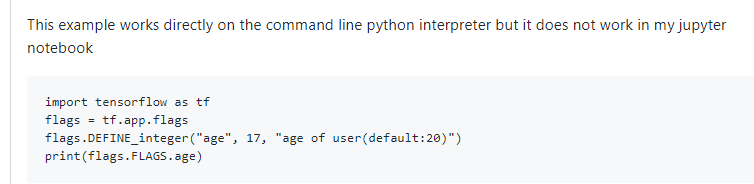
也就是说他的这段出错的代码在python命令行是可以运行的。
坑爹的jupyter?
不不不,jupyter还是很方便的,jupyter牛逼!
但是怎么解决呢,继续搜索,直到大神一句话醍醐灌顶

https://github.com/jupyter/notebook/issues/3327
大神原话可能不是这个意思,但是说者无心听者有意加上我英语渣:为什么非要在jupyter上跑这行代码?就一个下载功能,直接用脚本跑呗。于是…

problem solved ^_^。
以后不要太死心眼…
初学tensorflow遇到的Error——UnrecognizedFlagError: Unknown command line flag 'f'的更多相关文章
- Error running 'xxx': Command line is too long. Shorten command line for xxx
跑单元测试时,报错如下: Error running 'xxx': Command line is too long. Shorten command line for xxx 解决方案: 在项目所在 ...
- 运行springboot项目报错 Error running 'ResourceApplication': Command line is too long. Shorten comma
方法1 IDEA 运行报错:Error running '***': Command line is too long 技术标签: IDEA Error running 'Test': Com ...
- idea报错:Error running $classname: Command line is too long. Shorten command line for $classname.
Command line is too long 打印的变量太长了,超过了限制,这都会报错...我只想知道idea基于什么原理会报这个错... 解决 1.按照提示修改该类的配置,选择jar manif ...
- idea启动springboot项目报Error running 'ServiceStarter': Command line is too long. Shorten command line for ServiceStarter or also for Application
解决办法:在.idea文件夹下面的workspace.xml中的 <component name="PropertiesComponent">标签下面添加: <p ...
- idea 启动 Error running 'XxGatewayApplication': Command line is too long. Shorten command line for XxGatewayApplication or also for Spring Boot default
在idea workspace里 <component name="PropertiesComponent">标签下加入 <property name=" ...
- Error running 'App': Command line is too long. Shorten command line for App or also for Spring Boot default configuration.
找到标签 <component name="PropertiesComponent">.在标签里加一行 : <property name="dynam ...
- selenium运行chrome去掉command -line flag
每次驱动chrome浏览器都会出现这玩意,比较烦人··想办法去掉了它: ChromeOptions options = new ChromeOptions();options.addArguments ...
- Spring session redis ERR unknown command 'CONFIG'
部署线上服务启动报错 redis.clients.jedis.exceptions.JedisDataException: ERR unknown command 'CONFIG' Redis CON ...
- List of Chromium Command Line Switches(命令行开关集)——官方指定命令行更新网址
转自:http://peter.sh/experiments/chromium-command-line-switches/ There are lots of command lines which ...
随机推荐
- Asp.Net Core 轻松学-利用xUnit进行主机级别的网络集成测试
前言 在开发 Asp.Net Core 应用程序的过程中,我们常常需要对业务代码编写单元测试,这种方法既快速又有效,利用单元测试做代码覆盖测试,也是非常必要的事情:但是,但我们需要对系统进行集 ...
- C#语法——委托,架构的血液
本篇文章主要介绍委托的应用. 委托是大家最常见的语法了,但会用与精通之间的差别是巨大的. 一个程序员如果不能精通委托,那么,他永远无法成为高级程序员. 所以,让我们把委托刻到血液里吧. 这样,你才能称 ...
- Innosetup 设置文件的相对路径
在使用innosetup自动化打包的过程中,如果打包配置文件要随代码一起提交,则需要将打包文件改为相对路径,以便在其它端也可以直接打包,而不需要再次修改文件路径参数. 添加自动化打包文件 1. 添加b ...
- Java 在PDF中添加水印——文本/图片水印
水印是一种十分常用的防伪手段,常用于各种文档.资料等.常见的水印,包括文字类型的水印.图片或logo类型的水印.以下Java示例,将分别使用insertTextWatermark(PdfPageBas ...
- Linux IO模型(同步异步阻塞非阻塞等)的几篇好文章
聊聊同步.异步.阻塞与非阻塞聊聊Linux 五种IO模型聊聊IO多路复用之select.poll.epoll详解
- Ubuntu16.04安装Qt5.12.2
第一步:下载文件 https://download.qt.io/official_releases/qt/5.12/5.12.2/ 第二步:安装依赖库 sudo apt-get install bui ...
- 设计模式系列6:适配器模式(Adapter Pattern)
定义 将一个类的接口转换成客户希望的另一个接口,适配器模式使得原本由于接口不兼容而不能一起工作的那些类可以一起工作. --<设计模式>GoF UML类图 使用场景 在遗留代码复用,类 ...
- 好代码是管出来的——.Net Core中的单元测试与代码覆盖率
测试对于软件来说,是保证其质量的一个重要过程,而测试又分为很多种,单元测试.集成测试.系统测试.压力测试等等,不同的测试的测试粒度和测试目标也不同,如单元测试关注每一行代码,集成测试关注的是多个模块是 ...
- go语言打造p2p网络
传送门: 柏链项目学院 就像1000个人眼中有1000个哈姆雷特一样,每个人眼中的区块链也是不一样的!作为技术人员眼中的区块链就是将各种技术的融合,包括密码学,p2p网络,分布式共识机制以及博弈论等. ...
- Linux命令大杂烩
查看linux出口IP curl ifconfig.me scp跨服务器转移文件命令 scp 文件 root@IP:/application/apache-tomcat-8.0.36 回车, ...