
Spring MVC - 表单处理示例
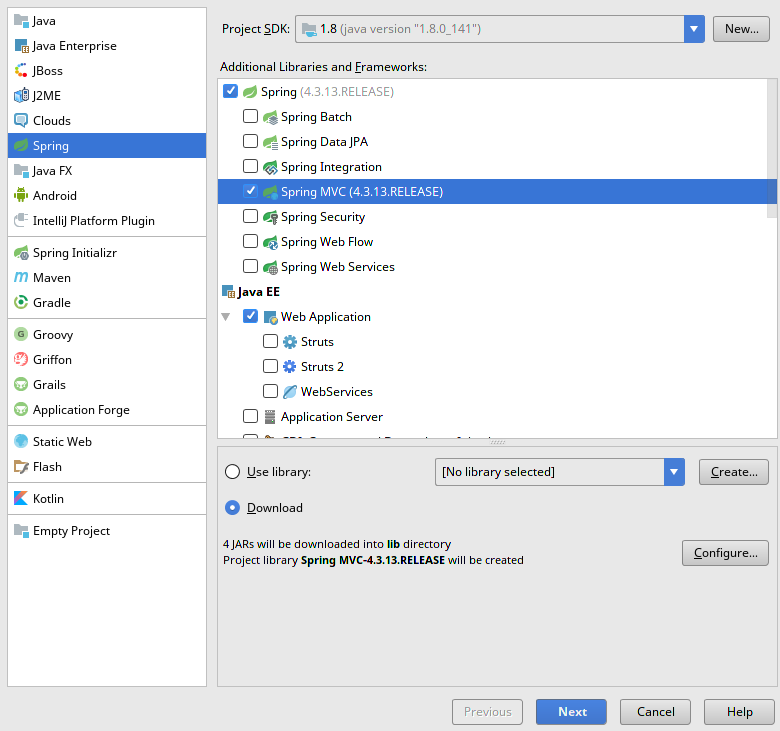
环境搭建
环境:
- Intellij IDEA
- Spring MVC
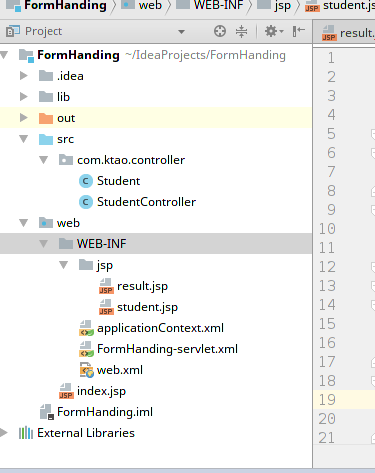
完整的项目文件结构如下所示:
Student.java
package com.ktao.controller;

public class Student {

    private Integer age;

    private String name;

    private Integer id;

    public void setAge(Integer age) {

        this.age = age;

    }

    public Integer getAge() {

        return age;

    }

    public void setName(String name) {

        this.name = name;

    }

    public String getName() {

        return name;

    }

    public void setId(Integer id) {

        this.id = id;

    }

    public Integer getId() {

        return id;

    }

}
StudentController.java
package com.ktao.controller;

import org.springframework.stereotype.Controller;

import org.springframework.ui.ModelMap;

import org.springframework.web.bind.annotation.ModelAttribute;

import org.springframework.web.bind.annotation.RequestMapping;

import org.springframework.web.bind.annotation.RequestMethod;

import org.springframework.web.portlet.ModelAndView;

@Controller

public class StudentController {

    @RequestMapping(value = "/student",method = RequestMethod.GET)

    public ModelAndView student(){

        return new ModelAndView("student","command",new Student());

    }

    @RequestMapping(value = "/addStudent", method = RequestMethod.POST)

    public String addStudent(Student student,ModelMap model) {

        model.addAttribute("name", student.getName());

        model.addAttribute("age", student.getAge());

        model.addAttribute("id", student.getId());

        return "result";

    }

}
配置文件
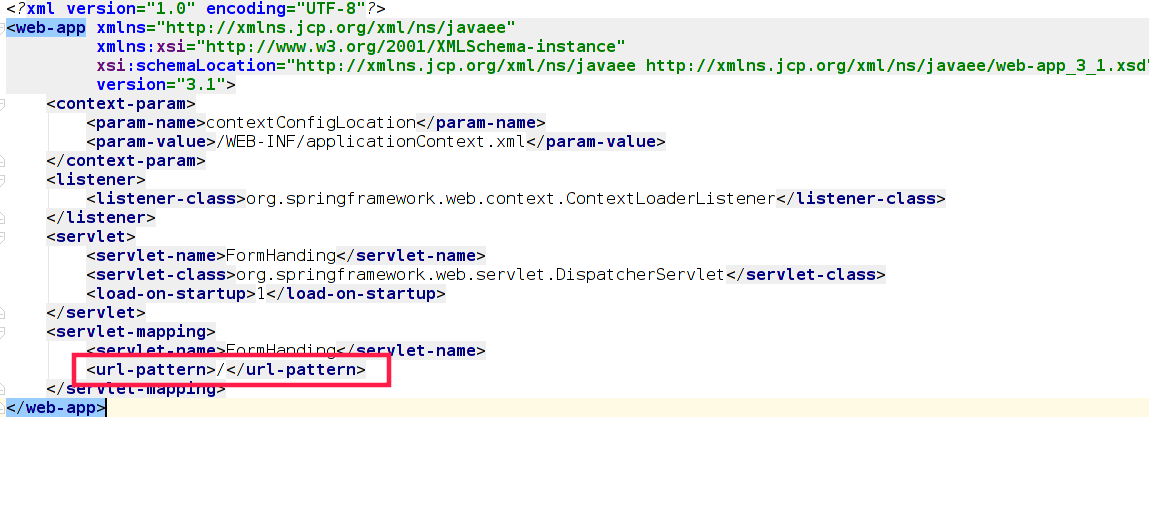
web.xml
FormHanding-servlet.xml
<?xml version="1.0" encoding="UTF-8"?>

<beans xmlns="http://www.springframework.org/schema/beans"

       xmlns:xsi="http://www.w3.org/2001/XMLSchema-instance"

       xmlns:context="http://www.springframework.org/schema/context"

       xsi:schemaLocation="http://www.springframework.org/schema/beans http://www.springframework.org/schema/beans/spring-beans.xsd http://www.springframework.org/schema/context http://www.springframework.org/schema/context/spring-context.xsd">

    <context:component-scan base-package="com.ktao.controller"/>

    <!--视图解析器-->

    <bean class="org.springframework.web.servlet.view.InternalResourceViewResolver">

        <property name="prefix" value="/WEB-INF/jsp/"/>

        <property name="suffix" value=".jsp"/>

    </bean>

</beans>
视图文件
student.jsp
<%@ page contentType="text/html; charset=UTF-8" %>

<%@taglib uri="http://www.springframework.org/tags/form" prefix="form"%>

<jsp:useBean id="command" class="com.ktao.controller.Student" scope="request" ></jsp:useBean>

<html>

<head>

    <title>Spring MVC表单处理</title>

</head>

<body>

<h2>Student Information</h2>

<form:form method="POST" action="addStudent">

    <table>

        <tr>

            <td><form:label path="name">名字:</form:label></td>

            <td><form:input path="name" /></td>

        </tr>

        <tr>

            <td><form:label path="age">年龄:</form:label></td>

            <td><form:input path="age" /></td>

        </tr>

        <tr>

            单<td><form:label path="id">编号:</form:label></td>

            <td><form:input path="id" /></td>

        </tr>

        <tr>

            <td colspan="2">

                <input type="submit" value="提交表单"/>

            </td>

        </tr>

    </table>

</form:form>

</body>

</html>

result.jsp
<%@ page contentType="text/html; charset=UTF-8" %>

<%@taglib uri="http://www.springframework.org/tags/form" prefix="form"%>

<html>

<head>

    <title>Spring MVC表单处理</title>

</head>

<body>

<h2>提交的学生信息如下 - </h2>

<table>

    <tr>

        <td>名称:</td>

        <td>${name}</td>

    </tr>

    <tr>

        <td>年龄:</td>

        <td>${age}</td>

    </tr>

    <tr>

        <td>编号:</td>

        <td>${id}</td>

    </tr>

</table>

</body>

</html>
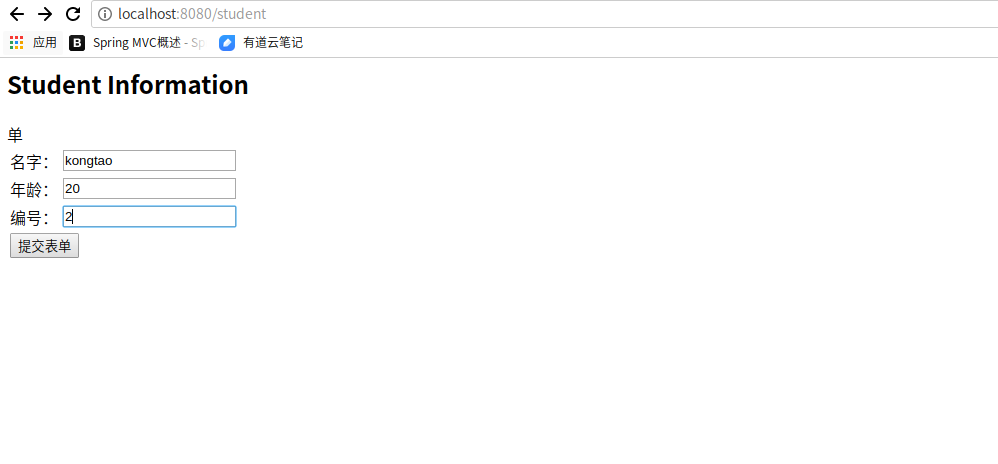
运行结果

报错分析
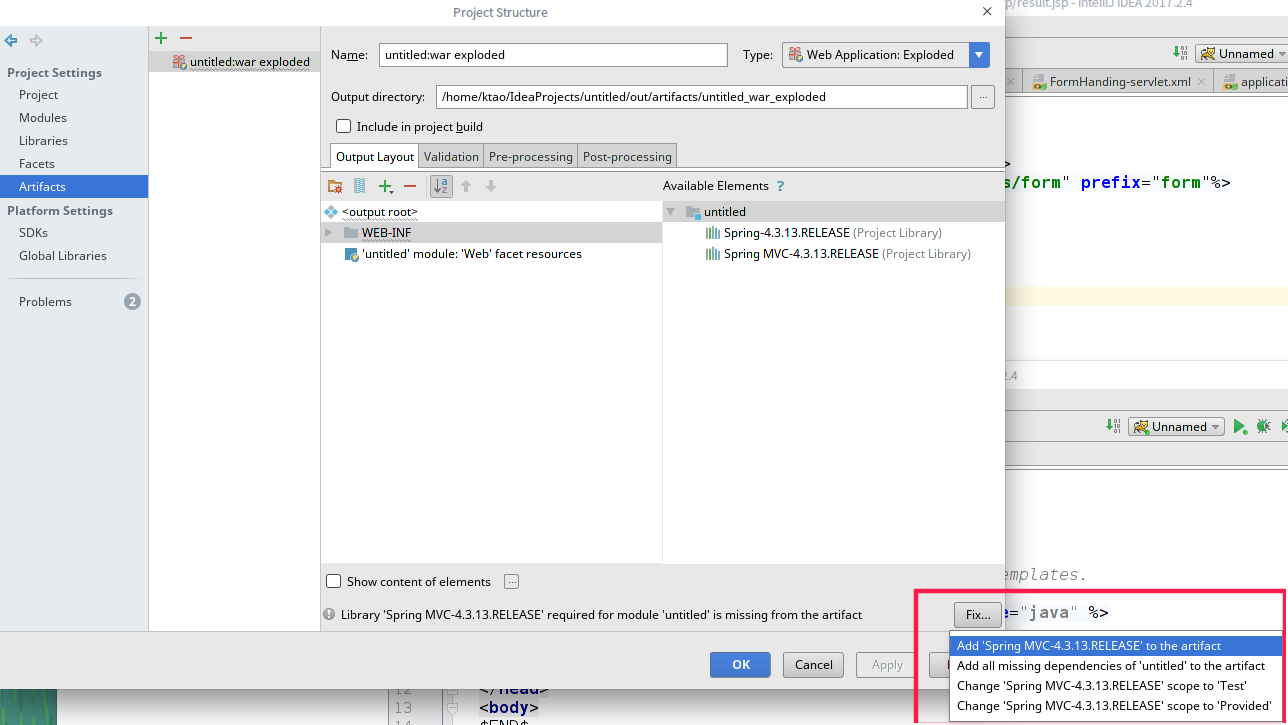
错误1

错因:lib文件包不完整
解决方法:
错误2
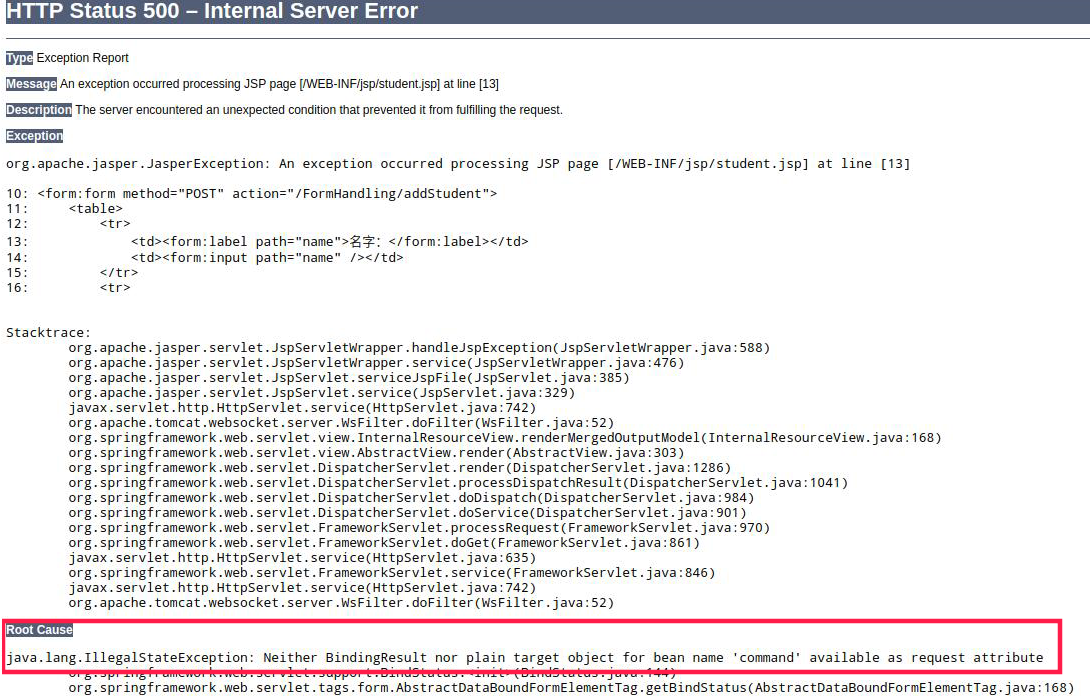
javax.servlet.jsp.JspTagException: Neither BindingResult nor plain target object for bean name 'command' available as request attribute
方法:
1为抛出异常原因,2为异常解决方法。
1. 原因: 进入spring:bind标签源码你可以看到
Object target = requestContext.getModelObject(beanName);
if (target == null) {
throw new IllegalStateException("Neither BindingResult nor plain target object for bean name '" +
beanName + "' available as request attribute");
}
beanName= <spring:bind path="command.spjg">的绿色部分
如果你是直接对某个页面进行请求,那么request中还没command这个对象
2.
在页面上加上
<jsp:useBean id="command" class="com.mvc.domain.BlogForm" scope="request" ></jsp:useBean>
红色部分填上你的绑定类
解释一下,这个command类似于struts的引用的form对象,使用jsp:userBean是引用在spring-mvc.xml配置文件中的command对象。

Spring MVC - 表单处理示例的更多相关文章
- Spring MVC表单处理
以下示例演示如何编写一个简单的基于Web的应用程序,它使用Spring Web MVC框架使用HTML表单. 首先使用Eclipse IDE,并按照以下步骤使用Spring Web Framework ...
- 使用Spring MVC表单标(转)
概述 在低版本的Spring中,你必须通过JSTL或<spring:bind>将表单对象绑定到HTML表单页面中,对于习惯了Struts表单标签的开发者来说,Spring MVC的 ...
- Spring MVC表单标签
从Spring 2.0开始,Spring MVC开始全面支持表单标签,通过Spring MVC表单标签,我们可以很容易地将控制器相关的表单对象绑定到HTML表单元素中. form标签 和使用任 ...
- Spring MVC表单提交
实际应用中,列表中的单条记录的修改,可能需要传很多对象参数到后台服务器,Spring MVC表单标签<form:> 提供了一种简洁的提交方式. <form id="form ...
- [Spring MVC] - 表单提交
Spring MVC自带的表单标签比较简单,很多时候需要借助EL和JSTL来完成. 下面是一个比较简单的表单提交页面功能: 1.User model package com.my.controller ...
- Spring MVC表单防重复提交
利用Spring MVC的过滤器及token传递验证来实现表单防重复提交. 创建注解 @Target(ElementType.METHOD) @Retention(RetentionPolicy.RU ...
- spring mvc表单的展现、输入处理、校验的实现
之前已经实现了spring mvc的入门例子及如何处理带参数的请求Controller编写.本文主要记录: 1)重定向请求 2)处理路径中含有变量的请求 3)使用JSR-303进行校验 ① 首先,编写 ...
- spring mvc表单form值自动传到javabean-注解@ModelAttribute
直接通过Form Bean进行表单可以简化表单提交的处理,特别是对于复杂表单,过于简单的表单就不建议了,因为毕竟需要额外创建一个Form Bean.前段时间项目中有一个比较复杂的表单,有多层次而且涉及 ...
- Spring MVC 表单校验 (七)
完整的项目案例: springmvc.zip 目录 实例 除了依赖spring-webmvc还需要依赖jackson-databind(用于转换json数据格式)和hibernate-validato ...
随机推荐
- JAVA_SE基础——7.常量&变量
上一篇,我讲了标识符&关键字 这篇我来解释下变量&常量~~~ 变量与常量这两个概念相信大家都不会感到陌生,在数学中就已经涉及了变量与常量.理解变量与常量,可以举这样一个例子: 例 ...
- typedef 使用
1,C 语言提供了 typedef 关键字,您可以使用它来为类型取一个新的名字. #include<stdio.h> typedef unsigned char BYTE; int mai ...
- c# 字符串的内存分配和驻留池( 转 )
刚开始学习C#的时候,就听说CLR对于String类有一种特别的内存管理机制:有时候,明明声明了两个String类的对象,但是他们偏偏却指向同一个实例.如下: string s1 = "he ...
- css3兼容IE8的方案 各个ie的hack
虽然现在很多项目已经对低版本IE不要求了,但是还有部分公司对IE8还是很执着的,咱作为屌丝前端程序员不能和老板说前端潮流,不能说趋势,只能动脑子了,下面就分享一些css3兼容ie8的方案思路.主要是实 ...
- SpringBoot+Angular2 开发环境搭建
https://segmentfault.com/a/1190000007921675
- 图数据库orientDB(1-2)例子
http://gog.orientdb.com/index.html#/infotab 小朱25岁,出生在教师家庭并且有个姐姐小田,他现在奋斗在帝都. 那么SQL是这样滴!!! CREATE VER ...
- C#微信公众号开发——access_token的获取
access_token是公众号的全局唯一票据,公众号调用各接口时都需使用access_token.正常情况下access_token有效期为7200秒,重复获取将导致上次获取的access_toke ...
- JS中apply和call的应用和区别
因为object没有某个方法,但是别的对象有,可以借助apply或call像别的对象借方法来操作. 猫吃鱼,狗吃肉,奥特曼打小怪兽. 有天狗想吃鱼了 猫.吃鱼.call(狗,鱼) 狗就吃到鱼了 猫成精 ...
- python基础——面向过程的编程思想及举例
面向过程的编程思想 1.面向过程的编程思想及举例 写程序时: 要先想功能,分步实现 2. os模块中walk输出目录中文件路径 os.walk() 方法用于通过在目录树中游走输出在目录中的文件名,向上 ...
- SpringMVC(十):SpringMVC 处理输出模型数据之Map及Model
Spring MVC提供了以下几种途径输出模型数据: 1)ModelAndView:处理方法返回值类型为ModelAndView时,方法体即可通过该对象添加模型数据: 2)Map及Model:处理方法 ...