
巧用Openlayers4的Style
原文:https://blog.csdn.net/gisshixisheng/article/details/80149087
概述
非常细化Openlayers4中的StyleFunction,因为它可以让我非常方便的实现各种效果,本文带你一起一探究竟。
StyleFunction
StyleFunction是一个样式函数,参数包括:feature和resolution,如下图。
不过,一般来说,resolution我用的很少,我一般会用zoom替换掉resolution这个参数;StyleFunction的返回值包括两种:样式或样式数组,如上图API。
样例
随着缩放点大小变化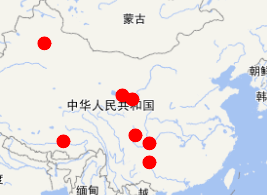

function styleFunction(feature) {

        var _zoom = map.getView().getZoom(),

            _radius = _zoom*2;

        _radius = _radius<2?2:_radius;

        _radius = _radius>15?15:_radius;

        return new ol.style.Style({

            image: new ol.style.Circle({

                radius: _radius,

                fill: new ol.style.Fill({

                    color: '#ff0000'

                }),

                stroke: new ol.style.Stroke({

                    color: '#ff0000',

                    width: 2

                })

            })

        })

    }
2、级别>4的时候出现标注

 function styleFunction(feature) {

        var _zoom = map.getView().getZoom(),

            _radius = _zoom*2;

        _radius = _radius<2?2:_radius;

        _radius = _radius>15?15:_radius;

        var _attr = feature.get("attribute");

        var _count = _zoom<5?"":_attr.count;

        return new ol.style.Style({

            image: new ol.style.Circle({

                radius: _radius,

                fill: new ol.style.Fill({

                    color: '#ff0000'

                }),

                stroke: new ol.style.Stroke({

                    color: '#ff0000',

                    width: 2

                })

            }),

            text: new ol.style.Text({

                text: _count.toString(),

                font:"bold 12px Times New Roman",

                fill: new ol.style.Fill({

                    color: '#fff'

                })

            })

        })

    }
3、样式组合
样式组合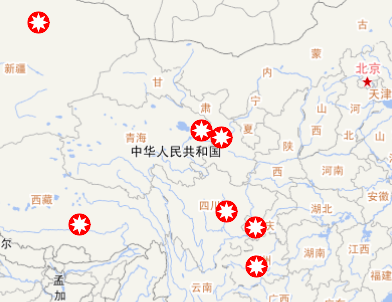
 function styleFunction(feature) {

        var styles = [];

        styles.push(

            new ol.style.Style({

                image: new ol.style.Circle({

                    radius: 10,

                    fill: new ol.style.Fill({

                        color: '#ff0000'

                    }),

                    stroke: new ol.style.Stroke({

                        color: '#ff0000',

                        width: 2

                    })

                })

            })

        );

        styles.push(

            new ol.style.Style({

                geometry: feature.getGeometry(),

                image: new ol.style.RegularShape({

                    radius1: 10,

                    radius2: 5,

                    points: 8,

                    fill: new ol.style.Fill({

                        color: '#fff'

                    })

                })

            })

        );

        return styles;

    }
4、展示线的节点
展示节点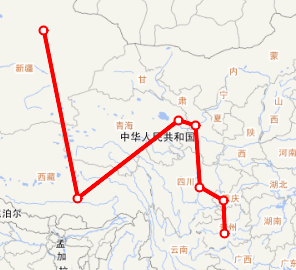
  function styleFunction(feature) {

        var styles = [];

        styles.push(

            new ol.style.Style({

                stroke: new ol.style.Stroke({

                    color: '#ff0000',

                    width: 4

                })

            })

        );

        var _coords = feature.get("geometry").getCoordinates();

        for(var i=0;i<_coords.length;i++){

            styles.push(

                new ol.style.Style({

                    geometry: new ol.geom.Point(_coords[i]),

                    image: new ol.style.Circle({

                        radius: 4,

                        fill: new ol.style.Fill({

                            color: '#ffff'

                        }),

                        stroke: new ol.style.Stroke({

                            color: '#ff0000',

                            width: 2

                        })

                    })

                })

            );

        }

        return styles;

    }
5、带箭头的线
带箭头的线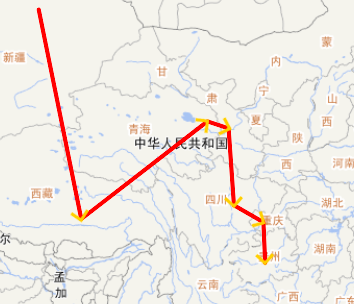
 function styleFunction(feature) {

        var styles = [];

        styles.push(

            new ol.style.Style({

                stroke: new ol.style.Stroke({

                    color: '#ff0000',

                    width: 4

                })

            })

        );

        var geometry = feature.get("geometry");

        geometry.forEachSegment(function(start, end) {

            var dx = end[0] - start[0];

            var dy = end[1] - start[1];

            var rotation = Math.atan2(dy, dx);

            // arrows

            styles.push(new ol.style.Style({

                geometry: new ol.geom.Point(end),

                image: new ol.style.Icon({

                    src: '../data/arrow.png',

                    anchor: [0.75, 0.5],

                    rotateWithView: false,

                    rotation: -rotation

                })

            }));

        });

        return styles;

    }
巧用Openlayers4的Style的更多相关文章
- 巧用style的另类写法
看到style,不少人可能会说这个我知道,就是控件写属性的话可以通过style来实现代码的复用,单独把这些属性及其参数写成style就可以便捷的调用. <?xml version="1 ...
- 前端工程师技能之photoshop巧用系列第三篇——切图篇
× 目录 [1]切图信息 [2]切图步骤 [3]实战 前面的话 前端工程师除了使用photoshop进行测量之外,更重要的是要使用该软件进行切图.本文是photoshop巧用系列的第三篇——切图篇 切 ...
- 前端工程师技能之photoshop巧用系列第二篇——测量篇
× 目录 [1]测量信息 [2]实战 [3]注意事项 前面的话 前端工程师使用photoshop进行的大量工作实际上是测量.本文是photoshop巧用系列第二篇——测量篇 测量信息 在网页制作中需要 ...
- 前端工程师技能之photoshop巧用系列第五篇——雪碧图
× 目录 [1]定义 [2]应用场景 [3]合并[4]实现[5]维护 前面的话 前面已经介绍过,描述性图片最终要合并为雪碧图.本文是photoshop巧用系列第五篇——雪碧图 定义 css雪碧图(sp ...
- 每日学习心得:Linq解决DataTable按照某一列的值排序问题/DataTable 导出CSV文件/巧用text-overflow解决数据绑定列数据展示过长问题
2013-8-5 1 Linq解决DataTable按照某一列的值排序 在之前的总结中提到过对拼接而成的复合的DataTable按照某一列值的大小排序,那个主要的思想是在新建表结构时将要排序的那一列的 ...
- 网站开发进阶(四十二)巧用clear:both
网站开发进阶(四十二)巧用clear:both 前言 我们在制作网页中用div+css或者称xhtml+css都会遇到一些很诡异的情况,明明布局正确,但是整个画面却混乱起来了,有时候在IE6下看的很正 ...
- openlayers4 入门开发系列之小区信号扇形图篇
前言 openlayers4 官网的 api 文档介绍地址 openlayers4 api,里面详细的介绍 openlayers4 各个类的介绍,还有就是在线例子:openlayers4 官网在线例子 ...
- openlayers4 入门开发系列之台风轨迹篇
前言 openlayers4 官网的 api 文档介绍地址 openlayers4 api,里面详细的介绍 openlayers4 各个类的介绍,还有就是在线例子:openlayers4 官网在线例子 ...
- openlayers4 入门开发系列之船讯篇
前言 openlayers4 官网的 api 文档介绍地址 openlayers4 api,里面详细的介绍 openlayers4 各个类的介绍,还有就是在线例子:openlayers4 官网在线例子 ...
随机推荐
- 【LeetCode算法-7】Reverse Integer
LeetCode第7题: Given a 32-bit signed integer, reverse digits of an integer. Example 1: Input: 123 Outp ...
- Django之ORM操作总结
Django之ORM总结 表结构 from django.db import models # 一对多:班级与学生 # 多对多:班级与老师 # Create your models here. #创建 ...
- 001.Ceph简介概述
一 Ceph简介 Red Hat Ceph是一个分布式的数据对象存储,系统设计旨在性能.可靠性和可扩展性上能够提供优秀的存储服务.分布式对象存储是存储的未来,因为它们适应非结构化数据,并且客户端可以同 ...
- SpringCloud Gateway入门
本文是介绍一下SpringCloud Gateway简单路由转发使用. SpringCloud Gateway简介 SpringCloud是基于Spring Framework 5,Project R ...
- CCF-炉石传说
#include<cstdio> typedef struct { int attack,health; } cus; cus info[][]; ]; ; void summon(); ...
- C#选择文件、选择文件夹、打开文件
1.选择文件用OpenDialog OpenFileDialog dialog = new OpenFileDialog(); dialog.Multiselect = true;//该值确定是否可以 ...
- php error_log() 范例
<?php// 如果无法连接到数据库,发送通知到服务器日志if (!Ora_Logon($username, $password)) { error_log("Oracle da ...
- 开车旅行 [NOIP 2012]
Description 小A 和小B决定利用假期外出旅行,他们将想去的城市从1到N 编号,且编号较小的城市在编号较大的城市的西边,已知各个城市的海拔高度互不相同,记城市 i的海拔高度为Hi,城市 i ...
- BZOJ1758[Wc2010]重建计划——分数规划+长链剖分+线段树+二分答案+树形DP
题目描述 输入 第一行包含一个正整数N,表示X国的城市个数. 第二行包含两个正整数L和U,表示政策要求的第一期重建方案中修建道路数的上下限 接下来的N-1行描述重建小组的原有方案,每行三个正整数Ai, ...
- chrome浏览器下载内容存放位置
点击: 或者直接快捷键 ctrl +J 打开下载的资料在[设置]中可将浏览器设置成默认浏览器,更换下载内容的存放位置:给一个提示,本人未曾修改下载的存放位置,是用户/Administrator/Dow ...