
Linux系统下本地yum镜像源环境部署-完整记录
之前介绍了Linux环境下本地yum源配置方法,不过这个是最简单最基础的配置,在yum安装的时候可能有些软件包不够齐全,下面说下完整yun镜像源系统环境部署记录(yum源更新脚本下载地址:https://pan.baidu.com/s/1miMNPgc 提取密码:x49g):
1)安装nginx,用于yum镜像源访问配置

[root@yum ~]# yum -y install gcc pcre-devel zlib-devel openssl-devel

[root@yum ~]# cd /data/software

[root@yum software]# wget http://nginx.org/download/nginx-1.12.0.tar.gz

[root@yum software]# tar -zvxf nginx-1.12.0.tar.gz

[root@yum software]# cd nginx-1.12.0

添加www用户,其中-M参数表示不添加用户家目录,-s参数表示指定shell类型

[root@yum nginx-1.12.0]# useradd www -M -s /sbin/nologin

[root@yum nginx-1.12.0]# ./configure --prefix=/data/nginx --user=www --group=www --with-http_ssl_module --with-http_flv_module --with-http_stub_status_module --with-http_gzip_static_module --with-pcre

[root@yum nginx-1.12.0]# make && make install

2)配置nginx

[root@yum ~]# cat /data/nginx/conf/vhosts/mirrors.conf

server {

    listen 80;

    server_name yum.kevin.cn mirrors.kevin.cn localhost;

    index index.html index.php index.htm;

    access_log  /data/nginx/logs/access.log main;

    error_log  /data/nginx/logs/error.log;

    location / {

    root /data/mirrors;

    autoindex on;

    autoindex_exact_size  off;

    autoindex_localtime on;

    }

  }

[root@yum ~]# /data/nginx/sbin/nginx -t

nginx: the configuration file /data/nginx/conf/nginx.conf syntax is ok

nginx: configuration file /data/nginx/conf/nginx.conf test is successful

[root@yum ~]# /data/nginx/sbin/nginx

[root@yum ~]# lsof -i:80

COMMAND  PID USER   FD   TYPE DEVICE SIZE/OFF NODE NAME

nginx   7741 root    6u  IPv4  28311      0t0  TCP *:http (LISTEN)

nginx   7769  www    6u  IPv4  28311      0t0  TCP *:http (LISTEN)

nginx   7770  www    6u  IPv4  28311      0t0  TCP *:http (LISTEN)

nginx   7771  www    6u  IPv4  28311      0t0  TCP *:http (LISTEN)

nginx   7772  www    6u  IPv4  28311      0t0  TCP *:http (LISTEN)

nginx   7773  www    6u  IPv4  28311      0t0  TCP *:http (LISTEN)

nginx   7774  www    6u  IPv4  28311      0t0  TCP *:http (LISTEN)

nginx   7775  www    6u  IPv4  28311      0t0  TCP *:http (LISTEN)

nginx   7776  www    6u  IPv4  28311      0t0  TCP *:http (LISTEN)

3)创建yum源数据目录

[root@yum ~]# mkdir -p /data/mirrors

[root@yum ~]# cd /data/mirrors/

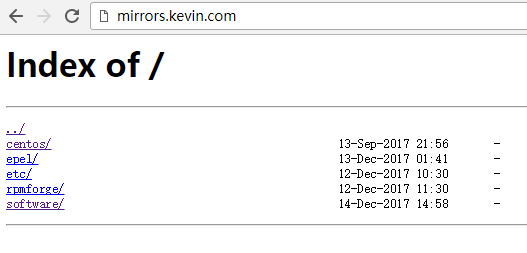
[root@yum mirrors]# mkdir centos  epel  etc  rpmforge

[root@yum mirrors]# ls

centos  epel  etc  rpmforge

4)编写yum源下载更新脚本(从mirrors.ustc.edu.cn镜像网站下载和更新)

[root@yum ~]# cat /data/script/mirrors.sh

#!/bin/bash

#==========================================

# Program   : /bin/update_yum_source.sh

# Info      : 定期同步官方 yum 源到本地

# Version   : 2017.12.10 v1.0

# author    :kevin

# Usage     : 3 3 * * * /bin/bash /data/script/mirrors.sh

#==========================================

Date=`date +%Y%m%d`

LogFile="/data/logs/$Date.log"

ReceiveMail="wangshibo@kevin.com"

RsyncBin="/usr/bin/rsync"

RsyncPerm="-avrt --delete --exclude=debug/  --exclude=isos/ --exclude=SRPMS/ --exclude=ppc/ --delete-excluded"

#============ centos ==============

CentOS_Path="/data/mirrors/centos"

YumSiteList="rsync://mirrors.ustc.edu.cn/centos/"

centosparm="--exclude=2*/ --exclude=3*/ --exclude=4*/ --exclude=5*/"

#============ epel ==============

epelSite="rsync://mirrors.ustc.edu.cn/fedora-epel"

epelLocalPath="/data/mirrors/epel"

epelparm="--include=7/x86_64 --include=7Server/x86_64 --include=6/x86_64 --include=6Server/x86_64"

#============ rpmforge ==============

rpmforgeSite="rsync://apt.sw.be/pub/freshrpms/pub/dag/redhat/"

#rpmforgeSite="rsync://apt.sw.be/redhat/"

rpmforgeLocalPath="/data/mirrors/rpmforge/"

rpmforgeparm="--exclude=ppc/ --exclude=el2.1/ --exclude=el3/ --exclude=el4/ --exclude=el5/"

echo "---- $Date `date +%T` Begin ----" >>$LogFile

# centos

$RsyncBin $RsyncPerm  $centosparm $YumSiteList $CentOS_Path >> $LogFile

# epel

$RsyncBin $RsyncPerm  $epelparm  $epelSite $epelLocalPath >> $LogFile

# rpmforge

$RsyncBin $RsyncPerm  $rpmforgeparm $rpmforgeSite $rpmforgeLocalPath >> $LogFile

echo  "---- $Date `date +%T` End ----" >> $LogFile

#/bin/mail -s "opt001 - update yum source - $Date" $ReceiveMail<$LogFile

以上脚本中需要注意的几点:

--exclude   表示rsync同步的时候,需要排除的目录(具体表现:同步下来的目录里面为空,大小为0)

--include   表示rsync同步的时候,只想同步的目录

由于本案例是部署yum源,用于linux服务器上本地yum方案安装,不需要同步isos镜像(同时也可以节省机器空间资源),所以在同步的时候将isos镜像目录屏蔽

执行同步脚本。这个过程比较长,大概要下载将近180G的内容。需要耐心等待~~

[root@yum ~]# sh -x /data/script/mirrors.sh

[root@yum ~]# du -sh /data/mirrors/*

93G   /data/mirrors/centos

80G   /data/mirrors/epel

4.0K  /data/mirrors/etc

4.0K  /data/mirrors/rpmforge

410M  /data/mirrors/software

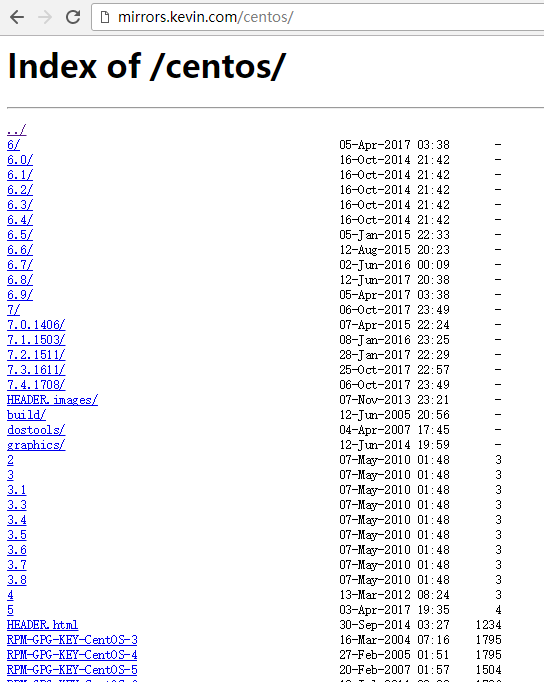
[root@yum ~]# ls /data/mirrors/centos/

2    3.6  6.0  6.6       7.1.1503   dostools          RPM-GPG-KEY-CentOS-3  RPM-GPG-KEY-CentOS-Debug-6     timestamp.txt

3    3.7  6.1  6.7       7.2.1511   filelist.gz       RPM-GPG-KEY-centos4   RPM-GPG-KEY-CentOS-Debug-7

3.1  3.8  6.2  6.8       7.3.1611   graphics          RPM-GPG-KEY-CentOS-4  RPM-GPG-KEY-CentOS-Security-6

3.3  4    6.3  6.9       7.4.1708   HEADER.html       RPM-GPG-KEY-CentOS-5  RPM-GPG-KEY-CentOS-Testing-6

3.4  5    6.4  7         build      HEADER.images     RPM-GPG-KEY-CentOS-6  RPM-GPG-KEY-CentOS-Testing-7

3.5  6    6.5  7.0.1406  dir_sizes  RPM-GPG-KEY-beta  RPM-GPG-KEY-CentOS-7  TIME

[root@yum ~]# ls /data/mirrors/epel/

4    5Client  7Server                           fullfilelist.KDUVzc9WPK           RPM-GPG-KEY-EPEL-4        RPM-GPG-KEY-EPEL-7Server

4AS  5Server  epel-release-latest-6.noarch.rpm  fullfiletimelist-epel             RPM-GPG-KEY-EPEL-5        testing

4ES  6        epel-release-latest-7.noarch.rpm  fullfiletimelist-epel.WaO7KUHvYz  RPM-GPG-KEY-EPEL-6

4WS  6Server  fullfilelist                      imagelist-epel                    RPM-GPG-KEY-EPEL-6Server

5    7        fullfilelist.AwiES3LjSB           RPM-GPG-KEY-EPEL                  RPM-GPG-KEY-EPEL-7

5)替换linux本机的yum源地址

[root@yum ~]# cd /etc/yum.repos.d/

[root@yum yum.repos.d]# ls

CentOS-Base.repo  CentOS-Debuginfo.repo  CentOS-fasttrack.repo  CentOS-Media.repo  CentOS-Vault.repo

[root@yum yum.repos.d]# mkdir bak

[root@yum yum.repos.d]# mv *.repo bak/

[root@yum yum.repos.d]# ls

bak

编写yum源文件

[root@yum yum.repos.d]# cat CentOS-Base.repo

# CentOS-Base.repo

#

# The mirrors system uses the connecting IP address of the client and the

# update status of each mirrors to pick mirrors that are updated to and

# geographically close to the client.  You should use this for CentOS updates

# unless you are manually picking other mirrorss.

#

# If the mirrorslist= does not work for you, as a fall back you can try the

# remarked out baseurl= line instead.

#

#

[base]

name=CentOS-CentOS-$releasever - Base

#mirrorslist=http://mirrorlist.centos.org/?release=CentOS-$releasever&arch=$basearch&repo=os&infra=$infra

baseurl=http://mirrors.kevin.cn/centos/$releasever/os/$basearch/

gpgcheck=1

gpgkey=http://mirrors.kevin.cn/centos/RPM-GPG-KEY-CentOS-$releasever

#released updates

[updates]

name=CentOS-CentOS-$releasever - Updates

#mirrorslist=http://mirrorlist.centos.org/?release=CentOS-$releasever&arch=$basearch&repo=updates&infra=$infra

baseurl=http://mirrors.kevin.cn/centos/$releasever/updates/$basearch/

gpgcheck=1

gpgkey=http://mirrors.kevin.cn/centos/RPM-GPG-KEY-CentOS-$releasever

#additional packages that may be useful

[extras]

name=CentOS-CentOS-$releasever - Extras

#mirrorslist=http://mirrorlist.centos.org/?release=CentOS-$releasever&arch=$basearch&repo=extras&infra=$infra

baseurl=http://mirrors.kevin.cn/centos/$releasever/extras/$basearch/

gpgcheck=1

gpgkey=http://mirrors.kevin.cn/centos/RPM-GPG-KEY-CentOS-$releasever

#additional packages that extend functionality of existing packages

[centosplus]

name=CentOS-CentOS-$releasever - Plus

#mirrorslist=http://mirrorlist.centos.org/?release=CentOS-$releasever&arch=$basearch&repo=centosplus&infra=$infra

baseurl=http://mirrors.kevin.cn/centos/$releasever/centosplus/$basearch/

gpgcheck=1

enabled=0

gpgkey=http://mirrors.kevin.cn/centos/RPM-GPG-KEY-CentOS-$releasever

#contrib - packages by Centos Users

[contrib]

name=CentOS-CentOS-$releasever - Contrib

#mirrorslist=http://mirrorlist.centos.org/?release=CentOS-$releasever&arch=$basearch&repo=contrib&infra=$infra

baseurl=http://mirrors.kevin.cn/centos/$releasever/contrib/$basearch/

gpgcheck=1

enabled=0

gpgkey=http://mirrors.kevin.cn/centos/RPM-GPG-KEY-CentOS-$releasever

[root@yum yum.repos.d]# cat epel.repo

[epel]

name=Extra Packages for Enterprise Linux $releasever - $basearch

baseurl=http://mirrors.kevin.cn/epel/$releasever/$basearch

#mirrorlist=https://mirrors.fedoraproject.org/metalink?repo=epel-6&arch=$basearch

failovermethod=priority

enabled=1

gpgcheck=1

gpgkey=http://mirrors.kevin.cn/epel/RPM-GPG-KEY-EPEL-$releasever

[epel-debuginfo]

name=Extra Packages for Enterprise Linux 6 - $basearch - Debug

baseurl=http://mirrors.kevin.cn/epel/$releasever/$basearch/debug

#mirrorlist=https://mirrors.fedoraproject.org/metalink?repo=epel-debug-6&arch=$basearch

failovermethod=priority

enabled=0

gpgkey=http://mirrors.kevin.cn/epel/RPM-GPG-KEY-EPEL-$releasever

gpgcheck=1

[epel-source]

name=Extra Packages for Enterprise Linux 6 - $basearch - Source

baseurl=http://mirrors.kevin.cn/epel/$releasever/SRPMS

#mirrorlist=https://mirrors.fedoraproject.org/metalink?repo=epel-source-6&arch=$basearch

failovermethod=priority

enabled=0

gpgkey=http://mirrors.kevin.cn/epel/RPM-GPG-KEY-EPEL-$releasever

gpgcheck=1

[root@yum yum.repos.d]# yum clean all

[root@yum yum.repos.d]# yum makecache

其他服务器要是想用本yum源,就按照上面操作,将/etc/yum.repos.d目录下的repo文件都移除,然后将上面编写的两个文件放进去,执行yum clean all和yum makecache即可!

============================================================================

温馨提示:以上的yum源配置及两个yum文件在centos6和centos7系统下都适用!已经验证!!

============================================================================

更新以上yum源的脚本:

可以将上面两个文件放到http://mirrors.kevin.com/software里面,用于脚本中下载

[root@yum ~]# cd /data/mirrors/software/

[root@yum software]# ls

yum_reset.sh        CentOS-Base.repo            epel.repo

[root@yum software]# cat yum_reset.sh

#!/bin/bash

cd /etc/yum.repos.d/

/bin/mkdir /etc/yum.repos.d/bak

mv /etc/yum.repos.d/*.repo /etc/yum.repos.d/bak

wget http://mirrors.kevin.com/software/CentOS-Base.repo

wget http://mirrors.kevin.com/software/epel.repo

/usr/bin/yum clean all

/usr/bin/yum makecache

只需要将上面的yum_reset.sh脚本下载到目标服务器上,然后执行,就可以将目标服务器的yum源更新了。

# wget http://mirrors.kevin.com/software/yum_reset.sh

# sh -x yum_reset.sh
可以定期更新以上的yum源同步脚本(mirros.sh),比如每月更新一次
[root@yum ~]# crontab -e

#每个月1号的23:00点同步一次yum源

0 23 1 * * /bin/bash -x /data/script/mirrors.sh > /dev/null 2>&1
如何将新的rpm包添加到本地部署的内部yum源里
根据上面部署的内部yum源路径,将新的rpm包拷贝到centos6或centos7对应的yum源的Packages包内即可.

比如将新的rpm包拷贝到centos6对应的/data/mirrors/centos/6/os/x86_64/Packages的rpm包路径下,然后执行:

# yum clean all

# yum makecache

如果是centos7下添加新rpm包,同理拷贝到/data/mirrors/centos/7/os/x86_64/Packages的rpm包路径下.
Linux系统下本地yum镜像源环境部署-完整记录的更多相关文章
- Linux系统下yum镜像源环境部署记录
之前介绍了Linux环境下本地yum源配置方法,不过这个是最简单最基础的配置,在yum安装的时候可能有些软件包不够齐全,下面说下完整yun镜像源系统环境部署记录(yum源更新脚本下载地址:https: ...
- linux系统下本地搭建git服务器
linux系统下如何搭建本地git服务器,用于存放团队的开发代码,如下步骤: 1.先用一台服务器来安装git,安装好linux以后,在这里选用的是Ubuntu 14.04.然后配置静态IP:172.1 ...
- 搭建本地yum镜像源
Blog:博客园 个人 目录 概述 语法说明 参数说明 部署 配置阿里云源 同步源 建仓 Nginx配置 配置定时计划 yum配置 概述 由于内网有大量机器不能访问公网,安装软件比较费劲,那么,如何让 ...
- Linux系统下配置网络、JAVA环境,配置tomcat,mysql
一.配置网络 1.进入自己的系统,并跳转到network-scripts 2.编辑 3.查看系统的信息 4.将其添加到刚刚的if-cfg-eth0中 5.重启网络 6.这个时候ping百度还是ping ...
- Linux系统下安装python3.7.3环境
这里用到的Linux系统是centos7系统,centos7是自带py的但是py的2.7.5版本 连接服务器的使用的是SSH Secure shell 1.首先安装依赖包 1)安装gcc编译器 gcc ...
- LINUX系统下Java和Scala的环境配置
最近,笔者在研究一个有关“自然语言处理”的项目,在这个项目中,需要我们用Spark进行编程.而Spark内核是由Scala语言开发的,所以在使用Spark之前,我们必须配置好Scala,而Scala又 ...
- ELK实时日志分析平台环境部署--完整记录
在日常运维工作中,对于系统和业务日志的处理尤为重要.今天,在这里分享一下自己部署的ELK(+Redis)-开源实时日志分析平台的记录过程(仅依据本人的实际操作为例说明,如有误述,敬请指出)~ ==== ...
- ELK实时日志分析平台环境部署--完整记录(转)
在日常运维工作中,对于系统和业务日志的处理尤为重要.今天,在这里分享一下自己部署的ELK(+Redis)-开源实时日志分析平台的记录过程(仅依据本人的实际操作为例说明,如有误述,敬请指出)~ ==== ...
- linux系统下Nagios+rrdtool+Pnp4nagios监控环境的搭建
环境中的软件版本>>>>>>>>>>>>>>>>>>nagios版本:3.5.1rrdtoo ...
随机推荐
- @addTagHelper的使用
@addTagHelper用来在cshtml页面加入自定义的Tag @addTagHelper “[the full type name of taghelper,] the assembly nam ...
- Requests 校花网图片爬取
纪念我们闹过的矛盾,只想平淡如水 import requestsimport reurl = 'http://www.xiaohuar.com/list-1-%s.html'for i in rang ...
- Flask消息闪现
目录 Flask消息闪现 简单的例子 闪现消息的类别 过滤闪现消息 Message Flashing 参考 Flask消息闪现 一个好的应用和用户界面都需要良好的反馈.如果用户得不到足够的反馈,那么应 ...
- <20190104>关掉一些鸡肋的Win10功能
讨厌鬼001 # - windows defender - 本身没什么卵用, 却一直占着位置, 而且不断提示更新. 必须关闭它 . 在"运行" 中, 输入 "gp ...
- GUI_鼠标事件
所有的组件都有鼠标和键盘监听器 import java.awt.Button; import java.awt.FlowLayout; import java.awt.Frame; import ja ...
- UVa 11846 - Finding Seats Again
链接: https://uva.onlinejudge.org/index.php?option=com_onlinejudge&Itemid=8&page=show_problem& ...
- xiaowuga poj3735—Training little cats(特殊操作转化为矩阵操作)
题意:有n只猫,对其进行k次操作,然后反复这样操作m次. 其中g 表示 i 猫加1, e表示 i 猫为0:s表示 i 与 j 猫互换. 解释一下样例: 3 1 6g 1g 2g 2s 1 2g 3e ...
- kafka监控kafka-eagle 容器化配置
由于kafka.zk 集群已经部署在k8s中, kafka的服务名 kafka-hs, zk的服务名为:zk-cs ,对kafka进行监控,所以需要把监控部署到k8s中,选择使用kafka-eagl ...
- 深入浅出的webpack4构建工具--webpack4+vue+route+vuex项目构建(十七)
阅读目录 一:vue传值方式有哪些? 二:理解使用Vuex 三:webpack4+vue+route+vuex 项目架构 回到顶部 一:vue传值方式有哪些? 在vue项目开发过程中,经常会使用组件来 ...
- nodeJS之Cookie和Session(一)
nodeJS之Cookie和Session(一) 一:Cookie HTTP是一个无状态协议,客户端每次发出请求时候,下一次请求得不到上一次请求的数据,那么如何将上一次请求和下一次请求的数据关联起 ...