
nginx介绍(三) - 虚拟主机
前言
前面提到过, 由nginx来分发请求到tomcat中, 那么怎么来区分这些tomcat呢?
我们一般访问网站的时候, 是不是可以使用 ip : port (127.0.0.1:8080)的方式来访问, 或者是 域名 : port (www.baidu.com:80), 只不过这里可以不写端口, 这是由于使用了默认的端口.
那么在nginx分发的时候, 是不是也可以通过 区分 域名 和 port 的方式来区分使用tomcat呢?
注: 同一个ip下面, 可以绑定多个域名, 但是一个域名, 只能有一个ip. 如果一个ip上面绑定了多个域名, 假如 127.0.0.1 绑定了 www.hao123.com 和 www.google.com, 那么在访问的时候, 给人的感觉, 是不是好像是我访问了不同的服务器, 并且, 他们都是使用默认80端口访问的.
一. 通过端口区分虚拟主机
1. 将nginx/html文件夹拷贝几份
[root@localhost nginx]# cp -r html html-8081

[root@localhost nginx]# cp -r html html-8082
接下来, 修改 html-8081, html-8082 下面的index.html文件
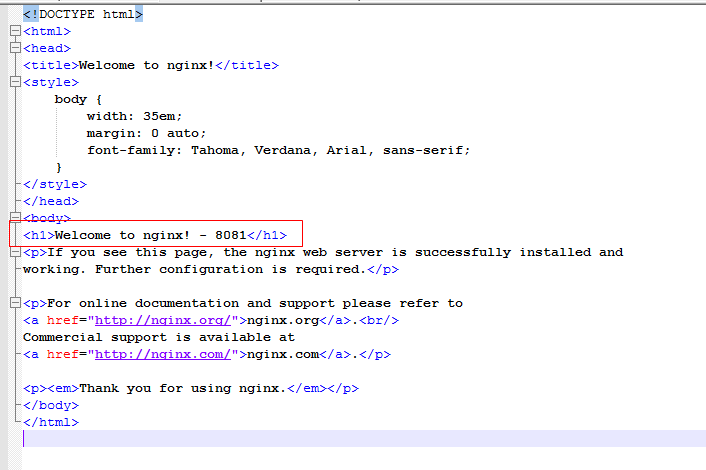
在欢迎的地方, 加上了各自的端口显示.
2. 修改配置文件
在server节点下面, 继续添加两个server节点, 主要修改其 listen , location.root 这两个地方
server {

        listen       8081;

        server_name  localhost;

        #charset koi8-r;

        #access_log  logs/host.access.log  main;

        location / {

            root   html-8081;

            index  index.html index.htm;

        }

        #error_page  404              /404.html;

        # redirect server error pages to the static page /50x.html

        #

        error_page   500 502 503 504  /50x.html;

        location = /50x.html {

            root   html;

        }

    }

    server {

        listen       8082;

        server_name  localhost;

        #charset koi8-r;

        #access_log  logs/host.access.log  main;

        location / {

            root   html-8082;

            index  index.html index.htm;

        }

        #error_page  404              /404.html;

        # redirect server error pages to the static page /50x.html

        #

        error_page   500 502 503 504  /50x.html;

        location = /50x.html {

            root   html;

        }

    }
3. 刷新配置
[root@localhost sbin]# ./nginx -s reload
4. 查看结果

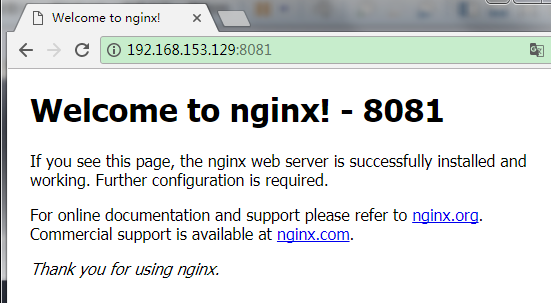
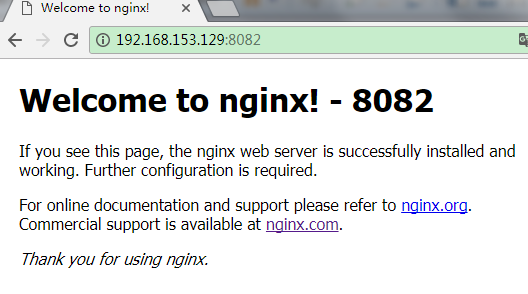
同一个ip下, 通过不同端口, 确实访问到了不同的页面.
二. 通过域名来区分
1. 将html再复制几个
[root@localhost nginx]# cp -r html html-hao123

[root@localhost nginx]# cp -r html html-google
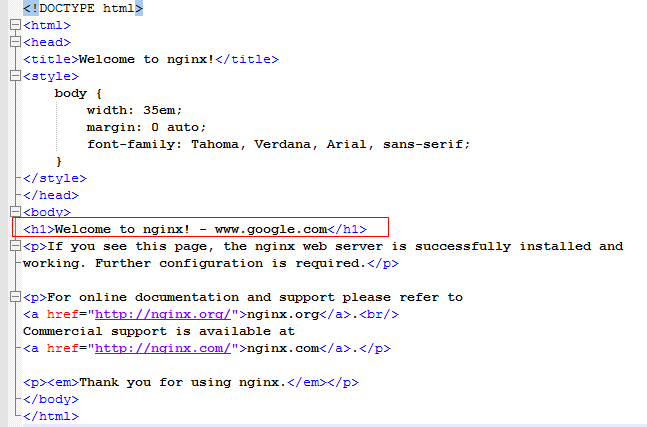
2. 为默认访问的index.html加一个小尾巴
3. 修改nginx配置文件
server {

        listen       ;

        server_name  www.hao123.com;

        #charset koi8-r;

        #access_log  logs/host.access.log  main;

        location / {

            root   html-hao123;

            index  index.html index.htm;

        }

        #error_page  404              /404.html;

        # redirect server error pages to the static page /50x.html

        #

        error_page   500 502 503 504  /50x.html;

        location = /50x.html {

            root   html;

        }

    }

    server {

        listen       ;

        server_name  www.google.com;

        #charset koi8-r;

        #access_log  logs/host.access.log  main;

        location / {

            root   html-google;

            index  index.html index.htm;

        }

        #error_page  404              /404.html;

        # redirect server error pages to the static page /50x.html

        #

        error_page   500 502 503 504  /50x.html;

        location = /50x.html {

            root   html;

        }

    }
4. 刷新配置
[root@localhost sbin]# ./nginx -s reload
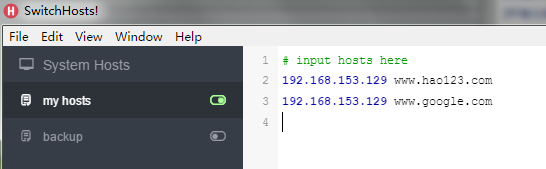
5. 修改客户端的host文件, 将www.baidu.com , www.google.com 映射进去
6. 验证结果

乍一看, 我访问的是 hao123 和 google 啊, 怎么跑到我部署的nginx里面去了呢. 罒ω罒
nginx介绍(三) - 虚拟主机的更多相关文章
- 第四百零二节,Django+Xadmin打造上线标准的在线教育平台—生产环境部署,uwsgi安装和启动,nginx的安装与启动,uwsgi与nginx的配置文件+虚拟主机配置
第四百零二节,Django+Xadmin打造上线标准的在线教育平台—生产环境部署,uwsgi安装和启动,nginx的安装与启动,uwsgi与nginx的配置文件+虚拟主机配置 软件版本 uwsgi- ...
- Nginx(二):虚拟主机配置
什么是虚拟主机? 虚拟主机使用的是特殊的软硬件技术,它把一台运行在因特网上的服务器主机分成一台台“虚拟”的主机,每台虚拟主机都可以是一个独立的网站,可以具有独立的域名,具有完整的Intemet服务器功 ...
- Nginx多站点虚拟主机实现单独启动停止php-fpm、单独控制权限设置
Nginx多站点虚拟主机实现单独启动停止php-fpm.单独控制权限设置 来源:osyunwei.com 作者:qihang01 发表于:2012-08-19 21:26 点击: 说明: 站点1:bb ...
- linux上nginx上配置虚拟主机的相关配置
1.配置主配置: nginx/conf/nginx.conf 2.虚拟主机配置:nginx/conf/extra/learn.weixin.com.conf 配置完后,重启服务器!
- Nginx下配置虚拟主机的三种方法
Nginx下,一个server标签就是一个虚拟主机. 1.基于域名的虚拟主机,通过域名来区分虚拟主机——应用:外部网站 2.基于端口的虚拟主机,通过端口来区分虚拟主机——应用:公司内部网站,外部网站的 ...
- 通过ngx-lua来统计Nginx上的虚拟主机性能数据
Web server调研分析 Filed under: Web Server — cmpan @ 2012-10-29 20:38:34 摘要 简单可依赖的架构首先需要有一个简单可依赖的前端WebSe ...
- Centos7 nginx配置多虚拟主机过程
一.前提准备 1.已经安装好了的Centos7服务器 2.ip 为192.168.1.209 [本次的配置ip] 3.确定防火墙等已经关闭 二.nignx配置文件参数详解 要配置多台虚拟主机,就需 ...
- Nginx如何配置虚拟主机?
注意,该环境是依赖于http://www.php20.com/forum.php?m ... &extra=page%3D1 基础上进行配置.默认不具备这些文件 .下面是增加一个mytest点 ...
- nginx下配置虚拟主机
linux 虚拟机下配置虚拟主机 nginx.conf 文件不动, 在 conf.d 或者 conf 目录下 新建项目.conf server { listen 80; server_name loc ...
随机推荐
- nginx路径设置(web)
原文 https://www.jianshu.com/p/57db2c5d0cb9 语法 root 语法:root path 默认值:root html 配置段:http.server.locatio ...
- python基础之Day15
一.函数递归 什么是函数递归: 函数递归调用是一种特殊的嵌套调用,在调用一个函数的过程中,又直接或间接地调用了该函数本身. 其中,函数的递归有明确的结束条件,不能无限制的调用,否则会撑破内存,在Pyt ...
- activeMQ和spring的整合
http://www.cnblogs.com/shuai-server/p/8966299.html 这篇博客中介绍了activemq传递消息的两种方式,今天分享的是activemq框架和sprin ...
- python_day12_css
目录: 简介 选择器(selecttor) 常用属性 页面布局 一.简介 1.CSS 定义 CSS是Cascading Style Sheets的简称,中文称为层叠样式表. CSS 规则由两个主要的部 ...
- Django手册
Django教程 Python一直是我最喜欢的语言,在Django和Tornado之间我选择了前者,没有特别的原因,网上人云亦云的,肯定不会有一方离另一方差很远,我就直接去看了看Github上两个项目 ...
- OpenCV图像分割1
1.基于阈值 1.1原理 灰度阈值化,假设输入图像为f,输出图像为g,则阈值化公式如下: g(i,j)=1 当f(i,j)>=T g(i,j)=0 当f(i,j)<T 1.2适用范围 当 ...
- mui 页面提示:Unable to preventDefault inside passive
页面提示: 点击该事件:页面提示:[8mui.min.js:7 [Intervention] Unable to preventDefault inside passive event listene ...
- 桌面应用开发之WPF页面导航
先看效果图 Get Start 为了项目解耦,使用mvvmlight框架.MVVM设计模式请自行了解. 1 新建项目 新建一个MvvmLight(WPF)项目,删除其中无关文件夹:Design ...
- 仿boost::any的泛型指针类any的实现
在boost库中,any是一种特殊容器,只能容纳一个元素,但这个元素可以是任意的类型----int.double.string.标准容器或者任何自定义类型.程序可以用any保存任意的数据,也可以在任何 ...
- MySQL 基础--字符类型
##=====================================================================================## MySQL支持的字符 ...