
[06] 利用mybatis-generator自动生成代码
1、mybatis-generator 概述
2、pom.xml中配置plugin
<build>

    <plugins>

        <!-- mybatis-generator -->

        <plugin>

            <groupId>org.mybatis.generator</groupId>

            <artifactId>mybatis-generator-maven-plugin</artifactId>

            <version>1.3.2</version>

            <configuration>

                <!-- mybatis-generator的配置文件,根据情况调整位置 -->

                <configurationFile>src/main/resources/generatorConfig.xml</configurationFile>

                <verbose>true</verbose>

                <overwrite>true</overwrite>

            </configuration>

            <executions>

                <execution>

                    <id>Generate MyBatis Artifacts</id>

                    <goals>

                        <goal>generate</goal>

                    </goals>

                </execution>

            </executions>

            <dependencies>

                <dependency>

                    <groupId>org.mybatis.generator</groupId>

                    <artifactId>mybatis-generator-core</artifactId>

                    <version>1.3.2</version>

                </dependency>

            </dependencies>

        </plugin>

    </plugins>

</build><build>
<plugins>
<!-- mybatis-generator -->
<plugin>
<groupId>org.mybatis.generator</groupId>
<artifactId>mybatis-generator-maven-plugin</artifactId>
<version>1.3.2</version>
<configuration>
<!-- mybatis-generator的配置文件,根据情况调整位置 -->
<configurationFile>src/main/resources/generatorConfig.xml</configurationFile>
<verbose>true</verbose>
<overwrite>true</overwrite>
</configuration>
<executions>
<execution>
<id>Generate MyBatis Artifacts</id>
<goals>
<goal>generate</goal>
</goals>
</execution>
</executions>
<dependencies>
<dependency>
<groupId>org.mybatis.generator</groupId>
<artifactId>mybatis-generator-core</artifactId>
<version>1.3.2</version>
</dependency>
</dependencies>
</plugin>
</plugins>
</build>
3、generatorConfig.xml配置文件
<?xml version="1.0" encoding="UTF-8"?>

<!DOCTYPE generatorConfiguration

        PUBLIC "-//mybatis.org//DTD MyBatis Generator Configuration 1.0//EN"

        "http://mybatis.org/dtd/mybatis-generator-config_1_0.dtd">

<generatorConfiguration>

    <!--JDBC驱动jar包的位置-->

    <classPathEntry location="C:/workspace/project/learning/mybatis/lib/mysql-connector-java-5.1.6.jar"/>

    <context id="default" targetRuntime="MyBatis3">

        <!--创建Java类时是否取消生成注释-->

        <commentGenerator>

            <property name="suppressDate" value="true"/>

            <property name="suppressAllComments" value="true"/>

        </commentGenerator>

        <!--JDBC数据库连接-->

        <jdbcConnection driverClass="com.mysql.jdbc.Driver"

                        connectionURL="jdbc:mysql://localhost:3306/test"

                        userId="root"

                        password="dev">

        </jdbcConnection>

        <!--

        Model模型生成器,用来生成含有主键key的类,记录类 以及查询Example类

        targetPackage     指定生成的model生成所在的包名

        targetProject     指定在该项目下所在的路径

        -->

        <javaModelGenerator targetPackage="dulk.learn.mybatis.generator.pojo"

                            targetProject="./src/main/java">

            <!-- 是否允许子包,即targetPackage.schemaName.tableName -->

            <property name="enableSubPackages" value="false"/>

            <!-- 是否对model添加构造函数 -->

            <property name="constructorBased" value="true"/>

            <!-- 是否对类CHAR类型的列的数据进行trim操作 -->

            <property name="trimStrings" value="true"/>

            <!-- 建立的Model对象是否 不可改变  即生成的Model对象不会有 setter方法,只有构造方法 -->

            <property name="immutable" value="false"/>

        </javaModelGenerator>

        <!--

        mapper映射文件生成所在的目录 为每一个数据库的表生成对应的SqlMap文件

        -->

        <sqlMapGenerator targetPackage="generator"

                         targetProject="./src/main/resources">

            <property name="enableSubPackages" value="false"/>

        </sqlMapGenerator>

        <!--

        客户端代码,生成易于使用的针对Model对象和XML配置文件的代码

        type="ANNOTATEDMAPPER",生成Java Model和基于注解的Mapper对象

        type="MIXEDMAPPER",生成基于注解的Java Model和相应的Mapper对象

        type="XMLMAPPER",生成SQLMap XML文件和独立的Mapper接口

        -->

        <javaClientGenerator type="XMLMAPPER"

                             targetPackage="dulk.learn.mybatis.generator.mapper"

                             targetProject="./src/main/java">

            <property name="enableSubPackages" value="false"/>

        </javaClientGenerator>

        <!--tables-->

        <table tableName="author" domainObjectName="Author"

               enableCountByExample="false" enableUpdateByExample="false"

               enableDeleteByExample="false" enableSelectByExample="false"

               selectByExampleQueryId="false">

        </table>

        <table tableName="book" domainObjectName="Book"

               enableCountByExample="false" enableUpdateByExample="false"

               enableDeleteByExample="false" enableSelectByExample="false"

               selectByExampleQueryId="false">

        </table>

    </context>

</generatorConfiguration>
x
<?xml version="1.0" encoding="UTF-8"?>
<!DOCTYPE generatorConfiguration
PUBLIC "-//mybatis.org//DTD MyBatis Generator Configuration 1.0//EN"
"http://mybatis.org/dtd/mybatis-generator-config_1_0.dtd">
<generatorConfiguration>
<!--JDBC驱动jar包的位置-->
<classPathEntry location="C:/workspace/project/learning/mybatis/lib/mysql-connector-java-5.1.6.jar"/>
<context id="default" targetRuntime="MyBatis3">
<!--创建Java类时是否取消生成注释-->
<commentGenerator>
<property name="suppressDate" value="true"/>
<property name="suppressAllComments" value="true"/>
</commentGenerator>
<!--JDBC数据库连接-->
<jdbcConnection driverClass="com.mysql.jdbc.Driver"
connectionURL="jdbc:mysql://localhost:3306/test"
userId="root"
password="dev">
</jdbcConnection>
<!--
Model模型生成器,用来生成含有主键key的类,记录类 以及查询Example类
targetPackage 指定生成的model生成所在的包名
targetProject 指定在该项目下所在的路径
-->
<javaModelGenerator targetPackage="dulk.learn.mybatis.generator.pojo"
targetProject="./src/main/java">
<!-- 是否允许子包,即targetPackage.schemaName.tableName -->
<property name="enableSubPackages" value="false"/>
<!-- 是否对model添加构造函数 -->
<property name="constructorBased" value="true"/>
<!-- 是否对类CHAR类型的列的数据进行trim操作 -->
<property name="trimStrings" value="true"/>
<!-- 建立的Model对象是否 不可改变 即生成的Model对象不会有 setter方法,只有构造方法 -->
<property name="immutable" value="false"/>
</javaModelGenerator>
<!--
mapper映射文件生成所在的目录 为每一个数据库的表生成对应的SqlMap文件
-->
<sqlMapGenerator targetPackage="generator"
targetProject="./src/main/resources">
<property name="enableSubPackages" value="false"/>
</sqlMapGenerator>
<!--
客户端代码,生成易于使用的针对Model对象和XML配置文件的代码
type="ANNOTATEDMAPPER",生成Java Model和基于注解的Mapper对象
type="MIXEDMAPPER",生成基于注解的Java Model和相应的Mapper对象
type="XMLMAPPER",生成SQLMap XML文件和独立的Mapper接口
-->
<javaClientGenerator type="XMLMAPPER"
targetPackage="dulk.learn.mybatis.generator.mapper"
targetProject="./src/main/java">
<property name="enableSubPackages" value="false"/>
</javaClientGenerator>
<!--tables-->
<table tableName="author" domainObjectName="Author"
enableCountByExample="false" enableUpdateByExample="false"
enableDeleteByExample="false" enableSelectByExample="false"
selectByExampleQueryId="false">
</table>
<table tableName="book" domainObjectName="Book"
enableCountByExample="false" enableUpdateByExample="false"
enableDeleteByExample="false" enableSelectByExample="false"
selectByExampleQueryId="false">
</table>
</context>
</generatorConfiguration>
<?xml version="1.0" encoding="UTF-8"?>

<!DOCTYPE generatorConfiguration

        PUBLIC "-//mybatis.org//DTD MyBatis Generator Configuration 1.0//EN"

        "http://mybatis.org/dtd/mybatis-generator-config_1_0.dtd">

<generatorConfiguration>

    <classPathEntry location="C:/workspace/project/learning/mybatis/lib/mysql-connector-java-5.1.6.jar"/>

    <context id="default" targetRuntime="MyBatis3">

        <commentGenerator>

            <property name="suppressDate" value="true"/>

            <property name="suppressAllComments" value="true"/>

        </commentGenerator>

        <jdbcConnection driverClass="com.mysql.jdbc.Driver"

                        connectionURL="jdbc:mysql://localhost:3306/test"

                        userId="root"

                        password="dev">

        </jdbcConnection>

        <javaModelGenerator targetPackage="dulk.learn.mybatis.generator.pojo"

                            targetProject="./src/main/java">

            <property name="trimStrings" value="true"/>

        </javaModelGenerator>

        <sqlMapGenerator targetPackage="generator"

                         targetProject="./src/main/resources">

        </sqlMapGenerator>

        <javaClientGenerator type="XMLMAPPER"

                             targetPackage="dulk.learn.mybatis.generator.mapper"

                             targetProject="./src/main/java">

        </javaClientGenerator>

        <table tableName="author" domainObjectName="Author"

               enableCountByExample="false" enableUpdateByExample="false"

               enableDeleteByExample="false" enableSelectByExample="false"

               selectByExampleQueryId="false">

        </table>

        <table tableName="book" domainObjectName="Book"

               enableCountByExample="false" enableUpdateByExample="false"

               enableDeleteByExample="false" enableSelectByExample="false"

               selectByExampleQueryId="false">

        </table>

    </context>

</generatorConfiguration><?xml version="1.0" encoding="UTF-8"?>
<!DOCTYPE generatorConfiguration
PUBLIC "-//mybatis.org//DTD MyBatis Generator Configuration 1.0//EN"
"http://mybatis.org/dtd/mybatis-generator-config_1_0.dtd">
<generatorConfiguration>
<classPathEntry location="C:/workspace/project/learning/mybatis/lib/mysql-connector-java-5.1.6.jar"/>
<context id="default" targetRuntime="MyBatis3">
<commentGenerator>
<property name="suppressDate" value="true"/>
<property name="suppressAllComments" value="true"/>
</commentGenerator>
<jdbcConnection driverClass="com.mysql.jdbc.Driver"
connectionURL="jdbc:mysql://localhost:3306/test"
userId="root"
password="dev">
</jdbcConnection>
<javaModelGenerator targetPackage="dulk.learn.mybatis.generator.pojo"
targetProject="./src/main/java">
<property name="trimStrings" value="true"/>
</javaModelGenerator>
<sqlMapGenerator targetPackage="generator"
targetProject="./src/main/resources">
</sqlMapGenerator>
<javaClientGenerator type="XMLMAPPER"
targetPackage="dulk.learn.mybatis.generator.mapper"
targetProject="./src/main/java">
</javaClientGenerator>
<table tableName="author" domainObjectName="Author"
enableCountByExample="false" enableUpdateByExample="false"
enableDeleteByExample="false" enableSelectByExample="false"
selectByExampleQueryId="false">
</table>
<table tableName="book" domainObjectName="Book"
enableCountByExample="false" enableUpdateByExample="false"
enableDeleteByExample="false" enableSelectByExample="false"
selectByExampleQueryId="false">
</table>
</context>
</generatorConfiguration>
4、使用方式
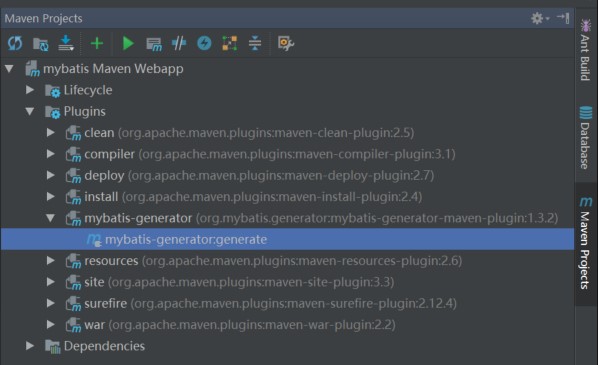
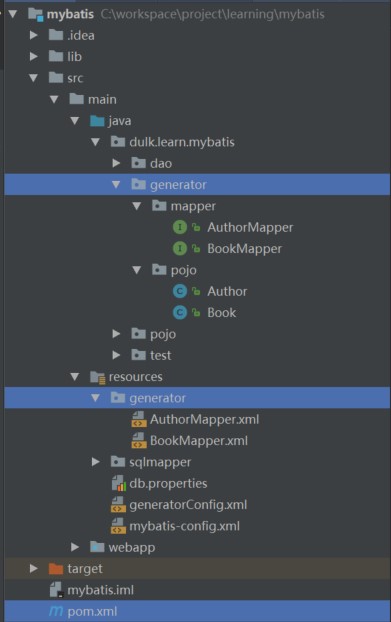
5、参考链接
[06] 利用mybatis-generator自动生成代码的更多相关文章
- SpringBoot 添加mybatis generator 自动生成代码插件
自动生成数据层代码,提高开发效率 1.pom添加插件,并指定配置文件路径 <!-- mybatis generator 自动生成代码插件 --> <plugin> <gr ...
- idea中mybatis generator自动生成代码配置 数据库是sqlserver
好长时间没有写博客了,最近公司要用java语言,开始学习java,属于初学者,今天主要记录一下mybatis generator自动生成代码,首先在如下图的目录中新建两个文件,如下图 generato ...
- SpringBoot入门篇--整合mybatis+generator自动生成代码+druid连接池+PageHelper分页插件
原文链接 我们这一篇博客讲的是如何整合Springboot和Mybatis框架,然后使用generator自动生成mapper,pojo等文件.然后再使用阿里巴巴提供的开源连接池druid,这个连接池 ...
- IDEA Maven Mybatis generator 自动生成代码
IDEA Maven Mybatis generator 自动生成代码 一.安装配置maven以及在Idea中配置maven 安装过程步骤可以看上面的博文,里面介绍得很详细. 二.建数据表 DROP ...
- IDEA Maven Mybatis generator 自动生成代码(实例讲解)(转)
IDEA Maven Mybatis generator 自动生成代码(实例讲解) MyBatis Generator • 简称MBG,是一个专门为MyBatis框架使用者定制的代码生成器,可以快速的 ...
- 使用Mybatis Generator自动生成代码
MyBatis Generator(MBG)是MyBatis MyBatis 和iBATIS的代码生成器.它将为所有版本的MyBatis以及版本2.2.0之后的iBATIS版本生成代码.它将内省数据库 ...
- Mybatis generator 自动生成代码(2)
最近准备开始做一个项目,需要开始手动创建sql,于是将Mybatis generator 工具功能强化了下. 首先,这里引入到版本一点的包 <dependency> <groupId ...
- Mybatis generator 自动生成代码
开发项目的时候,表很多,是不可能一点点的自己去写xml ,dao文件的,这里就需要用到代码的自动生成工具了. 第一步:导入jar包,当然,这之前,基本环境,像mybatis,数据库之类的都得搭建好. ...
- IDEA使用mybatis generator自动生成代码
主要就三步: 1.pom 文件中引入jar包并配置 build 属性 <dependencies> <!-- 自动生产mapper Begin! --> <depende ...
- mybatis generator自动生成代码时 只生成了insert 而没有其他的
mybatis框架提供了非常好用的逆向工程插件,但是在使用过程中会有很多问题. 我在使用中就遇到了只生成insert和insertSeletive方法,而不生成其他根据primary key查询更新删 ...
随机推荐
- GDAL中GDALDataType中值与其在C++中数据类型对应
GDAL中的GDALDataType是一个枚举型,其中的值为: GDT_Unknown : 未知数据类型 GDT_Byte : 8bit正整型 (C++中对应unsigned char) GDT_UI ...
- 《Inside C#》笔记(四) 类
类是对数据结构和算法的封装. 一 类成员 类成员包括以下几类,作者在后面的章节会详细讲解. 字段(用来保存数据,可用static readonly const来修饰).方法(操作数据的代码).属性(用 ...
- Android Context类
一.Context类的使用场景 ①.创建Application对象时,而且整个app公用一个Application对象 ②.创建Service对象时 ③.创建Activity对象时 二.应用程序共有几 ...
- Java并发编程(四)synchronized
一.synchronized同步方法或者同步块 在了解synchronized关键字的使用方法之前,我们先来看一个概念:互斥锁,顾名思义:能到达到互斥访问目的的锁. 举个简单的例子:如果对临界资源加上 ...
- Kotlin入门(12)类的概貌与构造
上一篇文章提到泛型函数appendString是在类外面定义,这不免使人疑惑,类里面又该怎样定义成员函数呢?为解答这个疑问,接下来的几篇文章将好好描述一下Kotlin如何操作类及其对象,本篇文章先对类 ...
- BeanFactory和ApplicationContext的比较
1.BeanFactory实例化后,不会马上实例化Bean:ApplicationContext在实例化后紧跟着就会实例化Bean 2.ApplicationContext还实现了ResourceLo ...
- Mac 的mysql5.7没有配置文件,如何解决only_full_group_by 问题
数据库版本是5.7.19,在写语句的时候,只要涉及ORDER BY,就会报错, ERROR 1055 (42000): Expression #7 of SELECT list is not in G ...
- typescritp 导出默认接口
假如有ITest.ts文件,如下: export default interface ITest{ } 这样会报错,编译不通过.据说是设计成这样的,具体详细见:https://github.com/M ...
- windows端ndk 编译.c/cpp文件生成so库示例
- 洗礼灵魂,修炼python(48)--巩固篇—模块
模块 其实前面都说过的,不过还是系统的再说一次,相信学到这,大部分都被搞忘了吧,所以再提一下,也为后面的博文做铺垫 1.什么是模块 在程序的开发过程中,随着程序代码越写越多,在一个文件里代码就会越来越 ...