
Django基础,Day5 - form表单投票详解
投票URL
polls/urls.py:
# ex: /polls/5/vote/

 url(r'^(?P<question_id>[0-9]+)/vote/$', views.vote, name='vote'),
创建投票form表单
polls/templates/polls/detail.html:
<h1>{{ question.question_text }}</h1>

{% if error_message %}<p><strong>{{ error_message }}</strong></p>{% endif %}

<form action="{% url 'polls:vote' question.id %}" method="post">

    {% csrf_token %}

    {% for choice in question.choice_set.all %}

        <input type="radio" name="choice" id="choice{{ forloop.counter }}" value="{{ choice.id }}"/>

        <label for="choice{{ forloop.counter }}">{{ choice.choice_text }}</label><br/>

    {% endfor %}

    <input type="submit" value="Vote"/>

</form>
代码解释:
{{ forloop.counter }} : for 循环次数
{% csrf_token %} : 解决POST请求跨域问题 Cross Site Request Forgeries
{% if %} {% endif %}:判断
{% for %} {% endfor %}:循环
投票Views 逻辑处理
投票 views vote in polls/views.py:
from django.http import HttpResponse, HttpResponseRedirect

from django.urls import reverse

def vote(request, question_id):

    question = get_object_or_404(Question, pk=question_id)

    try:

        selected_choice = question.choice_set.get(pk=request.POST['choice'])

    except (KeyError, Choice.DoesNotExist):

        # Redisplay the question voting form.

        return render(request, 'polls/detail.html', {

            'question': question,

            'error_message': "You didn't select a choice.",

        })

    else:

        selected_choice.votes += 1

        selected_choice.save()

        # Always return an HttpResponseRedirect after successfully dealing

        # with POST data. This prevents data from being posted twice if a

        # user hits the Back button.

        return HttpResponseRedirect(reverse('polls:results', args=(question.id,)))
代码解释:
request.POST,request.GET: 分别可获得POST或GET方法的参数值,如上 request.POST['choice'] 可取得POST请求中,name值为choice的Value值。若POST参数中没有choice,则会产生KeyError。
HttpResponseRedirect:重定向跳转,提交成功后进行自动重定向跳转是web 开发的一个良好实践。防止数据提交两次。
投票结果页 Views 逻辑处理
views results in polls/views.py:
from django.shortcuts import get_object_or_404, render

def results(request, question_id):

    question = get_object_or_404(Question, pk=question_id)

    return render(request, 'polls/results.html', {'question': question})
投票结果显示 template
polls/templates/polls/results.html:
<h1>{{ question.question_text }}</h1>

<ul>

    {% for choice in question.choice_set.all %}

        <li>{{ choice.choice_text }} -- {{ choice.votes }} vote{{ choice.votes|pluralize }}</li>

    {% endfor %}

</ul>

<a href="{% url 'polls:detail' question.id %}">Vote again?</a>
实现结果
1、访问detail.html:http://localhost:8000/polls/1/
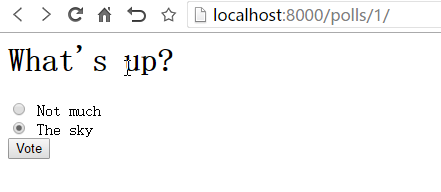
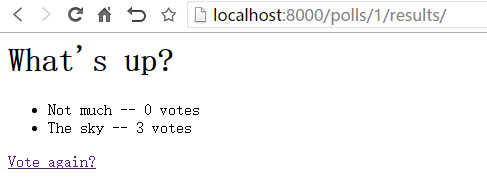
2、选择后,点击vote投票,跳转到结果页 results.html
***微信扫一扫,关注“python测试开发圈”,了解更多测试教程!***
Django基础,Day5 - form表单投票详解的更多相关文章
- Django基础之Form表单验证
Form表单验证 1.创建Form类(本质就是正则表达式的集合) from django.forms import Form from django.forms import fields from ...
- Django基础之form表单
1. form介绍 我们之前在HTML页面中利用form表单向后端提交数据时,都会写一些获取用户输入的标签并且用form标签把它们包起来. 与此同时, 我们在好多场景下都需要对用户的输入做校验, 比如 ...
- Django基础之form表单的补充进阶
1. 应用Bootstrap样式 <!DOCTYPE html> <html lang="en"> <head> <meta charse ...
- tornado中form表单验证详解
#!/usr/bin/env python# _*_ coding:utf-8 _*_import tornado.webimport tornado.ioloopimport re class Ba ...
- Django组件之Form表单
一.Django中的Form表单介绍 我们之前在HTML页面中利用form表单向后端提交数据时,都会写一些获取用户输入的标签并且用form标签把它们包起来. 与此同时我们在好多场景下都需要对用户的输入 ...
- 第三百一十一节,Django框架,Form表单验证
第三百一十一节,Django框架,Form表单验证 表单提交 html <!DOCTYPE html> <html lang="en"> <head& ...
- Django框架 之 Form表单和Ajax上传文件
Django框架 之 Form表单和Ajax上传文件 浏览目录 Form表单上传文件 Ajax上传文件 伪造Ajax上传文件 Form表单上传文件 html 1 2 3 4 5 6 7 <h3& ...
- [php基础]PHP Form表单验证:PHP form validator使用说明
在PHP网站开发建设中,用户注册.留言是必不可少的功能,用户提交的信息数据都是通过Form表单提交,为了保证数据的完整性.安全性,PHP Form表单验证是过滤数据的首要环节,PHP对表单提交数据的验 ...
- Django中的Form表单
Django中已经定义好了form类,可以很容易的使用Django生成一个表单. 一.利用Django生成一个表单: 1.在应用下创建一个forms文件,用于存放form表单.然后在forms中实例华 ...
随机推荐
- JavaScript—从数组的indexOf方法深入——Object的Property机制。
在js中,可以说万物皆对象(object),一个数组也是一个对象(array). 很多对象都有很多很方便的方法 比如数组的push,concat,slice等等,但是如果一些对象,它没有实现这些方法, ...
- CSS3:linear-gradient,线性渐变的使用方法
CSS3 渐变(gradients)可以让你在两个或多个指定的颜色之间显示平稳的过渡. 以前,你必须使用图像来实现这些效果,现在通过使用 CSS3 的渐变(gradients)即可实现.此外,渐变效果 ...
- Arduino舵机控制
普通舵机有3根线:GND(黑).VCC(红).Signal(黄) 红色的是电源正极,黑色的是电源负极,白色的是信号线.有些舵机线是红棕橘三色,分别对应红黑白. #include <Servo.h ...
- Linux下安装nginx
一直会使用nginx,也学习了好多nginx知识.也在本地安装过nginx,这次是第一次在正式的环境安装nginx,把这些记录下来总结经验. 一.安装环境 操作系统:CentOS release 6. ...
- git 修改最后一次提交的用户名 或者 commit的内容
修改git最后一次提交的命令 $ git commit --amend 修改git最后一次提交用户名的相关命令 git config user.name 'wangz' git config user ...
- 已知空间三个点,解算外接圆圆心坐标,C++编程实现
struct PT3 { double x, y, z; }; int solveCenterPointOfCircle(std::vector<PT3> pt, double cente ...
- docker学习(8) 在mac机上搭建私有仓库
docker的私有仓库类似maven的私服,一般用于公司内部搭建一个类似docker hub的环境,这样上传.下载镜像速度较快,本文将演示如何在mac上利用docker-machine搭建无需SSL证 ...
- [LeetCode] Sort Transformed Array 变换数组排序
Given a sorted array of integers nums and integer values a, b and c. Apply a function of the form f( ...
- [LeetCode] Invert Binary Tree 翻转二叉树
Invert a binary tree. 4 / \ 2 7 / \ / \ 1 3 6 9 to 4 / \ 7 2 / \ / \ 9 6 3 1 Trivia: This problem wa ...
- [LeetCode] Consecutive Numbers 连续的数字
Write a SQL query to find all numbers that appear at least three times consecutively. +----+-----+ | ...