
第三方jar上传至公司maven仓库(私库)解决办法
在实际开发过程中,我们经常会遇到需要引用的jar依赖,在我们公司的maven仓库不存在,这个时候我们就需要把jar上传上去,在项目中添加对应依赖就OK了。
步骤1:下载jar
在http://mvnrepository.com/中找到所需jar包,或者在其它地方下载对应jar包。
步骤2:添加仓库
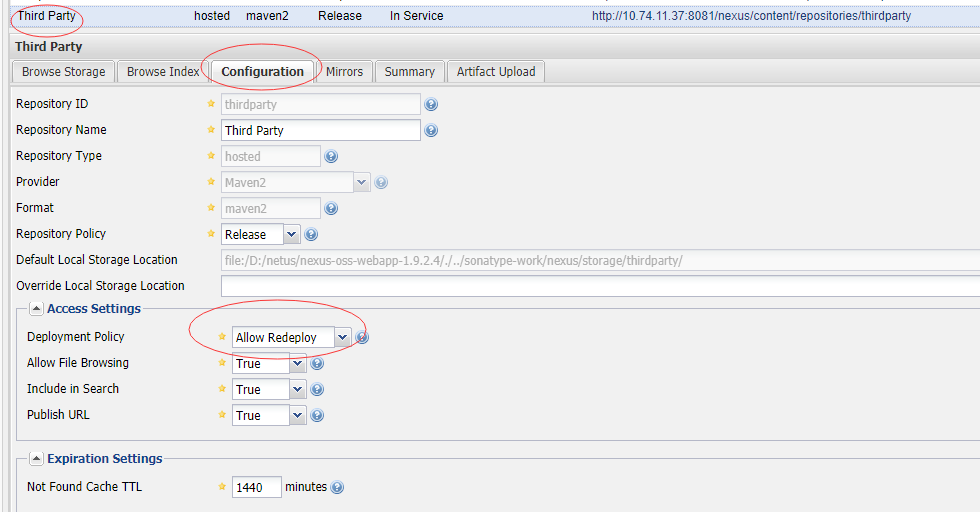
打开maven仓库视图界面,登录(一般是用管理员用户),点击左边的Repositories,找到Third Party,检查如图所示配置。
步骤三:上传jar
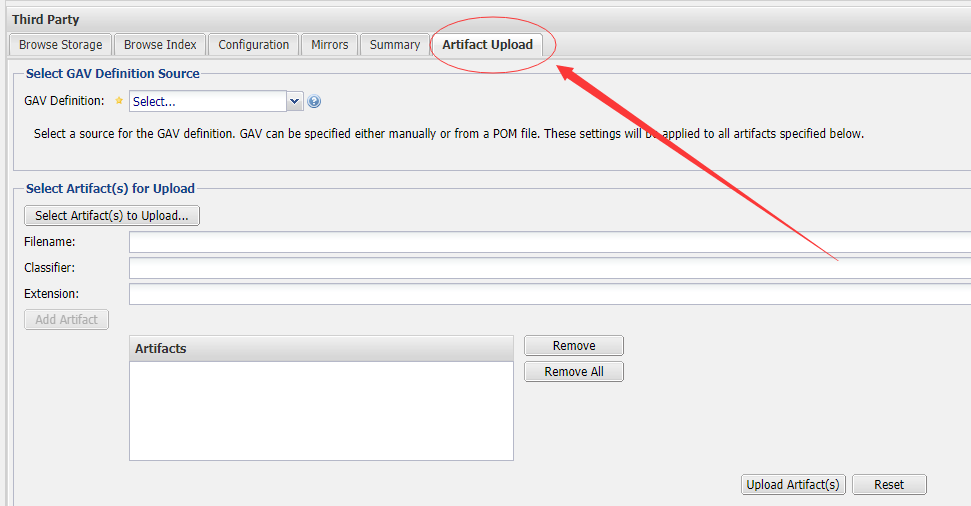
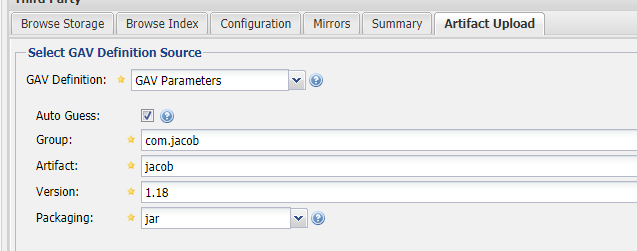
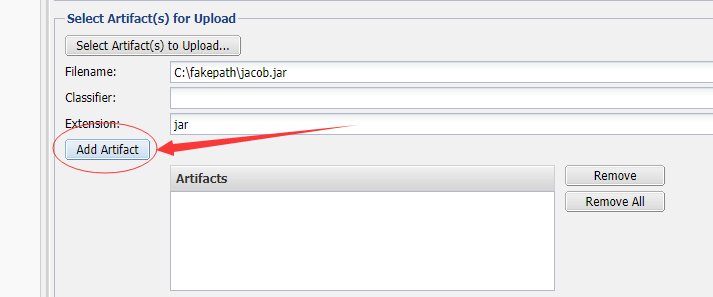
点击Artifact Upload,GAV Definition选择GAV Parameters,然后填上必要信息,参照下面2图。
前:
后:
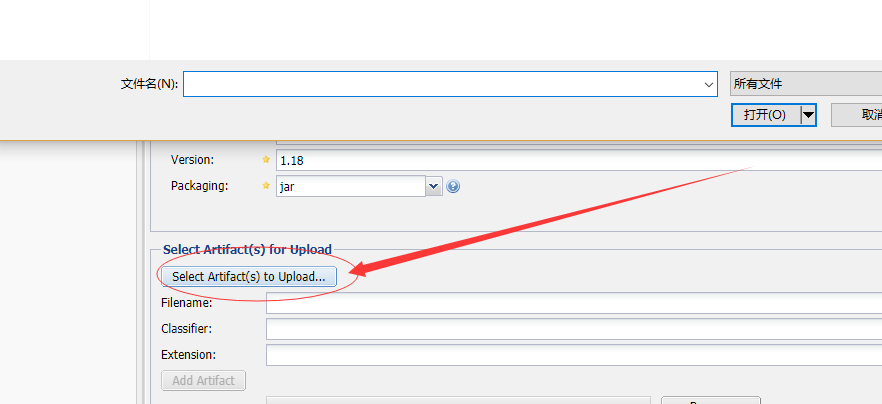
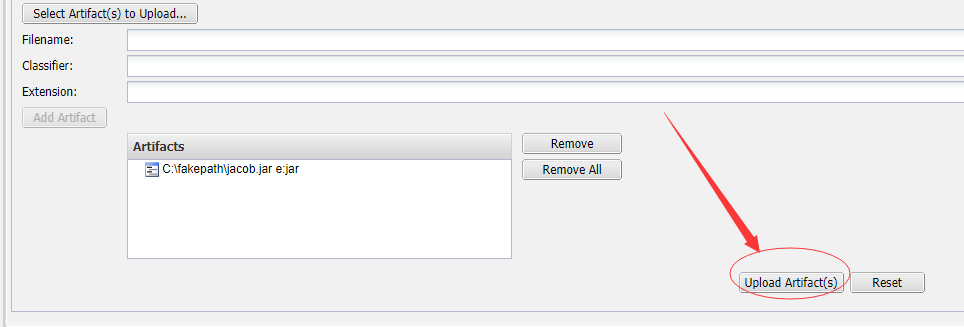
这样jar就上传到Third Party了。
但是,这样还不够,需要再检查一个东西
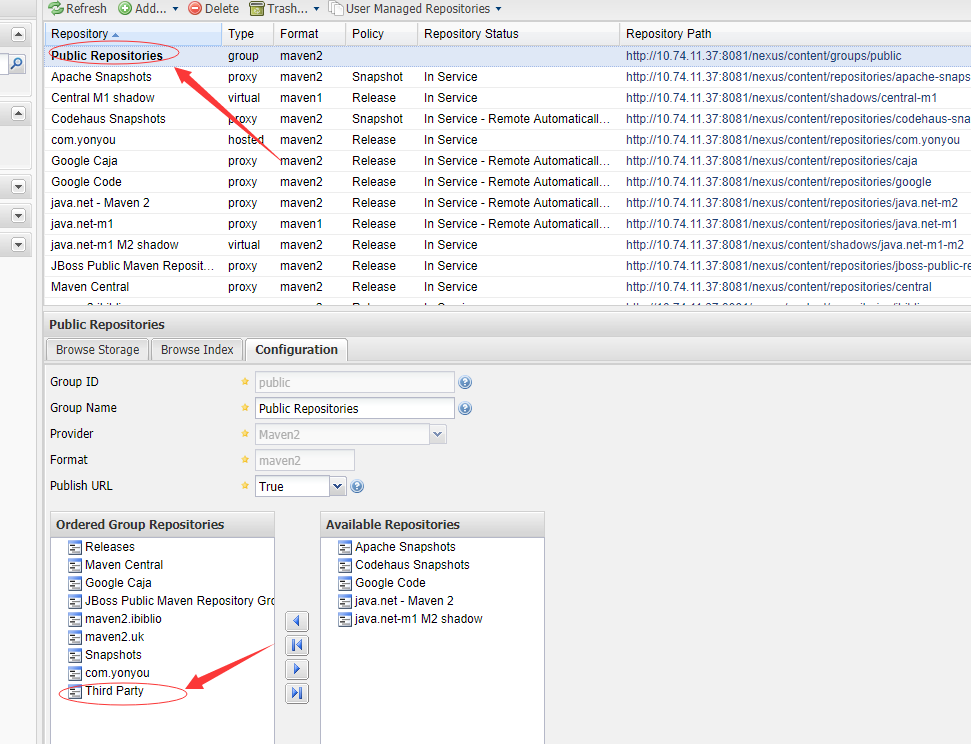
,这样就行了,还不够,要去maven的conf里设置下settings文件里面的server,附上我的settings.xml配置文件
<?xml version="1.0" encoding="UTF-8"?>

<!--

Licensed to the Apache Software Foundation (ASF) under one

or more contributor license agreements.  See the NOTICE file

distributed with this work for additional information

regarding copyright ownership.  The ASF licenses this file

to you under the Apache License, Version 2.0 (the

"License"); you may not use this file except in compliance

with the License.  You may obtain a copy of the License at

    http://www.apache.org/licenses/LICENSE-2.0

Unless required by applicable law or agreed to in writing,

software distributed under the License is distributed on an

"AS IS" BASIS, WITHOUT WARRANTIES OR CONDITIONS OF ANY

KIND, either express or implied.  See the License for the

specific language governing permissions and limitations

under the License.

-->

<!--

 | This is the configuration file for Maven. It can be specified at two levels:

 |

 |  1. User Level. This settings.xml file provides configuration for a single user,

 |                 and is normally provided in ${user.home}/.m2/settings.xml.

 |

 |                 NOTE: This location can be overridden with the CLI option:

 |

 |                 -s /path/to/user/settings.xml

 |

 |  2. Global Level. This settings.xml file provides configuration for all Maven

 |                 users on a machine (assuming they're all using the same Maven

 |                 installation). It's normally provided in

 |                 ${maven.home}/conf/settings.xml.

 |

 |                 NOTE: This location can be overridden with the CLI option:

 |

 |                 -gs /path/to/global/settings.xml

 |

 | The sections in this sample file are intended to give you a running start at

 | getting the most out of your Maven installation. Where appropriate, the default

 | values (values used when the setting is not specified) are provided.

 |

 |-->

<settings xmlns="http://maven.apache.org/SETTINGS/1.0.0"

          xmlns:xsi="http://www.w3.org/2001/XMLSchema-instance"

          xsi:schemaLocation="http://maven.apache.org/SETTINGS/1.0.0 http://maven.apache.org/xsd/settings-1.0.0.xsd">

  <!-- localRepository

   | The path to the local repository maven will use to store artifacts.

   |

   | Default: ${user.home}/.m2/repository

  <localRepository>/path/to/local/repo</localRepository>

  -->

  <!-- interactiveMode

   | This will determine whether maven prompts you when it needs input. If set to false,

   | maven will use a sensible default value, perhaps based on some other setting, for

   | the parameter in question.

   |

   | Default: true

  <interactiveMode>true</interactiveMode>

  -->

  <!-- offline

   | Determines whether maven should attempt to connect to the network when executing a build.

   | This will have an effect on artifact downloads, artifact deployment, and others.

   |

   | Default: false

  <offline>false</offline>

  -->

  <!-- pluginGroups

   | This is a list of additional group identifiers that will be searched when resolving plugins by their prefix, i.e.

   | when invoking a command line like "mvn prefix:goal". Maven will automatically add the group identifiers

   | "org.apache.maven.plugins" and "org.codehaus.mojo" if these are not already contained in the list.

   |-->

  <pluginGroups>

    <!-- pluginGroup

     | Specifies a further group identifier to use for plugin lookup.

    <pluginGroup>com.your.plugins</pluginGroup>

    -->

    <pluginGroup>com.alibaba.org.apache.maven.plugins</pluginGroup>

    <pluginGroup>com.alibaba.maven.plugins</pluginGroup>

    <pluginGroup>org.mortbay.jetty</pluginGroup>

    <pluginGroup>org.codehaus.cargo</pluginGroup>

    <pluginGroup>org.apache.maven.plugins</pluginGroup>

    <pluginGroup>org.codehaus.mojo</pluginGroup>

  </pluginGroups>

  <!-- proxies

   | This is a list of proxies which can be used on this machine to connect to the network.

   | Unless otherwise specified (by system property or command-line switch), the first proxy

   | specification in this list marked as active will be used.

   |-->

  <proxies>

    <!-- proxy

     | Specification for one proxy, to be used in connecting to the network.

     |

    <proxy>

      <id>optional</id>

      <active>true</active>

      <protocol>http</protocol>

      <username>proxyuser</username>

      <password>proxypass</password>

      <host>proxy.host.net</host>

      <port>80</port>

      <nonProxyHosts>local.net|some.host.com</nonProxyHosts>

    </proxy>

    -->

  </proxies>

  <!-- servers

   | This is a list of authentication profiles, keyed by the server-id used within the system.

   | Authentication profiles can be used whenever maven must make a connection to a remote server.

   |-->

  <servers>

    <!-- server

     | Specifies the authentication information to use when connecting to a particular server, identified by

     | a unique name within the system (referred to by the 'id' attribute below).

     |

     | NOTE: You should either specify username/password OR privateKey/passphrase, since these pairings are

     |       used together.

     |

    <server>

      <id>deploymentRepo</id>

      <username>repouser</username>

      <password>repopwd</password>

    </server>

    -->

    <!-- Another sample, using keys to authenticate.

    <server>

      <id>siteServer</id>

      <privateKey>/path/to/private/key</privateKey>

      <passphrase>optional; leave empty if not used.</passphrase>

    </server>

    -->

    <server>

        <id>nexus-releases</id>

        <username>admin</username>

        <password>mtait</password>

    </server>

    <server>

        <id>nexus-snapshots</id>

        <username>admin</username>

        <password>mtait</password>

    </server>

    <server>

        <id>nexus</id>

        <username>admin</username>

        <password>mtait</password>

    </server>

    <server>

        <id>tomcat.server</id>

        <username>mtait</username>

        <password>mtait</password>

    </server>

  </servers>

  <!-- mirrors

   | This is a list of mirrors to be used in downloading artifacts from remote repositories.

   |

   | It works like this: a POM may declare a repository to use in resolving certain artifacts.

   | However, this repository may have problems with heavy traffic at times, so people have mirrored

   | it to several places.

   |

   | That repository definition will have a unique id, so we can create a mirror reference for that

   | repository, to be used as an alternate download site. The mirror site will be the preferred

   | server for that repository.

   |-->

  <mirrors>

    <!-- mirror

     | Specifies a repository mirror site to use instead of a given repository. The repository that

     | this mirror serves has an ID that matches the mirrorOf element of this mirror. IDs are used

     | for inheritance and direct lookup purposes, and must be unique across the set of mirrors.

     |

    <mirror>

      <id>mirrorId</id>

      <mirrorOf>repositoryId</mirrorOf>

      <name>Human Readable Name for this Mirror.</name>

      <url>http://my.repository.com/repo/path</url>

    </mirror>

     -->

    <mirror>

        <id>nexus</id>

        <name>Nexus Public Mirror</name>

        <!--<url>http://maven.aliyun.com/nexus/content/groups/public/</url>-->

        <url>http://10.74.11.37:8081/nexus/content/groups/public</url>

        <mirrorOf>*</mirrorOf>

    </mirror>

  </mirrors>

  <!-- profiles

   | This is a list of profiles which can be activated in a variety of ways, and which can modify

   | the build process. Profiles provided in the settings.xml are intended to provide local machine-

   | specific paths and repository locations which allow the build to work in the local environment.

   |

   | For example, if you have an integration testing plugin - like cactus - that needs to know where

   | your Tomcat instance is installed, you can provide a variable here such that the variable is

   | dereferenced during the build process to configure the cactus plugin.

   |

   | As noted above, profiles can be activated in a variety of ways. One way - the activeProfiles

   | section of this document (settings.xml) - will be discussed later. Another way essentially

   | relies on the detection of a system property, either matching a particular value for the property,

   | or merely testing its existence. Profiles can also be activated by JDK version prefix, where a

   | value of '1.4' might activate a profile when the build is executed on a JDK version of '1.4.2_07'.

   | Finally, the list of active profiles can be specified directly from the command line.

   |

   | NOTE: For profiles defined in the settings.xml, you are restricted to specifying only artifact

   |       repositories, plugin repositories, and free-form properties to be used as configuration

   |       variables for plugins in the POM.

   |

   |-->

  <profiles>

    <!-- profile

     | Specifies a set of introductions to the build process, to be activated using one or more of the

     | mechanisms described above. For inheritance purposes, and to activate profiles via <activatedProfiles/>

     | or the command line, profiles have to have an ID that is unique.

     |

     | An encouraged best practice for profile identification is to use a consistent naming convention

     | for profiles, such as 'env-dev', 'env-test', 'env-production', 'user-jdcasey', 'user-brett', etc.

     | This will make it more intuitive to understand what the set of introduced profiles is attempting

     | to accomplish, particularly when you only have a list of profile id's for debug.

     |

     | This profile example uses the JDK version to trigger activation, and provides a JDK-specific repo.

    <profile>

      <id>jdk-1.4</id>

      <activation>

        <jdk>1.4</jdk>

      </activation>

      <repositories>

        <repository>

          <id>jdk14</id>

          <name>Repository for JDK 1.4 builds</name>

          <url>http://www.myhost.com/maven/jdk14</url>

          <layout>default</layout>

          <snapshotPolicy>always</snapshotPolicy>

        </repository>

      </repositories>

    </profile>

    -->

    <!--

     | Here is another profile, activated by the system property 'target-env' with a value of 'dev',

     | which provides a specific path to the Tomcat instance. To use this, your plugin configuration

     | might hypothetically look like:

     |

     | ...

     | <plugin>

     |   <groupId>org.myco.myplugins</groupId>

     |   <artifactId>myplugin</artifactId>

     |

     |   <configuration>

     |     <tomcatLocation>${tomcatPath}</tomcatLocation>

     |   </configuration>

     | </plugin>

     | ...

     |

     | NOTE: If you just wanted to inject this configuration whenever someone set 'target-env' to

     |       anything, you could just leave off the <value/> inside the activation-property.

     |

    <profile>

      <id>env-dev</id>

      <activation>

        <property>

          <name>target-env</name>

          <value>dev</value>

        </property>

      </activation>

      <properties>

        <tomcatPath>/path/to/tomcat/instance</tomcatPath>

      </properties>

    </profile>

    -->

    <profile>

        <id>nexus</id>

        <repositories>

            <repository>

                <id>central</id>

                <url>http://central</url>

                <releases>

                    <enabled>true</enabled>

                </releases>

                <snapshots>

                    <enabled>true</enabled>

                </snapshots>

            </repository>

        </repositories>

        <pluginRepositories>

            <pluginRepository>

                <id>central</id>

                <url>http://central</url>

                <releases>

                    <enabled>true</enabled>

                </releases>

                <snapshots>

                    <enabled>true</enabled>

                </snapshots>

            </pluginRepository>

        </pluginRepositories>

    </profile>

    <profile>

        <id>sonatype</id>

        <repositories>

            <repository>

                <id>sonatype</id>

                <name>oss.sonatype.org</name>

                <url>https://oss.sonatype.org/content/repositories/snapshots/</url>

                <releases>

                    <enabled>true</enabled>

                </releases>

                <snapshots>

                    <enabled>true</enabled>

                </snapshots>

            </repository>

        </repositories>

    </profile>

  </profiles>

  <!-- activeProfiles

   | List of profiles that are active for all builds.

   |

  <activeProfiles>

    <activeProfile>alwaysActiveProfile</activeProfile>

    <activeProfile>anotherAlwaysActiveProfile</activeProfile>

  </activeProfiles>

  -->

  <activeProfiles>

      <activeProfile>nexus</activeProfile>

      <activeProfile>sonatype</activeProfile>

  </activeProfiles>

</settings>
到此,上传至maven仓库的第三方jar就在你的中央仓库中了,项目就可以直接添加依赖引入了。
<dependency>

      <groupId>com.jacob</groupId>

      <artifactId>jacob</artifactId>

      <version>1.18</version>

 </dependency>
注意:groupId,artifactId,version是你刚才添加的内容。
第三方jar上传至公司maven仓库(私库)解决办法的更多相关文章
- 上传文件到Maven仓库
1.上传jar到本地仓库 mvn install:install-file -DgroupId=org.csource -DartifactId=fastdfs-client-java -Dversi ...
- 将第三方jar包安装到本地maven仓库
这里有2个案例,需要手动发出Maven命令包括一个 jar 到 Maven 的本地资源库. 要使用的 jar 不存在于 Maven 的中心储存库中. 您创建了一个自定义的 jar ,而另一个 Mave ...
- github + SourceTree管理自己的库并上传到cocoapods及各种坑的解决办法
一.上传写好的库到github(我这里使用SourceTree客户端) 1.在github上创建一个仓库 2.将仓库拉倒本地 复制仓库地址 将刚才复制的地址粘贴到这里 3.上传项目到github 将写 ...
- 第三方jar上传到Maven私服(Nexus)
mvn deploy:deploy-file -DgroupId=taobao-sdk -DartifactId=taobao-sdk-java -Dversion=1.0 -Dpackaging=j ...
- 第三方Jar上传到Nexus3
mvn deploy:deploy-file -DgroupId=ESPPaaSService -DartifactId=ESPPaaSService -Dversion=1.0 -Dpackagin ...
- jquery.form.js上传文件ie弹出下载文件解决办法
在ie下如果返回类型为jsonresult,ie老版本无法识别json类型,默认将会采用下载或者打开文件! 如果使用mvc的话.直接修改action返回类型为string即可,例如:return Js ...
- 8.Element-ui日期组件上传到后台日期少一天解决办法
<el-date-picker type="date" value-format="yyyy-MM-dd" placeholder="转出日期& ...
- chrome文件上传 /获取文件路径c:/fakepath的解决办法
jsp页面 <td style="text-align: left;padding-left: 20px;"> <img name="image&quo ...
- 构建自己的jar包上传至Mvaen中央仓库和版本更新
构建自己的jar包上传至Mvaen中央仓库和版本更新 一直羡慕别人制造轮子,开源项目,供别人使用:我也想这样,可以自己才疏学浅,本次就将自己写小工具上传到Maven的中央仓库. 一步一步详细教程演示如 ...
随机推荐
- Linux 相关术语_002
Linux(Linux is not unix)是一套免费使用和自由传播的类Unix操作系统,是一个基于POSIX和UNIX的多用户.多任务.支持多线程和多CPU的操作系统. 它能运行主要的UNIX工 ...
- [python] python3.6 安装 pytesseract 出错
安装pytesseact出错, 下载 tesseract-ocr , 地址 https://github.com/tesseract-ocr/tesseract 修改pytesseract.py 设置 ...
- Nginx、haproxy反向代理设置
Nginx反向代理配置: #user nobody; worker_processes ; events { worker_connections ; } http { include mime.ty ...
- Dart 语言简易教程系列
google Fuchsia系统 及 dart语言简介 在 InteIIiJ IDEA 中搭建 Dart 的开发环境 Dart Linux 开发环境搭建 Dart 语言简易教程(一) Dart 语言简 ...
- Ext Js 6+ 如何引入dashboard模版
最近很多人问我在ext js 6+的版本中怎么引入官方的dashboard模版,正好我好久没写博客了,这里我写一篇博客来说明一下. 在这里以ext js 6.2.1版本为例(注:需要安装Sencha ...
- ThinkPHP3.2.3框架下接入阿里云短信服务接口实现:注册登录
首先介绍下短信注册登录流程: 注册页面点击获取手机号验证码按钮,用jquery的click事件POST或GET方法把手机号发送到后台控制器: 后台控制器创建函数,收到手机号后生成随机码,例如:6位的随 ...
- 牛客练习赛36B
唔在cf上做过,A题也做过,神仙说D题也是原题 这个题就是dp了.然后数组滚动一下,很显然能住遇到 i 只与 i-1 有关,所以还是挺好滚的. dp[i][j][k]表示到第I 天一共工作了J天连续 ...
- JavaScript Promise:去而复返
原文:http://www.html5rocks.com/en/tutorials/es6/promises/ 作者:Jake Archibald 翻译:Amio 女士们先生们,请准备好迎接 Web ...
- phpmyadmin新姿势getshell
旁白:在一个有WAF.并且mysql中的Into outfile禁用的情况下,我该如何getshell? 作者:倾旋email:payloads@aliyun.com投稿联系:service@cora ...
- CF886C Petya and Catacombs
题目描述 A very brave explorer Petya once decided to explore Paris catacombs. Since Petya is not really ...