
c# 查询本机可用的代理ip
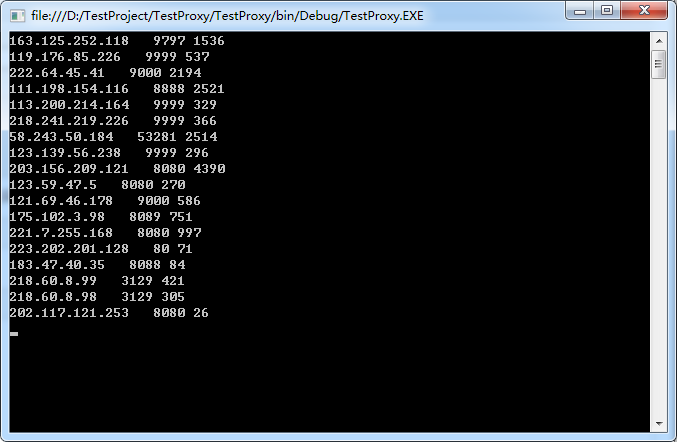
现在有很多网站都提供免费的代理ip,但是你会发现很多网站显示的可以用的 ,在自己电脑上是用不了,写个小代码提取出自己电脑上可以用的代理,没什么技术含量,只是为了记录一下
 string strUrl = "https://www.xicidaili.com/nt/";

            HttpHelper httpProxy = new HttpHelper();

            for (int i = ; i <= ; i++)

            {

                string strHtml = httpProxy.Get_Request(strUrl + i, httpProxy.cookie, "www.xicidaili.com", "https://www.xicidaili.com/nt/", blnHttps: true, strAccept: "text/html,application/xhtml+xml,application/xml;q=0.9,image/webp,image/apng,*/*;q=0.8,application/signed-exchange;v=b3", strUserAgent: "Mozilla/5.0 (Windows NT 6.1; Win64; x64) AppleWebKit/537.36 (KHTML, like Gecko) Chrome/73.0.3683.86 Safari/537.36");

                HtmlAgilityPack.HtmlDocument docList = new HtmlAgilityPack.HtmlDocument();

                docList.LoadHtml(strHtml);

                var trListNodes = docList.DocumentNode.SelectNodes("//*[@id=\"ip_list\"]/tr");

                for (int j = ; j < trListNodes.Count; j++)

                {

                    var trNode = trListNodes[j];

                    string strIp = trNode.SelectSingleNode("td[2]").InnerText.Trim();

                    string strPort = trNode.SelectSingleNode("td[3]").InnerText.Trim();

                    int intPort = int.Parse(strPort);

                    try

                    {

                        WebProxy proxyObject = new WebProxy(strIp, intPort);// port为端口号 整数型

                        HttpWebRequest Req = WebRequest.Create("http://www.bookschina.com") as HttpWebRequest;

                        Req.Proxy = proxyObject; //设置代理

                        Req.Timeout = ;   //超时

                        DateTime dt = DateTime.Now;

                        var Resp = (HttpWebResponse)Req.GetResponse();

                        Encoding bin = Encoding.GetEncoding("gb2312");

                        StreamReader sr = new StreamReader(Resp.GetResponseStream(), bin);

                        string str = sr.ReadToEnd();

                        sr.Close();

                        sr.Dispose();

                        var time = (DateTime.Now - dt).TotalMilliseconds;

                        Console.WriteLine(strIp + "   " + intPort + " " + time);

                    }

                    catch

                    { }

                }

            }
HttpHelper
using System;

using System.Collections.Generic;

using System.IO;

using System.Linq;

using System.Net;

using System.Net.Security;

using System.Security.Cryptography.X509Certificates;

using System.Text;

using System.Threading.Tasks;

namespace TestProxy

{

    public class HttpHelper

    {

        public CookieContainer cookie;

        public HttpHelper()

        {

            cookie = new CookieContainer();

        }

        private static bool CheckValidationResult(object sender, X509Certificate certificate, X509Chain chain, SslPolicyErrors errors)

        {

            return true; //总是接受

        }

        public string Get_Request(

            string strUrl,

            CookieContainer _cookie = null,

            string strHost = "",

            string strRefer = "",

            string strOrigin = "",

            Dictionary<string, string> lstHeads = null,

            string strEncoding = "utf-8",

            string strContentType = "",

            string strAccept = "text/html,application/xhtml+xml,application/xml;q=0.9,image/webp,*/*;q=0.8",

            string strUserAgent = "Mozilla/5.0 (Windows NT 6.1; WOW64) AppleWebKit/537.36 (KHTML, like Gecko) Chrome/45.0.2454.101 Safari/537.36",

            bool blnAllowAutoRedirect = true,

            int intTimeout =  * ,

            bool blnHttps = false,

            System.Net.WebProxy proxy = null)

        {

            HttpWebRequest request;

            HttpWebResponse response;

            request = (HttpWebRequest)WebRequest.Create(strUrl);

            request.Accept = strAccept;

            request.Timeout = intTimeout;

            request.Method = "GET";

            request.Credentials = CredentialCache.DefaultCredentials;

            request.UserAgent = strUserAgent;

            request.AllowAutoRedirect = blnAllowAutoRedirect;

            if (blnHttps)

            {

                ServicePointManager.ServerCertificateValidationCallback = new RemoteCertificateValidationCallback(CheckValidationResult);

                request.ProtocolVersion = HttpVersion.Version10;

                ServicePointManager.SecurityProtocol = SecurityProtocolType.Tls12;

            }

            if (!string.IsNullOrEmpty(strContentType))

            {

                request.ContentType = strContentType;

            }

            if (_cookie != null)

            {

                request.CookieContainer = _cookie;

            }

            if (!string.IsNullOrEmpty(strHost))

            {

                request.Host = strHost;

            }

            if (!string.IsNullOrEmpty(strRefer))

            {

                request.Referer = strRefer;

            }

            if (!string.IsNullOrEmpty(strOrigin))

            {

                request.Headers.Add("Origin", strOrigin);

            }

            if (lstHeads != null && lstHeads.Count > )

            {

                foreach (var item in lstHeads)

                {

                    request.Headers.Add(item.Key, item.Value);

                }

            }

            if (proxy != null)

                request.Proxy = proxy;

            response = (HttpWebResponse)request.GetResponse();

            var sr = new StreamReader(response.GetResponseStream(), Encoding.GetEncoding(strEncoding));

            string strResult = sr.ReadToEnd();

            sr.Close();

            request.Abort();

            response.Close();

            return strResult;

        }

        public string POST_Request(

            string strUrl,

            string postDataStr,

            CookieContainer _cookie = null,

            string strHost = "",

            string strRefer = "",

            string strOrigin = "",

            Dictionary<string, string> lstHeads = null,

            string strEncoding = "utf-8",

            string strContentType = "",

            string strAccept = "text/html,application/xhtml+xml,application/xml;q=0.9,image/webp,*/*;q=0.8",

            string strUserAgent = "Mozilla/5.0 (Windows NT 6.1; WOW64) AppleWebKit/537.36 (KHTML, like Gecko) Chrome/45.0.2454.101 Safari/537.36",

            bool blnAllowAutoRedirect = true,

            int intTimeout =  * ,

            bool blnHttps = false,

            System.Net.WebProxy proxy = null)

        {

            HttpWebRequest request;

            HttpWebResponse response;

            request = (HttpWebRequest)WebRequest.Create(strUrl);

            request.Accept = strAccept;

            request.Timeout = intTimeout;

            request.Method = "POST";

            request.Host = strHost;

            request.UserAgent = strUserAgent;

            if (_cookie != null)

            {

                request.CookieContainer = _cookie;

            }

            if (blnHttps)

            {

                ServicePointManager.ServerCertificateValidationCallback = new RemoteCertificateValidationCallback(CheckValidationResult);

                request.ProtocolVersion = HttpVersion.Version10;

                ServicePointManager.SecurityProtocol = SecurityProtocolType.Tls12;

            }

            request.AllowAutoRedirect = blnAllowAutoRedirect;

            if (!string.IsNullOrEmpty(strContentType))

            {

                request.ContentType = strContentType;

            }

            if (!string.IsNullOrEmpty(strOrigin))

            {

                request.Headers.Add("Origin", strOrigin);

            }

            if (!string.IsNullOrEmpty(strRefer))

            {

                request.Referer = strRefer;

            }

            if (!string.IsNullOrEmpty(strHost))

            {

                request.Host = strHost;

            }

            if (lstHeads != null && lstHeads.Count > )

            {

                foreach (var item in lstHeads)

                {

                    request.Headers.Add(item.Key, item.Value);

                }

            }

            if (!string.IsNullOrEmpty(postDataStr))

            {

                request.ContentLength = postDataStr.Length;

                Stream myRequestStream = request.GetRequestStream();

                StreamWriter myStreamWriter = new StreamWriter(myRequestStream);

                myStreamWriter.Write(postDataStr);

                myStreamWriter.Close();

            }

            if (proxy != null)

                request.Proxy = proxy;

            response = (HttpWebResponse)request.GetResponse();

            var sr = new StreamReader(response.GetResponseStream(), Encoding.GetEncoding(strEncoding));

            string strResult = sr.ReadToEnd();

            sr.Close();

            request.Abort();

            response.Close();

            return strResult;

        }

        public string DownloadFile(

            string strURLAddress,

            string strPath,

            CookieContainer _cookie = null,

            string strHost = "",

            string strRefer = "",

            string strOrigin = "",

            Dictionary<string, string> lstHeads = null,

            string strAccept = "",

            string strUserAgent = "",

            bool blnHttps = false,

            System.Net.WebProxy proxy = null)

        {

            try

            {

                // 设置参数

                HttpWebRequest request = WebRequest.Create(strURLAddress) as HttpWebRequest;

                if (!string.IsNullOrEmpty(strAccept))

                {

                    request.Accept = strAccept;

                }

                if (blnHttps)

                {

                    ServicePointManager.ServerCertificateValidationCallback = new RemoteCertificateValidationCallback(CheckValidationResult);

                    request.ProtocolVersion = HttpVersion.Version10;

                    ServicePointManager.SecurityProtocol = SecurityProtocolType.Tls12;

                }

                if (!string.IsNullOrEmpty(strUserAgent))

                {

                    request.UserAgent = strUserAgent;

                }

                if (_cookie != null)

                {

                    request.CookieContainer = _cookie;

                }

                if (!string.IsNullOrEmpty(strOrigin))

                {

                    request.Headers.Add("Origin", strOrigin);

                }

                if (!string.IsNullOrEmpty(strRefer))

                {

                    request.Referer = strRefer;

                }

                if (!string.IsNullOrEmpty(strHost))

                {

                    request.Host = strHost;

                }

                if (lstHeads != null && lstHeads.Count > )

                {

                    foreach (var item in lstHeads)

                    {

                        request.Headers.Add(item.Key, item.Value);

                    }

                }

                if (proxy != null)

                    request.Proxy = proxy;

                request.Timeout = ;

                //发送请求并获取相应回应数据

                HttpWebResponse response = request.GetResponse() as HttpWebResponse;

                string strReceivePath = string.Empty;

                //直到request.GetResponse()程序才开始向目标网页发送Post请求

                Stream responseStream = response.GetResponseStream();

                //创建本地文件写入流

                Stream stream = new FileStream(strPath, FileMode.Create);

                byte[] bArr = new byte[];

                int size = responseStream.Read(bArr, , (int)bArr.Length);

                while (size > )

                {

                    stream.Write(bArr, , size);

                    stream.Flush();

                    size = responseStream.Read(bArr, , (int)bArr.Length);

                }

                stream.Close();

                responseStream.Close();

                return strPath;

            }

            catch (Exception ex)

            {

                return "";

            }

        }

    }

}
这个需要.net 4.5
c# 查询本机可用的代理ip的更多相关文章
- python检验代理ip是否可用、代理ip检验
python检验代理ip是否可用.代理ip检验 安装相关模块: pip install requests 验证代理IP是否可用脚本: import random import telnetlib im ...
- 利用Python爬取可用的代理IP
前言 就以最近发现的一个免费代理IP网站为例:http://www.xicidaili.com/nn/.在使用的时候发现很多IP都用不了. 所以用Python写了个脚本,该脚本可以把能用的代理IP检测 ...
- 把你的Centos设置成代理ip服务器
前言:最近在公司做爬虫相关的工作,做过数据抓取的都知道,写程序抓取数据的过程并不像平常我们用浏览器打开网页那么简单!大多数的网站为了自己站点的性能和数据安全都设置了各种反爬策略.最常见的就是添加验证码 ...
- 基于后端和爬虫创建的代理ip池
搭建免费的代理ip池 需要解决的问题: 使用什么方式存储ip 文件存储 缺点: 打开文件修改文件操作较麻烦 mysql 缺点: 查询速度较慢 mongodb 缺点: 查询速度较慢. 没有查重功能 re ...
- 【python3】如何建立爬虫代理ip池
一.为什么需要建立爬虫代理ip池 在众多的网站防爬措施中,有一种是根据ip的访问频率进行限制的,在某段时间内,当某个ip的访问量达到一定的阀值时,该ip会被拉黑.在一段时间内被禁止访问. 这种时候,可 ...
- springboot实现java代理IP池 Proxy Pool,提供可用率达到95%以上的代理IP
一.背景 前段时间,写java爬虫来爬网易云音乐的评论.不料,爬了一段时间后ip被封禁了.由此,想到了使用ip代理,但是找了很多的ip代理网站,很少有可以用的代理ip.于是,抱着边学习的心态,自己开发 ...
- Python3.x:免费代理ip的批量获取并入库
Python3.x:免费代理ip的批量获取并入库 一.简介 网络爬虫的世界,向来都是一场精彩的攻防战.现在许多网站的反爬虫机制在不断的完善,其中最令人头疼的,莫过于直接封锁你的ip.但是道高一尺魔高一 ...
- Python3.x:代理ip刷评分
Python3.x:代理ip刷评分 声明:仅供为学习材料,不允许用作商业用途: 一,功能: 针对某网站对企业自动刷评分: 网站:https://best.zhaopin.com/ 二,步骤: 1,获取 ...
- Python3.x:代理ip刷点赞
Python3.x:代理ip刷点赞 声明:仅供为学习材料,不允许用作商业用途: 一,功能: 针对某网站对企业自动刷点赞: 网站:https://best.zhaopin.com/ 二,步骤: 1,获取 ...
随机推荐
- 【BZOJ 1026】 [SCOI2009]windy数
[题目链接]:http://www.lydsy.com/JudgeOnline/problem.php?id=1026 [题意] [题解] 数位Dp 设f[i][j]表示长度为i,第一位(也就是最高位 ...
- 5 wcf双工
1 创建两个项目 Wcf_WsDual_Service Wcf_WsDual_Client 2 Wcf_WsDual_Service 项目中创建 LoginService.cs 的wcf文件 ...
- bash实现多进程运行
之前一段时间,发现线上日志服务器总是会突然丢失日志,碰到问题时搞的很被动.联系运维同学,又总是被往后推(后来看了一下日志归档脚本,运维同学写的bug).索性自己写了一个脚本,添加到crontab任务中 ...
- DDD实战8_1 实现对领域中连接字符串的可配置
1.在webapi的配置文件中配置连接字符串节 2.在webapi的startup类中的Configure方法中 将工具类里面AppSetting的静态Section的值 对应上webapi的配置文件 ...
- 注释为基础的SpringMVC
SpringMVC根据征求意见 正在使用SpringMVC以前的评论.首先,为使说明.于springMVC3.x版本号之后提供了很easy的启用注解方法仅仅须要的-servlet.xml中加上< ...
- Program for Linux USB-devices driver step by step (ONE)
Program for Linux USB-devices driver 開始啃硬骨头~ 这里我打算一步步给出USB device driver 的demo.希望有心能可以共同交流学习. 希望认识很多 ...
- QProcess::startDetached(5.10有了一种新的方式)
From Qt 5.10 on, there is a new way how to start detached processes with QProcess. Of course you kno ...
- WPF中自定义的DataTemplate中的控件,在Window_Loaded事件中加载机制初探
原文:WPF中自定义的DataTemplate中的控件,在Window_Loaded事件中加载机制初探 最近因为项目需要,开始学习如何使用WPF开发桌面程序.使用WPF一段时间之后,感 ...
- 2-22-实现jsp通过tomcat连接mysql
所有软件的版本如下: MySQL-Connector-Java: mysql-connector-java-5.1.36 Tomcat: apache-tomcat-8.0.26 JDK: jdk-8 ...
- js的一些写法问题
尽量不要拼接字符,用自定义标签来完成 用winform的形式更佳