
一台虚拟机配置nginx反向代理+3个apache虚拟主机
三个虚拟主机通过一张网卡添加三个IP来实现
一、安装nginx
1.解决依赖
[root@xuegod1 ~]# yum groupinstall "Development Tools" "Development Libraries" -y
[root@xuegod1 ~]# yum install gcc gcc-c++ autoconf automake zlib zlib-devel openssl openssl-devel pcre* pcre-devel -y
Zlib:Nginx提供gzip模块,需要zlib的支持
Openssl:Nginx提供SSL的功能
[root@xuegod1 ~]# tar xf pcre-8.37.tar.bz2 -C /usr/local/src/ //解压此安装包即可,不需要安装,Nginx需要指定pcre的源码不是安装后的路径,此包的功能是支持地址重写rewrite功能 pcre的依赖可以yum安装pcre和pcre-devel解决!
2.解压编译安装
[root@xuegod1 nginx-1.8.0]# tar xvf nginx-1.8.0.tar.gz -C /usr/local/src/ ; cd /usr/local/src/nginx-1.8.0
[root@xuegod1 nginx-1.8.0]# ./configure --prefix=/usr/local/nginx --with-http_dav_module --with-http_stub_status_module --with-http_addition_module --with-http_sub_module --with-http_flv_module --with-http_mp4_module --with-pcre=/usr/local/src/pcre-8.37/
[root@xuegod1 ~]# make -j 4 ; make install ; cd
[root@xuegod1 ~]# useradd -M -u 8001 -s /sbin/nologin nginx //用于运行Nginx的用户
3.配置Nginx支持php文件
[root@xuegod1 ~]# vim /usr/local/nginx/conf/nginx.conf //Nginx主配置文件
#user nobody;
user nginx nginx; //添加此行
并在所支持的主页面格式中添加php格式的主页,类似如下:
location / {
root html;
index index.php index.html index.htm;
}
#location ~ \.php$ {
# root html;
# fastcgi_pass 127.0.0.1:9000;
# fastcgi_index index.php;
# fastcgi_param SCRIPT_FILENAME /scripts$fastcgi_script_name;
# include fastcgi_params;
#} #找到上面这段内容,将这段内容复制,去掉#且修改为如下
location ~ \.php$ {
root html;
fastcgi_pass 127.0.0.1:9000;
fastcgi_index index.php;
fastcgi_param SCRIPT_FILENAME /usr/local/nginx/html$fastcgi_script_name; #将scripts修改为nginx的html,即Nginx页面目录,因为要处理的php文件也在这个目录下
include fastcgi_params;
}
4.启动Nginx
[root@xuegod1 ~]# /usr/local/nginx/sbin/nginx
[root@xuegod1 ~]# netstat -tlnp|grep nginx
tcp 0 0 0.0.0.0:80 0.0.0.0:* LISTEN 11786/nginx
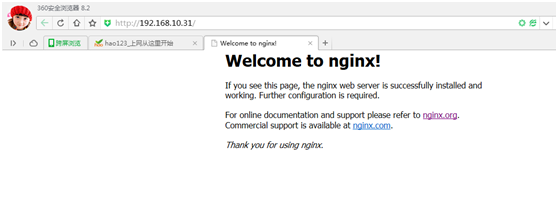
使用浏览器测试 http://192.168.10.31
二、安装apache和php
[root@xuegod44 conf]# yum install php httpd -y
1.配置网卡
[root@xuegod44 network-scripts]# cp ifcfg-eth0 ifcfg-eth0:1
[root@xuegod44 ~]# cd /etc/sysconfig/network-scripts/
[root@xuegod44 network-scripts]#ifcfg-eth0:1
DEVICE=eth0:1
TYPE=Ethernet
ONBOOT=yes
NM_CONTROLLED=yes
BOOTPROTO=none
IPADDR=192.168.10.51
NETMASK=255.255.255.0
[root@xuegod44 network-scripts]# cp ifcfg-eth0:1 ifcfg-eth0:2
[root@xuegod44 network-scripts]# cp ifcfg-eth0:1 ifcfg-eth0:3
[root@xuegod44 network-scripts]# vim ifcfg-eth0:2
DEVICE=eth0:2
TYPE=Ethernet
ONBOOT=yes
NM_CONTROLLED=yes
BOOTPROTO=none
IPADDR=192.168.10.52
NETMASK=255.255.255.0
[root@xuegod44 network-scripts]# vim ifcfg-eth0:3
DEVICE=eth0:3
TYPE=Ethernet
ONBOOT=yes
NM_CONTROLLED=yes
BOOTPROTO=none
IPADDR=192.168.10.53
NETMASK=255.255.255.0
[root@xuegod44 network-scripts]# service network restart
[root@xuegod44 network-scripts]# ifconfig
eth0 Link encap:Ethernet HWaddr 00:0C:29:BA:FD:EF
inet addr:192.168.10.44 Bcast:192.168.10.255 Mask:255.255.255.0
inet6 addr: fe80::20c:29ff:feba:fdef/64 Scope:Link
UP BROADCAST RUNNING MULTICAST MTU:1500 Metric:1
RX packets:59171 errors:0 dropped:0 overruns:0 frame:0
TX packets:36411 errors:0 dropped:0 overruns:0 carrier:0
collisions:0 txqueuelen:1000
RX bytes:68548149 (65.3 MiB) TX bytes:3833239 (3.6 MiB)
eth0:1 Link encap:Ethernet HWaddr 00:0C:29:BA:FD:EF
inet addr:192.168.10.51 Bcast:192.168.10.255 Mask:255.255.255.0
UP BROADCAST RUNNING MULTICAST MTU:1500 Metric:1
eth0:2 Link encap:Ethernet HWaddr 00:0C:29:BA:FD:EF
inet addr:192.168.10.52 Bcast:192.168.10.255 Mask:255.255.255.0
UP BROADCAST RUNNING MULTICAST MTU:1500 Metric:1
eth0:3 Link encap:Ethernet HWaddr 00:0C:29:BA:FD:EF
inet addr:192.168.10.53 Bcast:192.168.10.255 Mask:255.255.255.0
UP BROADCAST RUNNING MULTICAST MTU:1500 Metric:1
lo Link encap:Local Loopback
inet addr:127.0.0.1 Mask:255.0.0.0
inet6 addr: ::1/128 Scope:Host
UP LOOPBACK RUNNING MTU:65536 Metric:1
RX packets:0 errors:0 dropped:0 overruns:0 frame:0
TX packets:0 errors:0 dropped:0 overruns:0 carrier:0
collisions:0 txqueuelen:0
RX bytes:0 (0.0 b) TX bytes:0 (0.0 b)
2.配置apache
[root@xuegod44 ~]# cd /var/www/html/
[root@xuegod44 html]# mkdir a
[root@xuegod44 html]# mkdir b
[root@xuegod44 html]# mkdir c
[root@xuegod44 html]# echo "192.168.10.51" > a/index.html
[root@xuegod44 html]# echo "192.168.10.52" > b/index.html
[root@xuegod44 html]# echo "192.168.10.53" > c/index.html
[root@xuegod44 ~]# vim /etc/httpd/conf/httpd.conf
Listen 81
<VirtualHost 192.168.10.51:81>
ServerAdmin webmaster@dummy-host.example.com
DocumentRoot /var/www/html/a
ServerName xuegod44
ErrorLog logs/dummy-host.example.com-error_log
CustomLog logs/dummy-host.example.com-access_log common
</VirtualHost>
<VirtualHost 192.168.10.52:81>
ServerAdmin webmaster@dummy-host.example.com
DocumentRoot /var/www/html/b
ServerName xuegod44
ErrorLog logs/dummy-host.example.com-error_log
CustomLog logs/dummy-host.example.com-access_log common
</VirtualHost>
<VirtualHost 192.168.10.53:81>
ServerAdmin webmaster@dummy-host.example.com
DocumentRoot /var/www/html/c
ServerName xuegod44
ErrorLog logs/dummy-host.example.com-error_log
CustomLog logs/dummy-host.example.com-access_log common
</VirtualHost>
三、配置nginx
[root@xuegod44 ~]# vim /usr/local/nginx/conf/nginx.conf
第二行添加
user nginx nginx;
server {
listen 80;
server_name localhost;
#charset koi8-r;
#access_log logs/host.access.log main;
location / { #添加
root html;
index index.html index.htm;
if ($request_uri ~* \.html$) {
proxy_pass http://htmlservers;
}
if ($request_uri ~* \.php$) {
proxy_pass http://phpservers;
}
proxy_pass http://pciservers;
}
#error_page 404 /404.html;
# redirect server error pages to the static page /50x.html
#
error_page 500 502 503 504 /50x.html;
location = /50x.html {
root html;
}
# proxy the PHP scripts to Apache listening on 127.0.0.1:80
#
#location ~ \.php$ {
# proxy_pass http://127.0.0.1;
#}
# pass the PHP scripts to FastCGI server listening on 127.0.0.1:9000
#
#location ~ \.php$ {
# root html;
# fastcgi_pass 127.0.0.1:9000;
# fastcgi_index index.php;
# fastcgi_param SCRIPT_FILENAME /scripts$fastcgi_script_name;
# include fastcgi_params;
#}
#location ~ \.php$ {
# # proxy_pass http://127.0.0.1;
# #}
#
# # pass the PHP scripts to FastCGI server listening on 127.0.0.1:9000
# #
location ~ \.php$ {
root html;
fastcgi_pass 127.0.0.1:9000;
fastcgi_index index.php;
fastcgi_param SCRIPT_FILENAME /usr/local/nginx/html$fastcgi_script_name;
include fastcgi_params;
}
}
upstream htmlservers { #server模块外添加
server 192.168.10.51:81;
server 192.168.10.52:81;
server 192.168.10.53:81;
}
upstream phpservers {
server 192.168.10.51:81;
server 192.168.10.52:81;
server 192.168.10.53:81;
}
upstream pciservers {
server 192.168.10.51:81;
server 192.168.10.52:81;
server 192.168.10.53:81;
}
# deny access to .htaccess files, if Apache's document root
# concurs with nginx's one
#
#location ~ /\.ht {
# deny all;
#}
4.测试
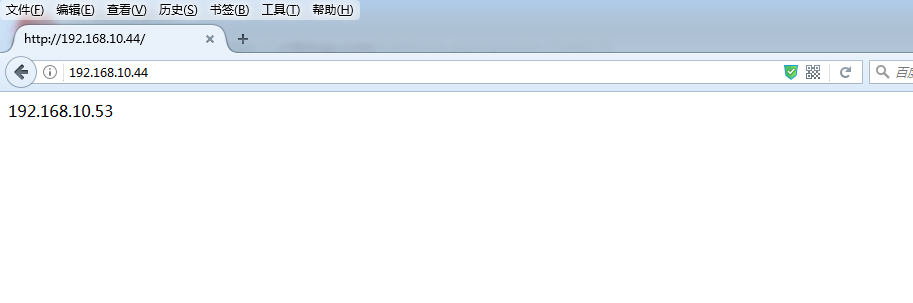
使用浏览器访问http://192.168.10.44
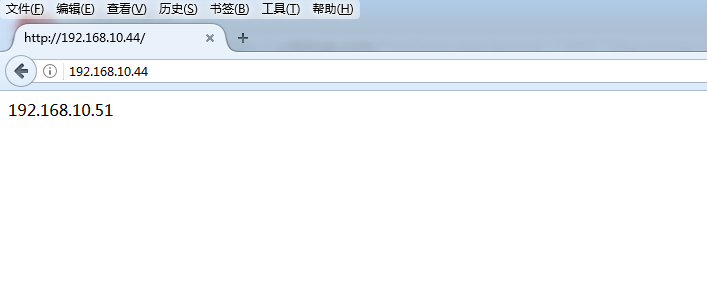
刷新一次
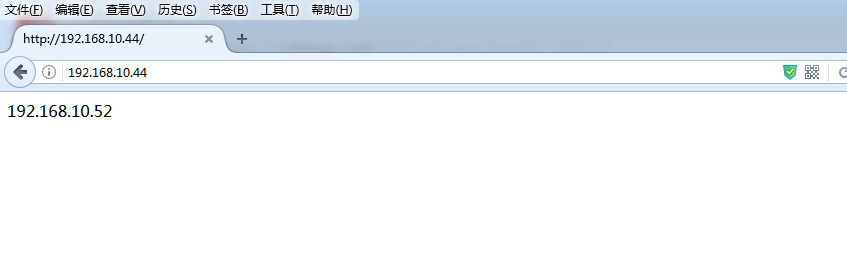
再刷新一次
备注:apache这里不能用80端口,否则会与nginx冲突,因为nginx先占用了80端口。如果apache用80端口会报如下错误

一台虚拟机配置nginx反向代理+3个apache虚拟主机的更多相关文章
- Nginx反向代理1--基本介绍-虚拟主机
1 Nginx 1.1 什么是nginx Nginx是一款高性能的http 服务器/反向代理服务器及电子邮件(IMAP/POP3)代理服务器.由俄罗斯的程序设计师Igor Sysoev所开发, ...
- CentOS 7 学习(二) 配置Nginx反向代理
CentOS 7 学习(二) 配置Nginx反向代理 Nginx可以通过php-fpm来运行PHP程序,也可以转向apache,让apache调用php程序来运行. 不过对于Nginx来说,其反向代理 ...
- 配置LANMP环境(7)-- 配置nginx反向代理,与配置apache虚拟主机
一.配置nginx反向代理 1.修改配置文件 vim /etc/nginx/nginx.conf 在35行http下添加一下内容: include /data/nginx/vhosts/*.conf; ...
- 为docker私有registry配置nginx反向代理
公司的Docker私有registry已经搭建好了,用官方的registry image很容易就搭建好了.现在就是要用nginx的反向代理把它放出来,以便在外网可以访问. 我的上一篇blog 讲了如何 ...
- 使用SSL配置Nginx反向代理的简单指南
反向代理是一个服务器,它接收通过Web发出的请求,即http和https,然后将它们发送到后端服务器(或服务器).后端服务器可以是单个或一组应用服务器,如Tomcat,wildfly或Jenkins等 ...
- Centos 7.6配置nginx反向代理,直接yum安装
一,实验介绍 利用三台centos7虚拟机搭建简单的nginx反向代理负载集群, 三台虚拟机地址及功能介绍 192.168.2.76 nginx负载均衡器 192.168.2.82 web ...
- [亲测]ASP.NET Core 2.0怎么发布/部署到Ubuntu Linux服务器并配置Nginx反向代理实现域名访问
前言 ASP.NET Core 2.0 怎么发布到Ubuntu服务器?又如何在服务器上配置使用ASP.NET Core网站绑定到指定的域名,让外网用户可以访问呢? 步骤 第1步:准备工作 一台Liun ...
- [亲测]七步学会ASP.NET Core 2.0怎么发布/部署到Ubuntu Linux服务器并配置Nginx反向代理实现域名访问
前言 ASP.NET Core 2.0 怎么发布到Ubuntu服务器?又如何在服务器上配置使用ASP.NET Core网站绑定到指定的域名,让外网用户可以访问呢? 步骤 第1步:准备工作 一台Liun ...
- Linux 笔记 - 第二十章 配置 Nginx 反向代理和负载均衡
一.简介 由于 Nginx 的反向代理和负载均衡功能经常被提及,所以将这两个功能单独提出来进行讲解. Nginx 其实仅仅是作为 Nginx Proxy 反向代理使用的,因为这个反向代理功能表现的效果 ...
随机推荐
- Sub-process /usr/bin/dpkg returned an error code (1)错误解决办法
之前通过wine安装了一款软件,不经常用,也没有拆卸 可是之后呢,每次更新都要提示更新那个软件,更新的时候又总是找不到更新源 无奈之下,我通过软件中心移除wine,没想到竟然碰到依赖问题,没有拆卸成功 ...
- [Java开发之路](15)注解
1. 简单介绍 注解(也被称为元数据),为我们在代码中加入信息提供了一种形式化的方法. 注解在一定程度上是把元数据与源码文件结合在一起,而不是保存在外部文档中这一大趋势之下所催生的. 它能够提供用来完 ...
- vimrum
# Insert your preferred key mappings here.unmap <a-O>map <a-O> closeOtherTabsmap , previ ...
- 【39.29%】【codeforces 552E】Vanya and Brackets
time limit per test1 second memory limit per test256 megabytes inputstandard input outputstandard ou ...
- HDU 5072 Coprime (单色三角形+容斥原理)
题目链接:Coprime pid=5072"> 题面: Coprime Time Limit: 2000/1000 MS (Java/Others) Memory Limit: ...
- PHP移动互联网开发笔记(1)——环境搭建及配置
开篇说明:记得我上大二的时候第一次听到PHP,当时只知道这是一个开发网站的语言,并没有深入学习,在学了Java Web开发和Android开发之后我对互联网的发展方向有了一个我自己的认识,现在我们不能 ...
- HDU2473 Junk-Mail Filter - 并查集删除操作(虚父节点)
传送门 题意: 每次合并两份邮件,或者将某一份邮件独立出来,问最后有多少个邮件集合. 分析: 考虑初始化每个节点的祖先为一个虚父节点(i + n),虚父节点指向它自己.这样可以进行正常的合并操作. 而 ...
- 【基础练习】【线性DP】codevs1576 最长严格上升子序列题解
连题目都不放了,就是标题中说的那样.裸题 于是直接上代码 暑假要来了 好好学习 --炉火照天地,红星乱紫烟. 赧郎明月夜.歌曲动寒川.
- NYOJ 1076 计划数(公式 要么 递归)
方案数量 时间限制:1000 ms | 内存限制:65535 KB 难度:2 描写叙述 给出一个N*M的棋盘.左下角坐标是(0.0).右上角坐标是(N,M),规定每次仅仅能向上或者向右走.问从左下 ...
- Android应用《撕开美女衣服》的实现过程及源代码
现在很多Android市场中都能找到关于美女的应用,比如 撕开美女衣服.吹裙子等. 这些应用的下载量挺大的,作为Android的开发人员或者一名技术人员我们不能只局限在欣赏应用的层面,很多时候需要我们 ...