
8.Appium的基本使用-1
1.Appium是什么?
Appium是一个跨平台移动端自动化测试工具,可以便捷的为ios和Android平台创建自动化测试用例。
模拟app内部各种操作,点击、滑动、文本输入等,手工操作的动作appium都能完成。
ios设备:appium使用UIAutomation实现驱动
Android设备:使用UIAutomator和Selendroid来实现驱动。

2.启动Appium,监听4723端口。
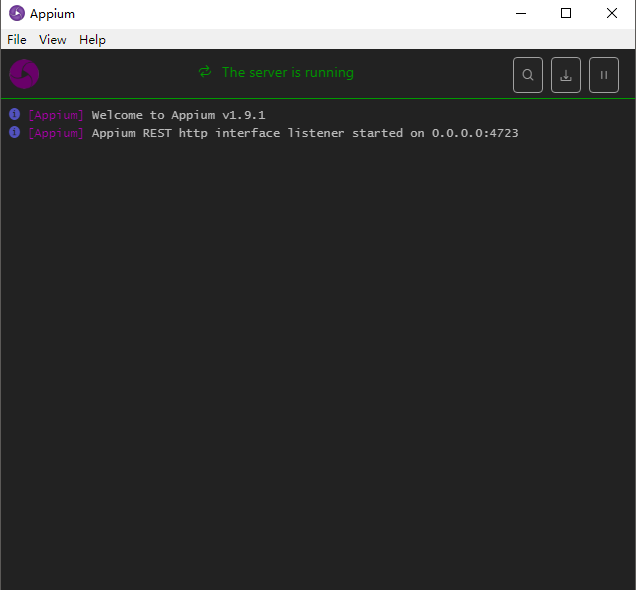
3.配置Android手机通过数据线和运行的Appium的PC相连,打开手机端USB调试功能确保可以连接到手机。
adb在上一节已经配置安装完成(参照上一节)。
cmd输入adb命令测试连接情况: adb devices -l (连接成功如下图所示,我用的是小米5x)

这里获取的连接信息配置要用到。
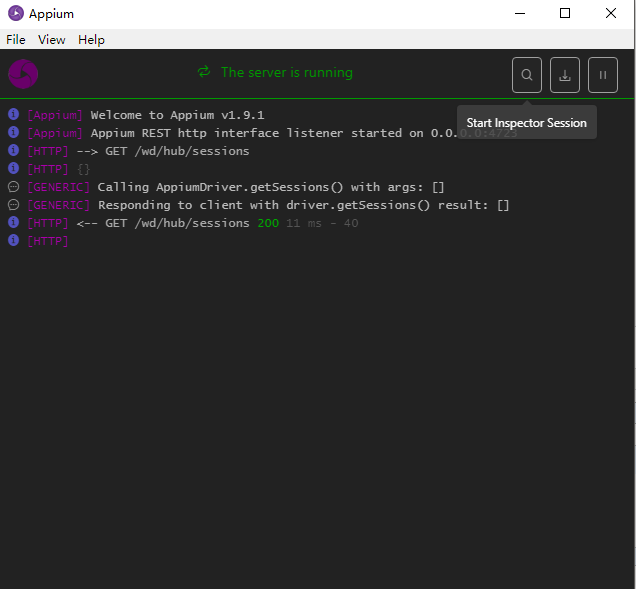
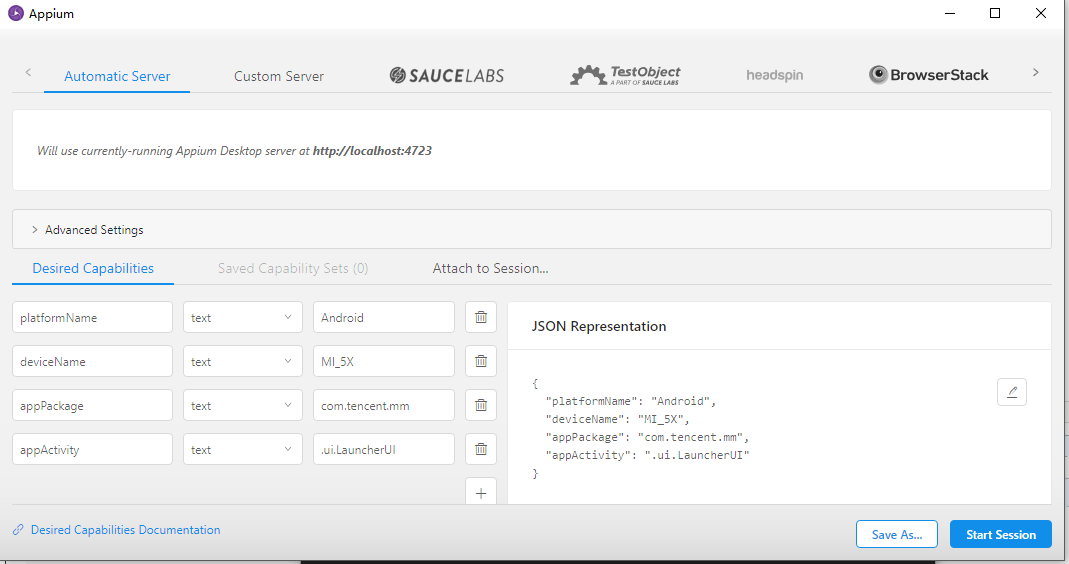
4.Appium内置驱动打开App,点击Appium 中搜索符号,如图进入配置界面配置Desired Capabilities 参数
platformName:平台名称
deviceName:设备名称
appPackage:app程序包名
appActivity:入口Activity名,通常以.开头
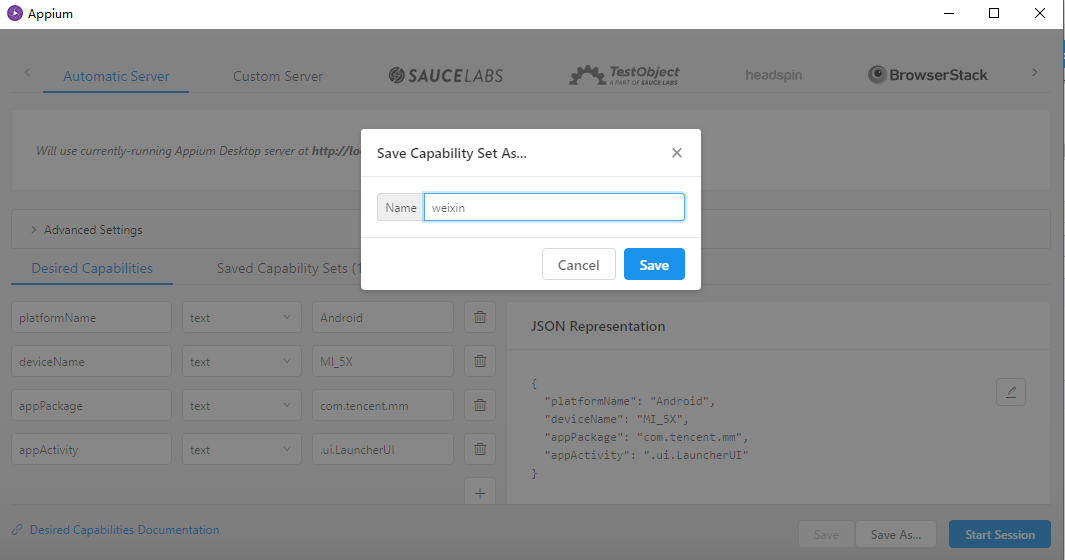
5.点击保存
6.点击 start session,就可以启动Android 手机上的微信app并进入启动页面,但是我这里出现了一个问题报了一个错误。
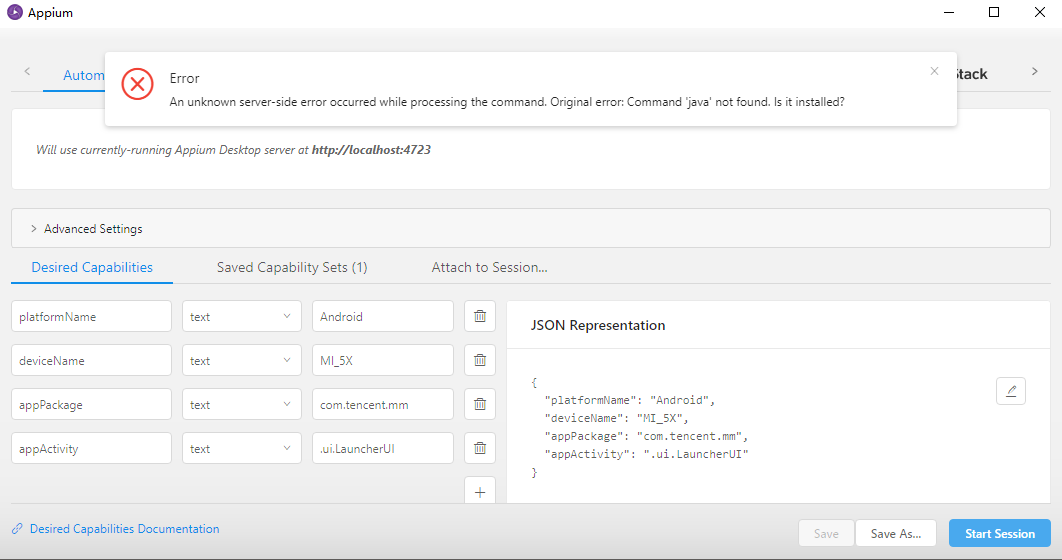
appium界面情况:

[Appium] Welcome to Appium v1.9.1

[Appium] Appium REST http interface listener started on 0.0.0.0:4723

[HTTP] --> GET /wd/hub/sessions

[HTTP] {}

[GENERIC] Calling AppiumDriver.getSessions() with args: []

[GENERIC] Responding to client with driver.getSessions() result: []

[HTTP] <-- GET /wd/hub/sessions 200 11 ms - 40

[HTTP]

[HTTP] --> GET /wd/hub/sessions

[HTTP] {}

[GENERIC] Calling AppiumDriver.getSessions() with args: []

[GENERIC] Responding to client with driver.getSessions() result: []

[HTTP] <-- GET /wd/hub/sessions 200 3 ms - 40

[HTTP]

[HTTP] --> POST /wd/hub/session

[HTTP] {"desiredCapabilities":{"appActivity":".ui.LauncherUI","appPackage":"com.tencent.mm","deviceName":"MI_5X","platformName":"Android","newCommandTimeout":0,"connectHardwareKeyboard":true}}

[MJSONWP] Calling AppiumDriver.createSession() with args: [{"appActivity":".ui.LauncherUI","appPackage":"com.tencent.mm","deviceName":"MI_5X","platformName":"Android","newCommandTimeout":0,"connectHardwareKeyboard":true},null,null]

[BaseDriver] Event 'newSessionRequested' logged at 1541407442906 (16:44:02 GMT+0800 (中国标准时间))

[Appium] Creating new AndroidDriver (v4.1.1) session

[Appium] Capabilities:

[Appium]   appActivity: .ui.LauncherUI

[Appium]   appPackage: com.tencent.mm

[Appium]   deviceName: MI_5X

[Appium]   platformName: Android

[Appium]   newCommandTimeout: 0

[Appium]   connectHardwareKeyboard: true

[BaseDriver] Creating session with MJSONWP desired capabilities: {"appActivity":".ui.Launche...

[BaseDriver] The following capabilities were provided, but are not recognized by appium: connectHardwareKeyboard.

[BaseDriver] Session created with session id: 1ec2b612-50a3-4a7c-b830-6cdd026cf0e4

[AndroidDriver] Shutting down Android driver

[AndroidDriver] Called deleteSession but bootstrap wasn't active

[BaseDriver] Event 'newSessionStarted' logged at 1541407443065 (16:44:03 GMT+0800 (中国标准时间))

[MJSONWP] Encountered internal error running command: Error: Command 'java' not found. Is it installed?

[MJSONWP]     at ChildProcess. (C:\Users\vm510\AppData\Local\Programs\Appium\resources\app\node_modules\appium\node_modules\teen_process\lib\exec.js:39:14)

[MJSONWP]     at ChildProcess.emit (events.js:182:13)

[MJSONWP]     at Process.ChildProcess._handle.onexit (internal/child_process.js:235:12)

[MJSONWP]     at onErrorNT (internal/child_process.js:406:16)

[MJSONWP]     at process._tickCallback (internal/process/next_tick.js:63:19)

[HTTP] <-- POST /wd/hub/session 500 164 ms - 179

[HTTP]

[HTTP] --> DELETE /wd/hub/session

[HTTP] {}

[HTTP] No route found. Setting content type to 'text/plain'

[HTTP] <-- DELETE /wd/hub/session 404 8 ms - 57

[HTTP]

[HTTP] --> POST /wd/hub/session

[HTTP] {"desiredCapabilities":{"appActivity":".ui.LauncherUI","appPackage":"com.tencent.mm","deviceName":"MI_5X","platformName":"Android","newCommandTimeout":0,"connectHardwareKeyboard":true}}

[MJSONWP] Calling AppiumDriver.createSession() with args: [{"appActivity":".ui.LauncherUI","appPackage":"com.tencent.mm","deviceName":"MI_5X","platformName":"Android","newCommandTimeout":0,"connectHardwareKeyboard":true},null,null]

[BaseDriver] Event 'newSessionRequested' logged at 1541407449259 (16:44:09 GMT+0800 (中国标准时间))

[Appium] Creating new AndroidDriver (v4.1.1) session

[Appium] Capabilities:

[Appium]   appActivity: .ui.LauncherUI

[Appium]   appPackage: com.tencent.mm

[Appium]   deviceName: MI_5X

[Appium]   platformName: Android

[Appium]   newCommandTimeout: 0

[Appium]   connectHardwareKeyboard: true

[BaseDriver] Creating session with MJSONWP desired capabilities: {"appActivity":".ui.Launche...

[BaseDriver] The following capabilities were provided, but are not recognized by appium: connectHardwareKeyboard.

[BaseDriver] Session created with session id: aad85d91-1bb2-465e-8e3c-e0cd1a4c12c4

[AndroidDriver] Shutting down Android driver

[AndroidDriver] Called deleteSession but bootstrap wasn't active

[BaseDriver] Event 'newSessionStarted' logged at 1541407449271 (16:44:09 GMT+0800 (中国标准时间))

[MJSONWP] Encountered internal error running command: Error: Command 'java' not found. Is it installed?

[MJSONWP]     at ChildProcess. (C:\Users\vm510\AppData\Local\Programs\Appium\resources\app\node_modules\appium\node_modules\teen_process\lib\exec.js:39:14)

[MJSONWP]     at ChildProcess.emit (events.js:182:13)

[MJSONWP]     at Process.ChildProcess._handle.onexit (internal/child_process.js:235:12)

[MJSONWP]     at onErrorNT (internal/child_process.js:406:16)

[MJSONWP]     at process._tickCallback (internal/process/next_tick.js:63:19)

[HTTP] <-- POST /wd/hub/session 500 16 ms - 179

[HTTP]

[HTTP] --> DELETE /wd/hub/session

[HTTP] {}

[HTTP] No route found. Setting content type to 'text/plain'

[HTTP] <-- DELETE /wd/hub/session 404 1 ms - 57

[HTTP]

[HTTP] --> POST /wd/hub/session

[HTTP] {"desiredCapabilities":{"appActivity":".ui.LauncherUI","appPackage":"com.tencent.mm","deviceName":"MI_5X","platformName":"Android","newCommandTimeout":0,"connectHardwareKeyboard":true}}

[MJSONWP] Calling AppiumDriver.createSession() with args: [{"appActivity":".ui.LauncherUI","appPackage":"com.tencent.mm","deviceName":"MI_5X","platformName":"Android","newCommandTimeout":0,"connectHardwareKeyboard":true},null,null]

[BaseDriver] Event 'newSessionRequested' logged at 1541407492319 (16:44:52 GMT+0800 (中国标准时间))

[Appium] Creating new AndroidDriver (v4.1.1) session

[Appium] Capabilities:

[Appium]   appActivity: .ui.LauncherUI

[Appium]   appPackage: com.tencent.mm

[Appium]   deviceName: MI_5X

[Appium]   platformName: Android

[Appium]   newCommandTimeout: 0

[Appium]   connectHardwareKeyboard: true

[BaseDriver] Creating session with MJSONWP desired capabilities: {"appActivity":".ui.Launche...

[BaseDriver] The following capabilities were provided, but are not recognized by appium: connectHardwareKeyboard.

[BaseDriver] Session created with session id: 1eef1933-beb8-40d3-bf1f-d58fa8b266bf

[AndroidDriver] Shutting down Android driver

[AndroidDriver] Called deleteSession but bootstrap wasn't active

[BaseDriver] Event 'newSessionStarted' logged at 1541407492348 (16:44:52 GMT+0800 (中国标准时间))

[MJSONWP] Encountered internal error running command: Error: Command 'java' not found. Is it installed?

[MJSONWP]     at ChildProcess. (C:\Users\vm510\AppData\Local\Programs\Appium\resources\app\node_modules\appium\node_modules\teen_process\lib\exec.js:39:14)

[MJSONWP]     at ChildProcess.emit (events.js:182:13)

[MJSONWP]     at Process.ChildProcess._handle.onexit (internal/child_process.js:235:12)

[MJSONWP]     at onErrorNT (internal/child_process.js:406:16)

[MJSONWP]     at process._tickCallback (internal/process/next_tick.js:63:19)

[HTTP] <-- POST /wd/hub/session 500 31 ms - 179

[HTTP]

[HTTP] --> DELETE /wd/hub/session

[HTTP] {}

[HTTP] No route found. Setting content type to 'text/plain'

[HTTP] <-- DELETE /wd/hub/session 404 2 ms - 57

[HTTP]

[HTTP] --> POST /wd/hub/session

[HTTP] {"desiredCapabilities":{"appActivity":".ui.LauncherUI","appPackage":"com.tencent.mm","deviceName":"MI_5X","platformName":"Android","newCommandTimeout":0,"connectHardwareKeyboard":true}}

[MJSONWP] Calling AppiumDriver.createSession() with args: [{"appActivity":".ui.LauncherUI","appPackage":"com.tencent.mm","deviceName":"MI_5X","platformName":"Android","newCommandTimeout":0,"connectHardwareKeyboard":true},null,null]

[BaseDriver] Event 'newSessionRequested' logged at 1541407700506 (16:48:20 GMT+0800 (中国标准时间))

[Appium] Creating new AndroidDriver (v4.1.1) session

[Appium] Capabilities:

[Appium]   appActivity: .ui.LauncherUI

[Appium]   appPackage: com.tencent.mm

[Appium]   deviceName: MI_5X

[Appium]   platformName: Android

[Appium]   newCommandTimeout: 0

[Appium]   connectHardwareKeyboard: true

[BaseDriver] Creating session with MJSONWP desired capabilities: {"appActivity":".ui.Launche...

[BaseDriver] The following capabilities were provided, but are not recognized by appium: connectHardwareKeyboard.

[BaseDriver] Session created with session id: 7de96b9a-4680-420e-bdee-d8c9619f12b6

[AndroidDriver] Shutting down Android driver

[AndroidDriver] Called deleteSession but bootstrap wasn't active

[BaseDriver] Event 'newSessionStarted' logged at 1541407700532 (16:48:20 GMT+0800 (中国标准时间))

[MJSONWP] Encountered internal error running command: Error: Command 'java' not found. Is it installed?

[MJSONWP]     at ChildProcess. (C:\Users\vm510\AppData\Local\Programs\Appium\resources\app\node_modules\appium\node_modules\teen_process\lib\exec.js:39:14)

[MJSONWP]     at ChildProcess.emit (events.js:182:13)

[MJSONWP]     at Process.ChildProcess._handle.onexit (internal/child_process.js:235:12)

[MJSONWP]     at onErrorNT (internal/child_process.js:406:16)

[MJSONWP]     at process._tickCallback (internal/process/next_tick.js:63:19)

[HTTP] <-- POST /wd/hub/session 500 30 ms - 179

[HTTP]

[HTTP] --> DELETE /wd/hub/session

[HTTP] {}

[HTTP] No route found. Setting content type to 'text/plain'

[HTTP] <-- DELETE /wd/hub/session 404 1 ms - 57

[HTTP]

[HTTP] --> POST /wd/hub/session

[HTTP] {"desiredCapabilities":{"appActivity":".ui.LauncherUI","appPackage":"com.tencent.mm","deviceName":"MI_5X","platformName":"Android","newCommandTimeout":0,"connectHardwareKeyboard":true}}

[MJSONWP] Calling AppiumDriver.createSession() with args: [{"appActivity":".ui.LauncherUI","appPackage":"com.tencent.mm","deviceName":"MI_5X","platformName":"Android","newCommandTimeout":0,"connectHardwareKeyboard":true},null,null]

[BaseDriver] Event 'newSessionRequested' logged at 1541407780059 (16:49:40 GMT+0800 (中国标准时间))

[Appium] Creating new AndroidDriver (v4.1.1) session

[Appium] Capabilities:

[Appium]   appActivity: .ui.LauncherUI

[Appium]   appPackage: com.tencent.mm

[Appium]   deviceName: MI_5X

[Appium]   platformName: Android

[Appium]   newCommandTimeout: 0

[Appium]   connectHardwareKeyboard: true

[BaseDriver] Creating session with MJSONWP desired capabilities: {"appActivity":".ui.Launche...

[BaseDriver] The following capabilities were provided, but are not recognized by appium: connectHardwareKeyboard.

[BaseDriver] Session created with session id: a53170dd-299c-4767-81f8-b6999ef40638

[AndroidDriver] Shutting down Android driver

[AndroidDriver] Called deleteSession but bootstrap wasn't active

[BaseDriver] Event 'newSessionStarted' logged at 1541407780083 (16:49:40 GMT+0800 (中国标准时间))

[MJSONWP] Encountered internal error running command: Error: Command 'java' not found. Is it installed?

[MJSONWP]     at ChildProcess. (C:\Users\vm510\AppData\Local\Programs\Appium\resources\app\node_modules\appium\node_modules\teen_process\lib\exec.js:39:14)

[MJSONWP]     at ChildProcess.emit (events.js:182:13)

[MJSONWP]     at Process.ChildProcess._handle.onexit (internal/child_process.js:235:12)

[MJSONWP]     at onErrorNT (internal/child_process.js:406:16)

[MJSONWP]     at process._tickCallback (internal/process/next_tick.js:63:19)

[HTTP] <-- POST /wd/hub/session 500 27 ms - 179

[HTTP]

[HTTP] --> DELETE /wd/hub/session

[HTTP] {}

[HTTP] No route found. Setting content type to 'text/plain'

[HTTP] <-- DELETE /wd/hub/session 404 1 ms - 57

[HTTP]

[HTTP] --> POST /wd/hub/session

[HTTP] {"desiredCapabilities":{"appActivity":".ui.LauncherUI","appPackage":"com.tencent.mm","deviceName":"MI_5X","platformName":"Android","newCommandTimeout":0,"connectHardwareKeyboard":true}}

[MJSONWP] Calling AppiumDriver.createSession() with args: [{"appActivity":".ui.LauncherUI","appPackage":"com.tencent.mm","deviceName":"MI_5X","platformName":"Android","newCommandTimeout":0,"connectHardwareKeyboard":true},null,null]

[BaseDriver] Event 'newSessionRequested' logged at 1541408028828 (16:53:48 GMT+0800 (中国标准时间))

[Appium] Creating new AndroidDriver (v4.1.1) session

[Appium] Capabilities:

[Appium]   appActivity: .ui.LauncherUI

[Appium]   appPackage: com.tencent.mm

[Appium]   deviceName: MI_5X

[Appium]   platformName: Android

[Appium]   newCommandTimeout: 0

[Appium]   connectHardwareKeyboard: true

[BaseDriver] Creating session with MJSONWP desired capabilities: {"appActivity":".ui.Launche...

[BaseDriver] The following capabilities were provided, but are not recognized by appium: connectHardwareKeyboard.

[BaseDriver] Session created with session id: 26f601d9-0b75-4b0a-8f11-2a43dfc53112

[AndroidDriver] Shutting down Android driver

[AndroidDriver] Called deleteSession but bootstrap wasn't active

[BaseDriver] Event 'newSessionStarted' logged at 1541408028848 (16:53:48 GMT+0800 (中国标准时间))

[MJSONWP] Encountered internal error running command: Error: Command 'java' not found. Is it installed?

[MJSONWP]     at ChildProcess. (C:\Users\vm510\AppData\Local\Programs\Appium\resources\app\node_modules\appium\node_modules\teen_process\lib\exec.js:39:14)

[MJSONWP]     at ChildProcess.emit (events.js:182:13)

[MJSONWP]     at Process.ChildProcess._handle.onexit (internal/child_process.js:235:12)

[MJSONWP]     at onErrorNT (internal/child_process.js:406:16)

[MJSONWP]     at process._tickCallback (internal/process/next_tick.js:63:19)

[HTTP] <-- POST /wd/hub/session 500 23 ms - 179

[HTTP]

[HTTP] --> DELETE /wd/hub/session

[HTTP] {}

[HTTP] No route found. Setting content type to 'text/plain'

[HTTP] <-- DELETE /wd/hub/session 404 1 ms - 57

[HTTP]

[HTTP] --> GET /wd/hub/sessions

[HTTP] {}

[GENERIC] Calling AppiumDriver.getSessions() with args: []

[GENERIC] Responding to client with driver.getSessions() result: []

[HTTP] <-- GET /wd/hub/sessions 200 2 ms - 40

[HTTP]

[HTTP] --> GET /wd/hub/sessions

[HTTP] {}

[GENERIC] Calling AppiumDriver.getSessions() with args: []

[GENERIC] Responding to client with driver.getSessions() result: []

[HTTP] <-- GET /wd/hub/sessions 200 1 ms - 40

[HTTP]
8.Appium的基本使用-1的更多相关文章
- Appium移动自动化框架
引言:Appium 是一个移动端自动化测试开源工具,可以针对不同的平台用一套API来编写测试用例.本文对Appium自动化测试框架的功能进行了概括. 本文选自<软件自动化测试开发>. Ap ...
- appium+robotframework环境搭建
appium+robotframework环境搭建步骤(Windows系统的appium自动化测试,只适用于测试安卓机:ios机需要在mac搭建appium环境后测试) 搭建步骤,共分为3部分: 一. ...
- Appium python API 总结
Appium python api 根据testerhome的文章,再补充一些文章里面没有提及的API [TOC] [1]find element driver 的方法 注意:这几个方法只能通过sel ...
- Appium scroll 滑动查找
首先看uiautomator如何实现滑动查找 UiScrollable scrollView = new UiScrollable(new UiSelector().className("a ...
- Appium+python的一个简单完整的用例
最近一直在忙,终于有时间来整理一下,传一个简单的用例,运行之后可以看到用例的报告,希望对大家有帮助. HTMLTestRunner这个包网上有很多,大家可以自己下载. 1 import unittes ...
- Appium环境搭建+cordova
1.安装JDK 配置JAVA_HOME(变量值为jdk的安装目录)以及Path path值如下: 验证是否生效 2.安装node.js 选择适合自己的版本官网直接下载https://nodejs.or ...
- Appium简单测试用例
工程目录如下: 封装初始化androiddriver 方法 import org.openqa.selenium.remote.DesiredCapabilities; import java.io. ...
- appium常用方法整理
1.相对坐标解锁九宫格 应用场景 QQ解锁屏幕如上,可见九个按键在同一个View下面,要实现解锁,用press moveTo release perform方法 实现代码如下: WebElem ...
- appium 滑动
前些日子,配置好了appium测试环境,至于环境怎么搭建,参考:http://www.cnblogs.com/tobecrazy/p/4562199.html 知乎Android客户端登陆:htt ...
- Appium 三种wait方法(appium 学习之改造轮子)
前些日子,配置好了appium测试环境,至于环境怎么搭建,参考:http://www.cnblogs.com/tobecrazy/p/4562199.html 知乎Android客户端登陆:htt ...
随机推荐
- PHP-不同Str 拼接方法性能对比
问题 在PHP中,有多种字符串拼接的方式可供选择,共有: 1 . , .= , sprintf, vprintf, join, implode 那么,那种才是最快的,或者那种才是最适合业务使用的,需要 ...
- Delphi 与 C/C++ 数据类型对照表
Delphi 数据类型 C/C++ ShorInt 8位有符号整数 char Byte 8位无符号整数 BYTE,unsigned short SmallInt 16位有符号整数 short Word ...
- OpenEXR的采样机制
OpenEXR的输出机制是无损的,这样做会受到部分低配置电脑存储及运算带宽的限制. 当前有很多针对图像的压缩算法来解决这个问题,OpenEXR另外提供了WRITE_YC这种存储方式,这种方式会将RGB ...
- xfce的主题
debian9默认的丑到无法直视 主题的下载地址 https://www.xfce-look.org/ 个人比较喜欢的几个 BubbleTux Flamebird JacWin10 安装方式 解压到~ ...
- html文件form表单action调用servlet连接mysql数据库实例
web.xml文件 <?xml version="1.0" encoding="UTF-8"?> <web-app xmlns:xsi=&qu ...
- 使用R语言-为矩阵(表格)的行列命名
转自:http://www.dataguru.cn/article-2217-1.html R语言中经常进行矩阵(表格)数据的处理,在纷繁复杂的数据中,为其行列定义一个名字变得尤为重要.在处理巨量数据 ...
- DB2如何将数据库表解锁
死锁是应用程序争抢资源造成de,把相关应用程序结束掉就可以解除死锁了 先用list application for database yourdatabasename show detail 来看看应 ...
- IP网络设计
一.总体规划 网络设计的分层思想 按照网络设计的分层思想,通常将网络分为:核心层.汇聚层和接入层三个部分.这三部分在功能上有明显差别 ,因此在IP设计上,有必要对这三个部分区别对待. 二.核心层 核心 ...
- 以太网安全技术ACL原理+配置
一.以太网访问控制列表 主要作用:在整个网络中分布实施接入安全性 访问控制列表ACL(Access Control List)为网络设备提供了基本的服务安全性.对某个服务而言,安全管理员首先应该考虑的 ...
- [UE4]不推荐的UI更新方式
在创建UI的时候,把UI保存到一个变量,直接访问其中的控件. 这种方法会增加耦合,不推荐,应当尽量避免使用这种方式.