
Python: PySide(PyQt)QMessageBox按钮显示中文
习惯了Delphi、c#调用系统MessageBox本地化显示,待用PySide调用时,Qt原生提示对话框,默认以英文显示。
如何本地化呢?
参考些资料,加以摸索,实现所需效果。并可根据此思路,设计自己所需要的MessageBox封装。
    QTextCodec.setCodecForTr(QTextCodec.codecForName("UTF-8"))

    box = QMessageBox(QMessageBox.Question, self.tr("提示"), self.tr("您确定要退出吗?"), QMessageBox.NoButton, self)

    yr_btn = box.addButton(self.tr("是"), QMessageBox.YesRole)

    box.addButton(self.tr("否"), QMessageBox.NoRole)

    box.exec_()

    if box.clickedButton() == yr_btn:

        print 'Bye bye...'

        return

    else:

        print '继续...'
效果如下图示:
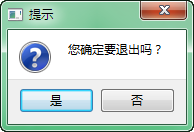
直接以.exec_()判断,[是]按钮返回0,尚不知如何与QMesageBox.YesRole对应。但若使用QMessageBox.AcceptRole与QMessageBox.RejectRole则可以。
下面代码,摘自PySide自带例子:
    MESSAGE = "<p>Message boxes have a caption, a text, and up to three " \

              "buttons, each with standard or custom texts.</p>" \

              "<p>Click a button to close the message box. Pressing the Esc " \

              "button will activate the detected escape button (if any).</p>"

    msgBox = QMessageBox(QMessageBox.Question,

            "QMessageBox.warning()", MESSAGE,

            QMessageBox.NoButton, self)

    msgBox.addButton("Save &Again", QMessageBox.AcceptRole)

    msgBox.addButton("&Continue", QMessageBox.RejectRole)

    if msgBox.exec_() == QMessageBox.AcceptRole:

        print "Save Again"

    else:

        print "Continue"
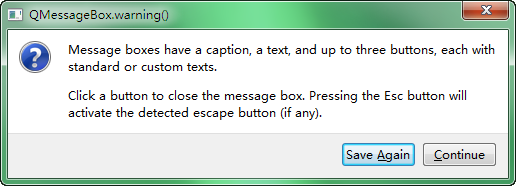
显示如图:
另一种分步方案:
    box = QtGui.QMessageBox()

    box.setIcon(QtGui.QMessageBox.Question)

    box.setWindowTitle('Kaydet!')

    box.setText('Kaydetmek İstediğinize Emin Misiniz?')

    box.setStandardButtons(QtGui.QMessageBox.Yes | QtGui.QMessageBox.No)

    buttonY = box.button(QtGui.QMessageBox.Yes)

    buttonY.setText('Evet')

    buttonN = box.button(QtGui.QMessageBox.No)

    buttonN.setText('Iptal')

    box.exec_()

    if box.clickedButton() == buttonY:

        print 'YES pressed'

    elif box.clickedButton() == buttonN:

       print 'NO pressed'
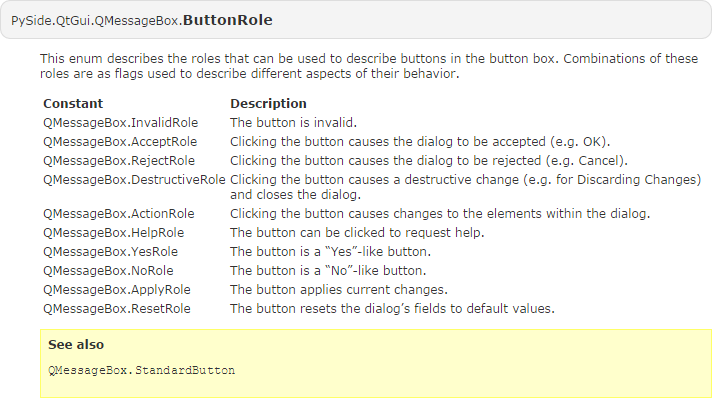
谁可知之?大抵其官方文档可见些解释吧。一些是点击触发事件,一些仅是样式类似。
参考资料
QMessageBox - PySide v1.0.7 documentation
QDialogButtonBox Class | Qt 4.8
Python: PySide(PyQt)QMessageBox按钮显示中文的更多相关文章
- extjs之messagebox按钮显示中文
在extjs中我们用到了很多的提示框,但是在对话框按钮上面显示的都是英文的ok.yes.no.cancel,这里给出一个方法,能够使得提示框的按钮文本显示问中文. extjs在加载完成之后会调用页面的 ...
- UIWebView弹出键盘按钮显示中文
UIWebView是一个很常用的视图,一般用来加载网页,比如百度: 点击文本框输入框后,会弹出一个带有toolbar的键盘,toolbar中有3个辅助按钮 有了这3个按钮,是方便很多,但默认是英文的, ...
- 让UIWebView弹出键盘上的按钮显示中文
UIWebView是一个很常用的视图,一般用来加载网页,比如百度: 点击文本框输入框后,会弹出一个带有toolbar的键盘,toolbar中有3个辅助按钮 有了这3个按钮,是方便很多,但默认是英文的, ...
- dev XtraMessageBox按钮显示中文
dev的XtraMessageBox控件使用起来很美观,但默认显示确定的是英文,如下图: 通过下面代码可使“OK”显示为中文:首先创建一个继承自Localizer的类: using DevExpres ...
- IOS 调用系统相册或照相机tab按钮显示中文
- 让XtraMessageBox按钮显示中文
需要定义一个继承子Localizer的类,然后重写GetLocalizedString public class MessboxClass : Localizer { public override ...
- python matplotlib plot 数据中的中文无法正常显示的解决办法
转发自:http://blog.csdn.net/laoyaotask/article/details/22117745?utm_source=tuicool python matplotlib pl ...
- uploadify不能正确显示中文的按钮文本的解决办法
uploadify 目前不能正确显示中文的按钮文本. 我发现bug的原因是uploadify错误的使用了 js 的 escape 和 flash 的 unescape配对,而这2个是不兼容的.正确的转 ...
- 关于python无法显示中文的问题:SyntaxError: Non-ASCII character '\xe4' in file test.py on line 3, but no encoding declared。
[已解决]关于python无法显示中文的问题:SyntaxError: Non-ASCII character '\xe4' in file test.py on line 3, but no enc ...
随机推荐
- svn下载地址
SVN svn服务器端下载: https://www.visualsvn.com/server/download/ svn eclipse插件地址(new soft install): http:// ...
- zookeeper 入门知识
作为开启分布式架构的基石,除了必会还有的选么 自己的一些理解,有错误的话请一定要给予指正! 一.是什么? 分布式数据一致性的解决方案. 二.有什么用 数据的发布/订阅(配置中心) . 负载均衡(du ...
- python 叠加装饰器详解
def out1(func1): #7.func1=in2的内存地址,就是in2 print('out1') def in1(): #8.调用函数index() 因为函数在in1里,所以首先运行in1 ...
- kvm配置USB直通
参照:https://www.linuxidc.com/Linux/2014-12/110919.htm WebVirMgr界面是没有直接的途径了,只能靠修改xml文件,在<device> ...
- c 时间 学习
linux #include <stdio.h> #include <time.h> int main(int argc,char **argv) { //两种时间的获取方法 ...
- [Shell]Bash基本功能:多命令顺序执行与管道符
/*----------------------------------------------------------------------------------------------- @黑 ...
- Git设置/取消代理
设置代理 git config --global http.proxy http://proxy.com:1234 git config --global https.proxy http://pro ...
- mybatis实现一对多连接查询
问题:两个对象User和Score,它们之间的关系为一对多. 底层数据库为postgresql,ORM框架为mybatis. 关键代码如下: mybatis配置文件如下: mybatis.xml文件内 ...
- MVC part4
SpringMVC 注解 @Controller 负责注册一个bean 到spring 上下文中,bean 的ID 默认为类名称开头字母小写,你也可以自己指定, 如下 方法一: @Controller ...
- Java中String的intern方法,javap&cfr.jar反编译,javap反编译后二进制指令代码详解,Java8常量池的位置
一个例子 public class TestString{ public static void main(String[] args){ String a = "a"; Stri ...