
Demo005 小学四则运算自动生成程序
目录
小学四则运算自动生成程序
0.传送门
领航员: 嚯唶
Coding:Rst321
1.题目要求
本次作业要求两个人合作完成,驾驶员和导航员角色自定,鼓励大家在工作期间角色随时互换,这里会布置两个题目,请各组成员根据自己的爱好任选一题。
题目1:
我们在刚开始上课的时候介绍过一个小学四则运算自动生成程序的例子,请实现它,要求:
- [x] 能够自动生成四则运算练习题
- [x] 可以定制题目数量
- [x] 用户可以选择运算符
- [x] 用户设置最大数(如十以内、百以内等)
- [x] 用户选择是否有括号、是否有小数
- [x] 用户选择输出方式(如输出到文件、打印机等)
- [x] 最好能提供图形用户界面(根据自己能力选做,以完成上述功能为主)
2.功能实现
2.1 总体设计
头文件:
/*#include<bits/stdc++.h>*/
#include <iostream>
#include <cstdio>
#include <cerrno>
#include <ctime>
#include <cstdlib>
#include <fstream>
#include <string>
using namespace std;
预处理块:
#define FILE_PATH "D:/Demo.txt" // 文件路径版权声明:
PS:在 codeblocks 不要使用©符号,否则.......
/**
 * Copyright © Ryanjie
 *
 * @program: Demo05 Arithmetic
 * @description: Arithmetic
 * @author: Ryanjie 嚯唶
 * @create: 2018-04-11 18:59
 *
 * version 1.0
 **/
全局变量:
char Arithmetic_brackets[4] = {'(' , ' ' , ')' , ' '}; //括号
char Arithmetic_operators[4] = {'+' , '-' , '*' , '/'}; //运算符
const int Arithmetic_operation = 4; //生成随机运算符
const int Arithmetic_bracket = 2; //生成随机括号
int Arithmetic_number; //题目数目
int Arithmetic_max; //最大数
int Arithmetic_iffile;   //确定是否打印
int Arithmetic_ifdecimal;  //确定是否有小数
int Arithmetic_ifbrackets;  //确定是否有括号
char* dt;   //当地时间
FILE *fp;   //文件地址
函数及功能 :
void showMenu();    //欢迎界面
void showExit();    //退出界面
void Arithmetic_Output_Screen();//屏幕输出函数
void Arithmetic_Output_File();  //文本输出函数
void getTime(); //获取日期和时间核心:随机生成函数rand()。关于rand() 的使用请看:rand与srand函数的使用 ,详细解释请查询维基百科。
2.2 用户欢迎界面
程序是让其他人使用,而良好的界面能大大提高他人使用的效率。
程序欢迎界面
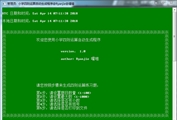
函数如下:
void showMenu()
{
    system("title 小学四则运算自动生成程序@Ryanjie@嚯唶");
    system("mode con cols=90");//改变控制台宽度
    system("color 2f");//改变背景颜色
    system("echo.");

    getTime();

    system("echo.");
    cout << "※※※※※※※※※※※※※※※※※※※※※※※※※※※※※※※※※※※※※※※※※※※※" << endl;
    cout << "※                                                                                    ※" << endl;
    cout << "※                欢迎您使用小学四则运算自动生成程序                                  ※" << endl;
    cout << "※                                                                                    ※" << endl;
    cout << "※                                                                                    ※" << endl;
    cout << "※                             version: 1.0                                          ※" << endl;
    cout << "※                                                                                    ※" << endl;
    cout << "※                             author: Ryanjie 嚯唶                                   ※" << endl;
    cout << "※                                                                                    ※" << endl;
    cout << "※                                                                                    ※" << endl;
    cout << "※                                                                                    ※" << endl;
    cout << "※                                                                                    ※" << endl;
    cout << "※                                                                                    ※" << endl;
    cout << "※                                                                                    ※" << endl;
    cout << "※                请您按照步骤来生成四则运算练习题:                                  ※" << endl;
    cout << "※                                                                                    ※" << endl;
    cout << "※                第1步:请设置题目数量 <1-100>                                       ※" << endl;
    cout << "※                第2步:请设置最大数 <1-1000>                                        ※" << endl;
    cout << "※                第3步:请选择是否有小数                                             ※" << endl;
    cout << "※                第4步:请选择是否有括号                                             ※" << endl;
    cout << "※                第5步:请选择是否打印到文件                                         ※" << endl;
    cout << "※                                                                                    ※" << endl;
    cout << "※※※※※※※※※※※※※※※※※※※※※※※※※※※※※※※※※※※※※※※※※※※※" << endl;
    system(" echo.");
}
2.3 用户功能界面
用户按需求设置相关参数,程序每个参数设置好临界点,并判断其是否越界,函数如下:
void menu1()
{
    system(" echo.");
    showMenu();
    cout << "第1步:请设置题目数量 <1-100> :" << endl;
    cin >> Arithmetic_number;
    while((Arithmetic_number > 100) || (Arithmetic_number < 1 ))
    {
        cout << "您设置的题目数目不符合要求(太多/太少)。 < 1 - 100 > " << endl;
        cout << endl;
        cout << "请按确认键重新输入,谢谢!" << endl;
        system("Pause >nul");
        cin >> Arithmetic_number;
    }
}

void menu2()
{
    system("echo.");
    cout << "第2步:请设置最大数 <1-1000> :" << endl;
    cin>>Arithmetic_max;
    while((Arithmetic_max > 1000) || (Arithmetic_max < 1 ))
    {
        cout << "您设置的最大数不符合要求(太大/太小)。 < 1 - 1000 > " << endl;
        cout << endl;
        cout << "请按确认键重新输入,谢谢!" << endl;
        system("Pause >nul");
        cin >> Arithmetic_max;
    }
}

void menu3()
{
    system("echo.");
    cout << "第3步:请选择是否有小数:(输入 <0> 生成整数 , 输入 <1> 生成小数) "<<endl;
    cin>>Arithmetic_ifdecimal;
    while((Arithmetic_ifdecimal !=0 ) && (Arithmetic_ifdecimal != 1 ))
    {
        cout << "您输入的数不符合要求。(输入 <0> 生成整数 , 输入 <1> 生成小数) " << endl;
        cout << endl;
        cout << "请按确认键重新输入!" << endl;
        system("Pause >nul");
        cin >> Arithmetic_ifdecimal;
    }
}

void menu4()
{
    system("echo.");
    cout << "第4步:请选择是否有括号:(输入 <0> 无括号 , 输入 <1> 有括号)" << endl;
    cin>>Arithmetic_ifbrackets;
    while((Arithmetic_ifbrackets !=0 ) && (Arithmetic_ifbrackets != 1 ))
    {
        cout << "您输入的数不符合要求。(输入 <0> 无括号 , 输入 <1> 有括号) " << endl;
        cout << endl;
        cout << "请按确认键重新输入!" << endl;
        system("Pause >nul");
        cin >> Arithmetic_ifbrackets;
    }
}

void menu5()
{
    system("echo.");
    cout << "第5步:请选择是否打印到文件:(输入 <0> 不打印(屏幕显示) , 输入 <1> 打印)" << endl;
    cin>>Arithmetic_iffile;
    while((Arithmetic_iffile !=0 ) && (Arithmetic_iffile != 1 ))
    {
        cout << "您输入的数不符合要求。(输入 <0> 不打印(屏幕显示) , 输入 <1> 打印) " << endl;
        cout << endl;
        cout << "请按确认键重新输入!" << endl;
        system("Pause >nul");
        cin >> Arithmetic_iffile;
    }
}

void menu()
{
    menu1();
    menu2();
    menu3();
    menu4();
    menu5();
}
2.4 屏幕输出
屏幕输出:

函数如下:
void Arithmetic_Output_Screen()
{
    cout <<"+----------------以下为*小学四则运算自动生成程序*所生成的四则运算练习题----------------+" << endl;

    for(int i=0; i<Arithmetic_number; ++i)
    {
        /*随机生成四个整数*/
        int number1 = rand() % Arithmetic_max;
        int number2 = rand() % Arithmetic_max;
        int number3 = rand() % Arithmetic_max;
        int number4 = rand() % Arithmetic_max;

        /*随机生成四个小数*/
        float number5 = (float)rand() / Arithmetic_max;
        float number6 = (float)rand() / Arithmetic_max;
        float number7 = (float)rand() / Arithmetic_max;
        float number8 = (float)rand() / Arithmetic_max;

        /*随机生成三个运算符*/
        int operation1 = rand() % Arithmetic_operation;
        int operation2 = rand() % Arithmetic_operation;
        int operation3 = rand() % Arithmetic_operation;
        char cur_operation1 = Arithmetic_operators[operation1];
        char cur_operation2 = Arithmetic_operators[operation2];
        char cur_operation3 = Arithmetic_operators[operation3];

        /*随机产生括号()*/
        int barcket1 = rand() % Arithmetic_bracket;
        char cur_barckets1 = Arithmetic_brackets[barcket1];
        char cur_barckets2 = Arithmetic_brackets[barcket1+2];

        if(Arithmetic_ifdecimal)
        {
            if(Arithmetic_ifbrackets)
            {
                cout << "NO." << i << " : "<< cur_barckets1 << number5 << " " << cur_operation1 << " " << number6 << cur_barckets2 << " " << cur_operation2 << " " << number7 << " " << cur_operation3 << " " << number8 << "=" << endl;
            }
            else
            {
                cout << "NO." << i << " : "<< number5 << " " << cur_operation1 << " " << number6 << " " << cur_operation2 << " " << number7 << " " << cur_operation3 << " " << number8 << "=" << endl;
            }
        }
        else
        {
            if(Arithmetic_ifbrackets)
            {
                cout << "NO." << i << " : "<< cur_barckets1 << number1 << " " << cur_operation1 << " " << number2 << cur_barckets2 << " " << cur_operation2 << " " << number3 << " " << cur_operation3 << " " << number4 << "=" << endl;
            }
            else
            {
                cout << "NO." << i << " : "<< number1 << " " << cur_operation1 << " " << number2 << " " << cur_operation2 << " " << number3 << " " << cur_operation3 << " " << number4 << "=" << endl;
            }
        }
    }

    cout << "+--------------------------------------------------------------------------------------+" << endl;

}
2.5 文本输出
由于原始文件里已经存在上一次打印的四则运算练习题,所以写入文件需要使用追加命令
fp = fopen(FILE_PATH, "at+");函数如下:
void Arithmetic_Output_File()
{
    cout << Arithmetic_number <<endl;
    fp = fopen(FILE_PATH, "at+");
    if (fp != NULL)
    {
        fprintf( fp ,"\n");
        fprintf( fp,"+----------------以下为*小学四则运算自动生成程序*所生成的四则运算练习题----------------+\n");
        time_t now = time(0);
        char* dt = ctime(&now);
        tm *gmtm = gmtime(&now);
        dt = asctime(gmtm);
        fprintf( fp ,"                                                UTC 日期和时间:%s \n" , dt );

        for(int i = 0; i < Arithmetic_number; ++i)
        {
            /*随机生成四个整数*/
            int number1 = rand() % Arithmetic_max;
            int number2 = rand() % Arithmetic_max;
            int number3 = rand() % Arithmetic_max;
            int number4 = rand() % Arithmetic_max;

            /*随机生成四个小数*/
            float number5 = (float)rand() / Arithmetic_max;
            float number6 = (float)rand() / Arithmetic_max;
            float number7 = (float)rand() / Arithmetic_max;
            float number8 = (float)rand() / Arithmetic_max;

            /*随机生成三个运算符*/
            int operation1 = rand() % Arithmetic_operation;
            int operation2 = rand() % Arithmetic_operation;
            int operation3 = rand() % Arithmetic_operation;
            char cur_operation1 = Arithmetic_operators[operation1];
            char cur_operation2 = Arithmetic_operators[operation2];
            char cur_operation3 = Arithmetic_operators[operation3];

            /*随机产生括号()*/
            int barcket1 = rand() % Arithmetic_bracket;
            char cur_barckets1 = Arithmetic_brackets[barcket1];
            char cur_barckets2 = Arithmetic_brackets[barcket1+2];
            if(Arithmetic_ifdecimal)  //判断是否有小数
            {
                if(Arithmetic_ifbrackets)   //判断是否有括号
                {
                    fprintf( fp, "NO. %2d : %c %.2f %c %.2f %c %c %.2f %c %.2f = \n" ,i, cur_barckets1 , number5 , cur_operation1 , number6 , cur_barckets2 , cur_operation2 , number7 , cur_operation3 , number8 );
                    //fprint( << "NO." << i << " : "<< cur_barckets1 << number5 << " " << cur_operation1 << " " << number6 << cur_barckets2 << " " << cur_operation2 << " " << number7 << " " << cur_operation3 << " " << number8 << "=" << endl;
                }
                else
                {
                    fprintf( fp,"NO. %2d : %.2f %c %.2f %c %.2f %c %.2f = \n" ,i, number5 , cur_operation1 , number6, cur_operation2 , number7 , cur_operation3 , number8 );
                    //fprint( << "NO." << i << " : "<< number5 << " " << cur_operation1 << " " << number6 << " " << cur_operation2 << " " << number7 << " " << cur_operation3 << " " << number8 << "=" << endl;
                }
            }
            else
            {
                if(Arithmetic_ifbrackets)
                {
                    fprintf( fp,"NO. %2d : %c %d %c %d %c %c %d %c %d = \n" ,i, cur_barckets1 , number1 , cur_operation1 , number2 , cur_barckets2 , cur_operation2 , number3 , cur_operation3 , number4 );
                    //fprint( << "NO." << i << " : "<< cur_barckets1 << number1 << " " << cur_operation1 << " " << number2 << cur_barckets2 << " " << cur_operation2 << " " << number3 << " " << cur_operation3 << " " << number4 << "=" << endl;
                }
                else
                {
                    fprintf( fp,"NO. %2d : %d %c %d %c %d %c %d = \n" ,i, number1 , cur_operation1 , number2, cur_operation2 , number3 , cur_operation3 , number4 );
                    //fprint( << "NO." << i << " : "<< number1 << " " << cur_operation1 << " " << number2 << " " << cur_operation2 << " " << number3 << " " << cur_operation3 << " " << number4 << "=" << endl;
                }
            }
        }
    }
    else
    {
        perror(FILE_PATH);
        exit(-1);
    }
    fprintf( fp,"+--------------------------------------------------------------------------------------+\n");

    fprintf( fp, "\n");
}
2.6 获取时间
获取UTC 日期和时间,函数如下:
void getTime()
{
    system("cls");
    system("echo.");
    time_t now = time(0);
    char* dt = ctime(&now);
    tm *gmtm = gmtime(&now);
    dt = asctime(gmtm);
    cout << "UTC 日期和时间:" << dt << endl;
    cout << "本地日期和时间:" << dt << endl;
    system("echo.");
}
2.7 用户退出界面
用户退出界面
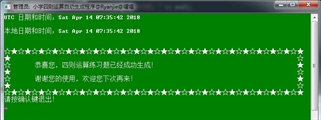
函数如下:
void showExit()
{
    getTime();
    cout<<"☆★☆★☆★☆★☆★☆★☆★☆★☆★☆★☆★☆★☆★☆★☆★☆★☆★☆★☆★☆★☆★☆★"<<endl;
    cout<<"★                                                                                    ☆"<<endl;
    cout<<"☆       恭喜您,四则运算练习题已经成功生成!                                         ★"<<endl;
    cout<<"★                                                                                    ☆"<<endl;
    cout<<"☆       谢谢您的使用,欢迎您下次再来!                                               ★"<<endl;
    cout<<"★                                                                                    ☆"<<endl;
    cout<<"☆★☆★☆★☆★☆★☆★☆★☆★☆★☆★☆★☆★☆★☆★☆★☆★☆★☆★☆★☆★☆★☆★"<<endl;
    cout << "请按确认键退出!" << endl;
    system("Pause >nul");
}
3. 评价&总结
邹欣老师在《现代软件工程讲义 3 结对编程和两人合作》一文中提到:
在结对编程模式下,一对程序员肩并肩地、平等地、互补地进行开发工作。两个程序员并排坐在一台电脑前,面对同一个显示器,使用同一个键盘,同一个鼠标一起工作。他们一起分析,一起设计,一起写测试用例,一起编码,一起单元测试,一起集成测试,一起写文档等。
我们把结对编程中两位合作者的关系看作驾驶员和领航员,其中:
- 驾驶员(Driver)是控制键盘输入的人
- 领航员(Navigator)起到领航、提醒的作用
本次结对编程中的两位合作者:
- 驾驶员:Ryanjie(我)
- 领航员:嚯唶
在本次结对编程中,我担任驾驶员(Driver)工作,主要完成代码编写工作,而嚯唶在此次作业中担任领航员(Navigator)工作,它主要提醒我以及对代码的单元测试。这次作业对于我来说这是一次全新的体验,两个人将更容易发现问题,也更容易想出更好的解决方案。
此次结对编程中,嚯唶在很多地方给我提供了准备工作以及思路(像我么这样底子比较薄弱的很难编出来这个程序)。此外,他还设计出了合理的测试用例,将此次编写的代码进行了合理的测试,同时指出了我在编写代码时存在的一些问题,改进了我的编程方法,为以后编程积累了宝贵的经验。结对编程可以提高代码的质量,并且在审查过程中可以及时吸取建议进而增进整体的质量。这次结对编程过程相比一个人编程来说也不那么枯燥了,可以互相讨论问题,一同陷入沉思。
总体来说,我们这一次作业较好的完成了预定的要求,实现了基本的功能,完成了结对编程的功能。由于时间的原因(要准备考验),所以没有使用界面。结对编程培养了我们的协助能力,问题解决能力,希望在之后学习生活中,能够有较多这样互相学习、互相进步的机会,在以后的学习过程中希望有机会好好的体验结对编程的各个不同阶段。
最后,写代码时一定要及时保存代码.!!!
合影

Coding地址 Ryanjie/Arithmetic
图片看不见的请看: Ryanjie/Arithmetic/ScreenShots/
Demo005 小学四则运算自动生成程序的更多相关文章
- 作业二:个人编程项目——编写一个能自动生成小学四则运算题目的程序
1. 编写一个能自动生成小学四则运算题目的程序.(10分) 基本要求: 除了整数以外,还能支持真分数的四则运算. 对实现的功能进行描述,并且对实现结果要求截图. 本题发一篇随笔,内容包括: 题 ...
- myapp——自动生成小学四则运算题目的命令行程序(侯国鑫 谢嘉帆)
1.Github项目地址 https://github.com/baiyexing/myapp.git 2.功能要求 题目:实现一个自动生成小学四则运算题目的命令行程序 功能(已全部实现) 使用 -n ...
- java实现自动生成小学四则运算——朱庭震,詹祺豪
组员:朱庭震,詹祺豪 Github地址:https://github.com/ztz1998/second/tree/master 1题目:实现一个自动生成小学四则运算题目的命令行程序. 2说明: 自 ...
- Individual Project "写一个能自动生成小学四则运算题目的程序"
一.题目简介 写一个能自动生成小学四则运算题目的程序. 初步拟定要实现的功能后,估计一下自己需要花多长时间.编程过程中记录自己实际用了多长时间. 然后和同学们比较一下各自程序的功能.实现方法的异同等等 ...
- Python实现自动生成小学四则运算题目
Github地址: https://github.com/guoyuyi/gyy.github.io/blob/%E4%BD%9C%E4%B8%9A1/zy1.py 题目描述: 通过python语言编 ...
- 个人作业1——四则运算题目生成程序(java代码,基于控制台)
一.题目描述: 从<构建之法>第一章的 "程序" 例子出发,像阿超那样,花二十分钟写一个能自动生成小学四则运算题目的命令行 "软件",满足以下需求: ...
- 个人作业1——四则运算题目生成程序(基于C++)
题目描述: 从<构建之法>第一章的 "程序" 例子出发,像阿超那样,花二十分钟写一个能自动生成小学四则运算题目的命令行 "软件",满足以下需求: 1 ...
- 【软件工程Ⅱ】作业四 |个人项目-小学四则运算 “软件”之初版(C语言)
本次作业的要求来自于:https://edu.cnblogs.com/campus/gzcc/GZCC-16SE2/homework/2186 本次作业代码的github地址:https://gith ...
- Practice1小学四则运算
本次实验是做一个自动生成小学四则运算的小程序,对于我来说是检验基础的一次实验,要运用Visual C++来编写完成,“自动生成”第一印象是要用到Random()函数,“加减乘除”则应该用到switch ...
随机推荐
- Java之工具类:判断对象是否为空或null
import java.lang.reflect.Array; import java.util.Collection; import java.util.Map; /** * 判断对象是否为空或nu ...
- Java之File类详解
常用操作: File f = new File("C:\\testdata\\filedir\\a\\b\\c"); f.mkdir(); //建立单级目录 f.mkdirs(); ...
- Semi synchronous replication
目标 主库宕机不丢数据(Master Failover without data loss) facebook有两篇不错的文章: 2015/01: performance-issues-and-fix ...
- Fib的奇怪定理 : gcd(F[n],F[m])=F[gcd(n,m)]
引理1:gcd(F[n],f[n-1])=1 因为 F[n]=f[n-1]+F[n-2] 所以 gcd(F[n],f[n-1]) = gcd(F[n-1]+F[n-2],F[n-1]) gcd的更损相 ...
- 上传文件到aws的s3存储
只要有aws-cli客户端就可以上传文件到aws的S3存储.可以在任意机器上.这里以centos为例. 1.安装python.pip. # yum install -y python python-p ...
- jenkins构建docker镜像上传到harbor并发布到kubernetes
很早之前写过一篇jenkins集成docker的文章,使用的是CloudBees Docker Build and Publish plugin插件.这篇文章是直接使用shell脚本做的,主要是这次有 ...
- 前端学习 -- Css -- 高度坍塌问题的产生以及解决
在文档流中,父元素的高度默认是被子元素撑开的,也就是子元素多高,父元素就多高. 但是当为子元素设置浮动以后,子元素会完全脱离文档流,此时将会导致子元素无法撑起父元素的高度,导致父元素的高度塌陷. 由于 ...
- hdu 1789 Doing HomeWork Again (贪心算法)
题目链接:http://acm.hdu.edu.cn/showproblem.php?pid=1789 /*Doing Homework again Time Limit: 1000/1000 MS ...
- 命令行 设置redis 时间
> set name jack OK > expire jack (integer) > ttl jack (integer) - > expire name (integer ...
- logback常见配置
依赖jar包 <!-- https://mvnrepository.com/artifact/ch.qos.logback/logback-core --> <dependency& ...