
jqgrid 在表格底部添加自定义按钮
往往我们需要在jqgrid底部的分页行中添加一些自定义按钮,效果如下:
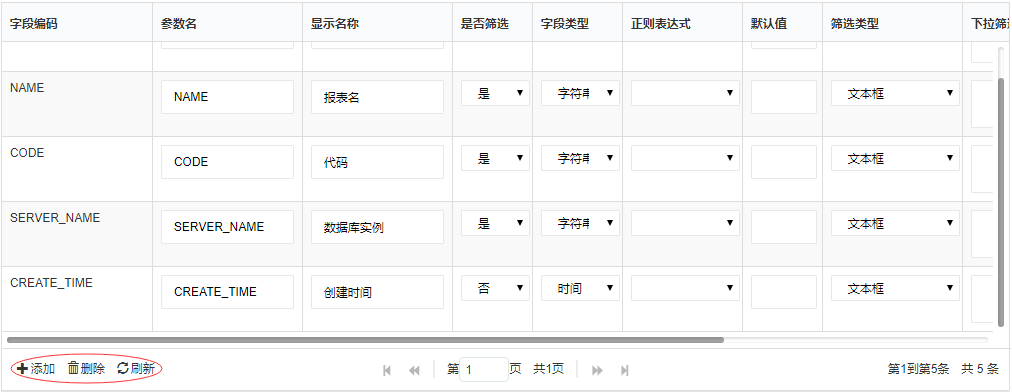
上图中,三个按钮均是自定义添加上的。
1、要新增自定义按钮在表格底部,仍离不开分页div,需要给jqgrid绑定分页方法
2、由于此功能中,我们不使用jqgrid默认按钮,故需要将默认按钮设置为不启用false
以上截图完整代码,参考如下:
//根据传入的筛选信息加载grid

function LoadFilterGrid(newFilterArr) {

    $.jgrid.gridUnload("filterGrid");//先卸载

    $("#filterGrid").jqGrid({

        altRows: true,//隔行换色

        data: newFilterArr,

        editurl: 'clientArray',

        styleUI: 'Bootstrap',

        //responsive: true,

        datatype: "local",

        page: 1,

        colModel: [

            { label: 'ID', name: 'Id', width: 20, hidden: true },//id值隐藏

            { label: 'TbReportId', name: 'TbReportId', width: 20, hidden: true },//TbReportId值隐藏

            { label: '字段编码', name: 'FieldCode', width: 150, editable: false },

             {//参数名作为主键

                 label: '参数名',

                 name: 'FieldParam',

                 width: 150,

                 key: true,

                 editable: true,

                 edittype: "text"

                 //editrules: { required: true }

             },

              {

                  label: '显示名称',

                  name: 'FieldName',

                  width: 150,

                  editable: true,

                  edittype: "text"

                  //editrules: { required: true }

              },

              {

                  label: '是否筛选',

                  name: 'IsSearch',

                  width: 80,

                  editable: true,

                  edittype: "select",

                  editoptions: {

                      value: "false:否;true:是"

                  }//默认为否

              },

              {

                  label: '字段类型',

                  name: 'DataType',

                  width: 90,

                  editable: true,

                  edittype: "select",

                  editoptions: {

                      value: "Decimal:数值型;String:字符串;Int32:整型;Int64:长整型;Int16:短整型;DateTime:时间"

                  }

              },

               {

                   label: '正则表达式',

                   name: 'RegularId',

                   width: 120,

                   editable: true,

                   edittype: "select",

                   editoptions: {

                       value: GetRegulars

                   }

               },

                {

                    label: '默认值',

                    name: 'DefaultValue',

                    width: 80,

                    editable: true,

                    edittype: "text"

                },

                 {

                     label: '筛选类型',

                     name: 'FilterType',

                     width: 140,

                     editable: true,

                     edittype: "select",

                     editoptions: {

                         value: "1:文本框;2:复选下拉框;3:单选下拉框;4:日期/年月日;5:日期/年月"

                     }

                 },

                  {

                      label: '下拉筛选sql',

                      name: 'FilterSql',

                      width: 130,

                      editable: true,

                      edittype: "textarea"

                  },

                  {

                      label: '筛选排序',

                      name: 'OrderNum',

                      width: 80,

                      editable: true,

                      edittype: "text"

                  },

                  {

                      label: '快捷筛选',

                      name: 'IsQuick',

                      width: 80,

                      editable: true,

                      edittype: "select",

                      editoptions: {

                          value: "false:否;true:是"

                      }//默认非快捷筛选

                  },

                  {

                      label: '内置字段?',

                      name: 'IsCustom',

                      width: 100,

                      editable: false

                  },

                  {

                      label: '筛选说明',

                      name: 'Remark',

                      width: 120,

                      editable: true,

                      edittype: "textarea",

                      //edittype: "text",

                      hidden: true,//隐藏字段

                      editrules: { edithidden: true }//让隐藏字段可编辑,编辑时显示

                  }

        ],

        loadonce: false,

        viewrecords: true,

        shrinkToFit: false,

        autoScroll: false,

        height: window.innerHeight * 0.6,

        width: $(".modal-body").width(),

       // autowidth: true,

        rowNum: newFilterArr.length + 3,//默认比原行数+3

        pager: "#filterGridPager"

    });

    $('#filterGrid').navGrid('#filterGridPager',

               { edit: false, add: false, del: false, search: false, refresh: false, view: false, position: "left", cloneToTop: false });

    // 添加一个‘添加’按钮

    $('#filterGrid').navButtonAdd('#filterGridPager',

        {

            buttonicon: "glyphicon glyphicon-plus",

            title: "添加",

            caption: "添加",

            position: "last",

            onClickButton: addRow

        });

    //添加一个‘删除’按钮

    $('#filterGrid').navButtonAdd('#filterGridPager',

         {

             buttonicon: "glyphicon glyphicon-trash",

             title: "删除",

             caption: "删除",

             position: "last",

             onClickButton: delRow

         });

    //添加一个‘刷新’按钮

    $('#filterGrid').navButtonAdd('#filterGridPager',

         {

             buttonicon: "glyphicon glyphicon-refresh",

             title: "刷新",

             caption: "刷新",

             position: "last",

             onClickButton: refreshFiterGrid

         });

    //加载完毕后,打开所有行的编辑

    startEdit($("#filterGrid"));

}
说明:
1)filterGrid为jqgrid所在的table,filterGridPager为jqgrid分页插件所在的div
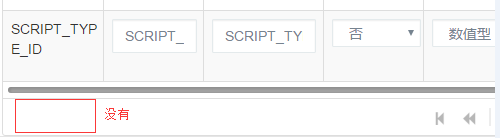
2)给filterGrid绑定分页行filterGridPager,将jqgrid默认按钮禁用(黄色区域)。
$('#filterGrid').navGrid('#filterGridPager',{ edit: false, add: false, del: false, search: false, refresh: false, view: false, position: "left", cloneToTop: false })
若不添加以上行代码,将不会显示自定义的按钮,看截图:
3)通过navButtonAdd添加自定义按钮方法
    // 添加一个‘添加’按钮

    $('#filterGrid').navButtonAdd('#filterGridPager',

        {

            buttonicon: "glyphicon glyphicon-plus",

            title: "添加",

            caption: "添加",

            position: "last",

            onClickButton: addRow

        });
4)小提示:由于当前功能中,会多次进行jqgrid表格编辑操作(添加、删除、编辑行),会多次绑定表格数据。为确保数据成功刷新与展示在每次绑定jqgrid时先卸载表格
$.jgrid.gridUnload("filterGrid");//先卸载
5)给按钮设置样式。buttonicon: "glyphicon glyphicon-plus"
jqgrid 在表格底部添加自定义按钮的更多相关文章
- AppBoxPro - 细粒度通用权限管理框架(可控制表格行内按钮)源码提供下载
特别声明: 提供的源代码已经包含了 AppBoxPro 的全部源代码,用 VS2012 打开项目后,直接 Ctrl+F5 可以运行起来(默认使用VS自带的LocalDB数据库). FineUIPro是 ...
- 给angularJs grid列上添加自定义按钮
由于项目需要在angular 显示的表格中添加按钮,多次查询资料终于找到解决方法.就是给columnDefs 上的列增加 cellTemplate,同时绑定对应的触发事件,代码如下 columnDef ...
- Dynamics CRM2013 任务列表添加自定义按钮
任务列表的command bar 上面添加自定义按钮如下 要注意的是此处的列表不是任务实体而是活动实体,如果你是在任务实体的home栏上面加那你永远看不见按钮的显示,但如果是要在任务的表单界面上加按钮 ...
- Dynamics 365 CRM 添加自定义按钮
在添加自定义按钮之前,我们需要下载这个工具 RibbonWorkbench, 它是专门针对自定义命令栏和Ribbon区域. 下载之后是一个zip压缩包. 怎样安装RibbonWorkbench: Se ...
- ckeditor添加自定义按钮整合swfupload实现批量上传图片
ckeditor添加自定义按钮整合swfupload实现批量上传图片给ckeditor添加自定义按钮,由于ckeditor只能上传一张图片,如果要上传多张图片就要结合ckfinder,而ckfinde ...
- RN如何固定底部的按钮
如上图的底部新增按钮,要是放在web里那是相当简单,直接是用固定定位就行,但是在RN里是没有固定定位可言的. 方案一: 采用绝对定位,相对于最外层的定位在底部位置.(在部分安卓机上有问题,动态计算的高 ...
- jqGrid多级表格的实现
原博主链接:http://blog.csdn.net/dreamstar613/article/details/54616503 jqGrid多级表格(可N级) 主要用的方法: subGridRowE ...
- jqGrid添加自定义按钮
用法: <script> ... jQuery("#grid_id").navGrid("#pager",...).navButtonAdd(&qu ...
- 00001- layui 表格的默认工具栏添加自定义按钮
首先定义table: var tableIns = table.render({ elem:'#businessUserListTable' ,url: ctx+'/business/business ...
随机推荐
- 查看linux 内存
1.vmstat vmstat命令显示实时的和平均的统计,覆盖CPU.内存.I/O等内容.例如内存情况,不仅显示物理内存,也统计虚拟内存. $ vmstat -s 2.top top命令提供了实时的运 ...
- 【CDQ分治】[HNOI2010]城市建设
题目链接 线段树分治+LCT只有80 然后就有了CDQ分治的做法 把不可能在生成树里的扔到后面 把一定在生成树里的扔到并查集里存起来 分治到l=r,修改边权,跑个kruskal就行了 由于要支持撤销, ...
- cf1102F. Elongated Matrix(状压dp)
题意 题目链接 Sol \(n \leqslant 16\)可以想到状压 我们可以预处理出任意两行之间每列的最小值以及相邻两列的最小值 然后枚举一个起点,\(f[sta][i]\)表示走过了\(sta ...
- CSS编辑元素的浮动
1.元素浮动: 1)使用 float:left; 这样的格式设置元素的浮动方式,属性值可以是left,right: 2)元素设置为左浮动时,元素将从原区域浮动到浏览器的左侧页面:右浮动时,就会附在右侧 ...
- <Android 基础(三十四)> TabLayout 从头到脚
1. 简介 1.TabLayout给我们提供的是一排横向的标签页 2.#newTab()这个方法来创建新的标签页,然后用过#setText()和#setIcon方法分别修改标签页的文本和图标,创建完成 ...
- VC中添加头文件以及库
原文:http://blog.csdn.net/lwb102063/article/details/52068389 附加头文件包含 VC6.0中: VC6.0默认include包含路径:Tool ...
- 创建一个OpenGL窗口
在上节课Windows10+VS2017 用GLFW+GLAD 搭建OpenGL开发环境 中,我们搭建好了OpenGL开发环境.这节课编写代码去测试开发环境. 还是用上节课创建的OpenGL项目,右击 ...
- linux chmod 给目录或文件赋权限 可读可写可执行
前提: mode权限设定字串,格式:[ugoa...][[+-=][rwxX]...][,...] 其中u表示拥有者(user),g表示与拥有者属于同一个群体(group),o表示其他以外的人(ot ...
- 8.什么是模块,模块的导入,__name__
相关内容: 什么是模块 模块的导入 模块的导入 自模块的导入 同级目录导入 不同级目录导入 目录内导入目录外 目录外导入目录内 __name__ 首发时间:2018-02-04 15:23 修改: 2 ...
- 向Sql Server数据库插入中文时显示乱码的解决办法 (转)
转自:http://blog.csdn.net/wizardlun/article/details/4577658 參考:http://shareideas.blog.51cto.com/362642 ...