
jqgrid 在表格底部添加自定义按钮
往往我们需要在jqgrid底部的分页行中添加一些自定义按钮,效果如下:
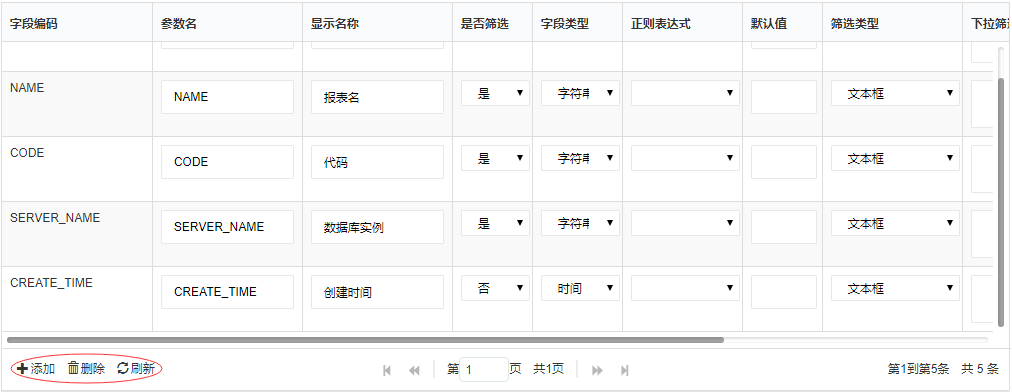
上图中,三个按钮均是自定义添加上的。
1、要新增自定义按钮在表格底部,仍离不开分页div,需要给jqgrid绑定分页方法
2、由于此功能中,我们不使用jqgrid默认按钮,故需要将默认按钮设置为不启用false
以上截图完整代码,参考如下:
//根据传入的筛选信息加载grid

function LoadFilterGrid(newFilterArr) {

    $.jgrid.gridUnload("filterGrid");//先卸载

    $("#filterGrid").jqGrid({

        altRows: true,//隔行换色

        data: newFilterArr,

        editurl: 'clientArray',

        styleUI: 'Bootstrap',

        //responsive: true,

        datatype: "local",

        page: 1,

        colModel: [

            { label: 'ID', name: 'Id', width: 20, hidden: true },//id值隐藏

            { label: 'TbReportId', name: 'TbReportId', width: 20, hidden: true },//TbReportId值隐藏

            { label: '字段编码', name: 'FieldCode', width: 150, editable: false },

             {//参数名作为主键

                 label: '参数名',

                 name: 'FieldParam',

                 width: 150,

                 key: true,

                 editable: true,

                 edittype: "text"

                 //editrules: { required: true }

             },

              {

                  label: '显示名称',

                  name: 'FieldName',

                  width: 150,

                  editable: true,

                  edittype: "text"

                  //editrules: { required: true }

              },

              {

                  label: '是否筛选',

                  name: 'IsSearch',

                  width: 80,

                  editable: true,

                  edittype: "select",

                  editoptions: {

                      value: "false:否;true:是"

                  }//默认为否

              },

              {

                  label: '字段类型',

                  name: 'DataType',

                  width: 90,

                  editable: true,

                  edittype: "select",

                  editoptions: {

                      value: "Decimal:数值型;String:字符串;Int32:整型;Int64:长整型;Int16:短整型;DateTime:时间"

                  }

              },

               {

                   label: '正则表达式',

                   name: 'RegularId',

                   width: 120,

                   editable: true,

                   edittype: "select",

                   editoptions: {

                       value: GetRegulars

                   }

               },

                {

                    label: '默认值',

                    name: 'DefaultValue',

                    width: 80,

                    editable: true,

                    edittype: "text"

                },

                 {

                     label: '筛选类型',

                     name: 'FilterType',

                     width: 140,

                     editable: true,

                     edittype: "select",

                     editoptions: {

                         value: "1:文本框;2:复选下拉框;3:单选下拉框;4:日期/年月日;5:日期/年月"

                     }

                 },

                  {

                      label: '下拉筛选sql',

                      name: 'FilterSql',

                      width: 130,

                      editable: true,

                      edittype: "textarea"

                  },

                  {

                      label: '筛选排序',

                      name: 'OrderNum',

                      width: 80,

                      editable: true,

                      edittype: "text"

                  },

                  {

                      label: '快捷筛选',

                      name: 'IsQuick',

                      width: 80,

                      editable: true,

                      edittype: "select",

                      editoptions: {

                          value: "false:否;true:是"

                      }//默认非快捷筛选

                  },

                  {

                      label: '内置字段?',

                      name: 'IsCustom',

                      width: 100,

                      editable: false

                  },

                  {

                      label: '筛选说明',

                      name: 'Remark',

                      width: 120,

                      editable: true,

                      edittype: "textarea",

                      //edittype: "text",

                      hidden: true,//隐藏字段

                      editrules: { edithidden: true }//让隐藏字段可编辑,编辑时显示

                  }

        ],

        loadonce: false,

        viewrecords: true,

        shrinkToFit: false,

        autoScroll: false,

        height: window.innerHeight * 0.6,

        width: $(".modal-body").width(),

       // autowidth: true,

        rowNum: newFilterArr.length + 3,//默认比原行数+3

        pager: "#filterGridPager"

    });

    $('#filterGrid').navGrid('#filterGridPager',

               { edit: false, add: false, del: false, search: false, refresh: false, view: false, position: "left", cloneToTop: false });

    // 添加一个‘添加’按钮

    $('#filterGrid').navButtonAdd('#filterGridPager',

        {

            buttonicon: "glyphicon glyphicon-plus",

            title: "添加",

            caption: "添加",

            position: "last",

            onClickButton: addRow

        });

    //添加一个‘删除’按钮

    $('#filterGrid').navButtonAdd('#filterGridPager',

         {

             buttonicon: "glyphicon glyphicon-trash",

             title: "删除",

             caption: "删除",

             position: "last",

             onClickButton: delRow

         });

    //添加一个‘刷新’按钮

    $('#filterGrid').navButtonAdd('#filterGridPager',

         {

             buttonicon: "glyphicon glyphicon-refresh",

             title: "刷新",

             caption: "刷新",

             position: "last",

             onClickButton: refreshFiterGrid

         });

    //加载完毕后,打开所有行的编辑

    startEdit($("#filterGrid"));

}
说明:
1)filterGrid为jqgrid所在的table,filterGridPager为jqgrid分页插件所在的div
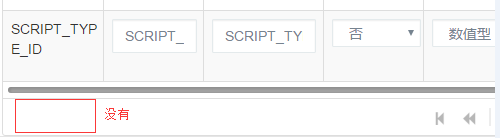
2)给filterGrid绑定分页行filterGridPager,将jqgrid默认按钮禁用(黄色区域)。
$('#filterGrid').navGrid('#filterGridPager',{ edit: false, add: false, del: false, search: false, refresh: false, view: false, position: "left", cloneToTop: false })
若不添加以上行代码,将不会显示自定义的按钮,看截图:
3)通过navButtonAdd添加自定义按钮方法
    // 添加一个‘添加’按钮

    $('#filterGrid').navButtonAdd('#filterGridPager',

        {

            buttonicon: "glyphicon glyphicon-plus",

            title: "添加",

            caption: "添加",

            position: "last",

            onClickButton: addRow

        });
4)小提示:由于当前功能中,会多次进行jqgrid表格编辑操作(添加、删除、编辑行),会多次绑定表格数据。为确保数据成功刷新与展示在每次绑定jqgrid时先卸载表格
$.jgrid.gridUnload("filterGrid");//先卸载
5)给按钮设置样式。buttonicon: "glyphicon glyphicon-plus"
jqgrid 在表格底部添加自定义按钮的更多相关文章
- AppBoxPro - 细粒度通用权限管理框架(可控制表格行内按钮)源码提供下载
特别声明: 提供的源代码已经包含了 AppBoxPro 的全部源代码,用 VS2012 打开项目后,直接 Ctrl+F5 可以运行起来(默认使用VS自带的LocalDB数据库). FineUIPro是 ...
- 给angularJs grid列上添加自定义按钮
由于项目需要在angular 显示的表格中添加按钮,多次查询资料终于找到解决方法.就是给columnDefs 上的列增加 cellTemplate,同时绑定对应的触发事件,代码如下 columnDef ...
- Dynamics CRM2013 任务列表添加自定义按钮
任务列表的command bar 上面添加自定义按钮如下 要注意的是此处的列表不是任务实体而是活动实体,如果你是在任务实体的home栏上面加那你永远看不见按钮的显示,但如果是要在任务的表单界面上加按钮 ...
- Dynamics 365 CRM 添加自定义按钮
在添加自定义按钮之前,我们需要下载这个工具 RibbonWorkbench, 它是专门针对自定义命令栏和Ribbon区域. 下载之后是一个zip压缩包. 怎样安装RibbonWorkbench: Se ...
- ckeditor添加自定义按钮整合swfupload实现批量上传图片
ckeditor添加自定义按钮整合swfupload实现批量上传图片给ckeditor添加自定义按钮,由于ckeditor只能上传一张图片,如果要上传多张图片就要结合ckfinder,而ckfinde ...
- RN如何固定底部的按钮
如上图的底部新增按钮,要是放在web里那是相当简单,直接是用固定定位就行,但是在RN里是没有固定定位可言的. 方案一: 采用绝对定位,相对于最外层的定位在底部位置.(在部分安卓机上有问题,动态计算的高 ...
- jqGrid多级表格的实现
原博主链接:http://blog.csdn.net/dreamstar613/article/details/54616503 jqGrid多级表格(可N级) 主要用的方法: subGridRowE ...
- jqGrid添加自定义按钮
用法: <script> ... jQuery("#grid_id").navGrid("#pager",...).navButtonAdd(&qu ...
- 00001- layui 表格的默认工具栏添加自定义按钮
首先定义table: var tableIns = table.render({ elem:'#businessUserListTable' ,url: ctx+'/business/business ...
随机推荐
- django-缓存的应用
为什么需要缓存? django中文文档: 通常,计算值是昂贵的(即资源匮乏和缓慢),因此将值保存到可快速访问的缓存中可以有巨大的好处,为下一次需要做好准备. 这是一个足够重要和强大的技术,Django ...
- codevs1735 方程的解数(meet in the middle)
题意 题目链接 Sol 把前一半放在左边,后一半放在右边 meet in the middle一波 统计答案的时候开始想的是hash,然而MLE了两个点 实际上只要排序之后双指针扫一遍就行了 #inc ...
- Vue知识点(面试常见点)
v-bind和v-model的区别 1.v-bind用来绑定数据和属性以及表达式,缩写为':' 2.v-model使用在表单中,实现双向数据绑定的,在表单元素外使用不起作用 什么是 mvvm? MVV ...
- 【代码笔记】iOS-给密码进行加密
一,工程图. 二,代码. #import "ViewController.h" #import "Base64CodeByteFunc.h" @interfac ...
- 树莓派 MPG视频硬件解码破解 Raspberry Pi Patch for MPEG-2, VC-1 license
Enable the Pi's hardware decoding of MPEG-2 and VC-1 MPEG2 patents have expired If you have start.e ...
- Android中使用Log4j及配置说明
目前在进行Android开发时使用到了log4j,现在对其配置进行记录. 1. android-logging-log4j 下载地址 https://code.google.com/archive/p ...
- 【疑难杂症02】ResultSet.next() 效率低下问题解决
今天帮同事解决了一个问题,记录一下,帮助有需要的人. 一.问题解决经过 事情的经过是这样的,下午我在敲代码的时候,一个同事悄悄走到我身边,问我有没有用没用过Oracle,这下我蒙了,难道我在他们眼中这 ...
- Cordova-conifg.xml配置
DisallowOverscroll 布尔值,默认false.如果不想要WebView出现橡皮筋滚动条,则设置为true TopActivityIndicator 字符串值,默认gray.设置顶部 ...
- 给Jqgrid添加横向滚动条,实现点击行数据,触发事件。
function reloadNoKitScheduleGridData() { $("#noKittingScheduleList").jqGrid({ url: ". ...
- SQL Server 2014内存优化表的使用场景(转载)
最近一个朋友找到走起君,咨询走起君内存优化表如何做高可用的问题 大家知道,内存优化表作为In-Memory OLTP功能是从SQL Server 2014开始引入,用来对抗Oracle 12C的In- ...