
OpenCV——基本图形绘制(椭圆、圆、多边形、直线、矩形)
 //绘制椭圆

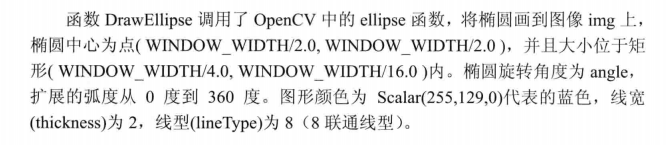
 void DrawEllipse(Mat img, double angle)

 {

     int thickhness = ;

     int lineType = ;

     ellipse(img,

         Point(WINDOW_WIDTH / , WINDOW_WIDTH / ),

         Size(WINDOW_WIDTH / , WINDOW_WIDTH / ),

         angle,

         , ,

         Scalar(, , ),

         thickhness,

         lineType);

 }
 //绘制实心圆

 void DrawFilledCircle(Mat img, Point center)

 {

     int thickness = -;

     int lineType = ;

     circle(img,

         center,

         WINDOW_WIDTH / ,

         Scalar(, , ),

         thickness,

         lineType);

 }

当thickness为其他>0的值时为正常的空心圆
 void DrawPolygon(Mat img)

 {

     int lineType = ;

     Point rookPoints[][];

     rookPoints[][] = Point(WINDOW_WIDTH/,* WINDOW_WIDTH/);

     rookPoints[][] = Point(* WINDOW_WIDTH/,* WINDOW_WIDTH/);

     rookPoints[][] = Point(* WINDOW_WIDTH/,* WINDOW_WIDTH/);

     rookPoints[][] = Point(* WINDOW_WIDTH/,* WINDOW_WIDTH/);

     rookPoints[][] = Point(* WINDOW_WIDTH/,* WINDOW_WIDTH/);

     rookPoints[][] = Point(* WINDOW_WIDTH/,* WINDOW_WIDTH/);

     rookPoints[][] = Point(*WINDOW_WIDTH/, WINDOW_WIDTH/);

     rookPoints[][] = Point(* WINDOW_WIDTH/, WINDOW_WIDTH/);

     rookPoints[][] = Point(* WINDOW_WIDTH/, WINDOW_WIDTH/);

     rookPoints[][] = Point(* WINDOW_WIDTH/, WINDOW_WIDTH/);

     rookPoints[][] = Point(* WINDOW_WIDTH/, WINDOW_WIDTH/);

     rookPoints[][] = Point(* WINDOW_WIDTH/, WINDOW_WIDTH/);

     rookPoints[][] = Point(* WINDOW_WIDTH/, WINDOW_WIDTH/);

     rookPoints[][] = Point(* WINDOW_WIDTH/, WINDOW_WIDTH/);

     rookPoints[][] = Point(* WINDOW_WIDTH/, WINDOW_WIDTH/);

     rookPoints[][] = Point(WINDOW_WIDTH/, WINDOW_WIDTH/);

     rookPoints[][] = Point(WINDOW_WIDTH/,* WINDOW_WIDTH/);

     rookPoints[][] = Point(* WINDOW_WIDTH/,* WINDOW_WIDTH/);

     rookPoints[][] = Point(* WINDOW_WIDTH/,* WINDOW_WIDTH/);

     rookPoints[][] = Point(WINDOW_WIDTH/,* WINDOW_WIDTH/);

     const Point* ppt[] = { rookPoints[] };

     int npt[] = {  };

     fillPoly(img,

         ppt,

         npt,

         ,//好像只能为1,填其他数程序出错

         Scalar(, , ),

         lineType);

 }
1、cvPolyLine 绘制简单或多样的多边形。
void cvPolyLine( CvArr* img, CvPoint** pts, int* npts, int
contours, int is_closed,
CvScalar color, int thickness=1, int line_type=8, int shift=0
);
img
图像。
pts
折线的顶点指针数组。
npts
折线的定点个数数组。也可以认为是pts指针数组的大小
contours 折线的线段数量。
is_closed 指出多边形是否封闭。如果封闭,函数将起始点和结束点连线。
color
折线的颜色。
thickness 线条的粗细程度。
line_type 线段的类型。参见cvLine。
shift
顶点的小数点位数。
2、cvFillPoly用于一个单独被多边形轮廓所限定的区域内进行填充。
函数可以填充复杂的区域,例如,有漏洞的区域和有交叉点的区域等等。
void cvFillPoly( CvArr* img, CvPoint** pts, int* npts, int
contours,CvScalar color, int line_type=8, int shift=0 );
img
图像。
pts
指向多边形的数组指针。
npts
多边形的顶点个数的数组。
contours 组成填充区域的线段的数量。
color
多边形的颜色。
line_type 组成多边形的线条的类型。
shift
顶点坐标的小数点位数
绘制直线
 int thickness = ;

     int lineType = ;

     line(rookImage,//要绘制的图

         Point(, ),//起始点

         Point(WINDOW_WIDTH, WINDOW_WIDTH),//终点

         Scalar(, , ),

         thickness,

         lineType);
绘制矩形
rectangle (image3, rec1,Scalar(, , ), -, , )
rectangle( CvArr* img, CvPoint pt1, CvPoint pt2, CvScalar color,
int thickness=1, int line_type=8, int shift=0 );
- img
- 图像.
- pt1
- 矩形的一个顶点。
- pt2
- 矩形对角线上的另一个顶点
- color
- 线条颜色 (RGB) 或亮度(灰度图像 )(grayscale image)。
- thickness
- 组成矩形的线条的粗细程度。取负值时(如 CV_FILLED)函数绘制填充了色彩的矩形。
- line_type
- 线条的类型。见cvLine的描述
- shift
- 坐标点的小数点位数。
OpenCV——基本图形绘制(椭圆、圆、多边形、直线、矩形)的更多相关文章
- IOS用CGContextRef画各种图形(文字、圆、直线、弧线、矩形、扇形、椭圆、三角形、圆角矩形、贝塞尔曲线、图片)
... 首先了解一下CGContextRef: An opaque type that represents a Quartz 2D drawing environment. Graphics Con ...
- (转) IOS用CGContextRef画各种图形(文字、圆、直线、弧线、矩形、扇形、椭圆、三角形、圆角矩形、贝塞尔曲线、图片)
首先了解一下CGContextRef: An opaque type that represents a Quartz 2D drawing environment. Graphics Context ...
- [置顶] IOS用CGContextRef画各种图形(文字、圆、直线、弧线、矩形、扇形、椭圆、三角形、圆角矩形、贝塞尔曲线、图片)
首先了解一下CGContextRef: An opaque type that represents a Quartz 2D drawing environment. Graphics Context ...
- opencv:基本图形绘制
可以使用opencv绘制 直线.圆.方形.椭圆等基本图形. 示例代码: #include <opencv.hpp> using namespace cv; int main() { // ...
- opencv:图形绘制与填充
#include <opencv2/opencv.hpp> #include <iostream> using namespace cv; using namespace st ...
- Android利用canvas画各种图形(点、直线、弧、圆、椭圆、文字、矩形、多边形、曲线、圆角矩形) .
1.首先说一下canvas类: Class Overview The Canvas class holds the "draw" calls. To draw something, ...
- 【opencv系列04】OpenCV4.X图形绘制
一. 基本图形绘制 1. 基本函数与参数 cv2.line(): 线 cv2.circle(): 圆 cv2.rectangle(): 矩形 cv2.ellipse(): 椭圆 cv2.putText ...
- 使用原生JavaScript的Canvas实现拖拽式图形绘制,支持画笔、线条、箭头、三角形、矩形、平行四边形、梯形以及多边形和圆形,不依赖任何库和插件,有演示demo
前言 需要用到图形绘制,没有找到完整的图形绘制实现,所以自己实现了一个 - - 一.实现的功能 1.基于oop思想构建,支持坐标点.线条(由坐标点组成,包含方向).多边形(由多个坐标点组成).圆形(包 ...
- QT 基本图形绘制
QT 基本图形绘制 1.告诉绘制引擎一些东西 QPainter::Antialiasing 在可能的情况下,反锯齿 QPainter::TextAntialiasing 在可能的情况下,文 ...
随机推荐
- call,apply,bind
var student={ name:"马云", say:function(){ console.log(this.name); } } var f=student.say; f. ...
- jdk源码->集合->HashMap
一.hash算法 1.1 hash简介 hash,一般翻译为散列,就是把任意长度的输入,通过散列算法,变换成固定长度的输出,该输出值就是散列值,这种转换是一种压缩映射,也就是散列的空间小于输入的空间, ...
- ESB企业服务总线
ESB是企业服务总线(Enterprise Service Bus)的缩写,是中间件技术与Web Service等技术结合的产物,也是SOA系统中的核心基础设施.ESB就是一个服务的中介,形成服务使用 ...
- 【代码笔记】iOS-performSelectorOnMainThread
代码: RootViewController.h #import <UIKit/UIKit.h> @interface RootViewController : UIViewControl ...
- AngularJS学习之 ngTable 翻页 功能以及利用angular service准备测试数据
1.官网链接 https://github.com/esvit/ng-table#4.0.0 2.安装ngTable后,一定要记得先注册到自己的项目 .module('pttengApp', [ ' ...
- LeetCode题解之Longest Increasing Subsequence
1.题目描述 2.题目分析 使用动态规划,在计算以每个字符结尾的最长子序列. 3.代码 int lengthOfLIS(vector<int>& nums) { ){ ; } ve ...
- LeetCode题解之Contains Duplicate II
1.题目描述 2.题目分析 使用哈希表 和分情况讨论的方法 3.代码 bool containsNearbyDuplicate(vector<int>& nums, int k) ...
- Oracle EBS AP取消核销
--取消核销 created by jenrry 20170425 DECLARE l_result BOOLEAN; l_msg_count NUMBER; l_result_n varchar2( ...
- 购物商城学习--第三讲(tomcat插件启动web工程)
此处提到的tomcat插件即maven工程集成的tomcat插件,可以在添加maven的tomcat插件之后,在本地通过脚本或者命令行方式运行web工程,tomcat插件启动只需要修改一个端口即可,非 ...
- 【转】Redis学习---NoSQL和SQL的区别及使用场景
什么是NoSQL NoSQL,指的是非关系型的数据库.NoSQL有时也称作Not Only SQL的缩写,是对不同于传统的关系型数据库的数据库管理系统的统称,它具有非关系型.分布式.不提供ACID的数 ...