
使用delphi-cross-socket 开发kbmmw smart http service
前几天我说了使用delphi-cross-socket 扩展kbmmw 的跨平台支持,今天我说一下使用
kbmMWCrossScoketHttpServerTransport 在linux 下支持 kbmmw 的samrt HTTP service.
本例子基于以前的 使用delphi 10.2 开发linux 上的Daemon 。
我们首先在dm 里面放置两个控件。
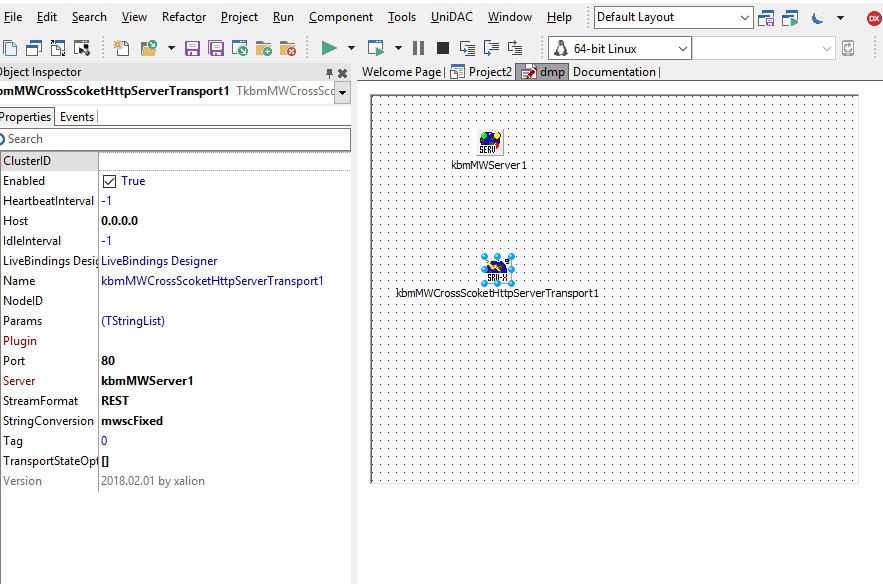
加入我们的smart http service.

连接linux 运行.
在浏览器里面访问。

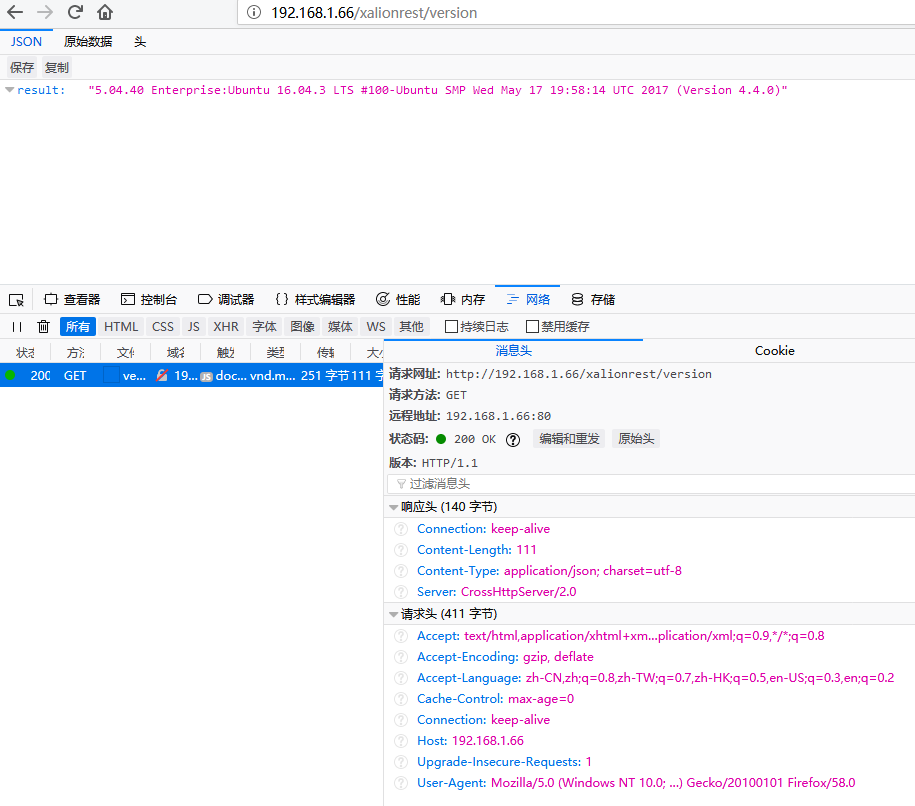
在linux 里面查看进程

大家可以看见这个后台进程。
ok, 跨平台就这么任性。
相关代码
program Project2;

{$APPTYPE CONSOLE}

{$R *.res}

uses

  Posix.Unistd,

  Posix.SysTypes,

  System.SysUtils,

  dmp in 'dmp.pas' {dmf: TDataModule},

  httpservice in 'httpservice.pas' {kbmMWCustomHTTPSmartService1: TkbmMWCustomHTTPSmartService};

procedure daemon;

begin

   dmf:=Tdmf.Create(nil);

   dmf.kbmmwserver1.AutoRegisterServices;

   dmf.kbmMWServer1.Active:=True;

  writeln('service started');

  try

    repeat

      sleep( * );

    until False;

  finally

   dmf.Free;

  end;

end;

var

   pid: pid_t;

begin

  pid := fork;

  if pid =  then

   begin

    writeln('starting service');

    daemon;

   end;

end.
unit httpservice;

// =========================================================================

// kbmMW - An advanced and extendable middleware framework.

// by Components4Developers (http://www.components4developers.com)

//

// Service generated by kbmMW service wizard.

//

// INSTRUCTIONS FOR REGISTRATION/USAGE

// -----------------------------------

// Please update the uses clause of the datamodule/form the TkbmMWServer is placed on by adding services unit name

// to it. Eg.

//

//     uses ...,kbmMWServer,YourServiceUnitName;

//

// Somewhere in your application, make sure to register the serviceclass to the TkbmMWServer instance.

// This can be done by registering the traditional way, or by using auto registration.

//

// Traditional registration

// ------------------------

// var

//    sd:TkbmMWCustomServiceDefinition;

// ..

//    sd:=kbmMWServer1.RegisterService(yourserviceclassname,false);

//

// Set the last parameter to true if this is the default service.

//

//

// Auto registration

// -----------------

// Make sure that your service class is tagged with the [kbmMW_Service] attribute.

// Then auto register all tagged services:

// ..

//    kbmMWServer1.AutoRegisterServices;

//

// -----------------------------------------------

//

// SPECIFIC HTTP SERVICE REGISTRATION INSTRUCTIONS

// -----------------------------------------------

// Cast the returned service definition object (sd) to a TkbmMWHTTPServiceDefinition. eg:

//

// var

//    httpsd:TkbmMWHTTPServiceDefinition;

// ..

//    httpsd:=TkbmMWHTTPServiceDefinition(sd)

//    httpsd.RootPath[mwhfcHTML]:='/';

//    httpsd.RootPath[mwhfcImage]:='/images';

//    httpsd.RootPath[mwhfcJavascript]:='/js';

//    httpsd.RootPath[mwhfcStyleSheet]:='.';

//    httpsd.RootPath[mwhfcOther]:='.';

// -----------------------------------------------

{$I kbmMW.inc}

interface

uses

  SysUtils,

{$ifdef LEVEL6}

  Variants,

{$else}

  Forms,

{$endif}

  Classes,

  kbmMWSecurity,

  kbmMWServer,

  kbmMWServiceUtils,

  kbmMWGlobal,

  kbmMWCustomHTTPSmartService ,kbmMWHTTPUtils,

  kbmMWSmartServiceUtils,

  kbmMWRTTI;

type

  [kbmMW_Service('name:xalionrest, flags:[listed]')]

  [kbmMW_Rest('path:/xalionrest')]

  // Access to the service can be limited using the [kbmMW_Auth..] attribute.

  // [kbmMW_Auth('role:[SomeRole,SomeOtherRole], grant:true')]

  //[kbmMW_HTTP('accept:[get], root:[media:"webfiles", html:"webfiles"]')]

  TkbmMWCustomHTTPSmartService1 = class(TkbmMWCustomHTTPSmartService)

  private

     { Private declarations }

  protected

     { Protected declarations }

  public

     { Public declarations }

     // HelloWorld function callable from both a regular client,

     // due to the optional [kbmMW_Method] attribute,

     // and from a REST client due to the optional [kbmMW_Rest] attribute.

     // The access path to the function from a REST client (like a browser)+

     // is in this case relative to the services path.

     // In this example: http://.../xalionhttp/helloworld

     // Access to the function can be limited using the [kbmMW_Auth..] attribute.

     // [kbmMW_Auth('role:[SomeRole,SomeOtherRole], grant:true')]

     [kbmMW_Rest('method:get, path:helloworld')]

     [kbmMW_Method]

     function HelloWorld:string;

     [kbmMW_Rest('method:get, path:version')]

     [kbmMW_Method]

     function version:string;

     [kbmMW_Method('EchoString')]       // 回应输入的串

     [kbmMW_Rest('method:get, path: ["echostring/{AString}","myechostring/{AString}" ]')]

     [kbmMW_Auth('role:[SomeRole,SomeOtherRole], grant:true')]

     function EchoString([kbmMW_Rest('value: "{AString}"')] const AString:string):string;

     [kbmMW_Method]

     [kbmMW_Rest('method:get, path: "cal/addnumbers"')]

     function AddNumbers([kbmMW_Rest('value: "$arg1", required: true')] const AValue1:integer;

                         [kbmMW_Rest('value: "$arg2", required: true')] const AValue2:integer;

                         [kbmMW_Arg(mwatRemoteLocation)] const ARemoteLocation:string):string;

     [kbmMW_Rest('method:post, path:postdata')]

     [kbmMW_Method]

     function postdata:string;

  end;

implementation

{%CLASSGROUP 'System.Classes.TPersistent'}

uses kbmMWExceptions;

{$R *.dfm}

// Service definitions.

//---------------------

function TkbmMWCustomHTTPSmartService1.version: string;

begin

      Result:='{"result":"'+self.Server.Version+':'+TOSversion.ToString  +'"}';

end;

function TkbmMWCustomHTTPSmartService1.AddNumbers(const AValue1,

  AValue2: integer; const ARemoteLocation: string):string;

begin

      Result:='{"result":"'+(AValue1+AValue2).ToString+'"}';;

end;

function TkbmMWCustomHTTPSmartService1.EchoString(

  const AString: string): string;

begin

     result:='{"result":"你好!'+astring+'"}';;

end;

function TkbmMWCustomHTTPSmartService1.HelloWorld:string;

begin

     Result:='{"result":"Hello world"}';

end;
使用delphi-cross-socket 开发kbmmw smart http service的更多相关文章
- Delphi跨平台Socket通讯库
盒子中的souledge大侠发布了新的Socket库,以下为原文: 我之前写过一个iocp的框架,放到googlecode上了. 由于当时的delphi版本尚无法跨平台,所以该框架只能运行在Windo ...
- Delphi revelations #1 – kbmMW Smart client on NextGen (Android) – Scope problems
Delphi 启示 #1 – kbmMW Smart client on NextGen (Android) – 作用域问题 以更高级的方式使用kbmMW smart client,在Android设 ...
- delphi 实现微信开发(1) (使用kbmmw web server)
原文地址:delphi 实现微信开发(1)作者:红鱼儿 大体思路: 1.用户向服务号发消息,(这里可以是个菜单项,也可以是一个关键词,如:注册会员.) 2.kbmmw web server收到消息,生 ...
- cross socket tcp客户端开发
cross socket tcp客户端开发 uses Net.SocketAPI, Net.CrossSocket.Base, Net.CrossSocket FCrossTcp: ICrossSoc ...
- Delphi各种Socket组件的模式和模型
Delphi各种Socket组件的模式和模型 Delphi的大多数书籍里面都没有提到delphi的各种socket通信组件的模式和模型,有的书只讲解了windows的socket模式和模型,并没有归纳 ...
- Delphi 跨平台 Socket 通讯库
Delphi 跨平台 Socket 通讯库 免费开源的Delphi 跨平台 Socket 通讯库. 源码URL:https://github.com/winddriver/Delphi-Cross-S ...
- 主窗体里面打开子窗体&&打印饼图《Delphi 6数据库开发典型实例》--图表的绘制
\Delphi 6数据库开发典型实例\图表的绘制 1.在主窗体里面打开子窗体:ShowForm(Tfrm_Print); procedure Tfrm_Main.ShowForm(AFormClass ...
- IOS socket开发基础
摘要 详细介绍了iOS的socket开发,说明了tcp和udp的区别,简单说明了tcp的三次握手四次挥手,用c语言分别实现了TCPsocket和UDPsocket的客户端和服务端,本文的作用是让我们了 ...
- Delphi的Socket编程步骤(repulish)
转贴自:http://topic.csdn.net/t/20010727/16/212155.html ClientSocket 和ServerSocket几个重要的属性: 1.client和se ...
随机推荐
- typedef void (*Fun) (void) 的理解——函数指针——typedef函数指针
首先介绍大家比较熟悉的typedef int i;//定义一个整型变量i typedef myInt int: myInt j;//定义一个整型变量j 上面介绍得是我们常用的比较简单的typedef的 ...
- TOJ 3850: String Function Encoding
传送门:http://acm.tzc.edu.cn/acmhome/problemdetail.do?&method=showdetail&id=3850 时间限制(普通/Java): ...
- vue的双向数据绑定实现原理
在目前的前端面试中,vue的双向数据绑定已经成为了一个非常容易考到的点,即使不能当场写出来,至少也要能说出原理.本篇文章中我将会仿照vue写一个双向数据绑定的实例,名字就叫myVue吧.结合注释,希望 ...
- swift - xcode - pod升级版本和降级版本
1. 查看当前版本 pod --version 2.如果安装过pod,更新命令 新版 sudo gem install -n /usr/local/bin cocoapods --pre 旧版 sud ...
- [leetcode]311. Sparse Matrix Multiplication 稀疏矩阵相乘
Given two sparse matrices A and B, return the result of AB. You may assume that A's column number is ...
- golang 创建一个简单的连接池,减少频繁的创建与关闭
一.连接池的描述图片如下: 二.连接池代码如下: package main; import ( "time" "sync" "errors" ...
- Http方式下载文件
代码: using System; using System.Collections.Generic; using System.IO; using System.Linq; using System ...
- c语言使用指针交换数值
练习题:将两个int类型数值交换 #include <stdio.h> void swap(int*,int*); int main(void){ , hex = 0x5f1043; sw ...
- python is 和 == 和=
Python中有很多运算符,今天我们就来讲讲is和==两种运算符在应用上的本质区别是什么. 在讲is和==这两种运算符区别之前,首先要知道Python中对象包含的三个基本要素,分别是:id(身份标识) ...
- u-boot之make all执行过程分析
在执行make 100ask24x0_config之后就配置完成了针对JZ2440开发板的UBOOT,接下来需要执行make all进行编译链接最终生成u-boot.map.u-boot.srec.u ...