
jupyter安装,修改登录密码,启动
jupyter安装,修改登录密码,启动
1.安装jupyter:
pip install jupyter
pip install jupyter notebook
2.生成jupyter的配置文件
jupyter notebook --generate-config
3.修改jupyter的配置文件
vim ~/.jupyter/jupyter_notebook_config.py将293行 #c.NotebookApp.token = '<generated>'修改为c.NotebookApp.token = 'password',则密码就改为password
4。启动jupyter
如果以root身份启动需要加入--allow-root
jupyter notebook --ip=127.0.0.1 --port 8000 --allow-root

其他方式修改如下:
对于一个jupyter编辑器使用的新手,更换浏览器或者Logout后,需要输入密码进行登陆时
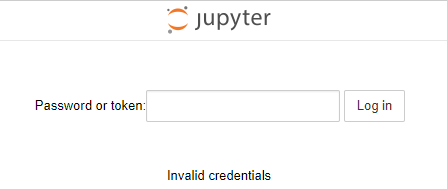
按照网上的教程怎么设置都不行,那么自己整理了一个适用于初学者的操作。
1.windows下,打开命令行,重新生成一个jupyter配置文件:
|
1
|
jupyter notebook --generate-config |
2.修个配置文件,找到这个新生成的文件:Windows: C:\Users\USERNAME\.jupyter\jupyter_notebook_config.py
搜索 NotebookApp.allow_password_change,改为:NotebookApp.allow_password_change=False ,记得去掉注释的#
3.回到windows命令行,运行jupyter notebook password
C:\Windows\System32>jupyter notebook password

Enter password:             #键入密码,不显示的

Verify password:            #再次重复键入密码

[NotebookPasswordApp] Wrote hashed password to C:\Users\用户\.jupyter\jupyter_notebook_config.json     #密码生成的一串sha1,写入到了这个文件,等下要把这串sha1,复制到第一个生成的配置文件中
4.还差一步密码才可以生效使用,在第一个jupyter_notebook_config.py配置文件中找到“c.NotebookApp.password“,等于,刚生成的那个密码sha1,效果如下:去掉前面的”#“
c.NotebookApp.password = u'sha1:xxxxxxxxxxxxxxxxxxxxxxxxxxxxxxxxxx'
5.保险起见,把jupyter重启,之后,无论是更换浏览器还是Logout登陆,新密码都可以正常使用了。
≡≡≡≡≡≡≡≡≡≡≡≡≡≡≡≡≡≡≡≡≡≡≡≡≡≡≡≡≡≡≡≡≡≡≡≡≡≡≡≡≡≡≡≡≡≡≡≡≡≡≡≡≡≡≡≡≡≡≡≡≡≡≡≡≡≡≡≡≡≡≡≡≡≡≡
第3步也可以换成:ipython执行

C:\Windows\System32>ipython

Python 3.6.4 |Anaconda, Inc.| (default, Jan 16 2018, 10:22:32) [MSC v.1900 64 bit (AMD64)]

Type 'copyright', 'credits' or 'license' for more information

IPython 6.2.1 -- An enhanced Interactive Python. Type '?' for help.

In [1]: from notebook.auth import passwd

In [2]: passwd()

Enter password:

Verify password:

Out[2]: 'sha1:xxxxxxxxxxxxxxxxxxxxxxxxxxxxxxxxxxxxxxx'
jupyter安装,修改登录密码,启动的更多相关文章
- MySQL 数据库修改登录密码
MySQL 数据库修改登录密码.. -------- mysql修改密码 默认的密码为空:mysql -u root -p第一次更改密码:mysqladmin -uroot -p password x ...
- mysql登录1045错误时 修改登录密码
1.进入 mysql 的 bin 目录下,打开 cmd ,关闭 mysql 数据库. 2.输入 mysqld --skip-grant-tables 回车. 保持窗口不要更改不要关闭 (--skip- ...
- mysql修改登录密码三种方式
一.用SET PASSWORD命令 首先登录MySQL,使用mysql自带的那个客户端连接上mysql. 格式:mysql> set password for 用户名@localhost = ...
- Ubuntu修改登录密码
Ubuntu 修改用户名或密码后无法登陆 解决方法 2017年09月01日 16:48:05 lee_3312 阅读数:2192 解决方法:进入recovery-mode修改登录信息 1)重启系统 ...
- mysql用户修改登录密码及开启远程登录
一.修改用户登录密码: mysql> show databases;ERROR 1820 (HY000): You must SET PASSWORD before executing this ...
- 可视化工具连接mysql报1862【mysql修改登录密码】
1862是密码被修改了. 修改方法: 1.以root登录账户: 账户与密码都是root mysql -uroot -proot 2.修改密码 set password = password('1234 ...
- mysql用户修改登录密码及授予用户远程登录权限
一.修改用户登录密码: mysql> show databases;ERROR 1820 (HY000): You must SET PASSWORD before executing this ...
- MySQL5.7修改登录密码的几种方式
1.更新mysql.user表 use mysql UPDATE user SET authentication_string = password('新密码') where user = 'root ...
- mysql mac 安装修改初始密码
step1:苹果->系统偏好设置->最下边点mysql 在弹出页面中 关闭mysql服务(点击stop mysql server) step2:进入终端输入:cd /usr/local/m ...
随机推荐
- Libre 6008 「网络流 24 题」餐巾计划 (网络流,最小费用最大流)
Libre 6008 「网络流 24 题」餐巾计划 (网络流,最小费用最大流) Description 一个餐厅在相继的N天里,第i天需要Ri块餐巾(i=l,2,-,N).餐厅可以从三种途径获得餐巾. ...
- 未处理的异常 stack overflow
今天在编译程序时遇到“0x00e304f7 处有未经处理的异常: 0xC00000FD: Stack overflow”的错误,也就是栈溢出了,google了一下,原来是我申请的一个变量太大了,con ...
- C#处理MySql多个返回集的方法
本文实例讲述了C#处理MySql多个返回集的方法.分享给大家供大家参考.具体方法如下: 关于Mysql返回多个集java和Php的较多,但是C#的完整代码好像没见过,研究了一下做个封装以后用 做一个M ...
- Spring cloud 微服务架构 Eureka篇
1 服务发现 ## 关于服务发现 在微服务架构中,服务发现(Service Discovery)是关键原则之一.手动配置每个客户端或某种形式的约定是很难做的,并且很脆弱.Spring Cloud提供了 ...
- 第一节 Spring的环境搭建
正在构建,扫一扫,敬请期待 和玩得来的人在一起玩才叫玩! 和玩不来的人在一起玩,那种感觉就像加班啊! 关注胖个人微信公众账号,希望对各位学生有所帮助! --胖先生 Spring框架,什么是Sprin ...
- 使用Arraylist将数组中元素随机均等乱序分为N个子数组
使用Arraylist将数组中元素随机均等乱序分为N个子数组 觉得有用的话,欢迎一起讨论相互学习~Follow Me 为了将数组中的元素 随机地 ,均等地, 不重复地 ,划分到N个子数组中 使用Arr ...
- python---django中序列化
def get_data(req): ret = {'status':True,'data':None} try: user_list = models.User.objects.all() ret[ ...
- python学习笔记5--json处理
import json #json串就是字符串. d = { 'car':{'color':'red','price':100,'count':50}, 'bus':{'color':'red','p ...
- HDU 3787 A+B 模拟题
解题报告:就是输入两个用逗号隔开的数字,求出这两个数字的和,并且用正常的方式输出来.直接写一个函数将一个包含逗号的数字转换成十进制的数返回就行了.这里推荐一个函数atoi(),参数是char*型的,然 ...
- [HNOI2013]比赛 (用Hash实现记忆化搜索)
[HNOI2013]比赛 题目描述 沫沫非常喜欢看足球赛,但因为沉迷于射箭游戏,错过了最近的一次足球联赛.此次联 赛共N支球队参加,比赛规则如下: (1) 每两支球队之间踢一场比赛. (2) 若平局, ...