
android开发学习——day7
线性布局
<?xml version="1.0" encoding="utf-8"?>

<LinearLayout xmlns:android="http://schemas.android.com/apk/res/android"

    xmlns:tools="http://schemas.android.com/tools"

    android:orientation="horizontal"

    android:id="@+id/activity_main"

    android:layout_width="match_parent"

    android:layout_height="match_parent"

    android:paddingBottom="@dimen/activity_vertical_margin"

    android:paddingLeft="@dimen/activity_horizontal_margin"

    android:paddingRight="@dimen/activity_horizontal_margin"

    android:paddingTop="@dimen/activity_vertical_margin"

    tools:context="test.example.com.uilayouttest.MainActivity">

    <Button

        android:id="@+id/button_1"

        android:layout_width="wrap_content"

        android:layout_height="wrap_content"

        android:layout_gravity="top"

        android:text="Button 1"/>

    <Button

        android:id="@+id/button_2"

        android:layout_width="wrap_content"

        android:layout_height="wrap_content"

        android:layout_gravity="center_vertical"

        android:text="Button 2"/>

    <Button

        android:id="@+id/button_3"

        android:layout_width="wrap_content"

        android:layout_height="wrap_content"

        android:layout_gravity="bottom"

        android:text="Button 3"/>

</LinearLayout>

相对布局
<?xml version="1.0" encoding="utf-8"?>

<RelativeLayout xmlns:android="http://schemas.android.com/apk/res/android"

xmlns:tools="http://schemas.android.com/tools"

android:orientation="horizontal"

android:id="@+id/activity_main"

android:layout_width="match_parent"

android:layout_height="match_parent"

android:paddingBottom="@dimen/activity_vertical_margin"

android:paddingLeft="@dimen/activity_horizontal_margin"

android:paddingRight="@dimen/activity_horizontal_margin"

android:paddingTop="@dimen/activity_vertical_margin"

tools:context="test.example.com.uilayouttest.MainActivity">

    <Button

    android:id="@+id/button1"

    android:layout_width="wrap_content"

    android:layout_height="wrap_content"

        android:layout_alignParentBottom="true"

        android:layout_alignParentRight="true"

    android:text="send"/>

    <Button

        android:id="@+id/button2"

        android:layout_width="wrap_content"

        android:layout_height="wrap_content"

        android:layout_above="@+id/button1"

        android:layout_toLeftOf="@+id/button1"

        android:text="button"/>

</RelativeLayout>

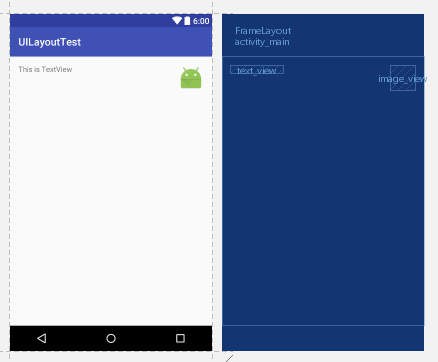
帧布局
<?xml version="1.0" encoding="utf-8"?>

<FrameLayout xmlns:android="http://schemas.android.com/apk/res/android"

xmlns:tools="http://schemas.android.com/tools"

android:id="@+id/activity_main"

android:layout_width="match_parent"

android:layout_height="match_parent"

android:paddingBottom="@dimen/activity_vertical_margin"

android:paddingLeft="@dimen/activity_horizontal_margin"

android:paddingRight="@dimen/activity_horizontal_margin"

android:paddingTop="@dimen/activity_vertical_margin"

tools:context="test.example.com.uilayouttest.MainActivity">

    <TextView

        android:id="@+id/text_view"

        android:layout_width="wrap_content"

        android:layout_height="wrap_content"

        android:layout_gravity="left"

        android:text="This is TextView"

        />

    <ImageView

        android:id="@+id/image_view"

        android:layout_width="wrap_content"

        android:layout_height="wrap_content"

        android:layout_gravity="right"

        android:src="@mipmap/ic_launcher"/>

</FrameLayout>
android开发学习——day7的更多相关文章
- Android开发学习之路-RecyclerView滑动删除和拖动排序
Android开发学习之路-RecyclerView使用初探 Android开发学习之路-RecyclerView的Item自定义动画及DefaultItemAnimator源码分析 Android开 ...
- Android开发学习路线图
Android开发学习方法: Android是一个比较庞大的体系,从底层的Linux内核到上层的应用层,各部分的内容跨度也比较大.因此,一个好的学习方法对我们学习Android开发很重要. 在此建议, ...
- android开发学习笔记000
使用书籍:<疯狂android讲义>——李刚著,2011年7月出版 虽然现在已2014,可我挑来跳去,还是以这本书开始我的android之旅吧. “疯狂源自梦想,技术成就辉煌.” 让我这个 ...
- Android开发学习总结(一)——搭建最新版本的Android开发环境
Android开发学习总结(一)——搭建最新版本的Android开发环境(转) 最近由于工作中要负责开发一款Android的App,之前都是做JavaWeb的开发,Android开发虽然有所了解,但是 ...
- Android开发学习之LauncherActivity开发启动的列表
Android开发学习之LauncherActivity开发启动的列表 创建项目:OtherActivity 项目运行结果: 建立主Activity:OtherActivity.java [jav ...
- 最实用的Android开发学习路线分享
Android开发学习路线分享.Android发展主导移动互联发展进程,在热门行业来说,Android开发堪称火爆,但是,虽然Android有着自身种种优势,但对开发者的专业性要求也是极高,这种要求随 ...
- Android开发学习必备的java知识
Android开发学习必备的java知识本讲内容:对象.标识符.关键字.变量.常量.字面值.基本数据类型.整数.浮点数.布尔型.字符型.赋值.注释 Java作为一门语言,必然有他的语法规则.学习编程语 ...
- Android开发学习之路--基于vitamio的视频播放器(二)
终于把该忙的事情都忙得差不多了,接下来又可以开始good good study,day day up了.在Android开发学习之路–基于vitamio的视频播放器(一)中,主要讲了播放器的界面的 ...
- Android开发学习之路--Android Studio cmake编译ffmpeg
最新的android studio2.2引入了cmake可以很好地实现ndk的编写.这里使用最新的方式,对于以前的android下的ndk编译什么的可以参考之前的文章:Android开发学习之路– ...
随机推荐
- 学习fortran77基础语法
Program ParamaterDefine Implicit None C FORTRAN变量名和关键字不区分大小写.但调用外部函数的话,需要在编译选项里指定 c 大小写等选项 因为链接器是区分大 ...
- SpringBoot初探
一:项目创建 个人用的是IDEA来做Demo的: 1.先创建一个空项目,然后创建一个基于Maven的java application项目: 2.创建好后配置pom.xml文件并最终reimport & ...
- php输出语句
看不懂? 抄一遍代码吧. echo 和 print 在 PHP 中有两个基本的输出方式: echo 和 print echo 和 print 区别: echo - 可以输出一个或多个字符串 print ...
- javascript 根据 两点 经纬度 测出距离
<!DOCTYPE html> <html> <head> <meta http-equiv="Content-Type" content ...
- Day1-python基础
python是一门动态解释性的强类型定义语言 python 3.0 ALL IS UNICODE NOW 认识python,了解python的发展史. 1.变量 变量命名规则:变量名只能是字母.数字 ...
- Sql Server用户名和登录名的关系总结
以前经常被SQL Server中的用户名和登录名搞迷糊,因为用sa(登录名)就搞定一切东西了,当然这会存在一些安全隐患.网上的文章也貌似讲得很好,但还是不明白.今天决心把这个问题弄明白.mashall ...
- C#系列之{流和序列化}
不论何种类型的文件都可以表示为一个字节数组.(Byte[]) 一.文件复制 (示例) 首先建立一个类似管道的东西将文件和内存中的程序连接,并将文件按字节发送.为了保存接收到的文件字节,需要创建一个字节 ...
- 1.4isAlive()方法
方法isAlive()的功能是判断当前线程是否处于活动状态 活动状态是线程已经启动且尚未终止,线程处于正在运行或准备开始运行的状态,就认为线程是存活的. 测试如下 package com.cky.th ...
- [leet code 198]House Robber
1 题目 You are a professional robber planning to rob houses along a street. Each house has a certain a ...
- WordPress建站指南(1)
写在前面: 3月份用10天零碎时间火速完成了建站,后台95%的工作都交给了WP(WordPress).如果想偷懒的话,WP是一个绝好的选择,估计有个小半天就建完收工了. 想有片自己的小花园,可是不会P ...