
ASP.NET Core 1.0 中 EntityFramework 与 PostgreSQL 的使用
https://docs.efproject.net/en/latest/providers/npgsql/index.html
前面在CentOS6.7环境下配置好了PostgreSQL, 就顺便试了一下 ASP.NET Core 1.0 环境下EF与PostgreSQL的使用,就是.NET Core 还不支持CentOS,要么就可以部署一下试试。
依赖包
"dependencies": {

    "Microsoft.AspNet.Diagnostics": "1.0.0-rc1-final",

    "Microsoft.AspNet.IISPlatformHandler": "1.0.0-rc1-final",

    "Microsoft.AspNet.Mvc": "6.0.0-rc1-final",

    "Microsoft.AspNet.Mvc.TagHelpers": "6.0.0-rc1-final",

    "Microsoft.AspNet.Server.Kestrel": "1.0.0-rc1-final",

    "Microsoft.AspNet.StaticFiles": "1.0.0-rc1-final",

    "Microsoft.AspNet.Tooling.Razor": "1.0.0-rc1-final",

    "Microsoft.Extensions.Configuration.FileProviderExtensions": "1.0.0-rc1-final",

    "Microsoft.Extensions.Configuration.Json": "1.0.0-rc1-final",

    "Microsoft.Extensions.Logging": "1.0.0-rc1-final",

    "Microsoft.Extensions.Logging.Console": "1.0.0-rc1-final",

    "Microsoft.Extensions.Logging.Debug": "1.0.0-rc1-final",

    "Microsoft.VisualStudio.Web.BrowserLink.Loader": "14.0.0-rc1-final",

    "EntityFramework.Commands": "7.0.0-rc1-final",

    "EntityFramework7.Npgsql": "3.1.0-rc1-3",

    "EntityFramework7.Npgsql.Design": "3.1.0-rc1-5"

  },

  "commands": {

    "web": "Microsoft.AspNet.Server.Kestrel",

    "ef": "EntityFramework.Commands"

  },
CODE FISRT
public class StockHqDbContext : DbContext

    {

        public DbSet<Blog> Blogs { get; set; }

        public DbSet<Post> Posts { get; set; }

        protected override void OnModelCreating(ModelBuilder modelBuilder)

        {

            // Make Blog.Url required

            modelBuilder.Entity<Blog>()

                        .Property(b => b.Url)

                        .IsRequired();

        }

    }

    public class Blog

    {

        public int BlogId { get; set; }

        public string Url { get; set; }

        public List<Post> Posts { get; set; }

    }

   public class Post

    {

        public int PostId { get; set; }

        public string Title { get; set; }

        public string Content { get; set; }

        public int BlogId { get; set; }

        public Blog Blog { get; set; }

    }
注册PostgreSqlProvider
public void ConfigureServices(IServiceCollection services)

        {

            var connection = Configuration["PostgreSqlProvider:ConnectionString"];

            services.AddEntityFramework()

                    .AddNpgsql()

                    .AddDbContext<StockHqDbContext>(options => options.UseNpgsql(connection));

            // Add framework services.

            services.AddMvc();

        }
配置文件
{

  "Logging": {

    "IncludeScopes": false,

    "LogLevel": {

      "Default": "Verbose",

      "System": "Information",

      "Microsoft": "Information"

    }

  },

  "PostgreSqlProvider": {

    "ConnectionString": "User ID=postgres;Password=xxxxx;Host=xxx.xxx.xxx.xxx;Port=5432;Database=stockhq;Pooling=true;"

  }

}
执行命令
dnvm use 1.0.0-rc1-final(dnvm install 1.0.0-rc1-final)

dnx ef migrations add FirstMigration

dnx ef database update
构造页面
public class BlogsController : Controller

    {

        private StockHqDbContext _context;

        public BlogsController(StockHqDbContext context)

        {

            _context = context;

        }

        public IActionResult Index()

        {

            return View(_context.Blogs.ToList());

        }

        public IActionResult Create()

        {

            return View();

        }

        [HttpPost]

        [ValidateAntiForgeryToken]

        public IActionResult Create(Blog blog)

        {

            if (ModelState.IsValid)

            {

                _context.Blogs.Add(blog);

                _context.SaveChanges();

                return RedirectToAction("Index");

            }

            return View(blog);

        }

    }
视图
@model IEnumerable<StockHq.Models.Blog>

@{

    ViewBag.Title = "Blogs";

}

<h2>Blogs</h2>

<p>

    <a asp-controller="Blogs" asp-action="Create">Create New</a>

</p>

<table class="table">

    <tr>

        <th>Id</th>

        <th>Url</th>

    </tr>

    @foreach (var item in Model)

    {

        <tr>

            <td>

                @Html.DisplayFor(modelItem => item.BlogId)

            </td>

            <td>

                @Html.DisplayFor(modelItem => item.Url)

            </td>

        </tr>

    }

</table>

@model StockHq.Models.Blog

@{

    ViewBag.Title = "New Blog";

}

<h2>@ViewData["Title"]</h2>

<form asp-controller="Blogs" asp-action="Create" method="post" class="form-horizontal" role="form">

    <div class="form-horizontal">

        <div asp-validation-summary="ValidationSummary.All" class="text-danger"></div>

        <div class="form-group">

            <label asp-for="Url" class="col-md-2 control-label"></label>

            <div class="col-md-10">

                <input asp-for="Url" class="form-control" />

                <span asp-validation-for="Url" class="text-danger"></span>

            </div>

        </div>

        <div class="form-group">

            <div class="col-md-offset-2 col-md-10">

                <input type="submit" value="Create" class="btn btn-default" />

            </div>

        </div>

    </div>

</form>
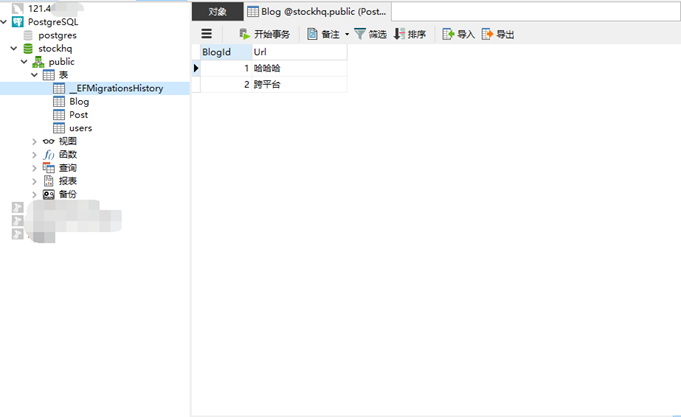
访问:http://localhost:49648/Blogs/Create 增加数据,完事,睡觉。
REFER:
http://dotnet.github.io/getting-startedhttps://github.com/aspnet/EntityFramework
https://github.com/npgsql/npgsql
.NET跨平台:在Linux上基于ASP.NET 5用EF7生成数据库
http://www.cnblogs.com/dudu/p/4621933.html十分钟轻松让你认识Entity Framework 7
http://www.cnblogs.com/n-pei/p/4274907.html
ASP.NET Core 1.0 中 EntityFramework 与 PostgreSQL 的使用的更多相关文章
- ASP.NET Core 1.0 中的依赖项管理
var appInsights=window.appInsights||function(config){ function r(config){t[config]=function(){var i= ...
- 在ASP.NET Core 1.0中如何发送邮件
(此文章同时发表在本人微信公众号"dotNET每日精华文章",欢迎右边二维码来关注.) 题记:目前.NET Core 1.0中并没有提供SMTP相关的类库,那么要如何从ASP.NE ...
- ASP.NET Core 1.0 中使用 Swagger 生成文档
github:https://github.com/domaindrivendev/Ahoy 之前文章有介绍在ASP.NET WebAPI 中使用Swagger生成文档,ASP.NET Core 1. ...
- 用ASP.NET Core 1.0中实现邮件发送功能
准备将一些项目迁移到 asp.net core 先从封装类库入手,在遇到邮件发送类时发现在 asp.net core 1.0中并示提供SMTP相关类库,于是网上一搜发现了MailKit 好东西一定要试 ...
- 在ASP.NET Core 2.0中使用CookieAuthentication
在ASP.NET Core中关于Security有两个容易混淆的概念一个是Authentication(认证),一个是Authorization(授权).而前者是确定用户是谁的过程,后者是围绕着他们允 ...
- 如何在ASP.NET Core 2.0中使用Razor页面
如何在ASP.NET Core 2.0中使用Razor页面 DotNetCore2017-11-22 14:49 问题 如何在ASP.NET Core 2.0中使用Razor页面 解 创建一个空的项 ...
- ASP.NET Core 3.0中使用动态控制器路由
原文:Dynamic controller routing in ASP.NET Core 3.0 作者:Filip W 译文:https://www.cnblogs.com/lwqlun/p/114 ...
- asp.net core 3.0 中使用 swagger
asp.net core 3.0 中使用 swagger Intro 上次更新了 asp.net core 3.0 简单的记录了一下 swagger 的使用,那个项目的 api 比较简单,都是匿名接口 ...
- 探索 ASP.Net Core 3.0系列三:ASP.Net Core 3.0中的Service provider validation
前言:在本文中,我将描述ASP.NET Core 3.0中新的“validate on build”功能. 这可以用来检测您的DI service provider是否配置错误. 具体而言,该功能可检 ...
随机推荐
- idea intellij对Spring进行单元测试
1.加入Junit4及SpringJUnit4支持 <!-- junit --> <dependency> <groupId>junit</groupId&g ...
- 微信小程序踩坑集合
1:官方工具:https://mp.weixin.qq.com/debug/w ... tml?t=1476434678461 2:简易教程:https://mp.weixin.qq.com/debu ...
- js实现百度搜索框滑动固定顶部
现在很多主流系统例如百度.有道.爱奇艺等的搜索框都有一个特点,滑动到刚好看不到搜索框时,固定搜索框到顶部,这也算是一个对用户友好型的操 作. 在看了百度的js和css后自己摸索出来实现效果,还是学艺不 ...
- picker
滚动选择器,现支持三种选择器,通过mode来区分,分别是普通选择器,时间选择器,日期选择器,默认是普通选择器. 普通选择器:mode = selector 属性名 类型 默认值 说明 range Ar ...
- leetcode - [7]Binary Tree Preorder Traversal
Given a binary tree, return the preorder traversal of its nodes' values. For example:Given binary tr ...
- 待了解概念_GraphicsView
Linux 的 KDE 是建立在 Graphics view基础上的. 新版本KDE 有向QML前移的趋势. Graphics View 使用了BSP 树的结构. Graphics View 是一个基 ...
- web-day10
第10章WEB10-requet&response篇 今日任务 登录系统后完成文件下载 商城系统注册功能. 教学导航 教学目标 掌握response设置响应头 掌握response重定向和转发 ...
- codeforces 891 b
B. Gluttony time limit per test 2 seconds memory limit per test 256 megabytes input standard input o ...
- node-lessons
教程:https://github.com/alsotang/node-lessons 0 nvm 的全称是 Node Version Manager,之所以需要这个工具,是因为 Node.js 的各 ...
- C++ const方法及对象
一.整体代码 01.cpp #include <iostream> using namespace std; class Test { public: Test(int x) : x_(x ...