
ngx_lua_API 指令详解(五)coroutine.create,coroutine.resume,coroutine.yield 等集合指令介绍
ngx_lua 模块(原理实现)
1、每个worker(工作进程)创建一个Lua VM,worker内所有协程共享VM;
2、将Nginx I/O原语封装后注入 Lua VM,允许Lua代码直接访问;
3、每个外部请求都由一个Lua协程处理,协程之间数据隔离;
4、Lua代码调用I/O操作等异步接口时,会挂起当前协程(并保护上下文数据),而不阻塞worker;
5、I/O等异步操作完成时还原相关协程上下文数据,并继续运行;
lua-nginx-module中,在Log,Header_filter,Body_filter几个阶段直接调用lua_pcall执行Lua脚本,
而在Access,Rewrite,Content等阶段Lua脚本的执行是在ngx_http_lua_run_thread函数中调用lua_resume实现的。再根据lua_resume的返回值进行处理。
一、命令列表
1、coroutine.create - 创建协程
2、coroutine.resume - 执行协程
3、coroutine.yield - 中断协程运行
4、以 coroutine.wrap 的方式创建协程
5、coroutine.running - 返回正在运行中的协程
6、coroutine.status - 查看协程状态
7、resume-yield 交互
二、命令详解
1、coroutine.create - 创建协程
语法: co = coroutine.create(f)
上下文: rewrite_by_lua *,access_by_lua *,content_by_lua *,init_by_lua *,ngx.timer。*,header_filter_by_lua *,body_filter_by_lua *,ssl_certificate_by_lua *,ssl_session_fetch_by_lua *,ssl_session_store_by_lua *
描述:函数 coroutine.create 用于创建一个新的协程,它只有一个以函数形式传入的参数,该函数是协程的主函数,它的代码是协程所需执行的内容
co = coroutine.create(function()

    io.write("coroutine create!\n")

end)

print(co)
当创建完一个协程后,会返回一个类型为 thread 的对象,但并不会马上启动运行协程主函数,协程的初始状态是处于挂起状态,如图所示:

lua-nginx-module中的coroutine API和原生Lua中类似,和ngx.thread不同,coroutine.create创建的协程需要手动去运行,所以resume和yield都需要在ngx_http_lua_run_thread中进行协程的切换。
2、coroutine.resume - 执行协程
语法: ok,... = coroutine.resume(co,...)
上下文: rewrite_by_lua *,access_by_lua *,content_by_lua *,init_by_lua *,ngx.timer。*,header_filter_by_lua *,body_filter_by_lua *,ssl_certificate_by_lua *,ssl_session_fetch_by_lua *,ssl_session_store_by_lua *
描述:协程有 4 种状态,分别是:挂起(suspended)、运行(running)、死亡(dead)和正常(normal),可以通过 coroutine.status 来输出查看协程当前的状态。

以上可以看出,新创建的初始状态是处于挂起(suspended)状态
3、coroutine.yield - 中断协程运行
语法: ... = coroutine.yield(...)
上下文: rewrite_by_lua *,access_by_lua *,content_by_lua *,init_by_lua *,ngx.timer。*,header_filter_by_lua *,body_filter_by_lua *,ssl_certificate_by_lua *,ssl_session_fetch_by_lua *,ssl_session_store_by_lua *
描述:coroutine.yield 函数可以让一个运行中的协程中断挂起,运行以下代码:
co = coroutine.create(function()

    for i = ,  do

        print("before coroutine yield", i)

        -- 协程中断挂起

        coroutine.yield()

        print("after coroutine yield", i)

    end

end)

-- run an coroutine

coroutine.resume(co)
RUN 结果

coroutine.resume(co) 上面第一个 resume 唤醒执行协程主函数代码,直到第一个 yield。第二个 resume 激活被挂起的协程,并从上一次协程被中断 yield 的位置继续执行协程主函数代码,直到再次遇到 yield 或程序结束。
resume 执行完协程主函数或者中途被挂起(yield)时,会有返回值返回,第一个值是 true,表示执行没有错误。如果是被 yield 挂起暂停,yield 函数有参数传入的话,这些参数会接着第一个值后面一并返回:
co = coroutine.create(function(a, b, c)

    coroutine.yield(a, b, c)

end)

print(coroutine.resume(co, , , ))
RUN结果

》》ngx_lua 导致协程yield的API主要分以下几种
(1)、ngx.exit,
(2)、ngx.exec
(3)、ngx.redirect
这三种情况都不需要协程继续运行了,退出执行相应的处理,更多了解:ngx_lua的协程调度(五)之ngx_http_lua_run_thread
4、以 coroutine.wrap 的方式创建协程。
语法: co = coroutine.wrap(f)
上下文: rewrite_by_lua *,access_by_lua *,content_by_lua *,init_by_lua *,ngx.timer。*,header_filter_by_lua *,body_filter_by_lua *,ssl_certificate_by_lua *,ssl_session_fetch_by_lua *,ssl_session_store_by_lua *
描述:跟 coroutine.create 一样,函数 coroutine.wrap 也是创建一个协程,但是它并不返回一个类型为 thread 的对象,而是返回一个函数。每当调用这个返回函数,都会执行协程主函数运行。所有传入这个函数的参数等同于传入 coroutine.resume 的参数。 coroutine.wrap 会返回所有应该由除第一个(错误代码的那个布尔量) 之外的由 coroutine.resume 返回的值。 和 coroutine.resume 不同之处在于, coroutine.wrap 不会返回错误代码,无法检测出运行时的错误,也无法检查 wrap 所创建的协程的状态。
function wrap(param)

    print("Before yield", param)

    obtain = coroutine.yield()

    print("After yield", obtain)

    return

end

resumer = coroutine.wrap(wrap)

print(resumer())

print(resumer())
RUN结果

5、coroutine.running - 返回正在运行中的协程。
语法: co = coroutine.running()
上下文: rewrite_by_lua *,access_by_lua *,content_by_lua *,init_by_lua *,ngx.timer。*,header_filter_by_lua *,body_filter_by_lua *,ssl_certificate_by_lua *,ssl_session_fetch_by_lua *,ssl_session_store_by_lua *
描述:函数 coroutine.running 用于返回正在运行中的协程,如果没有协程运行,则返回 nil
print(coroutine.running()) -- nil

co = coroutine.create(function()

    print(coroutine.running())         -- thread

    print(coroutine.running() == co)   -- true

end)

coroutine.resume(co)

print(coroutine.running())   -- nil
RUN结果

6、coroutine.status - 查看协程状。
语法: status = coroutine.status(co)
上下文: rewrite_by_lua *,access_by_lua *,content_by_lua *,init_by_lua *,ngx.timer。*,header_filter_by_lua *,body_filter_by_lua *,ssl_certificate_by_lua *,ssl_session_fetch_by_lua *,ssl_session_store_by_lua *
描述:可以通过 coroutine.status 来输出查看协程当前的状态。
function greet()

    print "hello world"

end

co = coroutine.create(greet) -- 创建 coroutine

print(coroutine.status(co))  -- 输出 suspended

print(coroutine.resume(co))  -- 输出 hello world

                             -- 输出 true (resume 的返回值)

print(coroutine.status(co))  -- 输出 dead

print(coroutine.resume(co))  -- 输出 false    cannot resume dead coroutine (resume 的返回值)

print(type(co))              -- 输出 thread
RUN结果

协程在创建时,需要把协程体函数传递给创建函数 create。新创建的协程处于 suspended 状态,可以使用 resume 让其运行,全部执行完成后协程处于 dead 状态。如果尝试 resume 一个 dead 状态的,则可以从 resume 返回值上看出执行失败。另外你还可以注意到 Lua 中协程(coroutine)的变量类型其实叫做「thread」Orz...
7、resume-yield 交互
描述:下面代码放在一个 lua 文件里运行,随便输入一些字符后按回车,则会返回输出刚才输入的内容:
function receive(prod)

    local status, value = coroutine.resume(prod)

    return value

end

function send(x)

    coroutine.yield(x)

end

function producer()

    return coroutine.create(function()

        while true do

            local x = io.read()

            send(x)

        end

    end)

end

function filter(prod)

    return coroutine.create(function()

--      for line = , math.huge do

        for line = ,  do

            local x = receive(prod)

            x = string.format("%5d Enter is %s", line, x)

            send(x)

        end

    end)

end

function consumer(prod)

--  repeat

--      local x = receive(prod)

--      print(type(x))

--      if x then

--          io.write(x, "\n")

--      end

--  until x == nil

    while true do

        local obtain = receive(prod)

        if obtain then

            io.write(obtain, "\n\n")

        else

            break

        end

    end

end

p = producer()

f = filter(p)

consumer(f)
RUN结果:
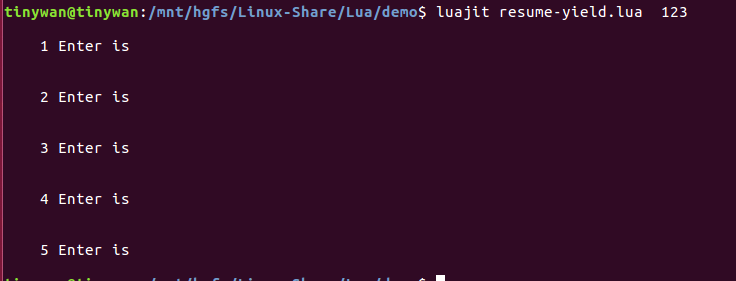
参照文献:https://github.com/ffmpeg-live/luaprimer/edit/master/05.md
ngx_lua_API 指令详解(五)coroutine.create,coroutine.resume,coroutine.yield 等集合指令介绍的更多相关文章
- [转]JVM指令详解(上)
作者:禅楼望月(http://www.cnblogs.com/yaoyinglong) 本文主要记录一些JVM指令,便于记忆与查阅. 一.未归类系列A 此系列暂未归类. 指令码 助记符 ...
- rsync指令详解
rsync指令详解(更详细的看官方文档http://rsync.samba.org/ftp/rsync/rsync.html) [root@Centos epel]# rsync --help rsy ...
- 迈向angularjs2系列(2):angular2指令详解
一:angular2 helloworld! 为了简单快速的运行一个ng2的app,那么通过script引入预先编译好的angular2版本和页面的基本框架. index.html: <!DOC ...
- nginx.conf中关于nginx-rtmp-module配置指令详解
译序:截至 Jul 8th,2013 官方公布的最新 Nginx RTMP 模块 nginx-rtmp-module 指令详解.指令Corertmp语法:rtmp { ... }上下文:根描述:保存所 ...
- Nginx RTMP 模块 nginx-rtmp-module 指令详解
译序:截至 Jul 8th,2013 官方公布的最新 Nginx RTMP 模块 nginx-rtmp-module 指令详解.指令Corertmp语法:rtmp { ... }上下文:根描述:保存所 ...
- nginx-rtmp-module 指令详解
译序:截至 Jul 8th,2013 官方公布的最新 Nginx RTMP 模块 nginx-rtmp-module 指令详解. Core rtmp 语法:rtmp { ... } 上下文:根 描述: ...
- C#中的预处理器指令详解
这篇文章主要介绍了C#中的预处理器指令详解,本文讲解了#define 和 #undef.#if.#elif.#else和#endif.#warning和#error.#region和#endregio ...
- .NET DLL 保护措施详解(五)常规条件下的破解
为了证实在常规手段破解下能有效保护程序核心功能(演示版本对AES加解密算法及数据库的密钥(一段字符串)进行了保护),特对此DLL保护思路进行相应的测试,包含了反编译及反射测试,看是否能得到AES加解密 ...
- 转:Windows下的PHP开发环境搭建——PHP线程安全与非线程安全、Apache版本选择,及详解五种运行模式。
原文来自于:http://www.ituring.com.cn/article/128439 Windows下的PHP开发环境搭建——PHP线程安全与非线程安全.Apache版本选择,及详解五种运行模 ...
随机推荐
- WinForm 随手记
从今天开始咱们正式进入WinForm开发模式 首先很官方的介绍下什么是winform:客户端应用程序:C/S 这就是winform 有什么特别特别重要的特点呢:可以操作用户电脑上的文件 举个简单的例子 ...
- 【Android UI设计与开发】第04期:引导界面(四)仿人人网V5.9.2最新版引导界面
这一篇我将会以人人网的引导界面为实例来展开详细的讲解,人人网的引导界面比较的新颖,不同于其他应用程序千篇一律的靠滑动来引导用户,而是以一个一个比较生动形象的动画效果展示在用户们的面前,有一种给人眼前一 ...
- Asp.Net_Mvc3.5语法_<%%>的用法
一. <%%>这种格式实际上就是和asp的用法一样的,只是asp中里面是vbscript或 者javascript代码,而在asp.net中用的是.net平台下支持的语言.特别 注意:服务 ...
- ANSYS渡槽槽身动水压力的施加(1)——矩形渡槽
前言 依据水工抗震规范中关于渡槽动水压力的部分编一个用于ANSYS渡槽模型动水压力施加的命令流,是我研究生时一直想要做的一件事,原因嘛主要是想对比一下规范提供的方法和ANSYS声学流体单元模拟水体这两 ...
- Unity3d-通过简单示例来理解Time.deltaTime
转载文章: Unity3d-通过简单示例来理解Time.deltaTime 2018年04月21日 18:04:14 Black_Window 阅读数:926 标签: UnityTime 更多 个人分 ...
- 金蝶盘点机PDA仓库条码管理家电类序列号扫描操作方法-采购入库单
1.1. 采购入库单 传统的进销存管理软件需要人工识别商品品种,清点商品数量,然后再去人工手工在电脑上一行行的录入采购入库单.录单效率低,误差大. 如果使用汉码盘点机PDA,入库时,仓管员只需要手持 ...
- spring boot 2.0 源码分析(五)
在上一篇文章中我们详细分析了spring boot是如何准备上下文环境的,今天我们来看一下run函数剩余的内容.还是先把run函数贴出来: /** * Run the Spring applicati ...
- Linux内核分析——第一周学习笔记
20135313吴子怡.北京电子科技学院 chapter 1 知识点梳理 第一节 存储程序计算机工作模型 1.冯诺依曼体系结构:即具有存储程序的计算机体系结构.目前大多数拥有计算和存储功能的设备(智能 ...
- 20135337朱荟潼 Linux第七周学习总结——可执行程序的装载
朱荟潼 + 原创作品转载请注明出处 + <Linux内核分析>MOOC课程http://mooc.study.163.com/course/USTC-1000029000 第七周 Linu ...
- php 有意思的小题
/** * 你的是一个数字和一个字符串进行比较,PHP会把字符串转换成数字再进行比较.* PHP转换的规则的是:若字符串以数字开头,则取开头数字作为转换结果,若无则输出0.***/1)$a =”abc ...