
Hadoop生态圈-Azkaban实现文件上传到hdfs并执行MR数据清洗
Hadoop生态圈-Azkaban实现文件上传到hdfs并执行MR数据清洗
作者:尹正杰
版权声明:原创作品,谢绝转载!否则将追究法律责任。
如果你没有Hadoop集群的话也没有关系,我这里给出当时我部署Hadoop集群的笔记:https://www.cnblogs.com/yinzhengjie/p/9154265.html。当然想要了解更多还是请参考官网的部署方案,我部署的环境只是测试开发环境。
一.启动Hadoop集群
1>.启动脚本信息
[yinzhengjie@s101 ~]$ more /usr/local/bin/xzk.sh

#!/bin/bash

#@author :yinzhengjie

#blog:http://www.cnblogs.com/yinzhengjie

#EMAIL:y1053419035@qq.com

#判断用户是否传参

if [ $# -ne  ];then

    echo "无效参数,用法为: $0  {start|stop|restart|status}"

    exit

fi

#获取用户输入的命令

cmd=$

#定义函数功能

function zookeeperManger(){

    case $cmd in

    start)

        echo "启动服务"

        remoteExecution start

        ;;

    stop)

        echo "停止服务"

        remoteExecution stop

        ;;

    restart)

        echo "重启服务"

        remoteExecution restart

        ;;

    status)

        echo "查看状态"

        remoteExecution status

        ;;

    *)

        echo "无效参数,用法为: $0  {start|stop|restart|status}"

        ;;

    esac

}

#定义执行的命令

function remoteExecution(){

    for (( i= ; i<= ; i++ )) ; do

            tput setaf

            echo ========== s$i zkServer.sh  $ ================

            tput setaf

            ssh s$i  "source /etc/profile ; zkServer.sh $1"

    done

}

#调用函数

zookeeperManger

[yinzhengjie@s101 ~]$
zookeeper启动脚本([yinzhengjie@s101 ~]$ more /usr/local/bin/xzk.sh )
[yinzhengjie@s101 ~]$ more /usr/local/bin/xcall.sh

#!/bin/bash

#@author :yinzhengjie

#blog:http://www.cnblogs.com/yinzhengjie

#EMAIL:y1053419035@qq.com

#判断用户是否传参

if [ $# -lt  ];then

        echo "请输入参数"

        exit

fi

#获取用户输入的命令

cmd=$@

for (( i=;i<=;i++ ))

do

        #使终端变绿色

        tput setaf

        echo ============= s$i $cmd ============

        #使终端变回原来的颜色,即白灰色

        tput setaf

        #远程执行命令

        ssh s$i $cmd

        #判断命令是否执行成功

        if [ $? ==  ];then

                echo "命令执行成功"

        fi

done

[yinzhengjie@s101 ~]$
批量执行命令的脚本([yinzhengjie@s101 ~]$ more /usr/local/bin/xcall.sh)
[yinzhengjie@s101 ~]$ more /soft/hadoop/sbin/start-dfs.sh

#!/usr/bin/env bash

# Licensed to the Apache Software Foundation (ASF) under one or more

# contributor license agreements.  See the NOTICE file distributed with

# this work for additional information regarding copyright ownership.

# The ASF licenses this file to You under the Apache License, Version 2.0

# (the "License"); you may not use this file except in compliance with

# the License.  You may obtain a copy of the License at

#

#     http://www.apache.org/licenses/LICENSE-2.0

#

# Unless required by applicable law or agreed to in writing, software

# distributed under the License is distributed on an "AS IS" BASIS,

# WITHOUT WARRANTIES OR CONDITIONS OF ANY KIND, either express or implied.

# See the License for the specific language governing permissions and

# limitations under the License.

# Start hadoop dfs daemons.

# Optinally upgrade or rollback dfs state.

# Run this on master node.

usage="Usage: start-dfs.sh [-upgrade|-rollback] [other options such as -clusterId]"

bin=`dirname "${BASH_SOURCE-$0}"`

bin=`cd "$bin"; pwd`

DEFAULT_LIBEXEC_DIR="$bin"/../libexec

HADOOP_LIBEXEC_DIR=${HADOOP_LIBEXEC_DIR:-$DEFAULT_LIBEXEC_DIR}

. $HADOOP_LIBEXEC_DIR/hdfs-config.sh

# get arguments

if [[ $# -ge  ]]; then

  startOpt="$1"

  shift

  case "$startOpt" in

    -upgrade)

      nameStartOpt="$startOpt"

    ;;

    -rollback)

      dataStartOpt="$startOpt"

    ;;

    *)

      echo $usage

      exit

    ;;

  esac

fi

#Add other possible options

nameStartOpt="$nameStartOpt $@"

#---------------------------------------------------------

# namenodes

NAMENODES=$($HADOOP_PREFIX/bin/hdfs getconf -namenodes)

echo "Starting namenodes on [$NAMENODES]"

"$HADOOP_PREFIX/sbin/hadoop-daemons.sh" \

  --config "$HADOOP_CONF_DIR" \

  --hostnames "$NAMENODES" \

  --script "$bin/hdfs" start namenode $nameStartOpt

#---------------------------------------------------------

# datanodes (using default slaves file)

if [ -n "$HADOOP_SECURE_DN_USER" ]; then

  echo \

    "Attempting to start secure cluster, skipping datanodes. " \

    "Run start-secure-dns.sh as root to complete startup."

else

  "$HADOOP_PREFIX/sbin/hadoop-daemons.sh" \

    --config "$HADOOP_CONF_DIR" \

    --script "$bin/hdfs" start datanode $dataStartOpt

fi

#---------------------------------------------------------

# secondary namenodes (if any)

SECONDARY_NAMENODES=$($HADOOP_PREFIX/bin/hdfs getconf -secondarynamenodes >/dev/null)

if [ -n "$SECONDARY_NAMENODES" ]; then

  echo "Starting secondary namenodes [$SECONDARY_NAMENODES]"

  "$HADOOP_PREFIX/sbin/hadoop-daemons.sh" \

      --config "$HADOOP_CONF_DIR" \

      --hostnames "$SECONDARY_NAMENODES" \

      --script "$bin/hdfs" start secondarynamenode

fi

#---------------------------------------------------------

# quorumjournal nodes (if any)

SHARED_EDITS_DIR=$($HADOOP_PREFIX/bin/hdfs getconf -confKey dfs.namenode.shared.edits.dir >&-)

case "$SHARED_EDITS_DIR" in

qjournal://*)

  JOURNAL_NODES=$(echo "$SHARED_EDITS_DIR" | sed 's,qjournal://\([^/]*\)/.*,\1,g; s/;/ /g; s/:[0-9]*//g')

  echo "Starting journal nodes [$JOURNAL_NODES]"

  "$HADOOP_PREFIX/sbin/hadoop-daemons.sh" \

      --config "$HADOOP_CONF_DIR" \

      --hostnames "$JOURNAL_NODES" \

      --script "$bin/hdfs" start journalnode ;;

esac

#---------------------------------------------------------

# ZK Failover controllers, if auto-HA is enabled

AUTOHA_ENABLED=$($HADOOP_PREFIX/bin/hdfs getconf -confKey dfs.ha.automatic-failover.enabled)

if [ "$(echo "$AUTOHA_ENABLED" | tr A-Z a-z)" = "true" ]; then

  echo "Starting ZK Failover Controllers on NN hosts [$NAMENODES]"

  "$HADOOP_PREFIX/sbin/hadoop-daemons.sh" \

    --config "$HADOOP_CONF_DIR" \

    --hostnames "$NAMENODES" \

    --script "$bin/hdfs" start zkfc

fi

# eof

[yinzhengjie@s101 ~]$
HDFS启动脚本([yinzhengjie@s101 ~]$ more /soft/hadoop/sbin/start-dfs.sh)
[yinzhengjie@s101 ~]$ more /soft/hadoop/sbin/start-yarn.sh

#!/usr/bin/env bash

# Licensed to the Apache Software Foundation (ASF) under one or more

# contributor license agreements.  See the NOTICE file distributed with

# this work for additional information regarding copyright ownership.

# The ASF licenses this file to You under the Apache License, Version 2.0

# (the "License"); you may not use this file except in compliance with

# the License.  You may obtain a copy of the License at

#

#     http://www.apache.org/licenses/LICENSE-2.0

#

# Unless required by applicable law or agreed to in writing, software

# distributed under the License is distributed on an "AS IS" BASIS,

# WITHOUT WARRANTIES OR CONDITIONS OF ANY KIND, either express or implied.

# See the License for the specific language governing permissions and

# limitations under the License.

# Start all yarn daemons.  Run this on master node.

echo "starting yarn daemons"

bin=`dirname "${BASH_SOURCE-$0}"`

bin=`cd "$bin"; pwd`

DEFAULT_LIBEXEC_DIR="$bin"/../libexec

HADOOP_LIBEXEC_DIR=${HADOOP_LIBEXEC_DIR:-$DEFAULT_LIBEXEC_DIR}

. $HADOOP_LIBEXEC_DIR/yarn-config.sh

# start resourceManager

#"$bin"/yarn-daemon.sh --config $YARN_CONF_DIR  start resourcemanager

"$bin"/yarn-daemons.sh --config $YARN_CONF_DIR --hosts masters start resourcemanager

# start nodeManager

"$bin"/yarn-daemons.sh --config $YARN_CONF_DIR  start nodemanager

# start proxyserver

#"$bin"/yarn-daemon.sh --config $YARN_CONF_DIR  start proxyserver

[yinzhengjie@s101 ~]$
资源调度器Yarn启动脚本([yinzhengjie@s101 ~]$ more /soft/hadoop/sbin/start-yarn.sh )
2>.启动zookeeper集群
[yinzhengjie@s101 ~]$ xzk.sh start

启动服务

========== s102 zkServer.sh start ================

ZooKeeper JMX enabled by default

Using config: /soft/zk/bin/../conf/zoo.cfg

Starting zookeeper ... STARTED

========== s103 zkServer.sh start ================

ZooKeeper JMX enabled by default

Using config: /soft/zk/bin/../conf/zoo.cfg

Starting zookeeper ... STARTED

========== s104 zkServer.sh start ================

ZooKeeper JMX enabled by default

Using config: /soft/zk/bin/../conf/zoo.cfg

Starting zookeeper ... STARTED

[yinzhengjie@s101 ~]$

[yinzhengjie@s101 ~]$

[yinzhengjie@s101 ~]$ xcall.sh jps

============= s101 jps ============

 AzkabanWebServer

 AzkabanExecutorServer

 Jps

命令执行成功

============= s102 jps ============

 Jps

 QuorumPeerMain

命令执行成功

============= s103 jps ============

 Jps

 QuorumPeerMain

命令执行成功

============= s104 jps ============

 Jps

 QuorumPeerMain

命令执行成功

============= s105 jps ============

 Jps

命令执行成功

[yinzhengjie@s101 ~]$
3>.启动HDFS分布式文件系统
[yinzhengjie@s101 ~]$ start-dfs.sh

SLF4J: Class path contains multiple SLF4J bindings.

SLF4J: Found binding in [jar:file:/soft/hadoop-2.7./share/hadoop/common/lib/slf4j-log4j12-1.7..jar!/org/slf4j/impl/StaticLoggerBinder.class]

SLF4J: Found binding in [jar:file:/soft/apache-hive-2.1.-bin/lib/log4j-slf4j-impl-2.4..jar!/org/slf4j/impl/StaticLoggerBinder.class]

SLF4J: See http://www.slf4j.org/codes.html#multiple_bindings for an explanation.

SLF4J: Actual binding is of type [org.slf4j.impl.Log4jLoggerFactory]

Starting namenodes on [s101 s105]

s101: starting namenode, logging to /soft/hadoop-2.7./logs/hadoop-yinzhengjie-namenode-s101.out

s105: starting namenode, logging to /soft/hadoop-2.7./logs/hadoop-yinzhengjie-namenode-s105.out

s105: starting datanode, logging to /soft/hadoop-2.7./logs/hadoop-yinzhengjie-datanode-s105.out

s103: starting datanode, logging to /soft/hadoop-2.7./logs/hadoop-yinzhengjie-datanode-s103.out

s104: starting datanode, logging to /soft/hadoop-2.7./logs/hadoop-yinzhengjie-datanode-s104.out

s102: starting datanode, logging to /soft/hadoop-2.7./logs/hadoop-yinzhengjie-datanode-s102.out

Starting journal nodes [s102 s103 s104]

s103: starting journalnode, logging to /soft/hadoop-2.7./logs/hadoop-yinzhengjie-journalnode-s103.out

s102: starting journalnode, logging to /soft/hadoop-2.7./logs/hadoop-yinzhengjie-journalnode-s102.out

s104: starting journalnode, logging to /soft/hadoop-2.7./logs/hadoop-yinzhengjie-journalnode-s104.out

SLF4J: Class path contains multiple SLF4J bindings.

SLF4J: Found binding in [jar:file:/soft/hadoop-2.7./share/hadoop/common/lib/slf4j-log4j12-1.7..jar!/org/slf4j/impl/StaticLoggerBinder.class]

SLF4J: Found binding in [jar:file:/soft/apache-hive-2.1.-bin/lib/log4j-slf4j-impl-2.4..jar!/org/slf4j/impl/StaticLoggerBinder.class]

SLF4J: See http://www.slf4j.org/codes.html#multiple_bindings for an explanation.

SLF4J: Actual binding is of type [org.slf4j.impl.Log4jLoggerFactory]

Starting ZK Failover Controllers on NN hosts [s101 s105]

s101: starting zkfc, logging to /soft/hadoop-2.7./logs/hadoop-yinzhengjie-zkfc-s101.out

s105: starting zkfc, logging to /soft/hadoop-2.7./logs/hadoop-yinzhengjie-zkfc-s105.out

[yinzhengjie@s101 ~]$

[yinzhengjie@s101 ~]$

[yinzhengjie@s101 ~]$ xcall.sh jps

============= s101 jps ============

 Jps

 DFSZKFailoverController

 AzkabanWebServer

 AzkabanExecutorServer

 NameNode

命令执行成功

============= s102 jps ============

 JournalNode

 DataNode

 Jps

 QuorumPeerMain

命令执行成功

============= s103 jps ============

 DataNode

 QuorumPeerMain

 JournalNode

 Jps

命令执行成功

============= s104 jps ============

 JournalNode

 DataNode

 Jps

 QuorumPeerMain

命令执行成功

============= s105 jps ============

 DFSZKFailoverController

 DataNode

 NameNode

 Jps

命令执行成功

[yinzhengjie@s101 ~]$
4>.启动YARN资源调度器
[yinzhengjie@s101 ~]$ start-yarn.sh

starting yarn daemons

s101: starting resourcemanager, logging to /soft/hadoop-2.7./logs/yarn-yinzhengjie-resourcemanager-s101.out

s105: starting resourcemanager, logging to /soft/hadoop-2.7./logs/yarn-yinzhengjie-resourcemanager-s105.out

s105: starting nodemanager, logging to /soft/hadoop-2.7./logs/yarn-yinzhengjie-nodemanager-s105.out

s103: starting nodemanager, logging to /soft/hadoop-2.7./logs/yarn-yinzhengjie-nodemanager-s103.out

s104: starting nodemanager, logging to /soft/hadoop-2.7./logs/yarn-yinzhengjie-nodemanager-s104.out

s102: starting nodemanager, logging to /soft/hadoop-2.7./logs/yarn-yinzhengjie-nodemanager-s102.out

[yinzhengjie@s101 ~]$

[yinzhengjie@s101 ~]$ xcall.sh jps

============= s101 jps ============

 DFSZKFailoverController

 AzkabanWebServer

 Jps

 AzkabanExecutorServer

 ResourceManager

 NameNode

命令执行成功

============= s102 jps ============

 JournalNode

 Jps

 DataNode

 NodeManager

 QuorumPeerMain

命令执行成功

============= s103 jps ============

 NodeManager

 Jps

 DataNode

 QuorumPeerMain

 JournalNode

命令执行成功

============= s104 jps ============

 JournalNode

 Jps

 DataNode

 QuorumPeerMain

 NodeManager

命令执行成功

============= s105 jps ============

 DFSZKFailoverController

 Jps

 DataNode

 NameNode

 NodeManager

命令执行成功

[yinzhengjie@s101 ~]$
5>.检查web服务是否可用正常访问
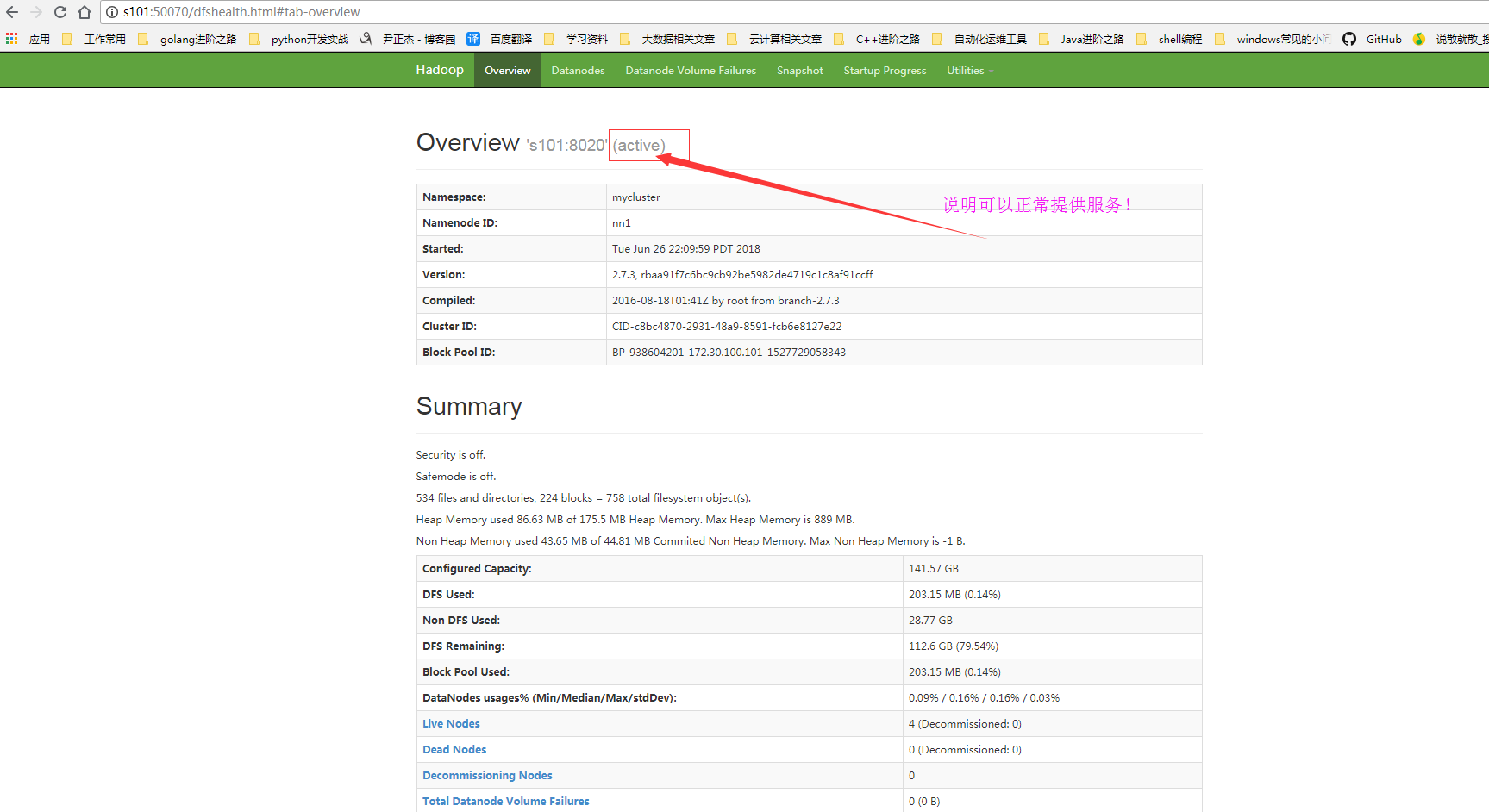
二.文件上传到hdfs
1>.创建job文件并将其压缩
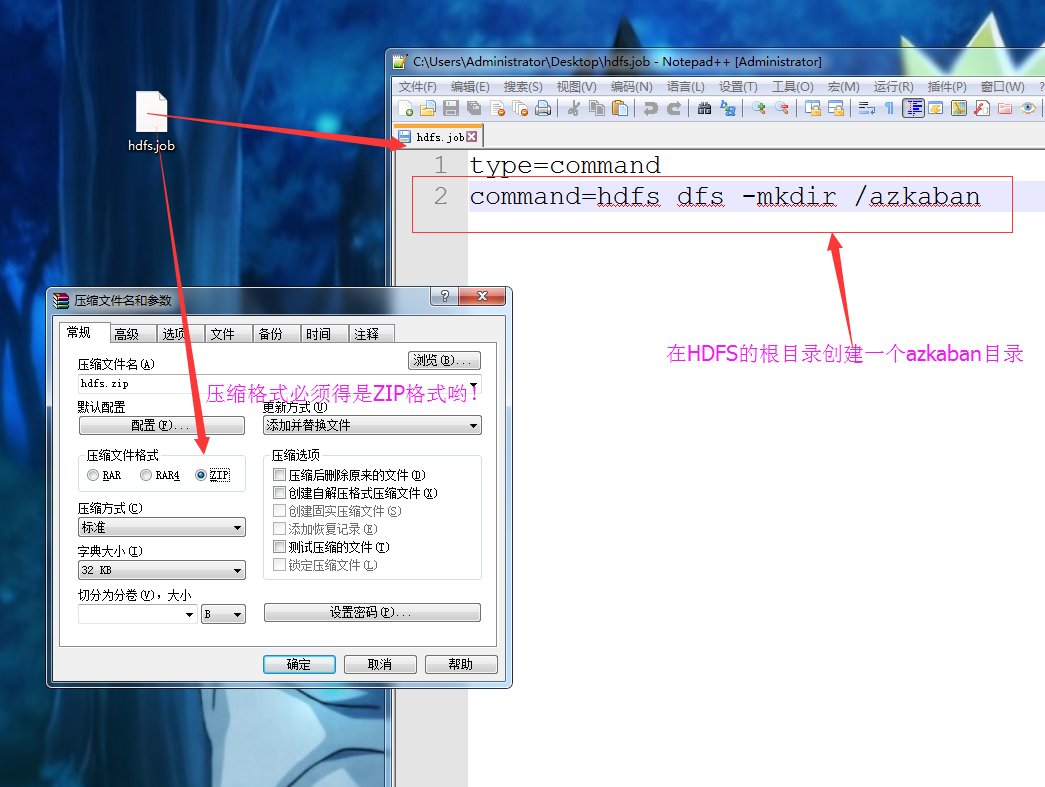
2>.将压缩后的文件上传至Azkaban的WEB服务器上

3>.执行jpb程序
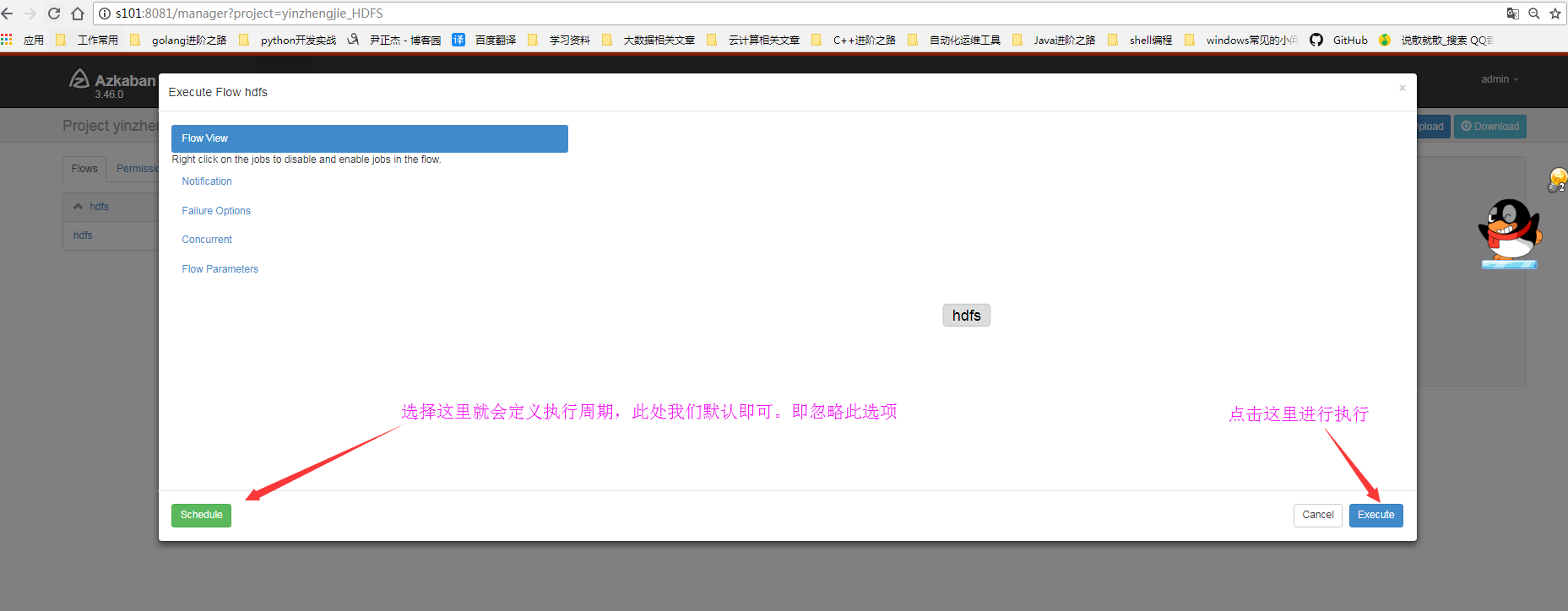
4>.点击继续
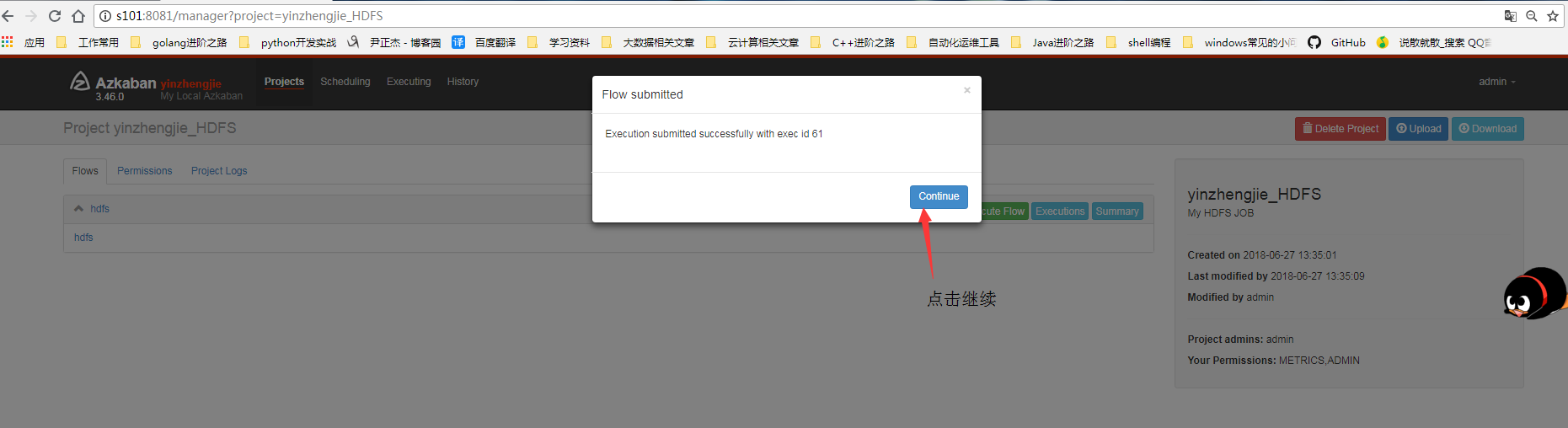
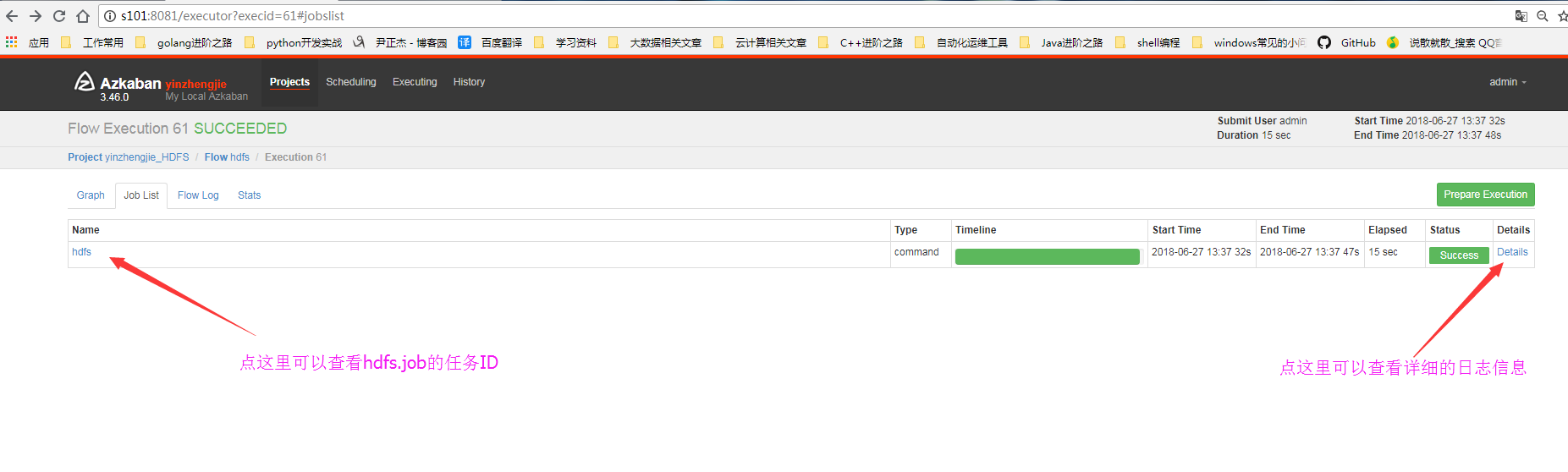
5>.查看细节
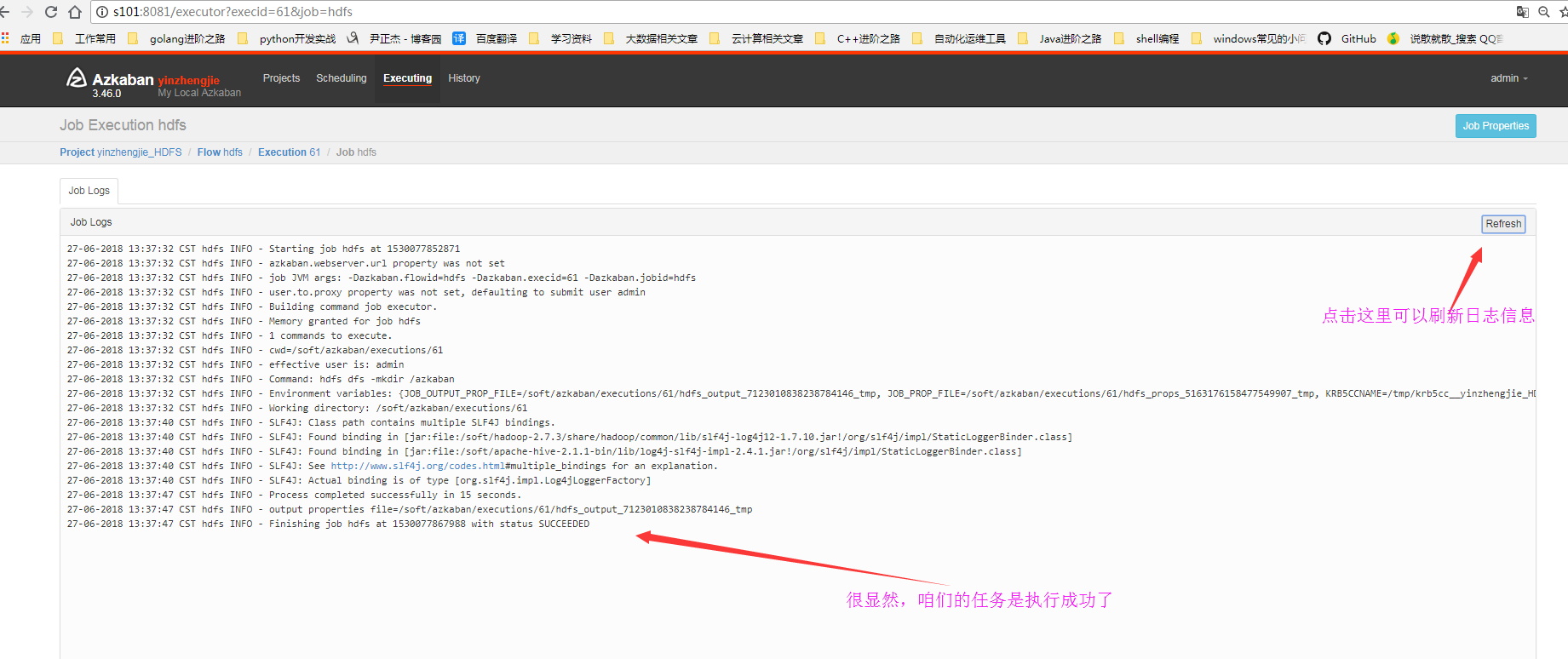
6>.查看日志信息
7>.查看HDFS的webUI是否在根下成功创建azkaban目录

8>.查看执行ID

三.执行MR数据清洗
1>.编辑的配置文件内容
[yinzhengjie@s101 ~]$ more /home/yinzhengjie/yinzhengjie.txt

Security is off.

Safemode is off.

 files and directories,  blocks =  total filesystem object(s).

Heap Memory used 74.06 MB of 261.5 MB Heap Memory. Max Heap Memory is  MB.

Non Heap Memory used 56.54 MB of 57.94 MB Commited Non Heap Memory. Max Non Heap Memory is - B.

[yinzhengjie@s101 ~]$
源文件内容([yinzhengjie@s101 ~]$ more /home/yinzhengjie/yinzhengjie.txt)
#putFileToHdfs Add by yinzhengjie

type=command

command=hdfs dfs -put /home/yinzhengjie/yinzhengjie.txt /azkaban
将需要进行单词统计的数据上传到HDFS中(putFileToHdfs.job)
#mapreduce.job ADD by yinzhengjie

type=command

command=hadoop jar /soft/hadoop/share/hadoop/mapreduce/hadoop-mapreduce-examples-2.7..jar wordcount /azkaban /azkaban_out
执行MapReduce任务对上传的到hdfs的文件进行单词统计(mapreduce.job)
2>.编辑job任务并压缩

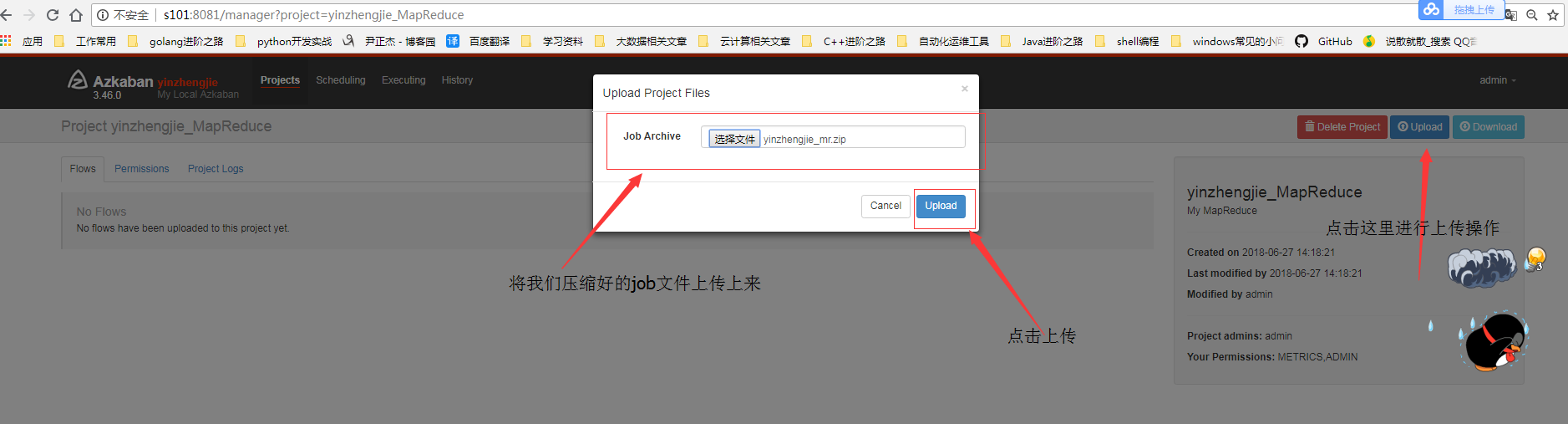
3>.将任务上传到azkaban的WEB界面中
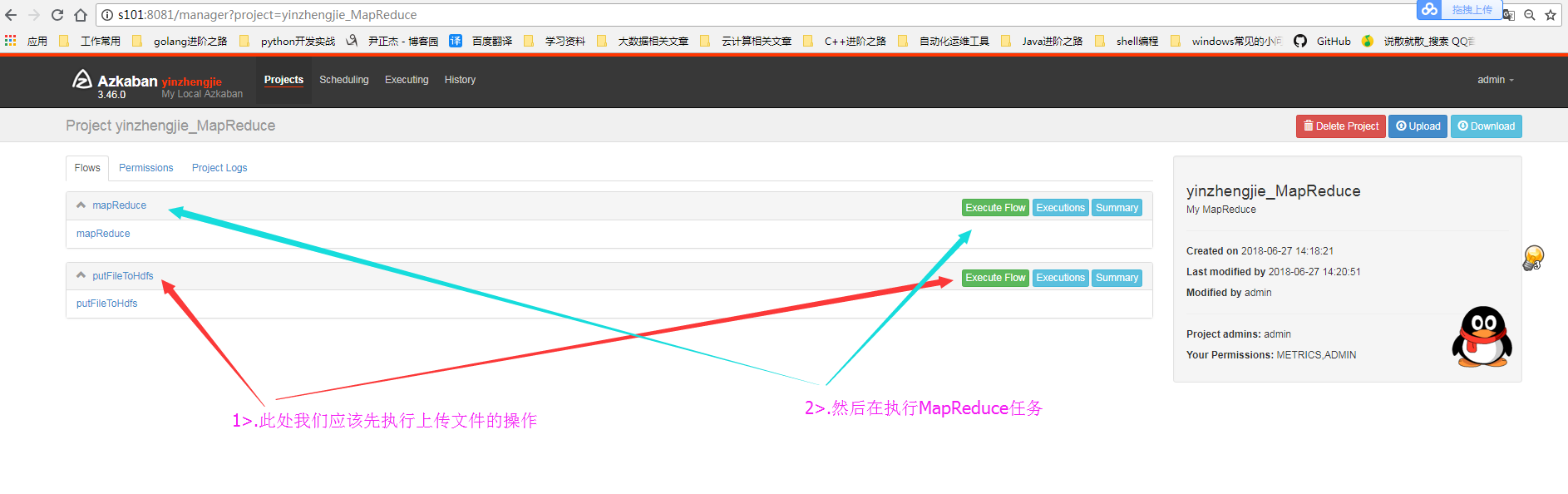
4>.选择执行顺序
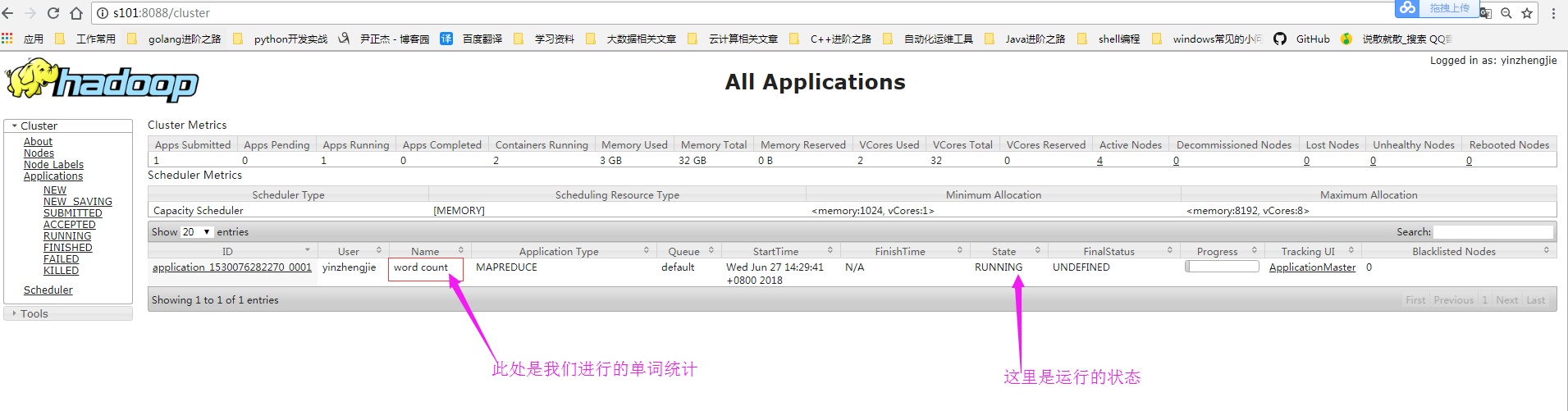
5>.查看MapReduce的运行状态
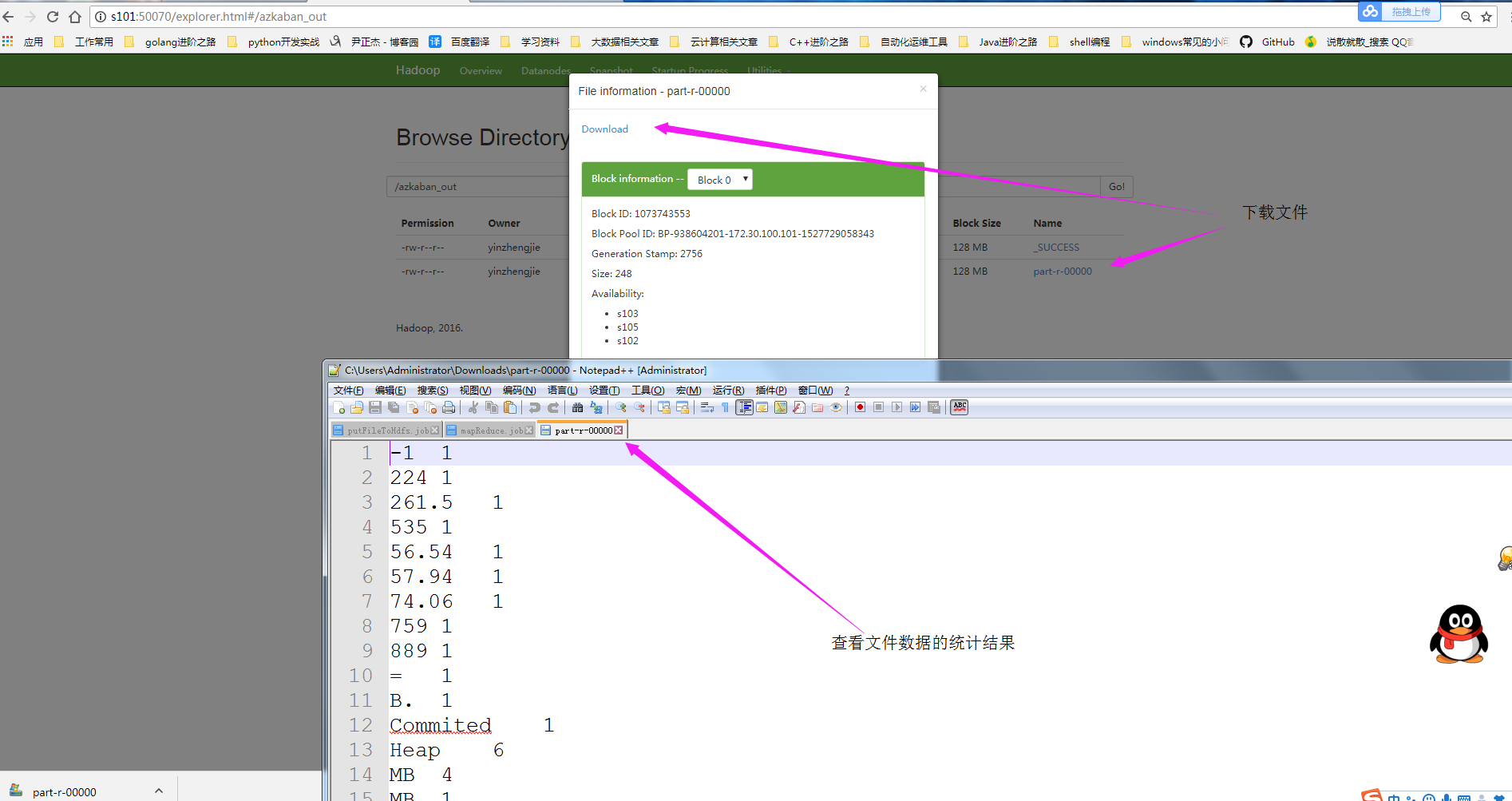
6>.查看MapReduce的运行结果
Hadoop生态圈-Azkaban实现文件上传到hdfs并执行MR数据清洗的更多相关文章
- Ubuntu本地文件上传至HDFS文件系统出现的乱码问题及解决方案
1.问题来源及原因 用shell命令上传到HDFS中之后出现中文乱码,在shell命令窗口查看如图: 在eclipse中的文件HDFS查看工具查看如图: 原因:上传至HDFS文件系统的文本文件(这里是 ...
- FTP文件上传到HDFS上
在做测试数据时,往往会有ftp数据上传到hdfs的需求,一般需要手动操作,这样做太费事,于是有了下边代码实现的方式: ftp数据上传到hdfs函数: import java.io.InputStrea ...
- HDwiki文件上传导致远程代码执行漏洞
漏洞版本: HDwiki(2011) 漏洞描述: 互动维客开源系统(HDwiki)作为中国第一家拥有自主知识产权的中文维基(Wiki)系统,由互动在线(北京)科技有限公司于2006 年11月28日正式 ...
- Python Paramiko实现sftp文件上传下载以及远程执行命令
一.简介 Paramiko模块是基于Python实现的SSH远程安全连接,用于SSH远程执行命令.文件传输等功能. 安装模块 默认Python没有自带,需要手动安装: pip3 install par ...
- Hadoop_13_Hadoop Shell脚本采集日志上传到HDFS
案例1:开发shell采集脚本 1.点击流日志每天都10T,在业务应用服务器上,需要准实时上传至数据仓库(Hadoop HDFS)上 2.一般上传文件都是在凌晨24点操作,由于很多种类的业务数据都要在 ...
- Hadoop 代码实现文件上传
本项目主要实现Windows下利用代码实现Hadoop中文件上传至HDFS 实现上传文本文件中单词个数的计数 1.项目结构 2.相关代码 CopyFromLocalFile 1 package com ...
- WEB文件上传漏洞介绍解决办法
引用:http://blog.csdn.net/kobejayandy/article/details/35861499 问题: -1. 上传文件WEB脚本语言,服务器的WEB容器解释并执行了用户上传 ...
- 中国电信某站点JBOSS任意文件上传漏洞
1.目标站点 http://125.69.112.239/login.jsp 2.简单测试 发现是jboss,HEAD请求头绕过失败,猜测弱口令失败,发现没有删除 http://125.69.112. ...
- WEB安全:文件上传漏洞
文件上传漏洞过程 用户上传了一个可执行的脚本文件,并通过此脚本文件获得了执行服务器端命令的能力. 一般的情况有: 上传文件WEB脚本语言,服务器的WEB容器解释并执行了用户上传的脚本,导致代码执行: ...
随机推荐
- Elasticsearch Java Rest Client API 整理总结 (二) —— SearchAPI
目录 引言 Search APIs Search API Search Request 可选参数 使用 SearchSourceBuilder 构建查询条件 指定排序 高亮请求 聚合请求 建议请求 R ...
- pycharm自动生成头文件注释
1.在file->settings->file and code templates->python script即可自定制pycharm创建文件自动生成的头文件注释信息 2.创建p ...
- 【ORACLE】数据库空闲1分钟自动断开
-- 开启参数,创建概要文件 SQL> show parameter resource_limit; NAME TYPE ...
- 20135202闫佳歆--week5 分析system_call中断处理过程--实验及总结
week 5 实验:分析system_call中断处理过程 一.使用gdb跟踪分析一个系统调用内核函数(上周选择那一个系统调用)--getpid 复习视频: 如何实现? - 更新menu代码到最新版 ...
- 软工实践练习一 git使用心得
使用git进行代码管理的心得 小组 1.结对的同学创建了小组,我属于被邀请的.附上图片一张. 2.已将代码库https://github.com/sefzu2015/AutoCS fork到了小组or ...
- sysbench的安装与简单使用
1. 下载sysbench的文件 https://codeload.github.com/akopytov/sysbench/zip/1.0.15 2. 放进linux机器以及进行解压缩 unzip ...
- linux 开机直接进入命令行
一.图形界面和命令行切换 linux系统在启动图形化界面后,可以在图形界面和命令行之间来回切换,linux提供了6个命令行终端(terminal或Console),分别为tty1——tty6,使用Ct ...
- ESLint的使用
ESLint是在ECMAScript/JavaScript代码中识别和报告模式匹配的工具,它的目标是保证代码的一致性和避免错误.在许多方面,它和JSLint.JSHint相似,除了少数的例外: ESL ...
- 深入理解javascript选择器API系列第三篇——HTML5新增的3种selector方法
前面的话 尽管DOM作为API已经非常完善了,但是为了实现更多的功能,DOM仍然进行了扩展,其中一个重要的扩展就是对选择器API的扩展.人们对jQuery的称赞,很多是由于jQuery方便的元素选择器 ...
- luogu1312
有趣的题面 超有趣的dfs大模拟,码了巨久,卡时过了此题qaq #include <cstdio> #include <cstring> #include <algori ...