
docker mysql authentication_string client does not support authentication 连接问题
docker安装mysql后,本地navicat连接报错client does not support authentication
解决办法:
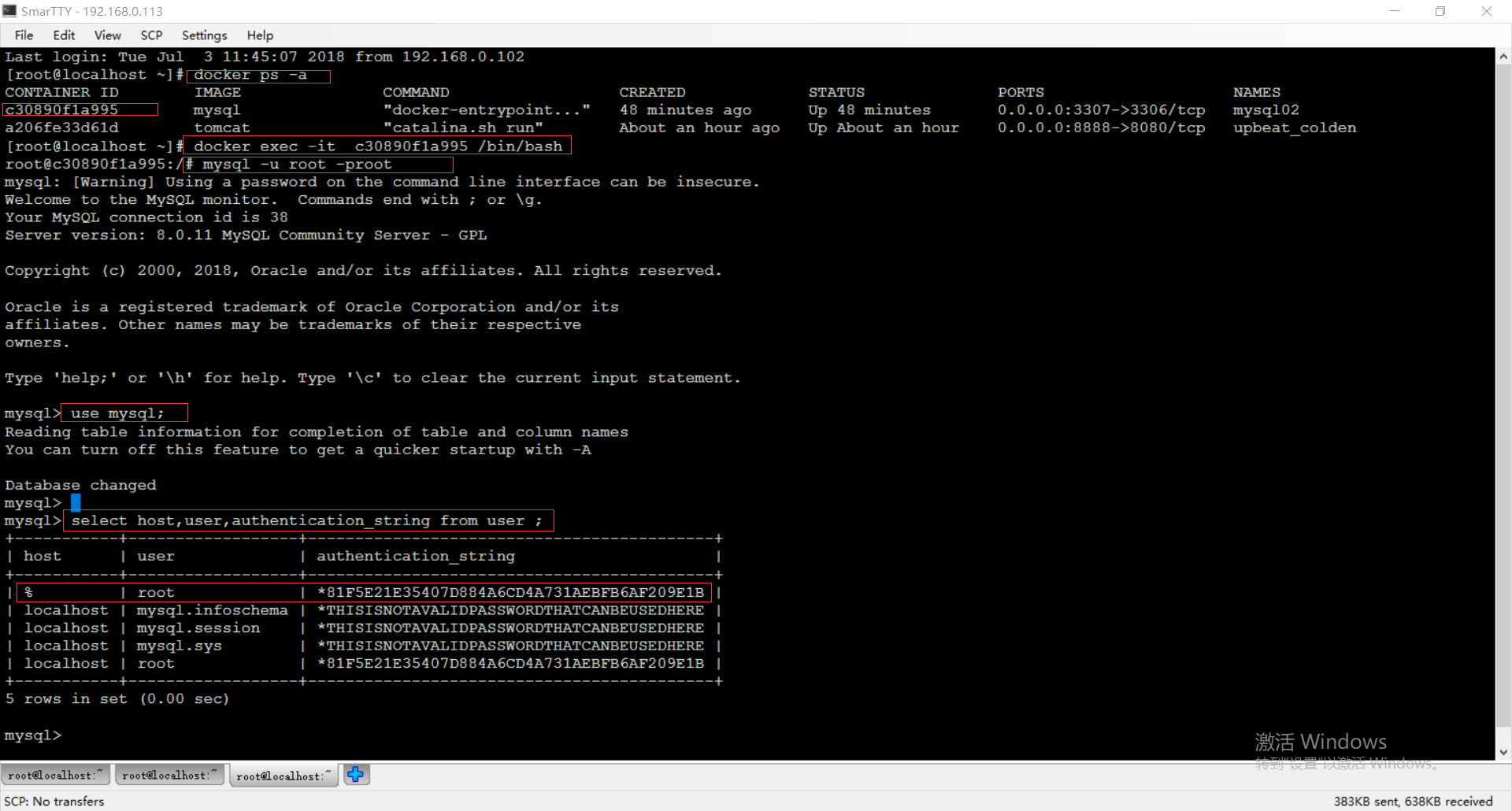
1. docker ps -a 查找到容器id
2. docker exec -it id /bin/bash 进入mysql容器
3.mysql -u root -proot登陆mysql
此处比较奇怪,我在docker中启动mysql容器指定密码是123456但是123456登陆不了,使用密码root可以登陆
4.use mysql; 进入mysql
5.查询用户表信息:
select host,user,authentication_string from user ;
6.更改host为% user为root的用户的authentication_string
host为%大家可以百度一下,说是方便远程连接
update user set authentication_string = 'root' where user = 'root' and host = '%';
update user set authentication_string = 'root' where user = 'root' and host = 'localhost';
7.如果还不行使用下面语句:
alter user 'root'@'localhost' identified with mysql_native_password by '123456';
alter user 'root'@'%' identified with mysql_native_password by '123456';
然后navicat登陆就成功啦

docker mysql authentication_string client does not support authentication 连接问题的更多相关文章
- navicat 连接 mysql 出现Client does not support authentication protocol requested by server解决方案
安装了navicat 和 mysql,结果最后在navicat中连接mysql时,出现了如下错误提示: Client does not support authentication protocol ...
- navicat连接mysql出现Client does not support authentication protocol requested by server解决方案
USE mysql; '; FLUSH PRIVILEGES; root是用户名 localhost是ip地址127.0.0.1都是特指本机,%表示任何IP都可访问 mysql_native_pass ...
- navicat for mysql 连接 mysql 出现Client does not support authentication protocol requested by server解决方案
一 .桌面左下角windows图标--搜索框内输入cmd,结果如图所示,点击cmd.exe,或者使用快捷键Windows键(在键盘上有个Windows标志的按键)+R输入cmd后回车. 二. 在出来的 ...
- navicat 连接 mysql 提示Client does not support authentication protocol requested by server错误
安装完mysql后,命令行登录没问题,但是用Navicat连接出现提示性错误.Mysql版本为:8.0.15 命令如下: 1.use mysql; 2.alter user 'root'@'local ...
- egg 连接 mysql 的 docker 容器,报错:Client does not support authentication protocol requested by server; consider upgrading MySQL client
egg 连接 mysql 的 docker 容器,报错:Client does not support authentication protocol requested by server; con ...
- MySQL Server8.0版本时出现Client does not support authentication protocol requested by server
MySQL Server8.0版本时出现Client does not support authentication protocol requested by server 解决方法: 1.roo ...
- Navicat连接Mysql报错:Client does not support authentication protocol requested by server;
Navicat连接Mysql报错:Client does not support authentication protocol requested by server: 刚安装Mysql,想用Nav ...
- node mysql问题:Client does not support authentication protocol requested by server; consider upgrading MySQL client!
node后台 mysql处理模块(版本:2.16.0) 执行connect方法时报错: Client does not support authentication protocol requeste ...
- Client does not support authentication protocol requested by server; consider upgrading MySQL client
出现错误 Client does not support authentication protocol requested by server; consider upgrading MySQL c ...
随机推荐
- vs编译器好多下划波浪线但不报错
解决办法:项目属性->c/c++->常规->附加包含目录->$(ProjectDir): $(ProjectDir) 项目的目录(定义形式:驱动器 + 路径):包括尾部的反斜杠 ...
- vue-router单页应用简单示例(一)
请先完成了项目初始化,具体请看我另一篇博文.vue项目初始化 看一下完成的效果图,很典型的单页应用. .vue后缀名的单文件组件 这里先说一下我对组件的理解.组件,顾名思义就是一组元素组成的一个原 ...
- Jq_$.getJSON( )
jQuery中的$.getJSON( )方法函数主要用来从服务器加载json编码的数据,它使用的是GET HTTP请求.使用方法如下: $.getJSON( url [, data ] [, succ ...
- Docker原理探究
问题思考:-------------------------------------Docker浅显原理理解-------------------------------------P1. ubunt ...
- Alpha Version Release Of Teamwork: Appendix 1 BUG BASH
在为期一周的发布周中,我们将app本身最后的细节完善,功能代码到位,UI不断改进和优化,团队在开始准备发布之前,对整个APP进行了一次BUG检查,每个人都部署了app在自己的android设备上进行测 ...
- linux内核分析--计算机是如何工作的
实验部分 使用gcc -S -o main.s main.c -m32命令将源代码编译成汇编代码. 源代码如下: int g(int x) { return x + 9; } int f(int x) ...
- NBPL团队总结
我们团队钱多多记账软件项目从2017年12月号开始,历时两个周.这两个周,我们从头学起,学到了很多新的知识,对一些概念有了认知,关于团队协作,关于团队建设,关于Android开发.回顾前两周,我们一致 ...
- 《Spring2之站立会议10》
<Spring2之站立会议10> 昨天,添加完了表情库: 今天,对整个项目进行了测试: 遇到的问题:测试后觉得有些方面还不足,需要进一步改进.
- 剑指offer:二叉搜索树的后续遍历序列
题目描述: 输入一个整数数组,判断该数组是不是某二叉搜索树的后序遍历的结果.如果是则输出Yes,否则输出No.假设输入的数组的任意两个数字都互不相同. 解题思路: 根据二叉搜索的性质,后序遍历是先搜索 ...
- beta yz 5
031602111 傅海涛 1.今天进展 接口微调修正 2.存在问题 文档转化太久 3.明天安排 完成全部接口的交互 4.心得体会 文档转化需要好好优化 031602115 黄家雄 1.界面优化 2. ...