
Eclipse Mark Occurrences
Mark Occurrences
The Mark Occurrences feature enables you to see where an element is referenced by simply clicking on the element in the editor.
When the Mark Occurrences feature is enabled, all occurrences of the element within the active file will be highlighted,
and indicators will be displayed in the annotations bar (to the right of the editor).
In addition, hovering over the element will cause a tooltip to be displayed with the location of all references of the element,
including occurrences of the element in other files.

Occurrences can be of 2 types -
“Write Occurrence” (for occurrences that are in a write mode) or
“Read Occurrence” (for occurrences that are in a read mode).
These will be highlighted in different colors according to the setting configured for PHP elements 'read' and 'write' occurrences
in the Annotations preferences page (Window | Preferences | General | Editors | Text Editors | Preferences).
Here you can also configure the indicators used in the vertical ruler/marker bar (to the left of the editor)
and the annnotations bar (to the right of the editor).
The types of elements whose occurrences will be highlighted can be configured in the
Mark Occurrences preferences page (Window | Preferences | PHP | Editor | Mark Occurrences ).
By default, the following types of elements are marked:
Method Exit - Exit points (throws / return / end of flow) of a method will be marked
Break / Continue - Scope (for, foreach, while, do-while or switch structure) of a break / continue statement will be marked
Local variables
Global variables
Parameters
Functions
Methods
Fields
Class Constants
Constants (defined)
Class/Interface
HTML Tags
You'll want to change the "Occurrences" and "Write Occurrences" colors.
This can be done in the Annotations menu, which is located —
as Colin said — in the Preferences menu under the path
General > Editors > Text Editors > Annotations
If you have an occurrence marked in the overview ruler (the column to the right of the scrollbar),
you can open the Annotations menu directly by right-clicking on the occurrence and selecting Preferences from the context menu.
The color of "occurrences" is used for instances where the variable is being read, but not modified,
in the code (e.g. k in if(k > 1)).
The color of "write occurrences" is used where the variable gets modified/written to
in the code (e.g. k in k = k + 1).
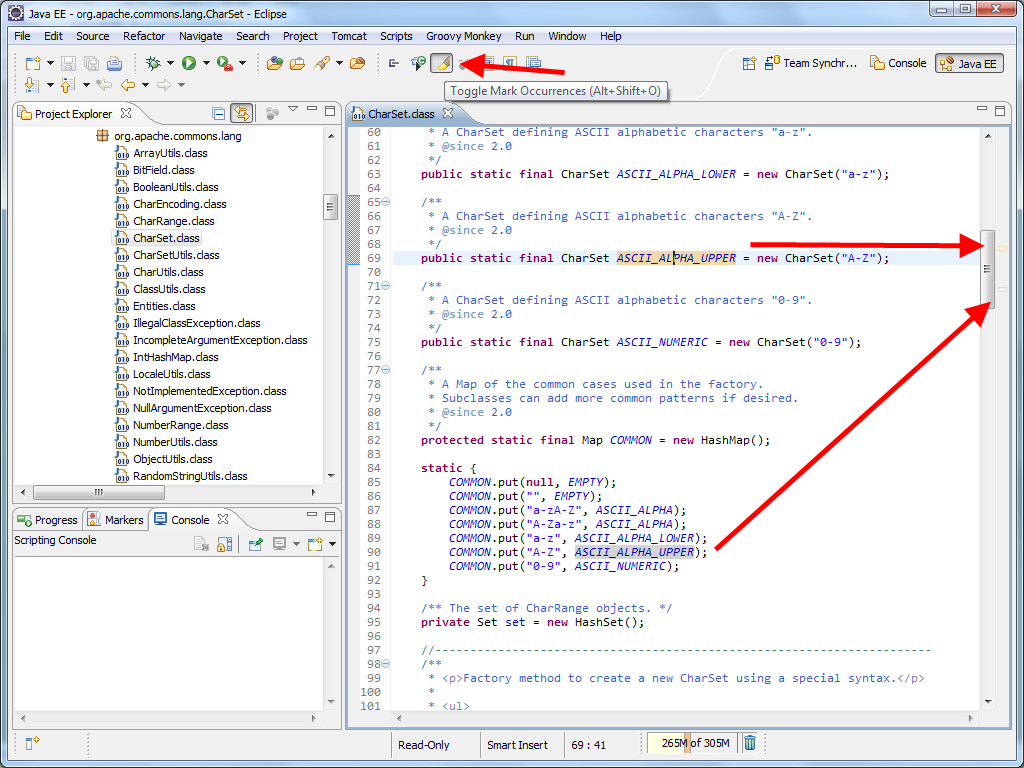
If you want to change the default highlight colours you can do so in the
Preferences > General > Editors > Text Editors > Annotations
– look for“Occurrence annotation” and “Write occurrences”.

Eclipse Mark Occurrences的更多相关文章
- eclipse使用tips-Toggle Mark Occurrences 颜色更改
Toggle Mark Occurrences这个功能非常好用,能把选中的方法/变量在本类中全部出现的地方高亮显示,是一个非常实用的功能.但是默认颜色是灰色,非常毁眼.可以通过下面的设置更改为自己喜欢 ...
- Eclipse 相同变量背景高亮显示设置(Occurrences)
为了你们查看设置的简便,本次书写重点用图片说明.
- eclipse常用快捷键
1. ctrl+shift+r:打开资源 这可能是所有快捷键组合中最省时间的了.这组快捷键可以让你打开你的工作区中任何一个文件,而你只需要按下文件名或mask名中的前几个字母,比如applic*.xm ...
- Eclipse 双击变量,其他相同变量有底色
转载:http://blog.csdn.net/majian_1987/article/details/46691697 方便下次查找. 在Eclipse中,鼠标选中或者光标移动到Java类的变量名时 ...
- [No000077]打造自己的Eclipse
下载官网的Eclipse IDE for Java EE Developers 在根目录下的eclipse.ini文件中添加"-Dfile.encoding=UTF-8", 作用: ...
- Eclipse设置选中高亮显示
高亮显示选中的变量对于程序员编程很有帮助,正常情况下Eclipse选中变量时都会高亮显示,可能软件冲突导致高亮显示失效,通过如下方法可以进行恢复. 单击IDE顶部Window菜单下的Prefences ...
- 【转】Eclipse快捷键 10个最有用的快捷键
转载地址:http://www.open-open.com/bbs/view/1320934157953 Eclipse中10个最有用的快捷键组合 一个Eclipse骨灰级开发者总结了他认为最有用但 ...
- 转:Eclipse快捷键 10个最有用的快捷键
Eclipse快捷键 10个最有用的快捷键 Eclipse中10个最有用的快捷键组合 一个Eclipse骨灰级开发者总结了他认为最有用但又不太为人所知的快捷键组合.通过这些组合可以更加容易的浏览源代 ...
- Eclipse中10个最有用的快捷键组合
Eclipse中10个最有用的快捷键组合 (转) 一个Eclipse骨灰级开发者总结了他认为最有用但又不太为人所知的快捷键组合.通过这些组合可以更加容易的浏览源代码,使得整体的开发效率和质量得到提升. ...
随机推荐
- EM算法原理详解
1.引言 以前我们讨论的概率模型都是只含观测变量(observable variable), 即这些变量都是可以观测出来的,那么给定数据,可以直接使用极大似然估计的方法或者贝叶斯估计的方法:但是当模型 ...
- C++产生固定范围内的固定数量的随机数
#include<iostream> #include<ctime> #include<random> using namespace std; void knut ...
- Linux DRM KMS 驱动简介【转】
转自:https://blog.csdn.net/yangkuanqaz85988/article/details/48689521 Whoops,上次写完<Linux DRM Graphic ...
- ASP.NET结合COM组件发送Email
在开发电子邮件发送程序的时候,我们经常需要使用到相应的组件,其实不需要第三方的组件(例如:Jmail)照常可以做到发送Email的功能. 在系统目录(如c:/winnt或c:/windows)的sys ...
- Kaggle案例分析3--Bag of Words Meets Bags of Popcorn
项目描述:这是一个关于情感分析的教程.谷歌的Word2Vec(文本深度表示模型)是一个由深度学习驱动的方法, 旨在获取words内部的含义.Word2Vec试图理解单词之间的含义与语义关系.它类似于r ...
- 【Android】隐藏底部虚拟按键
Google的官方文档是: https://developer.android.com/training/system-ui/navigation.html#behind 示例代码 1 View de ...
- 在内部局域网内搭建HTTPs
在内部局域网内搭建HTTPs 配置环境 Windows版本:Windows Server 2008 R2 Standard Service Pack 1 系统类型: 64 位操作系统 内存 ...
- CentOS 安装codeblocks
1. 安装wxWidgets .tar.bz2 [root@luozhonghua codeblocks]# cd wxWidgets- [root@luozhonghua wxWidgets-]# ...
- 浅谈SpringMVC
M--模型(实体vo[视图对象]与页面对面) V--视图(JSP,,velocity,FreeMarker,html,thymeleaf) C--控制器(servlet,if语句控制M数据跳转到V进行 ...
- python的map,filter,reduce学习
python2,python3中map,filter,reduce区别: 1,在python2 中,map,filter,reduce函数是直接输出结果. 2,在python3中做了些修改,输出前需要 ...