
tiler--python实现的有趣的自定义马赛克图像拼接工具
最近在github中发现了一个有趣的小工具,tiler
github链接https://github.com/nuno-faria/tiler
具体介绍请直接去github,这里只分享一下它的使用方法。
需要安装的库在requirements.txt中
可以在cmd中定位到此文下直接使用命令
pip3 install -r requirement.txt安装所需要的库.
如果安装报timeout错误的话可以使用命令此(设置超时为30s)
pip3 install --timeout 30 -r requirements.txt
使用方法非常简单
打开文件夹下的conf.py文件
修改主要的三个参数
# out file name

OUT = 'out.png'

# image to tile (ignored if passed as the 1st arg)

IMAGE_TO_TILE = None

# folder with tiles (ignored if passed as the 2nd arg)

TILES_FOLDER = None
OUT是输出图片的文件名,可以为默认。
IMAGE_TO_TILE是需要自己修改的,输入图片路径不可以有中文字符,cv2无法打开此图片文件导致之后加载图片报错
TILES_FOLDER参数,是tiles文件夹下文件夹路径
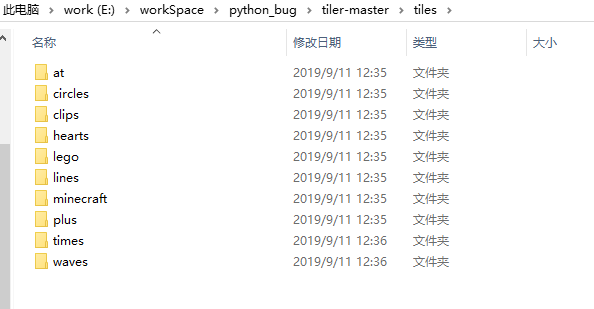
TILES_FOLDER参数可以是此文件夹下的这些,当然你也可以自己添加一些。
不过要注意的是conf.py是py文件注意字符串要加' '或“ ”
例如:
TILES_FOLDER = "E:/workSpace/python_bug/tiler-master/tiles/times/gen_times"
测试了一下,我的电脑CPU 酷睿i5 7300U 8GB内存,输入命令运行程序
>python tiler.py
运行中内存占用比较高,原始图片1319x742像素

总共跑了大约1分钟。最终效果:

最终成品还是比较不错的。
测试图片(图片来自百度图片,侵删)

参数设置:
DEPTH = 4

# list of rotations, in degrees, to apply over the original image

ROTATIONS = [0]

#############################

# TILER CONFS

# number of colors per image

COLOR_DEPTH = 32

# tiles scales (1 = default resolution)

RESIZING_SCALES = [0.5,0.4.0.3,0.2,0.1]

# number of pixels shifted to create each box (tuple with (x,y))

# if value is None, shift will be done accordingly to tiles dimensions

PIXEL_SHIFT = (5,5)

# if tiles can overlap

OVERLAP_TILES = False

# render image as its being built

RENDER = False

# multiprocessing pool size

POOL_SIZE = 4

# out file name

OUT = 'min.png'

# image to tile (ignored if passed as the 1st arg)

IMAGE_TO_TILE = 'E:/workSpace/python_bug/tiler-master/in1.jpg'

# folder with tiles (ignored if passed as the 2nd arg)

TILES_FOLDER = "E:/workSpace/python_bug/tiler-master/tiles/minecraft"
生成效果
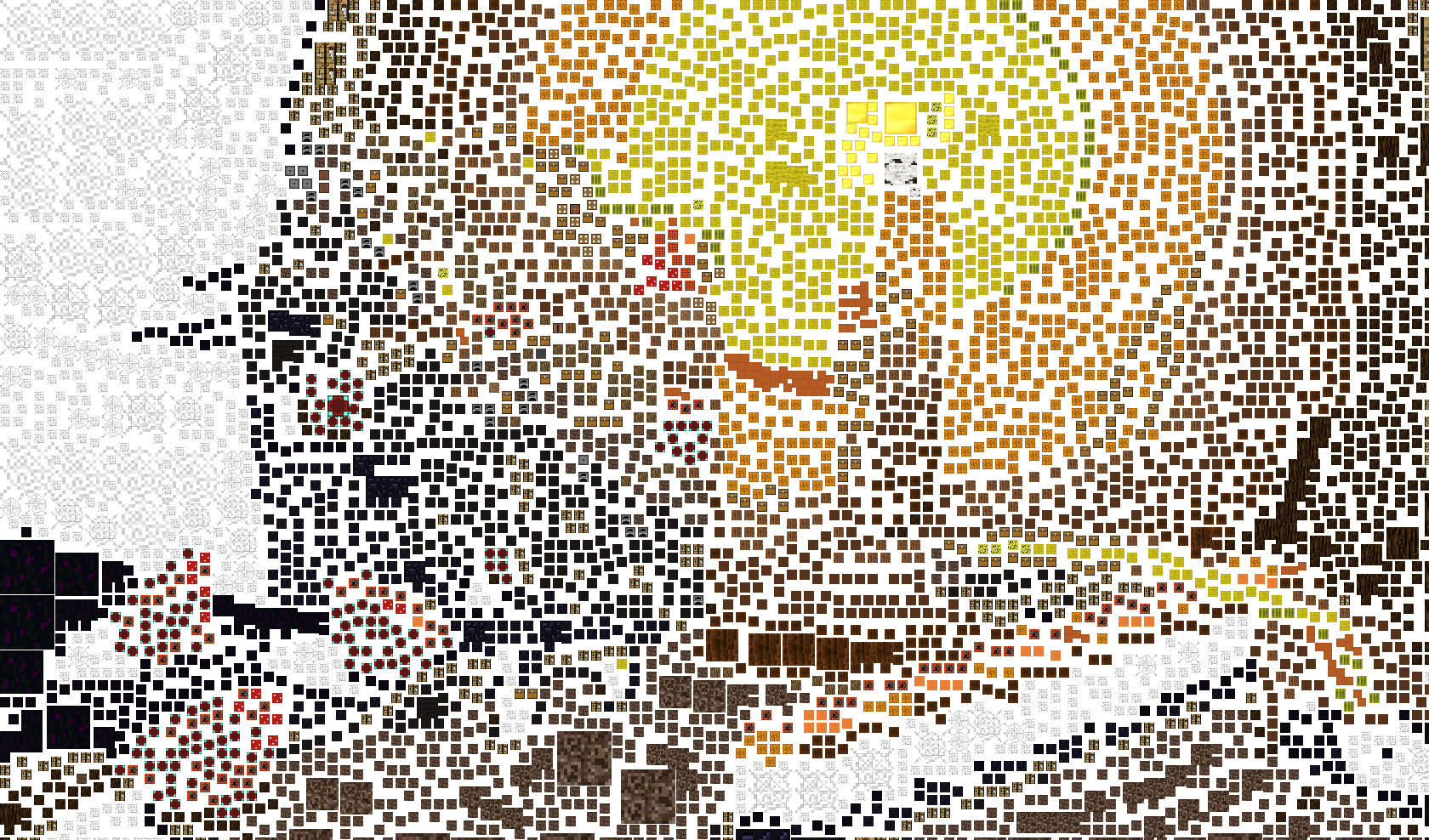
参数设置
# number of divisions per color (R, G and B)

# DEPTH = 4 -> 4 * 4 * 4 = 64 colors

DEPTH = 128

# list of rotations, in degrees, to apply over the original image

ROTATIONS = [0]

#############################

# TILER CONFS

# number of colors per image

COLOR_DEPTH = 128

# tiles scales (1 = default resolution)

RESIZING_SCALES = [0.1]

# number of pixels shifted to create each box (tuple with (x,y))

# if value is None, shift will be done accordingly to tiles dimensions

PIXEL_SHIFT = None

# if tiles can overlap

OVERLAP_TILES = False

# render image as its being built

RENDER = False

# multiprocessing pool size

POOL_SIZE = 4

# out file name

OUT = 'min2.png'

# image to tile (ignored if passed as the 1st arg)

IMAGE_TO_TILE = 'E:/workSpace/python_bug/tiler-master/in1.jpg'

# folder with tiles (ignored if passed as the 2nd arg)

TILES_FOLDER = "E:/workSpace/python_bug/tiler-master/tiles/minecraft"
生成效果

可以看出DEPTH,COLOR_DEPTH 是控制图片颜色主要参数。
tiler--python实现的有趣的自定义马赛克图像拼接工具的更多相关文章
- 这10个Python项目超有趣!
前言: Python可谓是现在很多人正在学或者想学的一个脚本语言了,提到学习自然就少不了拿项目练手,可是一般的项目根本提不起兴趣嘛,这10个项目可是非常有趣的,不信你看看. [Python 图片转字符 ...
- < python PIL - 批量图像处理 - 生成自定义大小图像 >
< python PIL - 批量图像处理 - 生成自定义大小图像 > 直接用python自带的PIL图像库,对一个文件夹下所有jpg/png的图像进行自定义像素变换 from PIL i ...
- python自动化测试(3)- 自动化框架及工具
python自动化测试(3) 自动化框架及工具 1 概述 手续的关于测试的方法论,都是建立在之前的文章里面提到的观点: 功能测试不建议做自动化 接口测试性价比最高 接口测试可以做自动化 后面所谈到 ...
- 自定义admin管理工具(stark组件)
自定义admin管理工具(stark组件) 创建项目 了解了admin的功能后,我们可以开始仿照admin编写我们自己的管理工具stark组件 首先创建一个新的项目,并创建三个app stark就是我 ...
- 学习Python要知道哪些重要的库和工具
本文转自:https://github.com/jobbole/awesome-python-cn 环境管理 管理 Python 版本和环境的工具 p:非常简单的交互式 python 版本管理工具. ...
- 终端的乐趣--Linux下有趣的终端命令或者工具【转】
转自:https://blog.csdn.net/gatieme/article/details/52144603 版权声明:本文为博主原创文章,遵循 CC 4.0 BY-SA 版权协议,转载请附上原 ...
- 用c#开发微信(5)自定义菜单设置工具 (在线创建)
读目录 1 使用 2 原理 3. 错误 上次写了<用c#开发微信 (4) 基于Senparc.Weixin框架的接收事件推送处理 (源码下载)>,有园友问到如何创建菜单的问题,今天就介绍下 ...
- python模块之lib2to3(py2转py3自动化工具)
# -*- coding: utf-8 -*- #python 27 #xiaodeng #python模块之lib2to3(py2转py3自动化工具) #http://tieba.baidu.com ...
- Python接口测试实战1(下)- 接口测试工具的使用
如有任何学习问题,可以添加作者微信:lockingfree 课程目录 Python接口测试实战1(上)- 接口测试理论 Python接口测试实战1(下)- 接口测试工具的使用 Python接口测试实战 ...
随机推荐
- iOS开发系列-Foundation与CoreFoundation内存管理
概述 对于初学者来说,可能仅只能将ARC用在objective-c对象上(也即继承自NSObject的对象),但是如果涉及到较为底层的东西,比如Core Foundation中的malloc()或者f ...
- HTML语法检测
网络上收集到的资源: HTML在线编辑//////////////////////////////////////////http://tool.oschina.net/codeformat/ 文本框 ...
- 2019-8-27-静默命令行安装-Visual-C++-发行包
title author date CreateTime categories 静默命令行安装 Visual C++ 发行包 lindexi 2019-8-27 15:39:3 +0800 2019- ...
- Apocalypse Someday
Apocalypse Someday 定义一个数是合法的,当且仅当中间出现至少一个连续的大于三个的6,求第x个合法的数,\(x\leq 50,000,000\) 解 首先,注意到求第几个,即想到试填法 ...
- 在Spring-boot中,为@Value注解添加从数据库读取properties支持
一般我们会把常用的属性放在工程的classpath文件夹中,以property,yaml或json的格式进行文件存储,便于Spring-boot在初始化时获取. @Value则是Spring一个非常有 ...
- Java 基础 - 内存泄露Memory leak & 内存溢出Out of memory
内存泄露 & 内存溢出 关系 https://www.cnblogs.com/panxuejun/p/5883044.html 内存泄露的6种情况: https://blog.csdn.net ...
- 列表中的index,extend,count方法
列表中的index,extend,count方法 #_author:Administrator#date:2019/10/24#1.index方法l=['blue','red','white','bl ...
- C++ SOCKET 基础编程
{ http://c.biancheng.net/socket/ }
- android gradle 和gradle plugin
android gradle 和gradle plugin 1.安装完AS3.5.2创建完项目一运行,报了如下错误 Error:Could not find com.android.tools.bui ...
- kubernetes istio之gateway
[root@master istio-]# kubectl apply -f samples/httpbin/httpbin.yaml service/httpbin created deployme ...