
通过WMI获取网卡MAC地址、硬盘序列号、主板序列号、CPU ID、BIOS序列号
转载:https://www.cnblogs.com/tlduck/p/5132738.html
 #define _WIN32_DCOM

 #include<iostream>

 #include<fstream>

 #include<string>

 #include "direct.h"

 #include <tchar.h>

 #include <time.h>

 #include <comdef.h>

 #include <Wbemidl.h>

 #include <conio.h>

 #include "atlstr.h"

 #include "atlbase.h"

 //#include "TcpCtl.h"

 //#include "winsock2.h"

 //#include "InitDll.h"

 using namespace std;

 # pragma comment(lib, "wbemuuid.lib")

 # pragma comment(lib, "ws2_32.lib")

 //通过WMI获取主板号

 BOOL ManageWMIBord(char bord[])

 {

     HRESULT hres;

     // Step 1:  初始化COM

     //hres = CoInitializeEx(0, COINIT_MULTITHREADED); //网上的代码都是使用这行语句进行初始化,但是我在实际使用中,发现也可以采用下面的语句进行初始化

     hres = CoInitialize();

     //网上的代码是没有注释下面这个判断的,但是实际使用中发现,如果之前已经初始化成功了,在第二次初始化的时候,下面的代码就会导致返回false,所以,实际使用中我就注释掉了

     //if (FAILED(hres))

     //{

     // cout << "Failed to initialize COM library. Error code = 0x"

     // << hex << hres << endl;

     // return false; // Program has failed.

     //}

     // Step 2:  设置COM的安全认证级别

     //在实际使用过程中,我发现如果这一步不注释掉的话,程序总是返回false,注释掉之后程序反而可以正常运行,原因未知

     // Note: If you are using Windows 2000, you need to specify -

     // the default authentication credentials for a user by using

     // a SOLE_AUTHENTICATION_LIST structure in the pAuthList ----

     // parameter of CoInitializeSecurity ------------------------

     ////hres = CoInitializeSecurity(

     //// NULL,

     //// -1, // COM authentication

     //// NULL, // Authentication services

     //// NULL, // Reserved

     //// RPC_C_AUTHN_LEVEL_DEFAULT, // Default authentication

     //// RPC_C_IMP_LEVEL_IMPERSONATE, // Default Impersonation

     //// NULL, // Authentication info

     //// EOAC_NONE, // Additional capabilities

     //// NULL // Reserved

     //// );

     ////

     ////if (FAILED(hres))

     ////{

     //// cout << "Failed to initialize security. Error code = 0x"

     //// << hex << hres << endl;

     //// CoUninitialize();

     //// return false; // Program has failed.

     ////}

     // Step 3:  获得WMI连接COM接口

     IWbemLocator *pLoc = NULL;

     hres = CoCreateInstance(

         CLSID_WbemLocator,

         ,

         CLSCTX_INPROC_SERVER,

         IID_IWbemLocator, (LPVOID *)&pLoc);

     if (FAILED(hres))

     {

         cout << "Failed to create IWbemLocator object."

             << " Err code = 0x"

             << hex << hres << endl;

         CoUninitialize();

         return false; // Program has failed.

     }

     // Step 4:  通过连接接口连接WMI的内核对象名"ROOT//CIMV2"

     IWbemServices *pSvc = NULL;

     hres = pLoc->ConnectServer(

         _bstr_t(L"ROOT\\CIMV2"), // Object path of WMI namespace

         NULL, // User name. NULL = current user

         NULL, // User password. NULL = current

         , // Locale. NULL indicates current

         NULL, // Security flags.

         , // Authority (e.g. Kerberos)

         , // Context object

         &pSvc // pointer to IWbemServices proxy

         );

     if (FAILED(hres))

     {

         cout << "Could not connect. Error code = 0x"

             << hex << hres << endl;

         pLoc->Release();

         CoUninitialize();

         return false; // Program has failed.

     }

     //cout << "Connected to ROOT\\CIMV2 WMI namespace" << endl;

     // Step 5:  设置请求代理的安全级别

     hres = CoSetProxyBlanket(

         pSvc, // Indicates the proxy to set

         RPC_C_AUTHN_WINNT, // RPC_C_AUTHN_xxx

         RPC_C_AUTHZ_NONE, // RPC_C_AUTHZ_xxx

         NULL, // Server principal name

         RPC_C_AUTHN_LEVEL_CALL, // RPC_C_AUTHN_LEVEL_xxx

         RPC_C_IMP_LEVEL_IMPERSONATE, // RPC_C_IMP_LEVEL_xxx

         NULL, // client identity

         EOAC_NONE // proxy capabilities

         );

     if (FAILED(hres))

     {

         cout << "Could not set proxy blanket. Error code = 0x"

             << hex << hres << endl;

         pSvc->Release();

         pLoc->Release();

         CoUninitialize();

         return false; // Program has failed.

     }

     // Step 6: 通过请求代理来向WMI发送请求----

     // For example, get the name of the operating system

     IEnumWbemClassObject* pEnumerator = NULL;

     hres = pSvc->ExecQuery(

         bstr_t("WQL"),

         //bstr_t("SELECT * FROM Win32_NetworkAdapterConfiguration WHERE IPEnabled = 'TRUE'"),

         bstr_t("SELECT * FROM Win32_BaseBoard"),//只需要通过修改这里的查询语句,就可以实现对MAC地址等其他信息的查询

         WBEM_FLAG_FORWARD_ONLY | WBEM_FLAG_RETURN_IMMEDIATELY,

         NULL,

         &pEnumerator);

     if (FAILED(hres))

     {

         cout << "Query for Network Adapter Configuration failed."

             << " Error code = 0x"

             << hex << hres << endl;

         pSvc->Release();

         pLoc->Release();

         CoUninitialize();

         return false; // Program has failed.

     }

     // Step 7:  循环枚举所有的结果对象

     IWbemClassObject *pclsObj;

     pclsObj = NULL;

     ULONG uReturn = ;

     while (pEnumerator)

     {

         HRESULT hr = pEnumerator->Next(WBEM_INFINITE, ,

             &pclsObj, &uReturn);

         if ( == uReturn)

         {

             break;

         }

         VARIANT vtProp;

         VariantInit(&vtProp);

         hr = pclsObj->Get(L"SerialNumber", , &vtProp, , );//查询不同的硬件信息,除了修改上面的查询语句,这里的字段也要修改

         if (!FAILED(hr))

         {

             CW2A tmpstr1(vtProp.bstrVal);

             strcpy_s(bord, , tmpstr1);//这里的200是可调的,自己根据实际情况设置,但是肯定不能大于bord的长度

             //cout << "BordSN:" << sn << endl;

         }

         VariantClear(&vtProp);

     }//end while

     // 释放资源

     pSvc->Release();

     pLoc->Release();

     pEnumerator->Release();

     pclsObj->Release();

     CoUninitialize();

     return true; // Program successfully completed.

 }

 int main()

 {

     char bord[];

     ManageWMIBord(bord);

     cout << bord << "\n";

     system("pause");

     return ;

 }
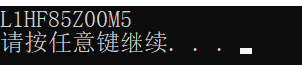
运行结果:
附:
// WQL查询语句
const T_WQL_QUERY szWQLQuery[] = {
// 网卡原生MAC地址
"SELECT * FROM Win32_NetworkAdapter WHERE (MACAddress IS NOT NULL) AND (NOT (PNPDeviceID LIKE 'ROOT%'))",
L"PNPDeviceID",
// 硬盘序列号
"SELECT * FROM Win32_DiskDrive WHERE (SerialNumber IS NOT NULL) AND (MediaType LIKE 'Fixed hard disk%')",
L"SerialNumber",
// 主板序列号
"SELECT * FROM Win32_BaseBoard WHERE (SerialNumber IS NOT NULL)",
L"SerialNumber",
// 处理器ID
"SELECT * FROM Win32_Processor WHERE (ProcessorId IS NOT NULL)",
L"ProcessorId",
// BIOS序列号
"SELECT * FROM Win32_BIOS WHERE (SerialNumber IS NOT NULL)",
L"SerialNumber",
// 主板型号
"SELECT * FROM Win32_BaseBoard WHERE (Product IS NOT NULL)",
L"Product",
// 网卡当前MAC地址
"SELECT * FROM Win32_NetworkAdapter WHERE (MACAddress IS NOT NULL) AND (NOT (PNPDeviceID LIKE 'ROOT%'))",
L"MACAddress",
//当前机器的型号和厂商
"SELECT * FROM Win32_computersystem",
L"Manufacturer",L"Model"
}
通过WMI获取网卡MAC地址、硬盘序列号、主板序列号、CPU ID、BIOS序列号的更多相关文章
- 转: 通过WMI获取网卡MAC地址、硬盘序列号、主板序列号、CPU ID、BIOS序列号
最近由于项目的需要,需要在程序中获取机器的硬盘序列号和MAC地址等信息,在C#下,可以很容易的获得这些信息,但是在C++程序中感觉比较麻烦.经过百度,发现很多大虾都是通过WMI来获取这些硬件信息的,网 ...
- (转)通过WMI获取网卡MAC地址、硬盘序列号、主板序列号、CPU ID、BIOS序列号
最近由于项目的需要,需要在程序中获取机器的硬盘序列号和MAC地址等信息,在C#下,可以很容易的获得这些信息,但是在C++程序中感觉比较麻烦.经过百度,发现很多大虾都是通过WMI来获取这些硬件信息的,网 ...
- 获取网卡MAC、硬盘序列号、CPU_ID、BIOS编号
抄来的 获取网卡MAC.硬盘序列号.CPU ID.BIOS编号 本文中所有原理及思想均取自网络,有修改.其中获取硬盘序列号.获取CPU编号.获取BIOS编号的原始代码的著作权归各自作者所有. 以下代码 ...
- Python 获取 网卡 MAC 地址
/*********************************************************************** * Python 获取 网卡 MAC 地址 * 说明: ...
- windows平台下获取网卡MAC地址、硬盘序列号、主板序列号、CPU ID、BIOS序列号
转自http://blog.csdn.net/jhqin/article/details/5548656,如有侵权,请联系本人删除,谢谢!! 头文件:WMI_DeviceQuery.h /* ---- ...
- VC++获取网卡MAC、硬盘序列号、CPU ID、BIOS编号
以下代码可以取得系统特征码(网卡MAC.硬盘序列号.CPU ID.BIOS编号) BYTE szSystemInfo[4096]; // 在程序执行完毕后,此处存储取得的系统特征码 UINT uSys ...
- 使用WinPcap获取网卡MAC地址
关键字:WinPcap 网卡 MAC地址 作者:txw1958 在WpdPack_4_1_2\WpdPack\Examples-remote\PacketDriver\GetMacAddress\目录 ...
- php获取网卡MAC地址源码
<?php /** 获取网卡的MAC地址原码:目前支持WIN/LINUX系统 获取机器网卡的物理(MAC)地址 **/ class GetMacAddr{ var $return_array = ...
- matlab 获取网卡MAC地址
输入命令 [sta,MACres] = dos('getmac'); 其中MACres 存储的信息即为网卡的 相关信息. 如果想判断读取的网卡信息是否有指定信息可以如下输入 USER1 = strf ...
随机推荐
- 小匠_碣 第三周期打卡 Task06~Task08
Task06:批量归一化和残差网络:凸优化:梯度下降 批量归一化和残差网络 对输入的标准化(浅层模型) 处理后的任意一个特征在数据集中所有样本上的均值为0.标准差为1. 标准化处理输入数据使各个特征的 ...
- make && make install
./configure --prefix= /usr/local/python3.6.6 make && make install prefix=/usr/local/pyth ...
- Spring AOP操作action时无法注入,报NullPointer异常
Spring AOP操作action时无法注入,报NullPointer异常当使用Spring AOP对action层进行操作时,会出现注入失败的问题,出现空指针异常.原因是一般struts2+spr ...
- eclipse sql server 导出excel文件
Jxl.jar 访问Excel的Jar包 注意:支持以.xls结尾的Excel文件,可能不支持.xlsx结尾的 下载地址: 程序所需要得包: 程序代码: package partice; import ...
- javasE--基础部分--线程
Day23 本单元目标 一.线程的相关概念 二.线程的创建和启动★ 三.线程的停止 四.线程的常用方法 五.线程的生命周期★ 六.线程的同步 七.线程的通信 八.线程的创建方式三 九.线程的创建方 ...
- UI高级组件
今天继续学习UI高级组件 网格视图 GridView 用GridView标签添加,显示网格视图,需要用到适配器,共有四种适配器 ArrayAdapter,SmipleAdapter,SmipleCou ...
- Java-POJ1014-Dividing
多重背包问题的特点是物品数量可以大于1但是有限制.状态定义与01背包一致. 多重背包的解法有多种,复杂度也各不相同. 对于物品数Ci较大的数据,可以采取二进制数进行优化(就是这样,别问就是baidu! ...
- 问题 I: 数字分组2
问题 I: 数字分组2 时间限制: 1 Sec 内存限制: 128 MB[命题人:admin] 题目描述 已知一堆魔法石的重量,问如何分成两堆,使得它们质量和之差最大,但不能大于(可以等于)这些数中 ...
- 数据存储 csv
# # 保存csv格式的数据import csv csvFile = open('test.csv','w+',newline='') #文本方式可读写 try: writer = csv.write ...
- JAVA中fail-fast机制
在JDK的Collection中我们时常会看到类似于这样的话: 例如,ArrayList: 注意,迭代器的快速失败行为无法得到保证,因为一般来说,不可能对是否出现不同步并发修改做出任何硬性保证.快速失 ...